Zoho email warmup: what it is and what it cannot prove
 ChatGPT
 Claude
 Gemini
 Perplexity
 Grok
GrokIn brief
Zoho email warmup is an optional third-party workflow, not a proven Zoho requirement. Check domain authentication before connecting a warm-up service.
Zoho email warmup is an optional third-party service workflow that sends and interacts with emails from a connected Zoho inbox. The available provider claims do not establish that Zoho Mail requires warm-up, endorses it, or that warm-up guarantees inbox placement. Before connecting any service, verify the sending domain's authentication posture and confirm the provider's current Zoho connection support.
At a glance
Quick takeaways
- Zoho email warmup usually refers to a third-party service connected to a Zoho inbox.
- Warmbox lists "Zoho Inbox" as a supported inbox integration.
- Warmup Inbox lists "Zoho" among the providers it says it works with.
- Those provider claims do not prove that Zoho recommends warm-up or that it improves delivery at a specific mailbox provider.
- A warm-up service cannot replace SPF, DKIM, and DMARC checks for the sending domain.
- Provider-specific connection requirements should be confirmed before granting access to a Zoho inbox.
How a Zoho email warmup workflow works
A third-party warm-up provider connects to a sending inbox and performs activity through its own network. Warmbox describes its workflow with the statement, "Warmbox will send everyday realistic emails from your inbox." Its product description also says it can remove emails from spam, open, bookmark, reply to, and favorite messages.
Warmup Inbox describes a separate workflow that connects a sending inbox through OAuth or SMTP, exchanges messages with its network, and tracks inbox, spam, and bounce rates. Its provider list includes "Zoho," and its connection copy states: "Connect your sending inbox OAuth into Gmail, Outlook, or any SMTP."
These descriptions explain what the warm-up vendors say their products do. They do not document Zoho Mail behavior, a Zoho Mail recommendation, or a receiver's inbox-placement decision. Email deliverability is affected by more than inbox activity. Email deliverability also depends on authentication, sender behavior, message content, recipient engagement, and each receiving system's local filtering decisions.
When a Zoho warmup decision changes
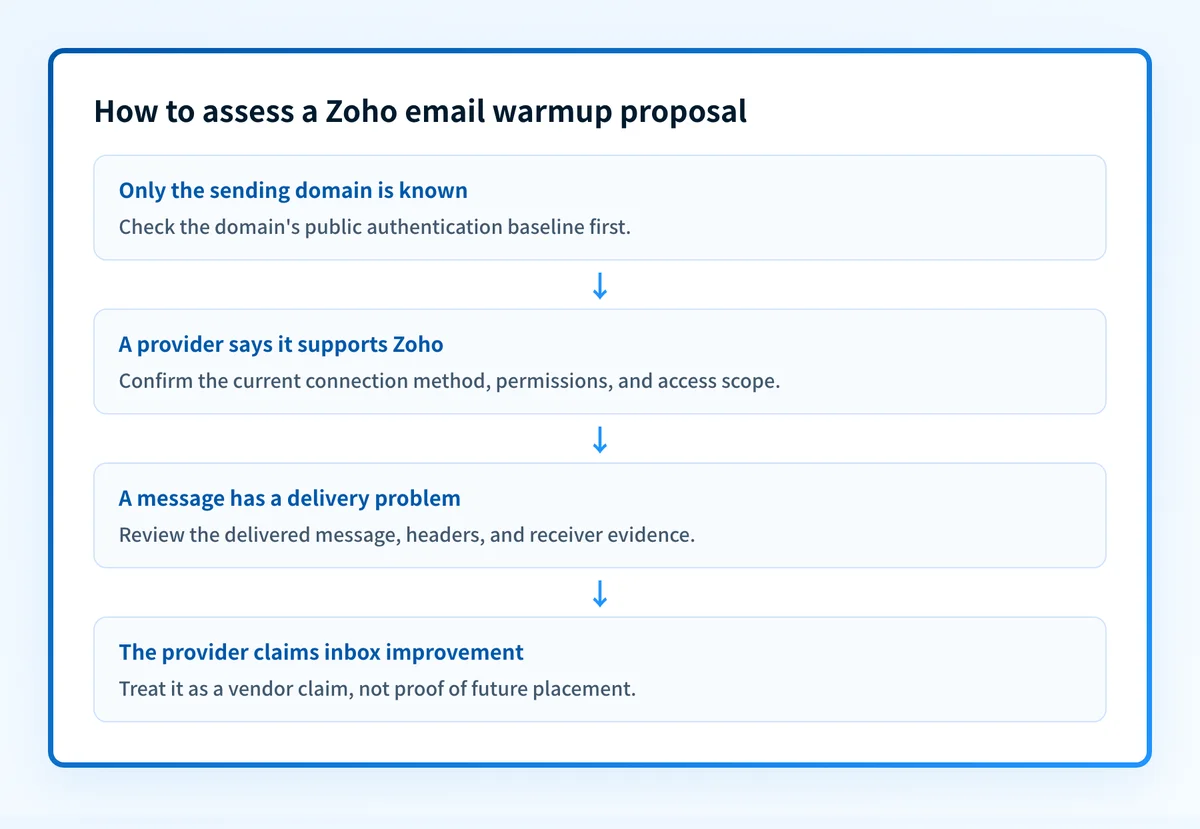
The useful decision rule is based on what is known and what remains unknown.
- If the sending domain does not have a known authentication baseline, check that first. Inbox activity cannot establish that the domain's SPF, DKIM, or DMARC posture is correct.
- If a vendor says it supports Zoho, treat that as the vendor's compatibility claim. Confirm its current connection requirements and access scope before authorizing the connection.
- If a mailbox provider places a message in spam or rejects it, use the delivered message, headers, bounce information, and the provider's own tools to investigate. A warm-up dashboard cannot prove why that receiver made its decision.
- If the goal is to set up an ESP or sender safely, use the broader email service provider setup guidance for the account and domain configuration work.
Do not grant a third-party warm-up service access to a production inbox until the team has reviewed the provider's current authorization method, data handling, and disconnect procedure.
Worked decision example
Use this example as a decision record, not as a configuration command or a promise about delivery.
Sending domain: mail.yourdomain.com
Sending inbox: outreach@yourdomain.com
Known evidence: A third-party service states that it supports Zoho.
Unknown evidence: Zoho's current connection requirements and whether the service affects recipient placement.
Next action: Check the sending domain's authentication baseline, then confirm the provider's current Zoho connection path before authorizing access.
This distinction matters because a connected inbox and an authenticated domain answer different questions. A service may be able to connect to a mailbox, while the domain still has an incomplete or misaligned authentication configuration. Conversely, a public DNS result can show published records without proving that a specific application used the expected sending path.
For a broader explanation of automated inbox activity, see AI email warmup: what it is and what it cannot prove. If your outbound mail uses Zoho Campaigns, SPF and DKIM setup for Zoho Campaigns covers that distinct authentication task.
Take the next step based on your evidence
Start with the evidence you have:
- If you only have the domain name, inspect its public authentication baseline before evaluating warm-up.
- If you have a delivered message, review its authentication results and the actual sending path before attributing placement to a warm-up service.
- If you have a provider proposal, confirm that its stated Zoho support, authorization method, and permissions still match your account.
- If you have a receiver-side problem, collect the receiver's bounce or dashboard evidence. A public domain check cannot reveal a receiver's private filtering decision.
Check the sending domain before connecting a warm-up service
Assess the sending domain's public email-security posture before relying on a third-party Zoho warm-up workflow. This gives you a baseline for the domain behind the proposed sending inbox.
Check the sending domain's email security
A public domain check does not prove a warm-up provider's Zoho compatibility, repair a sender configuration, monitor a connected inbox, or guarantee delivery at any recipient.
Evidence
Sources and further reading
Questions readers ask
Frequently asked questions
Is Zoho email warmup required?
Zoho does not require warm-up. Zoho Mail publishes no warm-up requirement and no warm-up recommendation for its accounts. The vendors that advertise Zoho support are selling an optional service of their own, so treat warm-up as a choice rather than a setup step.
Can a warm-up service connect to a Zoho inbox?
Some services can, as long as the provider supports the connection method Zoho offers and your account can authorize it. Warmbox lists "Zoho Inbox" and Warmup Inbox lists "Zoho" among its supported providers. Confirm the provider's current requirements before you grant access to a production inbox.
Does Zoho email warmup guarantee inbox placement?
No warm-up service can guarantee inbox placement, because every receiver decides for itself where a message lands. Automated activity inside a vendor's own network tells you nothing about how Gmail, Microsoft, Yahoo, or Zoho will filter your next production message.
Should SPF, DKIM, and DMARC be checked before warm-up?
Yes, check the sending domain's SPF, DKIM, and DMARC first, so you have an authentication baseline before you credit or blame a warm-up service. Published records still need to be compared with evidence from the real production sending path.
Can a public domain check prove that Zoho is sending correctly?
No, a public domain check only reads what DNS publishes, so it cannot show that a specific Zoho message used the expected authentication path. It also cannot explain why a receiver placed a message where it did. Use the delivered message's headers for that.

Written by
Johanie DupontBrand & Ecommerce Email
Johanie Dupont works on brand and ecommerce email at Palisade: BIMI and verified marks, sender requirements, and getting marketing mail into the inbox.
More from Johanie →