AI email warmup: what it is and what it cannot prove
 ChatGPT
 Claude
 Gemini
 Perplexity
 Grok
GrokIn brief
AI email warmup automates messages and mailbox interactions to try to improve sender reputation, but it cannot prove inbox placement or email.
AI email warmup is software that automates sending activity and positive mailbox interactions for a connected inbox in an attempt to improve sender reputation and email deliverability. It is a vendor workflow, not an email standard or proof that future campaigns will reach inboxes. It also does not validate DMARC, SPF, DKIM, DNS, or a receiver's private spam decision.
At a glance
Quick takeaways
- AI email warmup describes an automated vendor workflow, not a mailbox-provider protocol.
- A warm-up product may send messages from a connected inbox and automate interactions with those messages.
- Warmbox says its workflow can remove messages from spam, open, bookmark, and reply to some messages.
- A connected inbox can use different connection methods, depending on the vendor and provider.
- Warm-up activity does not prove that a production campaign will authenticate or reach the inbox.
- Email deliverability covers a broader operational discipline than inbox warm-up.
How AI email warmup works
The available vendor description is straightforward. Warmbox describes its service as an "AI-based warm-up tool" intended to raise inbox reputation and improve email deliverability. Its stated mechanism is automated mail sent from the connected inbox, followed by interactions that resemble lead engagement.
According to Warmbox's product description, those automated interactions can include removing messages from spam, opening messages, bookmarking messages, replying to some messages, and generating positive interactions. The vendor also says users connect an inbox before starting warm-up, with examples that include Gmail or Google Workspace OAuth, Outlook 365, Yahoo Mail, Amazon SES, and SMTP.
That workflow has two distinct parts:
- The tool needs access to an inbox or sending path that the user connects.
- The tool automates messages and interaction signals around those messages.
AI-assisted email tooling can cover several jobs that should remain separate. For example, Apollo documents email warm-up under its email deliverability materials, while Instantly presents AI outreach, campaign automation, and deliverability as separate product areas. Those product categories may appear together in a sales workflow, but that does not make a warm-up result an authentication check or a placement guarantee.
For a broader look at where AI can help with email-security work, see AI-powered email security. The relevant question is always what evidence the tool actually collects and what decision it can support.
When the answer changes
AI email warmup can mean different product mechanics across vendors because there is no supplied standard definition from an RFC, IETF specification, or mailbox-provider guidance. Treat a vendor's product page as a description of that vendor's workflow, not as a universal rule.
Use this decision rule:
- If you need to know whether a warm-up vendor sends messages and automates inbox interactions, use that vendor's current documentation.
- If you need to know whether your domain has a public authentication or DNS issue, inspect the domain's configuration.
- If you need to know how one delivered message authenticated, inspect the raw message headers from that exact sending path.
- If you need to know whether a receiver accepts, filters, or places your production mail, use evidence from the affected provider, campaign, and delivered messages.
Do not treat a warm-up dashboard as proof that every system using the domain is ready to send. Marketing platforms, transactional services, support systems, and employee mail can use different authentication paths and visible From domains.
A worked evidence example
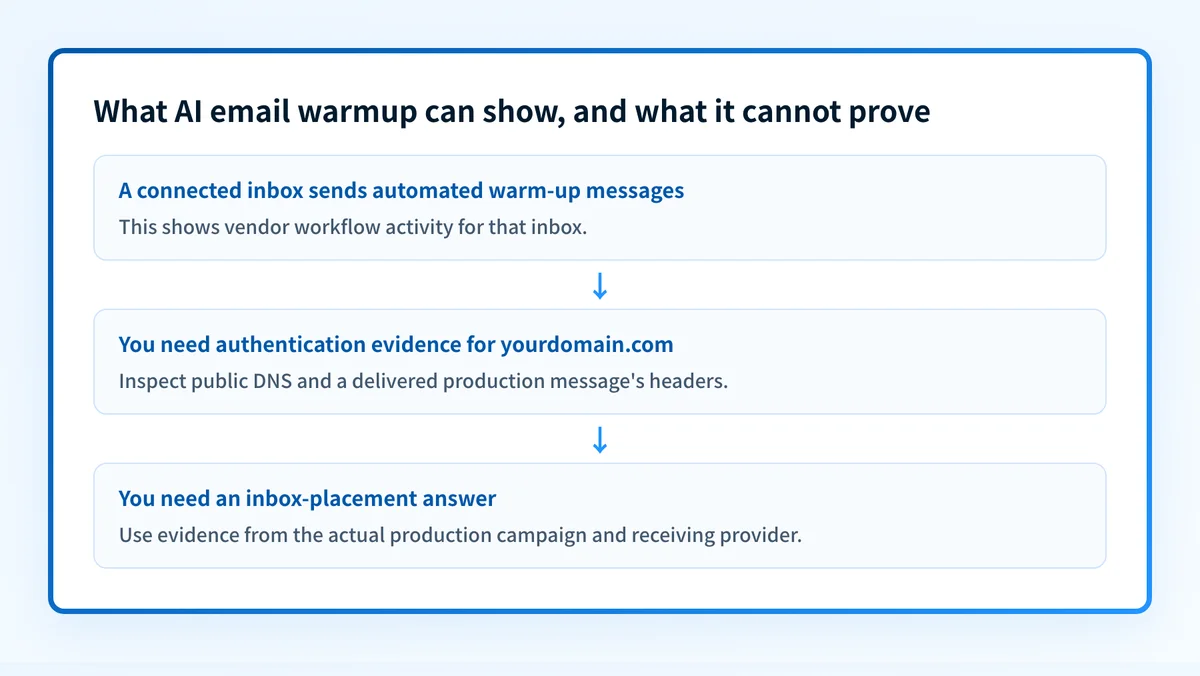
Consider a team that connects sales@yourdomain.com to a warm-up product before starting outbound campaigns. The product may report automated messages and positive interactions. That is evidence about the warm-up workflow, not a complete deliverability diagnosis.
Warm-up evidence: sales@yourdomain.com was connected to a vendor workflow
Authentication evidence: inspect the production message headers for SPF, DKIM, and DMARC results
DNS evidence: inspect the public domain configuration
Placement evidence: review messages delivered through the actual campaign path
The evidence should lead to different actions:
- If the warm-up tool is active but authentication evidence is missing, obtain a real delivered message from the production sender and inspect its headers.
- If the public domain configuration has a gap, fix the configuration through the appropriate domain and sending-service process before treating the issue as a reputation problem.
- If authentication passes but a receiver still filters mail, collect receiver-specific evidence. A warm-up result does not identify the receiver's exact reason.
- If the team manages many domains or sending sources, track each source separately. One connected inbox does not represent every sender that uses
yourdomain.com.
Choose the next check based on your evidence
Start with the evidence you already have.
If you only have a domain name and a concern that its email posture may be weak, use the Email Security Score tool. It is a useful first diagnostic for public-facing email-security configuration.
If you have a production message, preserve its raw headers and compare the authentication results with the visible From domain and the actual sending service. That message is more relevant than a generic warm-up report when the problem is a failed or filtered campaign.
If you are deciding whether warm-up belongs in an outreach process, read Apollo email warmup: what it does and what it cannot prove. Keep the vendor workflow separate from evidence about the domain, the production sender, and the receiving mailbox.
Check the email-security posture behind the warm-up question
Before attributing delivery trouble to reputation alone, inspect the public email-security configuration for the sending domain. That gives you a starting point for questions that a warm-up workflow does not answer.
Check the domain's email-security score
A public score cannot prove that a connected inbox will reach the inbox, repair a sender configuration, monitor every production source, or reveal a receiver's private filtering decision.
If your team needs to inventory sending sources, analyze DMARC aggregate-report data, and prioritize authentication or alignment issues across domains, Start with Palisade. Palisade is agentic DMARC software that analyzes aggregate-report data and proposes remediation priorities, while a human reviews the evidence and applies changes. It does not change DMARC policy automatically or guarantee delivery or inbox placement.
Evidence
Sources and further reading
Questions readers ask
Frequently asked questions
Is AI email warmup an email standard?
AI email warmup is not a standard. It is a category of vendor software, and no RFC, IETF specification, or mailbox provider defines it. Each vendor decides what its own warm-up workflow does, so compare products on their documented mechanics rather than the label.
Can AI email warmup prove inbox placement?
No warm-up product can prove inbox placement, because automated messages inside a vendor network say nothing about how a receiving provider will treat your next production message. Placement evidence comes from the real sender, the delivered messages, and the receiver involved.
Does AI email warmup check DMARC, SPF, or DKIM?
No, warm-up tools do not check DMARC, SPF, or DKIM. They connect an inbox and automate activity around messages, which is a separate job from validating the domain's authentication and DNS configuration. Check the domain and a real delivered message for that.
Does connecting one inbox warm up every sender on a domain?
No, connecting one inbox affects only that inbox and its configured sending path. Marketing platforms, transactional services, support systems, and employee mail can use the same domain with different authentication settings and different delivery outcomes. Track each sending source on its own.
Should a team investigate authentication before blaming a warm-up problem?
Yes, check authentication first, because a domain-level email-security check and the raw headers from a real production message reveal problems a warm-up report cannot see. Reputation work is worth doing after you know the authentication path is sound.

Written by
Johanie DupontBrand & Ecommerce Email
Johanie Dupont works on brand and ecommerce email at Palisade: BIMI and verified marks, sender requirements, and getting marketing mail into the inbox.
More from Johanie →