Reply.io email warmup: what it does and cannot prove
 ChatGPT
 Claude
 Gemini
 Perplexity
 Grok
GrokIn brief
Reply.io email warmup starts when you connect a mailbox and tracks warmup activity, but it does not prove inbox placement or instant outreach readiness.
Reply.io email warmup is an included feature that starts when you connect a mailbox to Reply.io. Reply.io says it uses automated peer-to-peer interactions between genuine inboxes and shows each inbox's reputation score, warmup stage, and daily activity. That describes activity inside Reply.io. It does not prove inbox placement, establish a universal sending limit, or make a mailbox instantly ready for high-volume outreach.
At a glance
Quick takeaways
- Reply.io says warmup starts when a mailbox is connected.
- Reply.io says warmup is included for every account added to Reply.
- Reply.io describes its warmup network as peer-to-peer interactions between real inboxes.
- Reply.io displays a reputation score, warmup stage, and daily activity per inbox.
- A Reply.io warmup status does not verify how a recipient mailbox provider will place a future campaign.
- Domain authentication and real delivered-message evidence remain separate checks.
How Reply.io email warmup works
Reply.io's email warmup page states, "Warmup starts the moment you connect." The same page says the feature is "Included for every account you add to Reply."
Reply.io describes the mechanism as a peer-to-peer network: "Every mailbox builds sender reputation through a peer-to-peer network of real inboxes no bots, no manual work, no extra subscriptions." It also says connected mailboxes can use SMTP or OAuth and be managed from the Reply dashboard.
The vendor says users can "Track progress per inbox" and monitor a reputation score, warmup stage, and daily activity. Those fields can help an operator see Reply.io's reported warmup activity for a connected mailbox. The supplied public material does not document how the reputation score is calculated, a score that is safe for campaign launch, or a specific interface path for changing warmup settings.
Warmup is one input within the wider email deliverability picture. Recipient systems can use their own signals and local policies when deciding whether to accept, filter, or place mail. A platform-reported score is therefore not the same evidence as a message delivered through the real production path.
When the answer changes
Reply.io's warmup claim changes meaning depending on the question being asked.
- If the question is whether Reply.io begins warmup activity after mailbox connection, the vendor says yes.
- If the question is whether every connected mailbox has access to warmup, Reply.io says it is included with every account added to Reply.
- If the question is whether warmup guarantees inbox placement, the available primary material does not establish that outcome.
- If the question is whether a mailbox is ready immediately, the answer is no as a verified deliverability claim. Reply.io says warmup starts immediately after connection, but it separately displays "14 Days from purchase to first send." That is vendor marketing text, not a universal readiness rule.
- If the mailbox's domain lacks correct authentication, warmup activity does not replace the need to publish and validate SPF, DKIM, and DMARC. A sender-platform example such as setting up SPF and DKIM for Customer.io illustrates the separate authentication work.
A worked readiness check
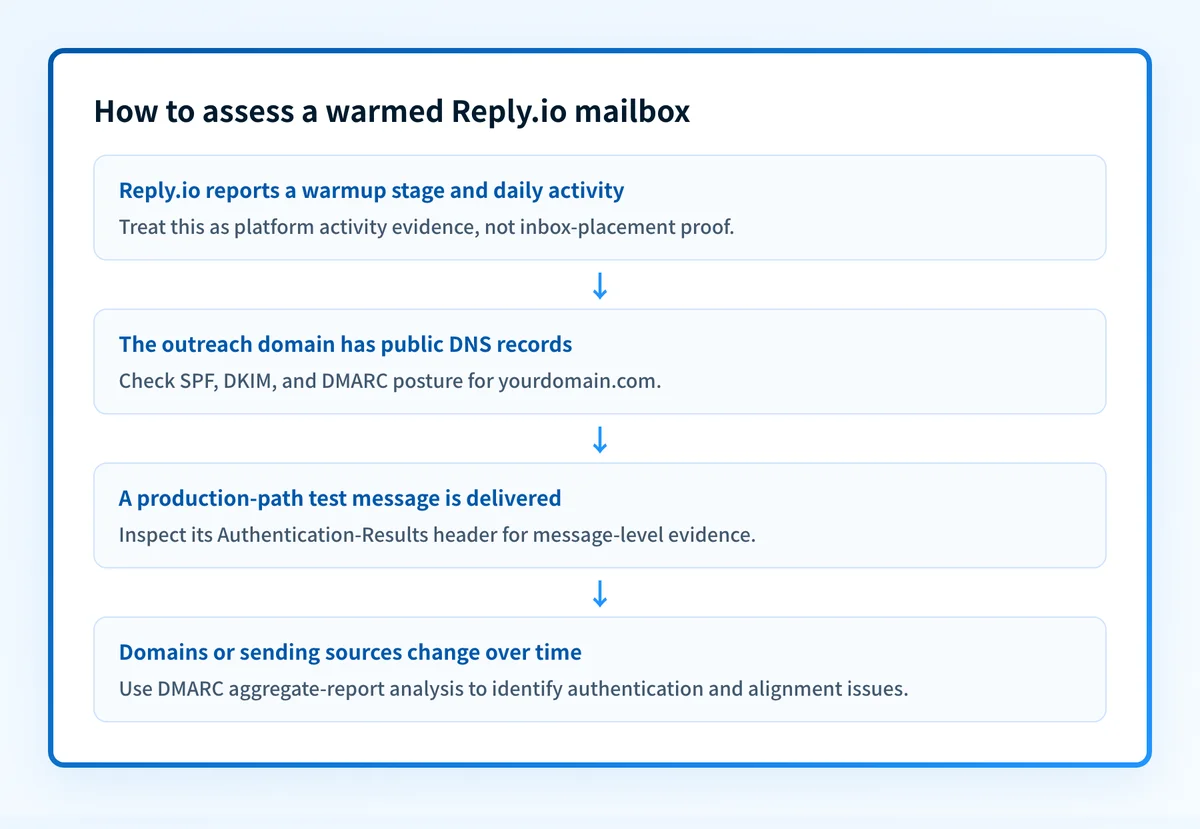
A Reply.io warmup stage can answer whether Reply.io reports ongoing warmup activity. It cannot answer whether SPF or DKIM passed for a campaign message, whether those identifiers aligned with the visible From domain, or how a recipient handled that message.
Use a record and message evidence checklist instead of treating one dashboard status as a complete result:
Illustrative readiness evidence
Visible From domain: yourdomain.com
SPF: pass with an aligned envelope domain
DKIM: pass with a d= domain aligned to yourdomain.com
DMARC: pass for the delivered production message
Reply.io: warmup stage and daily activity reviewed
Recipient evidence: delivered test message and raw Authentication-Results header retained
Do not publish account-generated selectors, SMTP credentials, OAuth tokens, full message headers, or customer addresses when collecting this evidence.
An Authentication-Results header records a receiving system's authentication assessment. RFC 8601 defines the header field and its result syntax. It is useful message-level evidence, but it remains evidence from that delivered message and receiving system.
This distinction matters when a Reply.io mailbox appears active in warmup but a real campaign path uses a different From domain, return path, signing configuration, or gateway. The warmup view may still be useful, yet it does not prove that the production route uses the authentication configuration you intended.
What to check next
Start with the evidence you have.
If you only have the Reply.io dashboard, record the connected mailbox, reported warmup stage, daily activity, and the date reviewed. Do not infer recipient placement from those fields.
If you have the sending domain, run it through Palisade's email security score checker to inspect its public email-security posture. Compare the result with the domain used in the visible From address. A public DNS-based check cannot prove that Reply.io is using that configuration for a live message, that a receiving provider will place it in the inbox, or that later DNS changes will not affect sending.
If you have a delivered test message, preserve a redacted copy of the raw headers and check its Authentication-Results values. Verify that the message came from the exact Reply.io production configuration you plan to use.
If you run several domains or regularly add new sending sources, the unresolved issue is inventory and ongoing DMARC evidence. AI email warmup: what it is and what it cannot prove explains why a warmup claim should stay separate from authentication and recipient outcomes. Palisade autonomously analyzes DMARC aggregate-report data, identifies sending sources and authentication or alignment issues, and creates prioritized remediation tickets. It can propose a next DMARC policy step, while a human reviews the evidence and applies any change.
Check the domain behind the warmed mailbox
Before relying on Reply.io's warmup status, inspect the public email-security posture of the exact domain used for outreach. Then compare that DNS evidence with a real delivered message from the configured mailbox.
Check the domain's email security
A public check does not prove Reply.io's current warmup activity, repair sender authentication, monitor every mailbox, or guarantee inbox placement. For an ongoing multi-domain DMARC workflow, Start with Palisade. Signup and trial do not require a credit card.
Evidence
Sources and further reading
Questions readers ask
Frequently asked questions
Does email warm up actually work?
There is no published evidence that warmup improves inbox placement, so treat the claim as unproven. Reply.io describes the activity it runs and the fields it tracks, which is a product description rather than a measured outcome. Judge readiness from your domain's authentication and from real delivered messages instead.
How much does Reply.io cost?
Reply.io's displayed homepage pricing starts at "$ 49" per user per month billed annually for Email Volume and "$ 89" per user per month billed annually for Multichannel. These are displayed starting prices, not a complete summary of plan entitlements or current account-specific charges.
How to warm up email instantly?
You cannot warm a mailbox instantly, even though Reply.io starts warmup the moment you connect one. Starting the feature is not the same as the mailbox being ready for outreach. Reply.io's own page shows "14 Days from purchase to first send," so plan for a wait rather than an instant switch.
Does a Reply.io reputation score prove that DMARC passes?
No, because the score is Reply.io's own measure and the vendor does not define it as DMARC evidence. To know whether DMARC passes, read the authentication results on a real delivered message and review DMARC aggregate reports once data has accumulated.

Written by
Johanie DupontBrand & Ecommerce Email
Johanie Dupont works on brand and ecommerce email at Palisade: BIMI and verified marks, sender requirements, and getting marketing mail into the inbox.
More from Johanie →