How do I set up SPF and DKIM for Zoho Campaigns?
 ChatGPT
 Claude
 Gemini
 Perplexity
 Grok
GrokIn brief
Set up SPF and DKIM for Zoho Campaigns by verifying the sender, publishing Zoho's DNS values, testing a delivered campaign, and checking DMARC.

Set up SPF and DKIM for Zoho Campaigns through its domain-authentication workflow: verify the sender, copy the SPF and DKIM DNS values displayed for that domain, publish them in authoritative DNS, then complete Zoho's domain verification and send a new campaign test. The path and workflow are verified from Zoho Campaigns' domain-authentication documentation. Values shown in your account are specific to that account and domain.
At a glance
Quick takeaways
- Zoho Campaigns requires sender verification and domain authentication before you can confirm SPF and DKIM for the sending domain.
- Copy the SPF and DKIM values from the Zoho Campaigns account that will send the campaign.
- Add Zoho to an existing SPF policy instead of publishing a second SPF TXT policy.
- A successful Zoho verification does not prove that a delivered campaign passed SPF, DKIM, or DMARC.
- Validate public DNS, Zoho's status, a new delivered message, and DMARC aggregate reports as separate checks.
- Use the email authentication learning center for protocol guidance that applies across sending platforms.
What should I check before configuring Zoho Campaigns?
Confirm that Zoho Campaigns is the platform sending the marketing messages in scope. This setup does not automatically authenticate employee mail sent through a mailbox provider, transactional mail sent by another application, or messages sent through a separate marketing platform.
You need access to the Zoho Campaigns organization that owns the sender domain, permission to complete its sender-verification workflow, and access to the domain's authoritative DNS zone. Identify the visible From domain you will use in the campaign and the mailbox that will receive your test.
If another team owns DNS, prepare a change request that includes the exact record owner and value displayed by Zoho. Check the DNS provider's host-field behavior before submitting it. Some DNS interfaces automatically append the zone name, so pasting a full domain into a relative host field can create a duplicated name.
Copy DNS values from the account and domain you are configuring. Do not publish selectors, targets, tokens, or hostnames from another account or from an online example.
Also inspect the current SPF record before editing it. SPF has one selected policy per domain. RFC 7208 says receivers must treat selection of multiple SPF records as a permanent error.
Which setup method should I use?
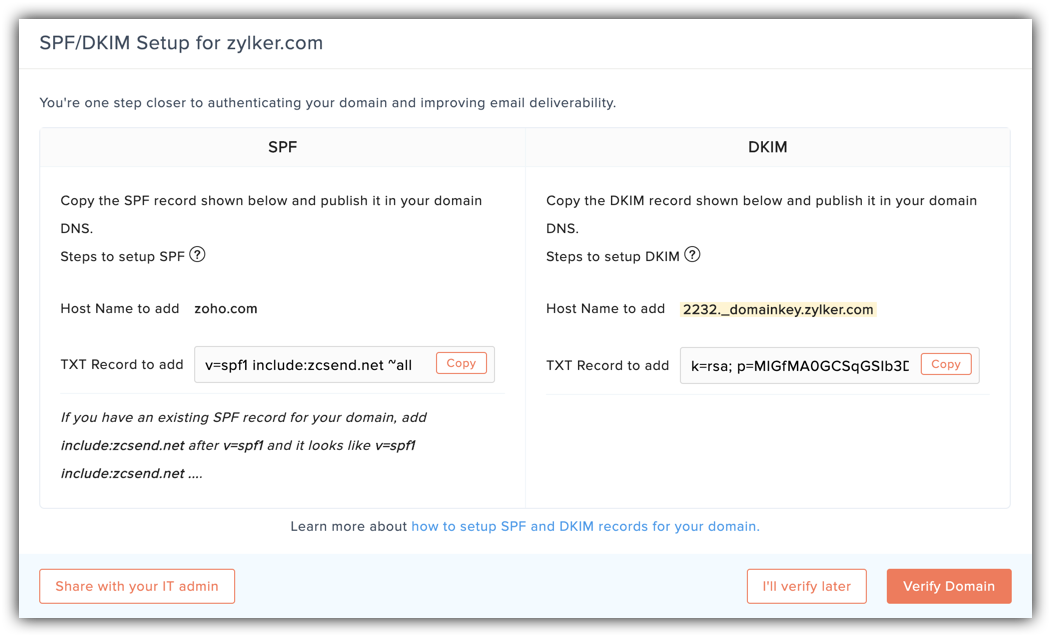
Use Zoho Campaigns' current domain-authentication workflow for the selected campaign sender domain. Its official guide covers sender verification, copying the displayed SPF and DKIM values, publishing them in DNS, and verifying the domain.
If the domain already sends through other services, preserve the existing SPF policy and add Zoho's required mechanism to that one policy. Zoho's current guide instructs domains with an existing SPF policy to add include:zcsend.net; compare that instruction with the exact value displayed in your account before publishing.
DKIM values are account-generated. Use the selector and public-key value Zoho supplies, even if another provider uses a familiar selector name. Do not reuse a selector that already has a different active DKIM record.
How do I configure SPF and DKIM for Zoho Campaigns?
1. Open domain authentication for the campaign sender
In Zoho Campaigns, open the domain-authentication workflow documented in Authenticate my domain. Select the sender domain used in the visible From address for the campaign.
Confirm the domain carefully before copying DNS values. A parent domain and a sending subdomain can have separate records and different alignment outcomes.
2. Complete sender verification
Complete Zoho's sender-verification step for the From address or domain selected in the workflow. This confirms control of the sender identity within Zoho Campaigns. It does not publish SPF or DKIM records, and it does not establish a delivered-message result.
Keep the verification mailbox available until the domain-authentication process is complete. If the selected sender address differs from the From address used in production campaigns, resolve that difference before proceeding.
3. Publish the SPF record change
Copy the SPF instruction from Zoho Campaigns. For a domain with an existing SPF record, Zoho documents adding its include mechanism to the existing policy.
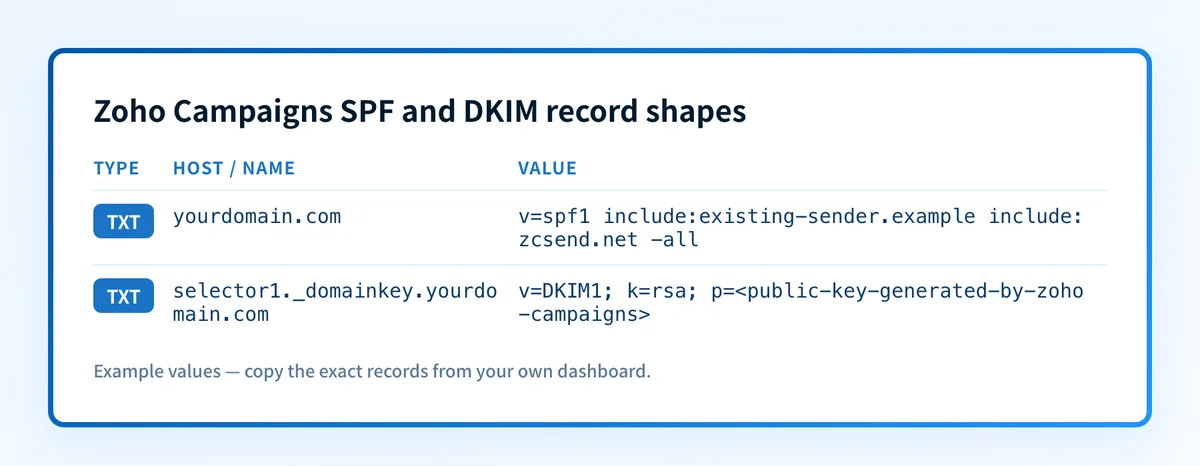
Record type: TXT
Host (illustrative only):
yourdomain.comValue structure (illustrative only):
v=spf1 include:existing-sender.example include:zcsend.net -allDo not publish this example. Use the exact SPF instruction displayed by Zoho Campaigns and retain mechanisms required by other authorized senders.
Do not create a second v=spf1 TXT record. Merge the required Zoho mechanism into the existing SPF policy, then check its total DNS lookup behavior. If the domain has no existing SPF policy, use the record shape Zoho displays for the selected domain.
4. Publish Zoho's DKIM record
Copy the DKIM record owner and full value from the same Zoho Campaigns domain-authentication view. The selector, public key, and any record target must come from the active account.
Record type: TXT
Host (illustrative only):
selector1._domainkeyValue structure (illustrative only):
v=DKIM1; k=rsa; p=public-key-generated-by-zoho-campaignsDo not publish this example. Copy the complete owner and value generated for your Zoho Campaigns account. An incomplete key cannot authenticate mail.
Do not shorten the public key or add quotes that the DNS provider does not require. Check for an existing record at the same selector before saving. If that selector is already in use, stop and choose a new selector or a documented key-rotation path rather than overwriting a working record.
5. Verify in Zoho Campaigns and send a new test
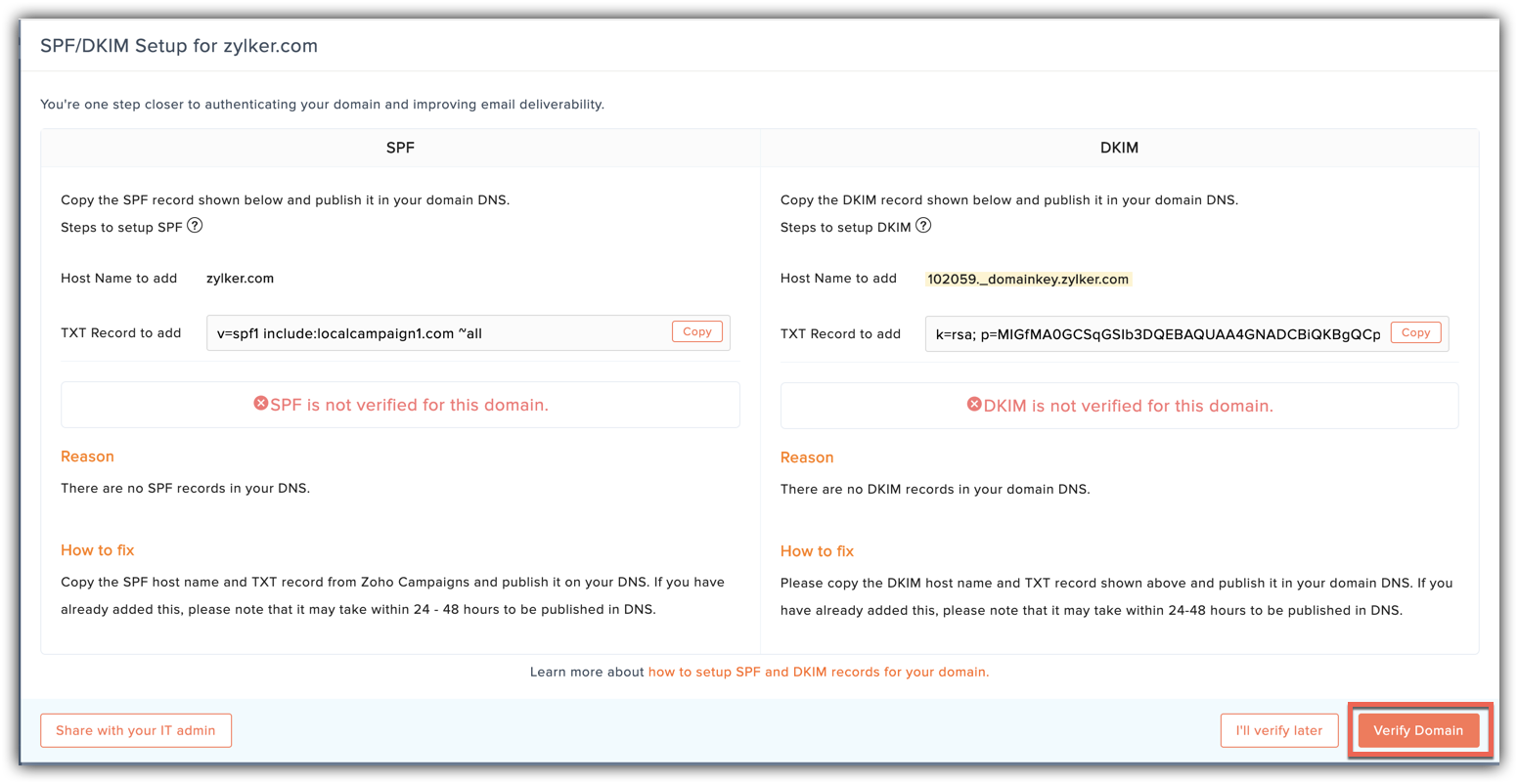
After the records answer publicly, return to Zoho Campaigns and complete domain verification. The current Zoho workflow shows SPF and DKIM verification status for the configured domain.
Send a new campaign from the exact production sender to a mailbox where you can inspect the raw message source. A message sent before the verification change is not evidence for the new configuration.
How does this setup affect DMARC?
SPF and DKIM help DMARC only when the passing authenticated identifier aligns with the visible From domain. RFC 9989 defines DMARC evaluation through SPF or DKIM identifier alignment. A DKIM pass for an unrelated signing domain does not make the campaign DMARC-aligned.
Use the DMARC checker to inspect the sender domain's published DMARC record before changing its policy. A public record check cannot show which Zoho Campaigns message path was used or how a receiving mailbox evaluated a particular campaign.
For a related platform workflow, see how to set up SPF and DKIM for Amazon SES. The DNS process changes by vendor, but the delivered-message and DMARC checks remain necessary.
How do I validate the setup?
Check public DNS
Query the exact SPF domain and DKIM selector shown by Zoho. Compare the authoritative DNS answer with at least one public resolver.
dig +short TXT yourdomain.com
dig +short TXT selector1._domainkey.yourdomain.com
Confirm that the SPF policy contains the intended Zoho mechanism and that the DKIM owner returns the complete expected value. Public DNS confirms publication only.
Check the Zoho Campaigns status
Return to the domain-authentication workflow and confirm Zoho shows the selected domain as verified. This indicates that Zoho accepted the current DNS configuration for that domain.
A green status is not a delivered-message check. It does not prove that every campaign route signs with the expected domain or that a receiver reported an aligned result.
Inspect a delivered message
Open the raw source of a new campaign test. Look for the DKIM-Signature field and the receiving mailbox's Authentication-Results field. RFC 8601 defines Authentication-Results and its receiver trust boundary.
Check for dkim=pass, the expected DKIM d= domain, and an SPF result associated with the production campaign path. Then compare the passing SPF or DKIM identifier with the visible From domain for DMARC alignment. Save a redacted header copy with the DNS change record.
Review DMARC reports
After DMARC aggregate reports accumulate, check whether Zoho Campaigns traffic appears as expected and passes alignment. Separate it from other marketing, transactional, and mailbox-hosted sources that use the same domain.
Troubleshooting
Zoho Campaigns cannot verify SPF
Inspect the domain's complete SPF TXT record. A common cause is publishing a second SPF policy instead of adding Zoho's required mechanism to the existing one. Restore one selected policy and retain every authorized sender mechanism.
Zoho Campaigns cannot verify DKIM
Compare the DNS answer character for character with the value displayed by Zoho. Check the final fully qualified owner name for a duplicated domain suffix, a truncated public key, or an existing record at the same selector.
Zoho shows verified, but the campaign fails DKIM
Send a new campaign and inspect its raw source. Confirm that the message actually includes the expected selector and signing domain. If it does not, verify the campaign sender domain selected in Zoho and escalate with the redacted message evidence.
SPF or DKIM passes, but DMARC fails
Compare the passing SPF domain or DKIM d= domain with the visible From domain. The authentication result may pass without satisfying DMARC alignment. Review the sender domain's DMARC record and the exact production campaign headers.
The DNS host includes the domain twice
Check whether the DNS provider automatically appends yourdomain.com. Enter only the relative host when that provider expects one, then query the fully qualified owner before returning to Zoho verification.
Check the sender domain after the Zoho Campaigns test
Use the Email Security Score to inspect the sender domain's public SPF, DKIM, and DMARC posture after publishing the Zoho Campaigns records. Compare its DNS findings with the delivered campaign headers you collected.
A public score cannot prove that Zoho Campaigns used the intended selector, envelope sender, or visible From domain on a campaign. It also cannot monitor future sender changes. When aggregate reports show recurring source or alignment issues across domains, Palisade analyzes that evidence and creates prioritized remediation tickets for human review. It does not configure Zoho Campaigns or guarantee inbox placement.
If that ongoing reporting gap applies to your team, Start with Palisade.
Evidence
Sources and further reading
Questions readers ask
Frequently asked questions
Does Zoho Campaigns need its own SPF record?
No. A domain should not publish a separate SPF policy for Zoho Campaigns when it already has one. Add Zoho's required mechanism to the existing SPF TXT policy, then preserve the mechanisms required by other authorized senders.
Does Zoho Campaigns DKIM need to align with the From domain?
Yes. DKIM can satisfy DMARC only when the passing DKIM signing domain aligns with the visible From domain under the domain's DMARC alignment mode. A valid signature from an unrelated domain does not satisfy DKIM alignment.
Can I use a Zoho Campaigns DKIM value from another account?
No. Copy the selector and DNS value from the Zoho Campaigns account and domain that will send the campaigns. Account-generated values from another account do not establish a valid signing path for your sender domain.
Does a verified Zoho status prove inbox placement?
No. Zoho verification shows that Zoho accepted the current DNS setup. It does not prove a receiving mailbox's spam decision, future delivery, or the result of every campaign path. Inspect a newly delivered message and then review DMARC aggregate reports.
Should I test a campaign after publishing SPF and DKIM?
Yes. Send a new campaign through the same sender and configuration used in production. Inspect the receiver-added Authentication-Results and the DKIM-Signature fields, then compare the authenticated domains with the visible From domain for DMARC alignment.

Written by
Dominic LandryDeliverability & DNS
Dominic Landry works on email deliverability and DNS configuration at Palisade, from SPF and DKIM records through to DMARC enforcement.
More from Dominic →