How do I set up SPF and DKIM for Amazon SES?
 ChatGPT
 Claude
 Gemini
 Perplexity
 Grok
GrokIn brief
Set up SPF and DKIM for Amazon SES by publishing identity-specific Easy DKIM records, configuring custom MAIL FROM, and validating real mail.

To set up SPF and DKIM for Amazon SES, open the sending domain under Configuration > Verified identities, use its Authentication settings to copy the Easy DKIM CNAME records, and publish those exact account-generated values in DNS. For SPF alignment, configure a custom MAIL FROM subdomain and publish the MX and SPF TXT records SES supplies. This console path is verified from AWS's current Easy DKIM documentation.
At a glance
Quick takeaways
- Amazon SES Easy DKIM uses three CNAME records generated for the selected domain identity.
- Copy DNS values from the AWS account, Region, and identity that will send the mail.
- A custom MAIL FROM subdomain is the Amazon SES configuration that can provide an SPF identity aligned with the visible From domain.
- Do not add an Amazon SES SPF include to an existing root-domain SPF record unless the SES setup specifically requires that record there.
- A successful SES identity status does not prove that a production message is signed, SPF-authenticated, or DMARC-aligned.
- Validate DNS, the SES identity state, a newly delivered message, and DMARC aggregate reports separately.
What should I check before configuring Amazon SES?
Confirm the exact outbound path in scope. This guide covers mail sent through an Amazon SES domain identity, such as application or transactional mail. It does not configure employee mailbox mail sent directly through Google Workspace or Microsoft 365, even if those messages use the same visible From domain.
Identify the AWS account and AWS Region used by the sender, the domain shown in production From addresses, and the DNS zone that controls that domain. AWS documents Easy DKIM records as identity-specific configuration, and its documentation notes that a Region can use a DKIM domain other than the default one. Use the values displayed for the active identity rather than values from an example or another Region.
You also need permission to view and edit the SES identity plus access to the authoritative DNS provider. If an existing SPF, DKIM, or MX record is already present, identify the system that owns it before changing anything.
Copy DNS values from the account and domain you are configuring. Do not publish selectors, targets, tokens, or hostnames from another account or from an online example.
For broader vendor-specific guidance, see the vendor email authentication guides. If Amazon SES is only one sender among several, document which application uses each identity before treating a DNS result as evidence for all mail.
Which setup method should I use?
Use Easy DKIM for the Amazon SES domain identity when you need SES to sign mail with DKIM. AWS's Easy DKIM management guide describes the three CNAME records associated with an Easy DKIM identity. Those records delegate the selector names AWS generates. They are not reusable DNS templates.
Use a custom MAIL FROM domain when the return-path domain needs to be under your organizational domain for SPF alignment. AWS documents custom MAIL FROM as a separate identity setting with its own MX and SPF records and fallback behavior in the IdentityMailFromDomainAttributes API reference.
DKIM and custom MAIL FROM solve different problems. Start with Easy DKIM if you need an aligned authentication path for DMARC. Add custom MAIL FROM when SPF alignment is a requirement for your sending design or operational policy.
How do I configure SPF and DKIM for Amazon SES?
1. Open the sending-domain identity
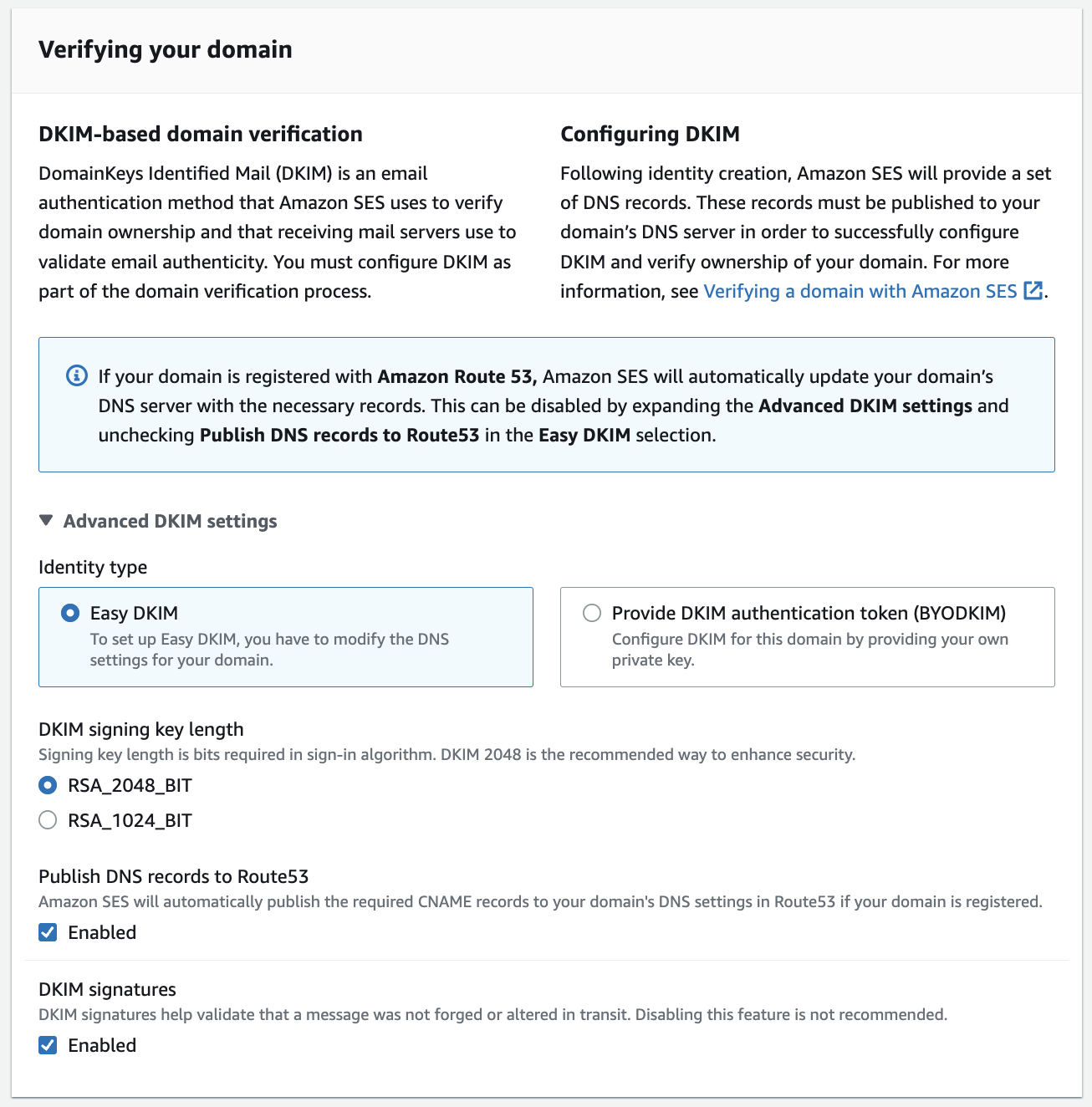
In the AWS Region that sends the mail, open Amazon SES and go to Configuration > Verified identities. Select the domain identity used by the application, then open its Authentication settings. AWS's official documentation verifies this identity and authentication path.
Check the selected domain and Region before copying a record. If the same domain sends through multiple AWS Regions, review the identity configuration in each sending Region.
2. Enable or review Easy DKIM
Use the selected identity's Easy DKIM configuration and open the DNS records AWS displays. Amazon SES generates three CNAME records for the identity. Copy all three record names and targets exactly as presented.
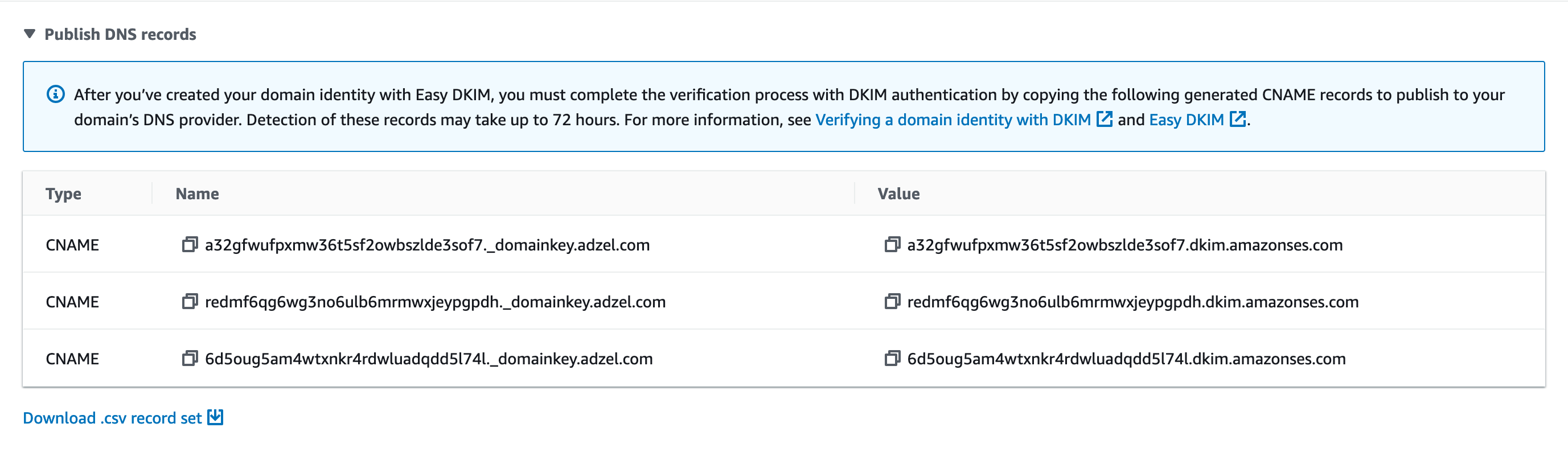
Do not replace an active DKIM selector because an online example uses a different name. If a generated owner conflicts with an existing record, stop and establish whether that selector belongs to an active sender before changing DNS.
3. Publish the Easy DKIM CNAME records
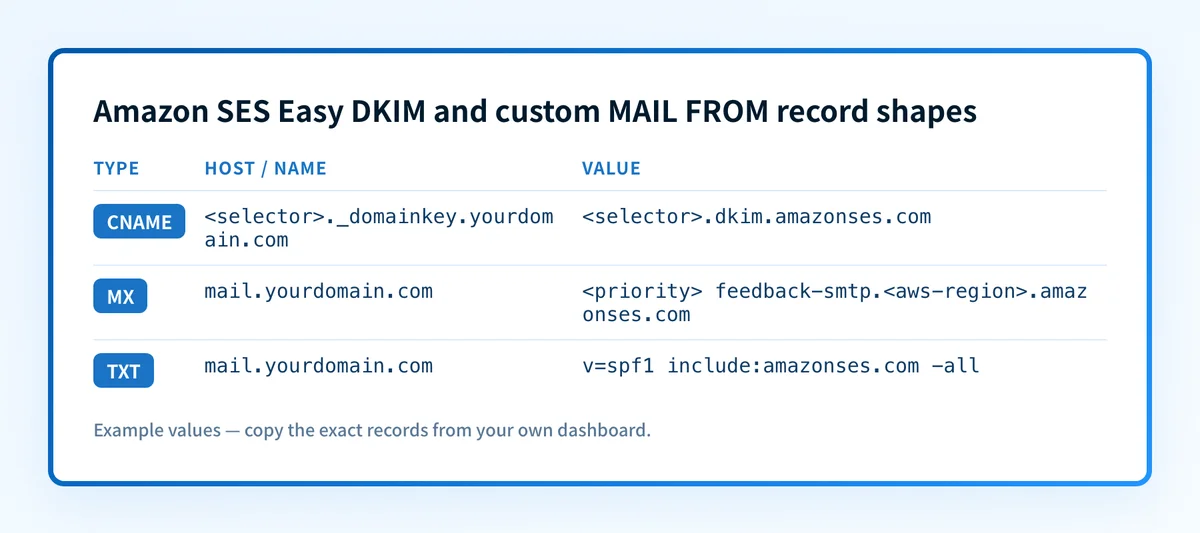
Create the three CNAME records in authoritative DNS. The following shape is illustrative only. Amazon SES generates the real selectors and targets in the identity settings.
Record type: CNAME
Host, illustrative only:
<selector>._domainkey.yourdomain.comValue, illustrative only:
<selector>.dkim.amazonses.comDo not publish these placeholders. Copy every complete CNAME owner and target from the selected Amazon SES identity and Region.
Some DNS providers append the zone name automatically. If the DNS zone is yourdomain.com, entering selector._domainkey.yourdomain.com into a host field that appends the zone can create selector._domainkey.yourdomain.com.yourdomain.com. Query the final public name after saving.
4. Configure a custom MAIL FROM domain when SPF alignment is needed
In the domain identity's custom MAIL FROM settings, choose a subdomain reserved for Amazon SES return paths, such as mail.yourdomain.com. AWS then provides an MX record and an SPF TXT record for that subdomain.
The records have this structure only:
Record type: MX
Host, illustrative only:
mail.yourdomain.comValue, illustrative only:
<priority> feedback-smtp.<aws-region>.amazonses.comRecord type: TXT
Host, illustrative only:
mail.yourdomain.comValue, illustrative only:
v=spf1 include:amazonses.com -allDo not publish these example values. Copy the exact MX priority, target, TXT value, and fallback choice Amazon SES displays for your identity.
A custom MAIL FROM SPF record belongs on the MAIL FROM subdomain, not automatically on the root domain. SPF has one policy record per identity. Merge a new root-domain SPF mechanism only when the root domain is actually evaluated for the relevant mail path and the existing record owner confirms the change.
5. Verify the SES status and send a new message
Return to the same Amazon SES identity and review its DKIM and custom MAIL FROM status after public DNS returns the expected records. AWS's identity state confirms that SES can find the required configuration for that identity.
Then send a new message through the exact production application path. A test sent before the DNS change or from a different AWS Region is not evidence for the path you configured.
How does this setup affect DMARC?
DMARC evaluates alignment between the visible From domain and a passing SPF or DKIM identifier. RFC 9989 defines the SPF and DKIM alignment checks used by DMARC.
Easy DKIM can satisfy DMARC when the passing DKIM signing domain aligns with the visible From domain. Custom MAIL FROM can make an aligned SPF identifier possible when the return-path subdomain aligns under the domain's published DMARC alignment mode. A valid SES identity alone does not establish either result.
Use the DMARC checker to inspect the published DMARC record before changing its policy. A public record check does not prove which SES application path is sending, whether a receiver accepted a message, or whether future mail will align.
For related setup patterns, compare this workflow with Brevo SPF and DKIM setup and Customer.io SPF and DKIM setup.
How do I validate the setup?
Check public DNS
Query the exact CNAME owners generated by Amazon SES. If you configured custom MAIL FROM, also query its MX and TXT records. Compare the authoritative answer and at least one public resolver with the values in the selected SES identity.
dig +short CNAME <selector>._domainkey.yourdomain.com
dig +short MX mail.yourdomain.com
dig +short TXT mail.yourdomain.com
The public DNS answers show what resolvers can see. They do not prove that SES has accepted the configuration or that an application is using it.
Check the Amazon SES identity status
Return to the same Region and selected identity. Confirm the current DKIM and, where applicable, custom MAIL FROM status. This is vendor-side evidence that Amazon SES recognizes the identity configuration.
A green SES indicator is not a delivered-message check. It does not prove that the application selected that identity, that the message traversed the intended Region, or that DKIM survived the delivery path.
Inspect a delivered message
Open the raw source for a newly delivered test message. Inspect the DKIM-Signature field for the expected selector and signing domain, then inspect the trusted receiver-added authentication result. RFC 8601 defines Authentication-Results and explains why the receiving system's assessment has a trust boundary.
Look for a trusted dkim=pass result and, where custom MAIL FROM is in use, the SPF result associated with the message's return-path identity. Compare the passing identifiers with the visible From domain to determine DMARC alignment.
Review DMARC reports
After aggregate reports accumulate, review Amazon SES traffic as a sending source and check the reported SPF and DKIM alignment results. This layer can reveal a separate application, Region, or return-path configuration that was not covered by a single test message.
Palisade is agentic DMARC software that analyzes DMARC aggregate-report data, identifies authentication and alignment issues, and creates prioritized remediation tickets. It can propose a next DMARC policy step when evidence supports it, while your team reviews the evidence and applies DNS changes.
Troubleshooting
SES still shows DKIM as pending
Check each public CNAME owner and target against the identity's current values. A missing record, altered target, or duplicated DNS suffix can prevent SES from finding the configuration.
Do not copy a record from another identity or Region to clear a pending state. Return to the selected identity and use its generated values.
The DKIM record is present but the test message does not pass DKIM
Confirm that the message came from the configured Amazon SES path and inspect its actual DKIM-Signature selector and d= value. A DNS record can be correct while the sending application uses a different AWS account, Region, identity, or mail route.
SPF passes but DMARC does not
Compare the SPF-authenticated return-path domain with the visible From domain. SPF can pass for a domain that does not align for DMARC. Configure and validate custom MAIL FROM only when the desired return-path alignment is part of the design.
DKIM passes but DMARC does not
Compare the passing DKIM d= domain with the visible From domain and the domain's DMARC alignment policy. A valid DKIM signature does not automatically meet DMARC alignment.
The root-domain SPF record was changed for SES and another sender broke
Restore the previous approved SPF policy before making another change. Review whether the SES workflow actually requires a root-domain SPF record or whether the configuration belongs on a custom MAIL FROM subdomain. SPF policy changes affect every sender evaluated against that identity.
Check the DNS records behind your Amazon SES identity
After you have the SES-generated CNAME, MX, and TXT values, inspect the public DNS names before changing DMARC policy. The public results help catch missing records and duplicated zone suffixes, but they do not prove the Amazon SES account state, the production sending path, or a receiver's private delivery decision.
Start with Palisade when you need to follow Amazon SES and other sending sources through DMARC aggregate reports. Palisade does not automatically change your DMARC policy or guarantee delivery. Your team reviews the evidence and applies the proposed change.
For a provider-specific implementation of these authentication checks, see How do I set up SPF and DKIM for Klaviyo?.
For a provider-specific implementation of these authentication checks, see How do I set up SPF and DKIM for Mailgun?.
For a provider-specific implementation of these authentication checks, see How do I set up SPF and DKIM for Postmark?.
Evidence
Sources and further reading
- Amazon SES Easy DKIM management
- Creating and verifying Amazon SES identities
- Amazon SES custom MAIL FROM identity attributes
- RFC 9989: Domain-based Message Authentication, Reporting, and Conformance
- RFC 8601: Authentication-Results
- Google Workspace: define an SPF record for Gmail — for the employee mailbox mail this guide excludes.
- Microsoft 365: set up SPF — the Microsoft 365 equivalent.
Questions readers ask
Frequently asked questions
Does Amazon SES Easy DKIM require three DNS records?
Yes. AWS documents three CNAME records for an Easy DKIM domain identity. Copy all three names and targets from the selected SES identity because they are account- and Region-specific.
Do I need a custom MAIL FROM domain for Amazon SES?
Only when your sending design requires Amazon SES to use a return-path subdomain that you control, including cases where SPF alignment is required. Easy DKIM and custom MAIL FROM are separate settings.
Can I add Amazon SES to my existing root-domain SPF record?
Only if the root domain is the SPF identity evaluated for the Amazon SES path and the change is compatible with every existing sender. A custom MAIL FROM setup normally places the SES SPF record on the return-path subdomain AWS provides.
Does a verified Amazon SES identity prove DMARC passes?
No. SES verification proves that Amazon SES recognizes the identity's expected DNS configuration. DMARC requires evidence from a delivered message and, over time, DMARC aggregate reports.
Can a passing DKIM signature still fail DMARC?
Yes. DMARC requires the passing DKIM signing domain to align with the visible From domain under the published DMARC alignment mode. A signature from an unrelated domain can pass DKIM without satisfying DMARC.

Written by
Dominic LandryDeliverability & DNS
Dominic Landry works on email deliverability and DNS configuration at Palisade, from SPF and DKIM records through to DMARC enforcement.
More from Dominic →