How do I set up SPF and DKIM for Postmark?
 ChatGPT
 Claude
 Gemini
 Perplexity
 Grok
GrokIn brief
Postmark authenticates via its own Return-Path, so the include is unnecessary. Real setup: one DKIM TXT record plus a Return-Path CNAME for alignment.

Authenticating Postmark takes one required DNS record, not three. Add the DKIM TXT record that Postmark's DNS Settings page generates for your domain, then add a custom Return-Path CNAME (pm-bounces.yourdomain.com pointing to pm.mtasv.net) so SPF aligns for DMARC. That is the whole setup. You do not need to add Postmark to your SPF record: Postmark's own documentation states that "it is no longer required to include Postmark in your own custom SPF record," because SPF is checked against the Return-Path domain, which Postmark already covers. Most third-party guides still tell you to paste include:spf.mtasv.net anyway.
At a glance
Quick Takeaways
- DKIM is the only required record: a TXT record with a timestamped selector, generated in Sender Signatures → DNS Settings.
- Postmark's default Return-Path domain is
pm.mtasv.net, which carries Postmark's SPF record, so your mail passes SPF with zero setup. - Passing SPF is not the same as SPF alignment. For DMARC, add the custom Return-Path CNAME.
include:spf.mtasv.neton your root domain does nothing for Postmark mail. The documented exception is Apple's Private Email Relay.- Keep the SPF record for your mailbox provider (Google Workspace, Microsoft 365). That one still matters.
What DNS records does Postmark actually need?
Postmark authenticates your mail with DKIM and handles SPF on its own bounce domain. Three records come up in setup conversations, but they are not equally important:
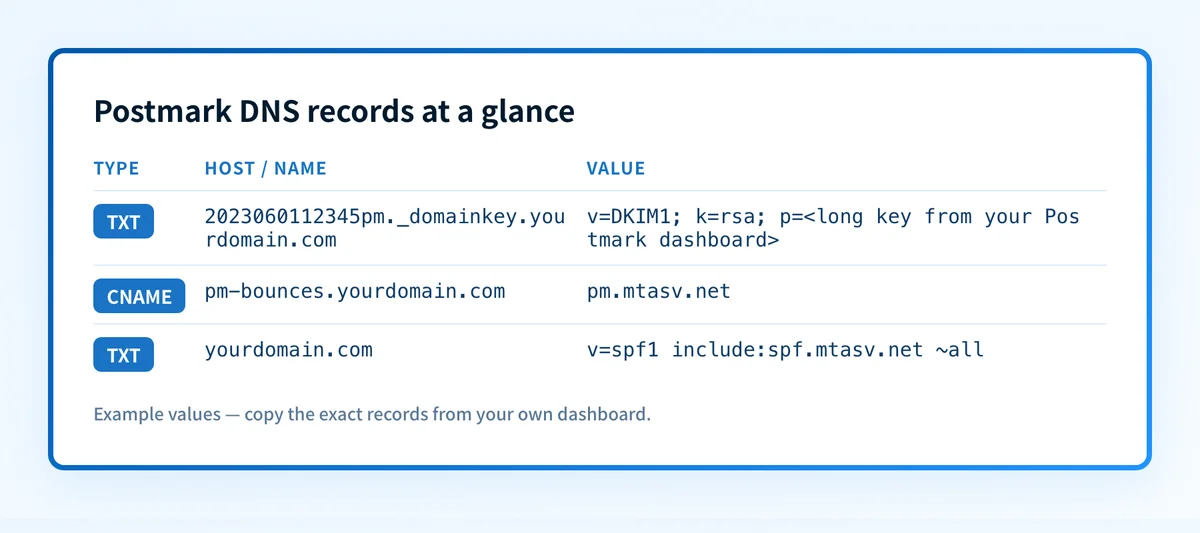 Only the DKIM TXT record is required; the Return-Path CNAME is what earns DMARC alignment.
| Record | Type | Example value | Do you need it? |
|---|---|---|---|
| DKIM | TXT | v=DKIM1; k=rsa; p=<long key> at 2023060112345pm._domainkey.yourdomain.com | Required |
| Custom Return-Path | CNAME | pm-bounces.yourdomain.com → pm.mtasv.net | Strongly recommended for DMARC |
| SPF include | TXT | v=spf1 include:spf.mtasv.net ~all | Optional, edge cases only |
The rest of this guide walks through each one, in that order.
How do I set up DKIM for Postmark?
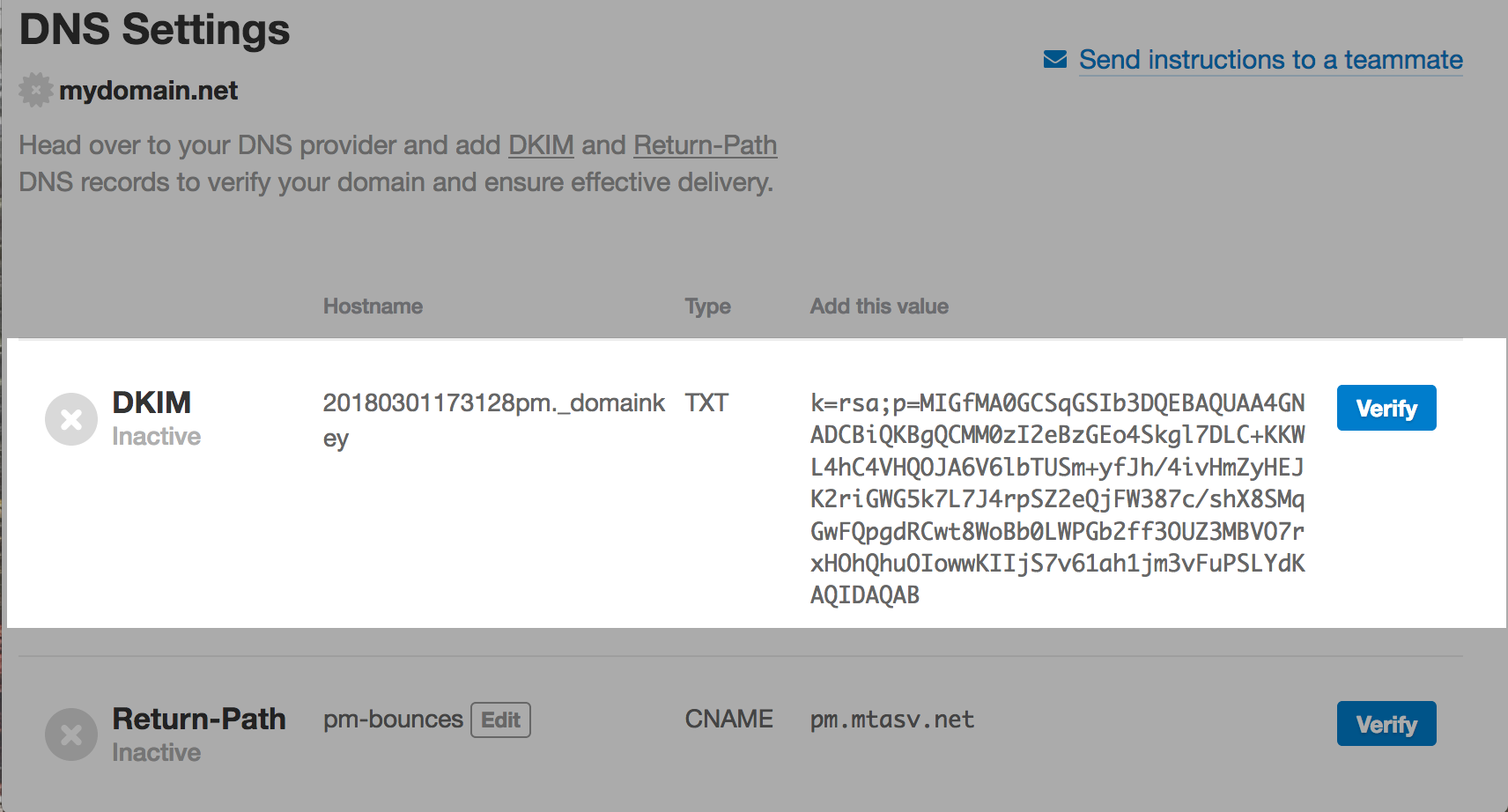
Postmark generates a unique DKIM record per domain, with a timestamped selector. Per Postmark's DKIM setup guide, the hostname "usually follows a format like 2023060112345pm._domainkey", so don't copy a selector from a blog post; use the exact one your dashboard issues.
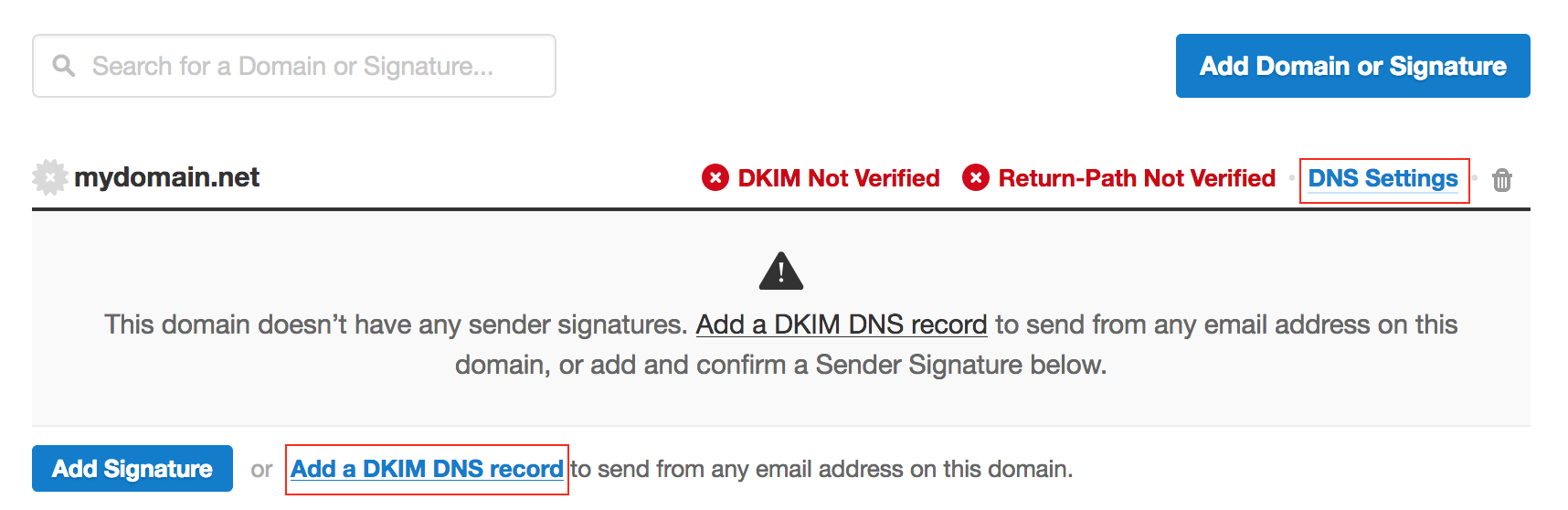
- Log in to Postmark and open Sender Signatures from the top menu.
- Add your domain if it isn't there, then click DNS Settings next to it.
- Copy the DKIM record: a TXT record with a hostname like
2023060112345pm._domainkey.yourdomain.comand a value starting withv=DKIM1; k=rsa; p=.... - Create that TXT record at your DNS provider. Many providers append your domain automatically, so enter only the part before your domain (e.g.
2023060112345pm._domainkey) in the host field. - Back on Postmark's DNS Settings page, click Verify. When it turns green, Postmark is signing your email with your domain's key.
Type:  TXT
Host:  2023060112345pm._domainkey.yourdomain.com
Value: v=DKIM1; k=rsa; p=<long key from your Postmark dashboard>
Because the selector is unique and dated, treat each Postmark DKIM record as its own entry: it will sit alongside selectors from Google, Microsoft, or any other sender without conflict.
Do I need to add an SPF record for Postmark?
No, and this is where most Postmark guides get it wrong. Postmark removed the SPF requirement back in 2017 and has been explicit about it since.
Here's the mechanism. Receiving servers evaluate SPF against the Return-Path domain (the bounce address), not the From address your recipients see. The old practice of adding every ESP to your domain's SPF record dates from SenderID, a Microsoft standard that checked the From domain, and as Postmark puts it, "SenderID is a dead standard now. SPF is still alive, so the DNS record lookup only happens on the Return-Path domain." By default, Postmark's Return-Path is its own domain, pm.mtasv.net, which publishes Postmark's sending IPs. That's why their docs say "your emails sent through Postmark will always pass SPF by default, without any necessary action on your end."
It goes further: adding include:spf.mtasv.net to your root domain's SPF record is not just unnecessary, for Postmark mail, it never gets read. Postmark's SPF FAQ confirms that "email providers no longer check the From field's domain when evaluating SPF and determining the results", the lookup lands on the Return-Path domain, which with Postmark is never your root domain. So the copy-pasted include just sits there, spending one of your ten SPF DNS lookups every time a receiver evaluates your record for some other mail stream.
Two honest caveats:
- Your mailbox provider still needs SPF. Postmark is blunt about this: "for your main mailbox provider, and any provider who uses your domain for the Return-Path, you still very much need an SPF record." Keep
include:_spf.google.comorinclude:spf.protection.outlook.comwhere they are. - Apple's Private Email Relay is the documented exception. If your app supports Sign in with Apple and emails relay addresses, Postmark's guide says Apple requires an SPF record,
v=spf1 include:spf.mtasv.net ~all, plus DKIM signed by your domain and a custom Return-Path that matches it.
How do I set up a custom Return-Path for Postmark?
DMARC doesn't just ask whether SPF passed; it asks whether the domain that passed matches your From domain. With Postmark's default Return-Path, SPF passes on pm.mtasv.net, Postmark's domain, not yours. As their alignment FAQ explains, "with DMARC, the Return-Path and From address must match for SPF alignment," so that pass contributes nothing to your DMARC evaluation. Your mail still passes DMARC through aligned DKIM, "DMARC only requires either SPF or DKIM to be aligned", but you're running on one rail. If a migration or a stray CMS integration breaks DKIM signing, there's no aligned SPF to catch the fall, and mail starts failing DMARC outright. Our SPF alignment guide covers why two aligned paths beat one.
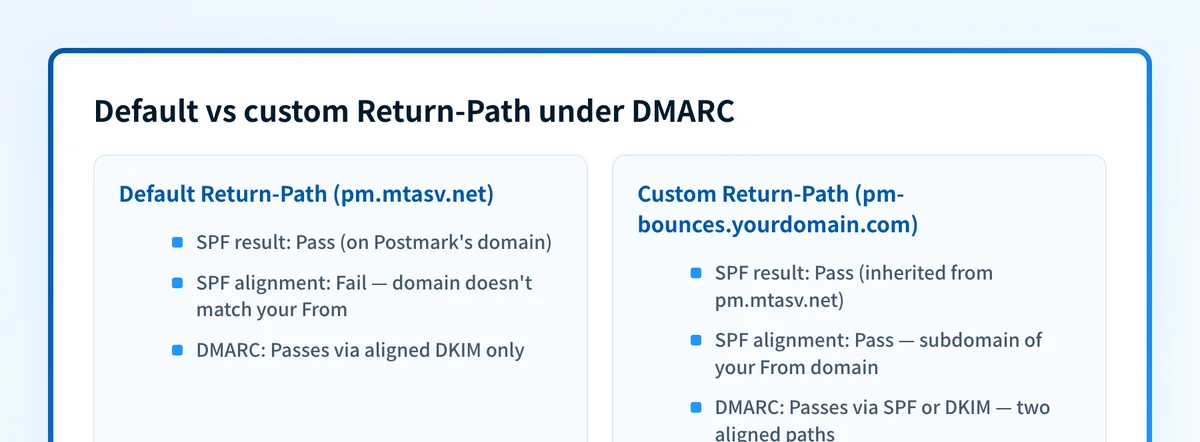 Both pass SPF: only the custom Return-Path makes that pass count toward DMARC.
The fix is a single CNAME, per Postmark's Return-Path guide:
Type:  CNAME
Host:  pm-bounces.yourdomain.com
Value: pm.mtasv.net- Create the CNAME above at your DNS provider (
pm-bouncesis Postmark's default alias for the subdomain). - In Postmark, open Sender Signatures → DNS Settings for your domain.
- In the Return-Path section, enter the alias you used in your CNAME record.
pm.mtasv.net already publishes Postmark's SPF record, the CNAME inherits it: bounces still flow to Postmark, but the Return-Path is now a subdomain of your domain, so SPF aligns under DMARC's default relaxed mode. No TXT record to maintain, no IP lists to babysit.
How do I verify my Postmark records?
- In Postmark: the DNS Settings page is the source of truth, click Verify and look for the DKIM record to turn green.
- From a terminal: Postmark's troubleshooting guide recommends
dig, e.g.dig 2023060112345pm._domainkey.yourdomain.com txt, to confirm the record exists where you think it does. - With Palisade: check
2023060112345pm._domainkey.yourdomain.comin the DKIM checker or the TXT record lookup, confirm thepm-bouncesCNAME with the DNS lookup tool, then run the DMARC checker to confirm your policy is in place before you tighten it.
Authentication-Results header: you want dkim=pass with your domain, and, after the Return-Path change, spf=pass with pm-bounces.yourdomain.com.
Common issues
DKIM won't verify (stuck pending). Two causes dominate, per Postmark's docs. First, propagation: "DNS changes might take several hours to propagate," so a just-published record can legitimately sit unverified for a while. Second, the duplicated-domain trap: some DNS providers auto-append your root domain, leaving the record at 2023060112345pm._domainkey.yourdomain.com.yourdomain.com. Check with dig; if it's doubled, re-enter the host as just the selector plus ._domainkey.
DMARC reports show SPF failing alignment on Postmark mail. This is expected behavior on the default Return-Path, not an incident. The mail passes SPF on pm.mtasv.net, which can't align with your From domain. If DKIM is verified, these messages still pass DMARC. Add the custom Return-Path CNAME and the alignment failures in your DMARC reports turn into aligned passes.
You added include:spf.mtasv.net but reports didn't change. Because that include sits on your root domain and Postmark's default Return-Path never queries it. Unless you need it for Apple's Private Email Relay, remove it to reclaim the DNS lookup. The custom Return-Path is what actually moves SPF alignment.
DKIM passes but doesn't align. If mail signs as a different domain than the From address (common after white-labeling or domain migrations), DKIM passes without helping DMARC. See why DKIM signatures fail alignment.
Questions readers ask
Frequently asked questions
What is pm.mtasv.net?
It's Postmark's Return-Path (bounce) domain. By default, mail sent through Postmark uses a Return-Path at pm.mtasv.net, which hosts Postmark's SPF record. That's how your mail passes SPF without any DNS work. It's also the CNAME target for your custom Return-Path.
Does Postmark work with a DMARC policy of p=reject?
Yes. With the DKIM record verified and a custom Return-Path in place, Postmark mail is aligned on both DKIM and SPF, and since DMARC enforcement only needs one aligned mechanism, that gives you redundancy. Verify both before tightening: a domain on a p=reject policy with broken DKIM and no aligned SPF will see Postmark mail rejected.
Should I remove include:spf.mtasv.net from my existing SPF record?
If you're not using Apple's Private Email Relay, it's doing nothing for Postmark mail, and every include costs one of SPF's ten DNS lookups. Keep your mailbox provider's include; drop redundant ESP includes when you're near the limit.
Is this the same process as other email providers?
The DKIM step is similar everywhere, but the SPF story is unusually honest at Postmark, most providers hand you a MAIL FROM subdomain plus TXT records instead. Compare Amazon SES, which uses three DKIM CNAMEs and a custom MAIL FROM domain.
Postmark's defaults get you delivering; the custom Return-Path gets you aligned. If you're rolling this out across client domains, Palisade monitors DMARC reports for every domain in one place and flags exactly which source is failing alignment before it becomes a deliverability ticket.

Written by
Dominic LandryDeliverability & DNS
Dominic Landry works on email deliverability and DNS configuration at Palisade, from SPF and DKIM records through to DMARC enforcement.
More from Dominic →