Fixing SPF Alignment (DMARC): Full Guide
 ChatGPT
 Claude
 Gemini
 Perplexity
 Grok
GrokIn brief
If your DMARC report says “SPF not aligned” (or you’re seeing p=quarantine/reject hits you didn’t expect), this guide is for you.
If your DMARC report says “SPF not aligned” (or you’re seeing p=quarantine/reject hits you didn’t expect), this guide is for you. Below we’ll explain what SPF alignment actually means, why it breaks, and the fastest ways to fix it using the Palisade DMARC agent.
TL;DR (what to do first)
- Pick one: either make your Return-Path/MAIL FROM use your domain (SPF alignment), or ensure DKIM is aligned. DMARC needs at least one of SPF or DKIM aligned to pass. Confirm your current policy with the DMARC checker.
- In the Palisade DMARC agent, open the failing source and click Fix. The agent will show the minimal DNS change (often a CNAME for a custom return-path or an
include:for SPF) and validate it. - If an ESP can’t SPF-align (no custom return-path option), use DKIM alignment for that sender and keep SPF as a secondary signal.
SPF alignment in one minute
- SPF pass ≠ SPF alignment. A message can pass SPF and still fail DMARC if the domain that passed SPF (the Return-Path/MAIL FROM) doesn’t belong to the same organizational domain as the From: header domain.
- Relaxed vs. strict: By default, DMARC’s relaxed mode treats
news.example.comandexample.comas aligned. Strict requires an exact, same-host match. If you setaspf=s, plan for exact matches everywhere. See aspf & adkim explained for the tag details. - Where SPF looks: SPF authenticates the envelope sender (MAIL FROM / Return-Path), not the visible From: header your users see.
Why SPF alignment breaks (common causes)
- Third-party senders use their own bounce domain. Your visible From: is
@example.com, but the Return-Path is@senderservice.com. - Shared infrastructure or reseller brands. The provider routes bounces via a shared vendor domain.
- You’re on
aspf=s(strict). Subdomains that used to align under relaxed alignment now fail. - SPF policy issues. Missing
include:for the sender, exceeding the 10-lookup limit, or apermerror/temperrorcausing SPF to fail before alignment is even checked. - Forwarding and lists. Forwarders modify the path: SPF often breaks in transit. DKIM alignment becomes the safety net for these hops.
The two clean ways to fix SPF alignment
Option A: Align the Return-Path to your domain (recommended when supported)
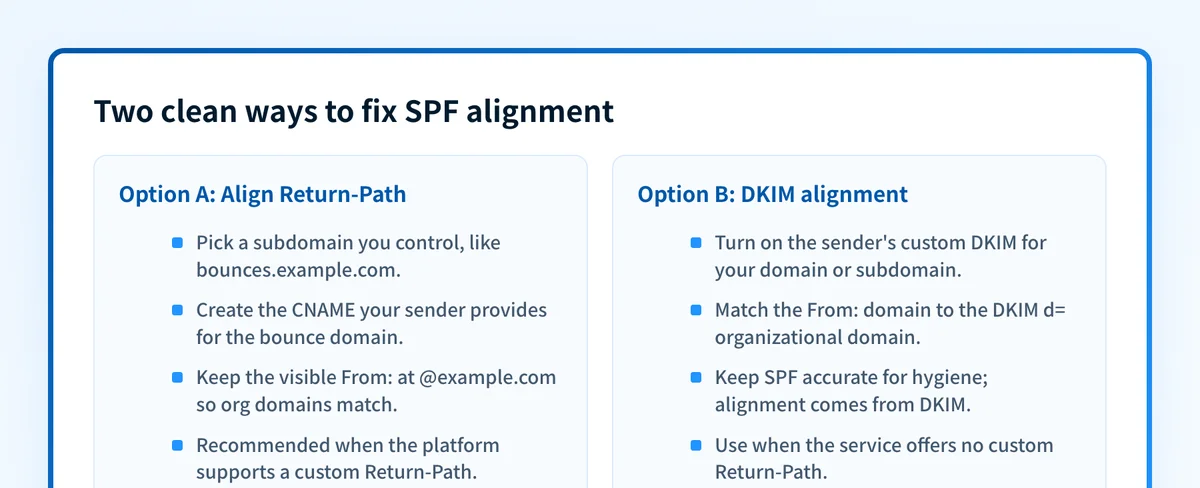 If the platform supports it, do both. DMARC passes when either path is aligned.
Most platforms let you set a custom bounce/return-path domain (a.k.a. custom MAIL FROM). The pattern is usually:
- Choose a subdomain you control, e.g.
bounces.example.comorrp.example.com. - Create a CNAME the sender gives you (e.g.
bounces.example.com → some.vendor.net), then confirm the CNAME resolves. - Keep your visible From: as
@example.com(or a subdomain of it) so organizational domains match under relaxed alignment.
- Go to Sources and open the failing sender.
- Click Fix → Align SPF. The agent will tell you if the provider supports custom Return-Path and generate the exact CNAME/SPF entries for your zone.
- Publish the record using Smart DNS suggestions. The agent monitors for propagation and flips the status to Aligned once mail is observed passing.
Option B: Rely on DKIM alignment when SPF alignment isn’t possible
Some services don’t offer custom Return-Path. That’s fine: DMARC passes if DKIM is aligned. Do this:
- Turn on the sender’s custom DKIM for your domain/subdomain.
- Send using a From: at the same organizational domain as the DKIM d= domain.
- Keep SPF accurate for hygiene, but accept that alignment will come from DKIM.
- Open the source → Fix → Align DKIM to generate/select the provider’s DKIM CNAMEs.
- Publish with Smart DNS and re-test. The agent confirms alignment on live traffic.
Provider-agnostic checklist
- Pick a sending subdomain (e.g.,
mail.example.com) and standardize on it for all ESPs. - Return-Path: set a custom bounce domain under that subdomain (
bounces.mail.example.com) when the platform allows it. - DKIM: always enable custom DKIM on your domain (or the same subdomain family).
- SPF record hygiene:
include: that trigger >10 DNS lookups, remove legacy vendors you no longer use, and don’t “flatten” aggressively if your sender rotates infrastructure (prefer vendor-maintained includes).
- DMARC mode: start with relaxed alignment; only move to strict after confirming every path truly matches.
How to fix this fast with Palisade
1) Find the culprit
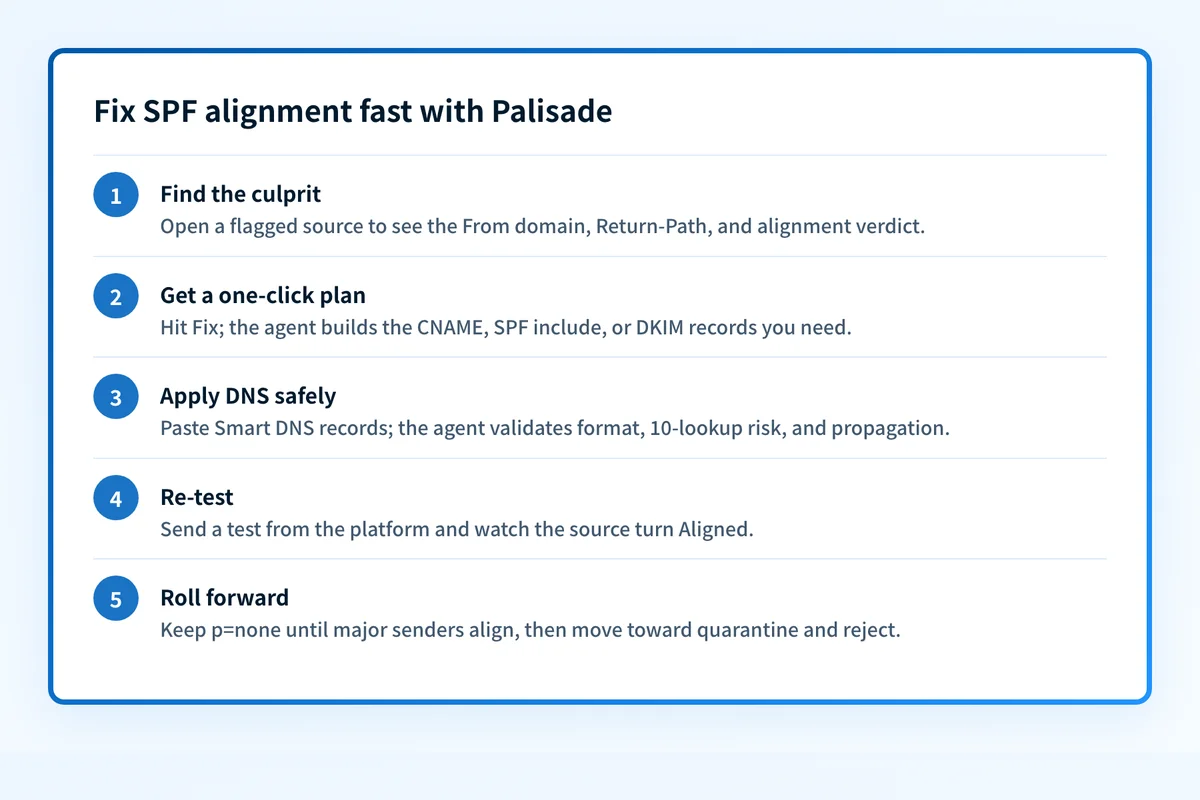 The agent builds the DNS records and confirms alignment on live traffic.
- The Email Security Score and the Palisade DMARC agent will flag sources with SPF not aligned. Click into a source to see:
2) Get a one-click plan
- Hit Fix and choose Align SPF (or Align DKIM if SPF alignment isn’t supported by that source).
- The agent auto-builds the correct DNS records:
3) Apply DNS safely
- Use Smart DNS suggestions to copy/paste records into your DNS host.
- The agent validates formatting (no stray quotes, TXT length split, etc.), checks for the 10-lookup pitfall, and verifies propagation.
4) Re-test & roll forward
- Send a test from the platform and watch the source turn Aligned.
- Keep DMARC at p=none until all major senders are aligned, then move toward quarantine, then reject.
5) MSP-friendly ops
- Triage alignment issues across many tenants with a single queue.
- The agent groups identical fixes (e.g., “Set custom Return-Path for Mail Platform X”) so you can apply them across domains quickly.
Troubleshooting playbook
SPF passes but alignment still fails
- Check the Return-Path in the raw headers. Does it belong to your vendor’s shared domain? If yes, configure a custom Return-Path.
- Make DKIM your alignment path. Confirm the visible From: domain and the DKIM
d=domain belong to the same organizational domain. If it still fails, work through why DKIM alignment breaks and re-check with the DKIM checker.
- Consolidate includes, remove unused vendors, prefer the vendor’s consolidated
include:where offered. If you must scope, create a subdomain-specific SPF (e.g.,spf.mail.example.com) used only by that sender.
- Expected. Ensure DKIM is aligned so DMARC can still pass downstream.
- Move back to relaxed (
aspf=r) unless your compliance policy mandates strict. Aligning every subdomain and host is operationally heavy.
Questions readers ask
FAQ
Do I need both SPF and DKIM aligned?
No. DMARC needs at least one to be aligned. Having both is ideal.
Can I change just the visible From?
Changing only the visible From: won’t fix SPF alignment if the Return-Path remains on a vendor domain. Either align the Return-Path or lean on DKIM.
Is a separate sending subdomain required?
Not required, but recommended for hygiene and simpler alignment, especially if you work with multiple providers.
What about BIMI?
BIMI depends on DMARC at p=quarantine or p=reject with alignment working. Fix SPF/DKIM alignment first, then move the policy.

Written by
Samuel ChenardCEO & Co-Founder, Palisade
Samuel Chenard is the CEO and co-founder of Palisade, agentic DMARC software for IT teams and MSPs, from one domain to thousands.
More from Samuel →