Email authentication for Gmail: SPF, DKIM, and DMARC requirements
 ChatGPT
 Claude
 Gemini
 Perplexity
 Grok
GrokIn brief
Email authentication for Gmail requires SPF or DKIM for every sender, and SPF, DKIM, and DMARC together once volume reaches 5,000 messages a day.
Email authentication for Gmail means publishing SPF or DKIM for the sending domain, plus DMARC once daily volume to Gmail addresses reaches 5,000 messages. Google made these baseline requirements for every sender starting February 1, 2024. A sender also needs valid forward and reverse DNS, a TLS connection, and correctly formatted messages. Mail that fails can be marked as spam or rejected outright with a 5.7.26 error at the SMTP level.
At a glance
Quick takeaways
- Every sender to Gmail needs SPF or DKIM (at least one), valid forward and reverse DNS records, a TLS connection, and RFC 5322 message formatting.
- Senders of 5,000 or more messages a day to Gmail addresses need SPF and DKIM together, plus a DMARC record with From-header alignment.
- A DMARC record published at
p=nonestill satisfies Gmail's bulk-sender requirement; enforcement is not mandatory to comply. - Unauthenticated mail can be marked as spam or rejected with a documented 5.7.26 error.
- Gmail's Postmaster Tools guidance asks senders to keep spam rate under 0.10 percent and never reach 0.30 percent or higher.
- Bulk and marketing mail needs one-click unsubscribe headers, not just a visible unsubscribe link.
How Gmail checks sender authentication
Google's sender requirements page sets a floor that applies to every domain sending to a Gmail or Google Workspace address, regardless of volume. At minimum, the sending domain must publish SPF or DKIM, the sending IP or domain must resolve with valid forward and reverse DNS (PTR) records, the connection must use TLS, and messages must follow RFC 5322 formatting. Senders also may not impersonate a Gmail From: header.
SPF and DKIM are checked independently during the SMTP transaction and at message evaluation. SPF verifies that the sending IP is authorized for the domain in the return path. DKIM verifies a cryptographic signature tied to the message body and key headers. DMARC then compares the visible From: header domain against the domain that passed SPF or DKIM, a check Google calls alignment, and applies the policy the domain publishes at _dmarc. when DMARC is configured. None of these checks require DKIM signing alone to satisfy Gmail's baseline; SPF alone is enough at low volume, though pairing both is what bulk sending requires.
When the requirements change
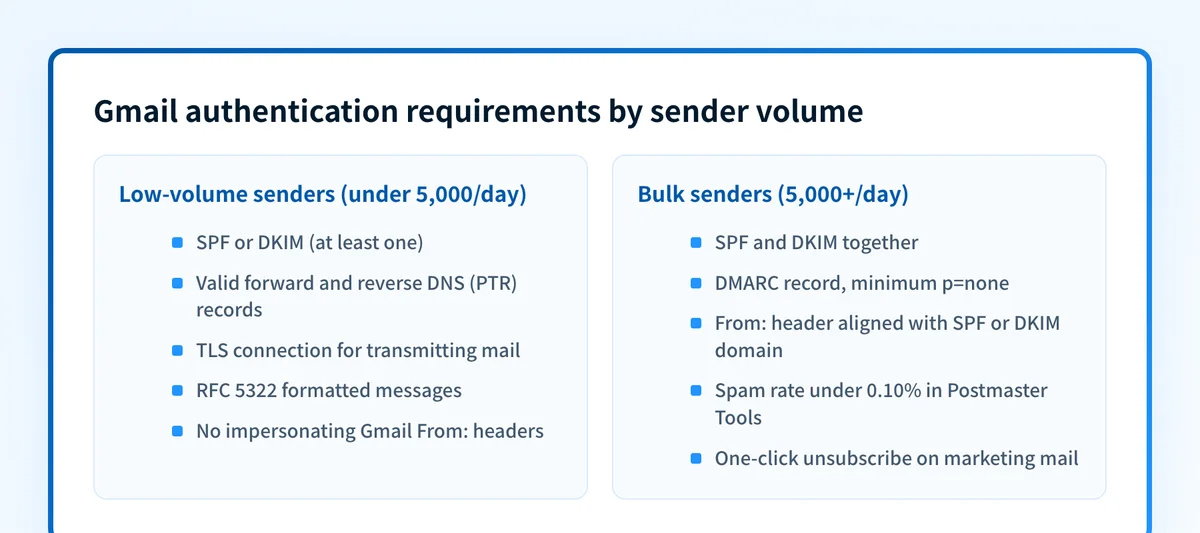
The rules differ by how much mail a domain sends to Gmail addresses in a day, and the difference is not cosmetic:
- Below 5,000 messages a day: SPF or DKIM (one is enough), valid PTR records, TLS, and RFC 5322 formatting.
- At or above 5,000 messages a day: SPF and DKIM together, a DMARC record at any policy level including
p=none, and From: header alignment with the SPF or DKIM domain. - Bulk senders sending marketing or subscribed mail also need one-click unsubscribe support via the
List-UnsubscribeandList-Unsubscribe-Post: List-Unsubscribe=One-Clickheaders, plus a visible unsubscribe link in the body. - Bulk senders are expected to keep spam complaint rate under 0.10 percent in Postmaster Tools and avoid reaching 0.30 percent or higher.
Worked example: what to publish
These are illustrative record shapes only. The DKIM public key and DMARC report address are placeholders; a sender publishes its own values from the Google Workspace Admin console and its own reporting mailbox, never a value copied from an example.
; SPF, published as a TXT record at the domain apex
yourdomain.com.              TXT   "v=spf1 include:_spf.google.com ~all"
; DKIM, published at the selector Google Workspace generates
selector._domainkey.yourdomain.com.  TXT   "v=DKIM1; k=rsa; p=<public-key>"
; DMARC, published at the fixed _dmarc host
_dmarc.yourdomain.com.        TXT   "v=DMARC1; p=none; rua=mailto:dmarc-reports@yourdomain.com"
Do not publish this exact text. Google generates the SPF include mechanism, DKIM selector, and public key per domain, and SPF records support at most 10 include mechanisms and can take up to 48 hours to start working. Google recommends 2048-bit DKIM keys, generated by a super administrator in the Admin console, with new sending domains waiting 24 to 72 hours after Gmail is enabled and up to 48 hours for the DNS record to propagate before signing is verified. DKIM cannot be self-tested; verification requires sending to an external Gmail or Workspace mailbox and inspecting that message's headers.
For DMARC, Google advises waiting 48 hours after SPF and DKIM are working before publishing the record, then moving from p=none toward p=quarantine and p=reject as aggregate reports confirm every legitimate source is aligned. Alignment can be strict or relaxed, set with the aspf and adkim tags, and staged rollout is handled by escalating the policy from none to quarantine to reject, since RFC 9989 retired the pct tag.
Diagnose an authentication failure
Work from what you already have rather than guessing at the cause:
- Start with a delivered message's raw headers. The
Authentication-Resultsheader shows the actual SPF, DKIM, and DMARC result Gmail applied to that specific message, which a DNS lookup alone cannot show. - Check the current published records for the sending domain. A record that looks correct in documentation can differ from what DNS is actually serving right now.
- If the bounce includes a 5.7.26 error, that is Google's documented response for messages that fail the required authentication, not a generic block.
- If DKIM was just enabled, confirm the propagation window has passed (24 to 72 hours for new Workspace tenants, up to 48 hours for the DNS record itself) before troubleshooting further.
- If the domain is near or over 5,000 messages a day to Gmail addresses, confirm DMARC is published; a domain running only SPF or DKIM at that volume does not meet the bulk requirement even if individual messages pass.
Check the current state of your records
Run the sending domain through Palisade's email security score to see whether SPF, DKIM, and DMARC are currently published and what they evaluate to right now.
Check your email security score
A DNS-based check confirms what is published today. It cannot confirm that a specific application is signing outgoing mail with the configured key, that every sending source for the domain is inventoried, or that Gmail's spam-rate or reputation signals are currently favorable. Those require message-header evidence and Postmaster Tools data respectively.
Evidence
Sources and further reading
Questions readers ask
Frequently asked questions
How do I authenticate my email on Gmail?
You do not authenticate mail inside Gmail itself; you publish records at the sending domain's DNS. Set up SPF or DKIM at minimum, per Google's sender guidelines, and add DKIM plus a DMARC record if the domain sends 5,000 or more messages a day to Gmail addresses. If the domain sends through Google Workspace, the SPF include and DKIM key are configured in the Admin console before the DNS record is published.
Is there an authenticator for Gmail?
Not in the sender-authentication sense this article covers. SPF, DKIM, and DMARC authenticate a domain's outgoing mail, not a person signing in. If the question is about securing a Gmail account at login, that is Google Account 2-Step Verification, a separate account-security feature from the DNS-based sender authentication described here.
How to fix email authentication failed Gmail?
Start with the delivered message's raw headers and read the Authentication-Results line to see which check, SPF, DKIM, or DMARC, actually failed and why. A bounce citing a 5.7.26 error means the message did not meet Gmail's minimum authentication requirement. Confirm the domain publishes at least SPF or DKIM, and both plus DMARC if it sends in bulk, then recheck after any DNS propagation window has passed.
How do I turn on authentication in Gmail?
For sending mail, authentication is enabled by publishing SPF, DKIM, and DMARC records at the domain's DNS, not through a Gmail setting. DKIM specifically is turned on in the Google Workspace Admin console: a super administrator generates the key, publishes the resulting TXT record, then enables signing, waiting up to 48 hours for DNS and up to 72 hours for a new tenant before it takes effect.
What spam rate does Gmail expect from bulk senders?
Gmail's Postmaster Tools guidance asks senders to keep their spam complaint rate under 0.10 percent and treat 0.30 percent or higher as a threshold that risks delivery problems, according to Google's sender guidelines. This applies alongside the SPF, DKIM, and DMARC requirements, not instead of them.
Do I need DMARC if I send fewer than 5,000 messages a day to Gmail?
No, not to meet Google's minimum requirement. Below the 5,000-message-a-day threshold, SPF or DKIM alone satisfies Gmail's baseline. DMARC becomes mandatory only once a domain reaches that bulk-sender volume, though publishing it at p=none earlier is a low-risk way to start collecting aggregate reports.

Written by
Samuel ChenardCEO & Co-Founder, Palisade
Samuel Chenard is the CEO and co-founder of Palisade, agentic DMARC software for IT teams and MSPs, from one domain to thousands.
More from Samuel →