Brevo email warmup
 ChatGPT
 Claude
 Gemini
 Perplexity
 Grok
GrokIn brief
Brevo email warmup is not documented as a native Brevo feature in the available help material. Check domain authentication before changing sending.
Brevo email warmup does not have a documented native feature, schedule, or sending procedure in the available Brevo help material. Brevo does document domain authentication, including an article titled “Authenticate your domain with Brevo (Brevo code, DKIM, DMARC)”. Before changing sending practices, confirm that the sending domain's authentication setup is complete and test the production mail path.
At a glance
Quick takeaways
- The available Brevo documentation confirms domain-authentication guidance, not a Brevo-specific warmup workflow.
- No documented Brevo sending-volume schedule or daily threshold is available here.
- Domain authentication and sending practices are separate checks.
- A published DNS record does not prove that Brevo is using it for a delivered message.
- A mailbox provider's inbox or spam decision is private to that provider.
- Do not rely on generic warmup advice as proof that a Brevo account is configured correctly.
What Brevo email warmup can mean
"Email warmup" usually describes a sending-practice question: whether a sender should change message volume or cadence before using a mailbox. That description alone does not establish that Brevo provides a warmup product, recommends a specific sequence, or applies a particular account limit.
The available Brevo help-center material identifies Deliverability as a help category and lists Brevo's domain-authentication article covering Brevo code, DKIM, and DMARC. It does not establish a Brevo-specific warmup procedure. Treat any volume plan, timing recommendation, or tool comparison that is not documented by Brevo as unverified.
Authentication is still relevant because it identifies whether a message has evidence that the sender is authorized to use the visible domain. For a broader explanation of the signals that affect mail delivery, see email deliverability. Authentication can support delivery, but it does not guarantee inbox placement.
Brevo setup should also be considered in the context of the wider ESP setup guidance. A sender can have valid DNS records while the application is not yet signing with the expected domain or using the intended return path.
When the answer changes
The answer changes only when Brevo publishes current documentation that addresses the exact question, such as a native feature, a documented sending-practice recommendation, an account-status rule, or a provider-specific path in the Brevo interface.
Use this decision rule:
- If Brevo documentation names a warmup feature or procedure, follow that current Brevo documentation and preserve the stated limits and conditions.
- If you only have DNS records, verify the records before treating them as a configuration result.
- If you have a delivered production message, inspect its raw headers and authentication results for evidence from the actual sending path.
- If you have access to Brevo account status or delivery reporting, use Brevo's own view to investigate its account-specific information.
- If you do not have current Brevo documentation or production evidence, do not infer a sending schedule from another provider's product or from a public DNS lookup.
A practical evidence check before changing sending practices
Start by separating the evidence you have from the conclusion it can support.
Illustrative evidence record only
Visible From domain: updates.yourdomain.com
Published DNS evidence: DKIM and DMARC records found
Delivered-message evidence: Authentication-Results header from a real message
Brevo evidence: Current account status or documented configuration result
DMARC evidence: Aggregate-report data after messages have been sent
Do not publish account-generated DNS values, selectors, CNAME targets, tokens, or unredacted message headers. Copy the values from Brevo's current domain-authentication instructions for your own account.
A DNS lookup can show what is publicly published. It cannot confirm that Brevo used the expected signing identity for a message. A Brevo status indicator can show a vendor-side configuration result, but it is not a delivered-message check. A delivered message can provide message-level evidence, while DMARC aggregate reports can later show authenticated traffic patterns after reporting data accumulates.
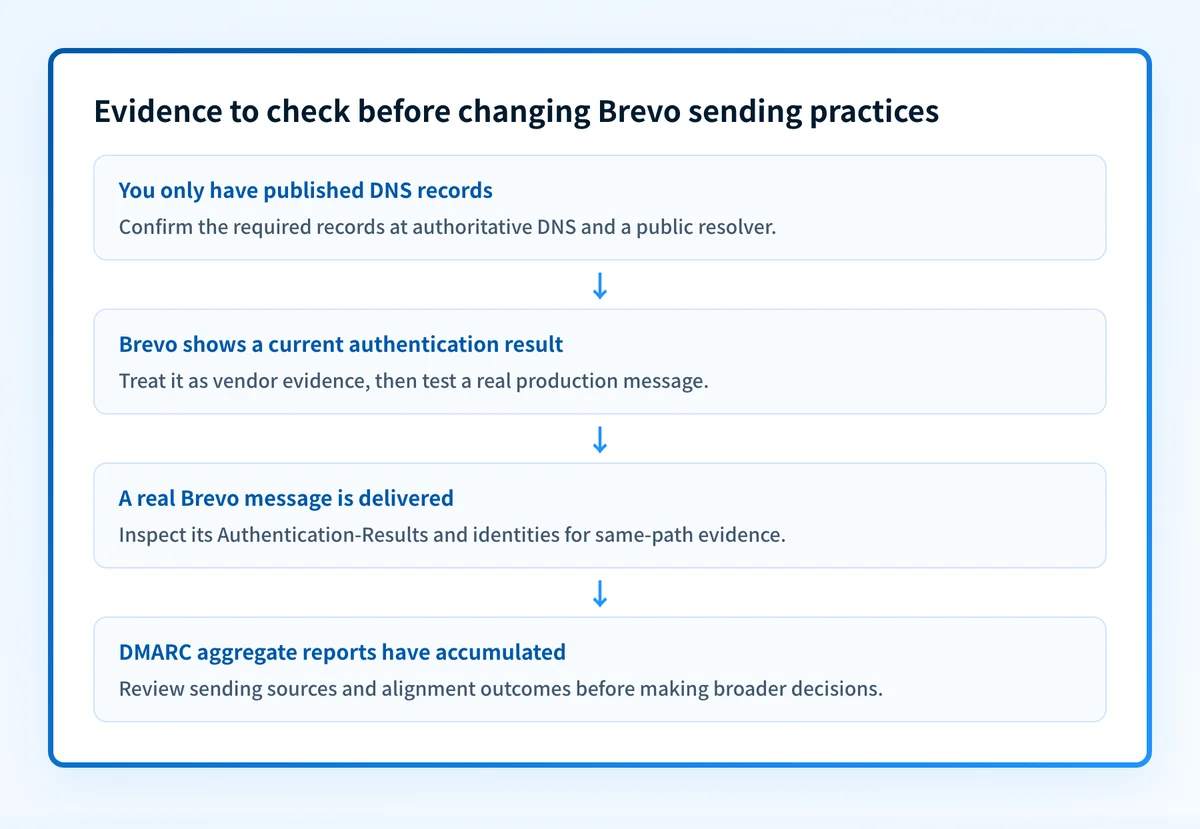
Use the four layers in order:
- DNS: query the authoritative DNS source and at least one public resolver for the records Brevo instructs you to publish.
- Vendor: confirm the current authentication or verification result in Brevo, using the vendor's documented path.
- Message: send a real message through the exact production path and inspect its raw headers, including authentication results.
- DMARC: review aggregate-report data after it accumulates to identify sources and alignment outcomes.
What to do next with the evidence you have
If you are still setting up Brevo, begin with Brevo's current domain-authentication instructions. Record the DNS values generated for your own account, then validate them at the DNS, vendor, message, and DMARC layers.
If you already send through Brevo, collect a delivered test message from the production path. Check the visible From domain, return-path identity, DKIM signing domain, and Authentication-Results header. Do not use an unredacted header in a public ticket or document.
If your question is whether a third-party warmup service is the best option, there is no independent primary comparison available here to support a recommendation. If your question is whether warmup improves inbox placement, do not treat a vendor claim as proof of a general result.
For adjacent questions about the concept itself, see Does email warmup work? and Apollo email warmup. Those articles address their own scopes and do not establish Brevo-specific configuration behavior.
Check the sending domain's security posture
Before changing Brevo sending practices, inspect the sending domain's public email-security posture and compare the result with a real message from the Brevo production path.
Check the email security score
A public check cannot prove that Brevo is using the expected configuration, repair a sender, monitor future changes, or guarantee a mailbox provider's delivery decision. If you need ongoing DMARC-report analysis across sending sources, Start with Palisade. Palisade analyzes DMARC aggregate-report data, identifies sending sources and authentication or alignment issues, and proposes prioritized remediation work for human review. It does not change DMARC policy or guarantee delivery.
Evidence
Sources and further reading
Questions readers ask
Frequently asked questions
What is the best email warm up tool?
No independent comparison ranks warmup tools, so no name can be given as the best one. Judge a tool against your provider's current documentation, your own sending requirements, and evidence from your authenticated production mail path. Brevo's help center does not document a warmup feature of its own, so any tool you add sits outside Brevo's documented setup.
Is email blasting illegal?
It depends on where you send from, who you send to, the type of message, and the consent you hold. This page does not give legal advice and cannot rule on your situation. Check the laws that apply to your sending and take advice on them before you run a large campaign.
How do I warm up my email address?
Complete Brevo's documented domain-authentication setup for the sending domain first, because a change in volume does nothing if the domain is not authenticated. Brevo's help center does not publish a warmup schedule, so there is no Brevo-specific ramp to copy. Validate the DNS records, the Brevo status view, a real delivered message, and later DMARC aggregate reports before you change how much you send.
Does email warmup actually work?
Brevo, the mailbox providers, and the standards bodies do not publish evidence that warmup produces a general inbox-placement result, so treat a vendor's claim as marketing rather than proof. Authentication checks can verify parts of your sending setup. They do not prove future delivery either.

Written by
Johanie DupontBrand & Ecommerce Email
Johanie Dupont works on brand and ecommerce email at Palisade: BIMI and verified marks, sender requirements, and getting marketing mail into the inbox.
More from Johanie →