Gmail rejected email from my domain
 ChatGPT
 Claude
 Gemini
 Perplexity
 Grok
GrokIn brief
Gmail rejected email from my domain: read the SMTP code, identify the sending path, and fix SPF, DKIM, DMARC, TLS, PTR, or reputation evidence.
Gmail rejected email from your domain when the exact sending path failed a receiver requirement or Gmail made a message, IP, or reputation decision. Start with the full SMTP bounce and identify whether it names authentication, TLS, PTR, message format, or unsolicited mail. Gmail does not provide one universal sender settings page for this diagnosis. The repair belongs in the service and DNS zone that sent the rejected message, as covered in the wider email sender setup hub.
At a glance
Quick takeaways
- A Gmail 5xx SMTP response is a rejection, while a 4xx response is a temporary deferral that the sender should retry.
- The three documented 5.7.26 messages have different causes: missing SPF or DKIM, an SPF
-allmismatch, or the sender domain's own DMARC policy. - A published SPF, DKIM, or DMARC record does not prove the production sender used it successfully.
- Gmail's sender guidelines apply to mail sent to personal Gmail accounts, not messages sent to Google Workspace accounts.
- Gmail documents blocked messages and blocked sending IP traffic, but does not document a durable domain-level block status that senders can look up.
- Reputation-related remediation depends on the SMTP evidence and sending behavior, not on changing a DMARC record alone.
What should I check before configuring Gmail?
First, determine which system actually sent the rejected message. That may be a marketing platform, transactional provider, Google Workspace, a CRM, an application, or a server sending directly to Gmail. Collect the complete SMTP bounce, the envelope sender, visible From domain, sending IP if shown, and a new delivered-message header from the same route if one is available.
Google states that its Email sender guidelines apply to messages sent to personal Gmail accounts. A failed delivery to a Google Workspace recipient may have a different recipient policy or routing cause. Do not assume Gmail's published sender-requirement mapping explains every Workspace rejection.
Confirm who can change the relevant DNS zone and who administers the sender. SPF and DMARC records can be shared by several services. DKIM selectors and vendor DNS targets are generated in the account that owns the sending path.
Copy DNS values from the account and domain you are configuring. Do not publish selectors, targets, tokens, or hostnames from another account or from an online example.
Also identify whether the rejection concerns marketing mail, transactional mail, or employee mailbox mail. A change that fixes one route can leave another route unauthenticated.
Which setup method should I use?
Use the bounce code to choose the next check. Do not begin by replacing DNS records from an online example or by treating a message-level block as proof that the whole domain is blocked.
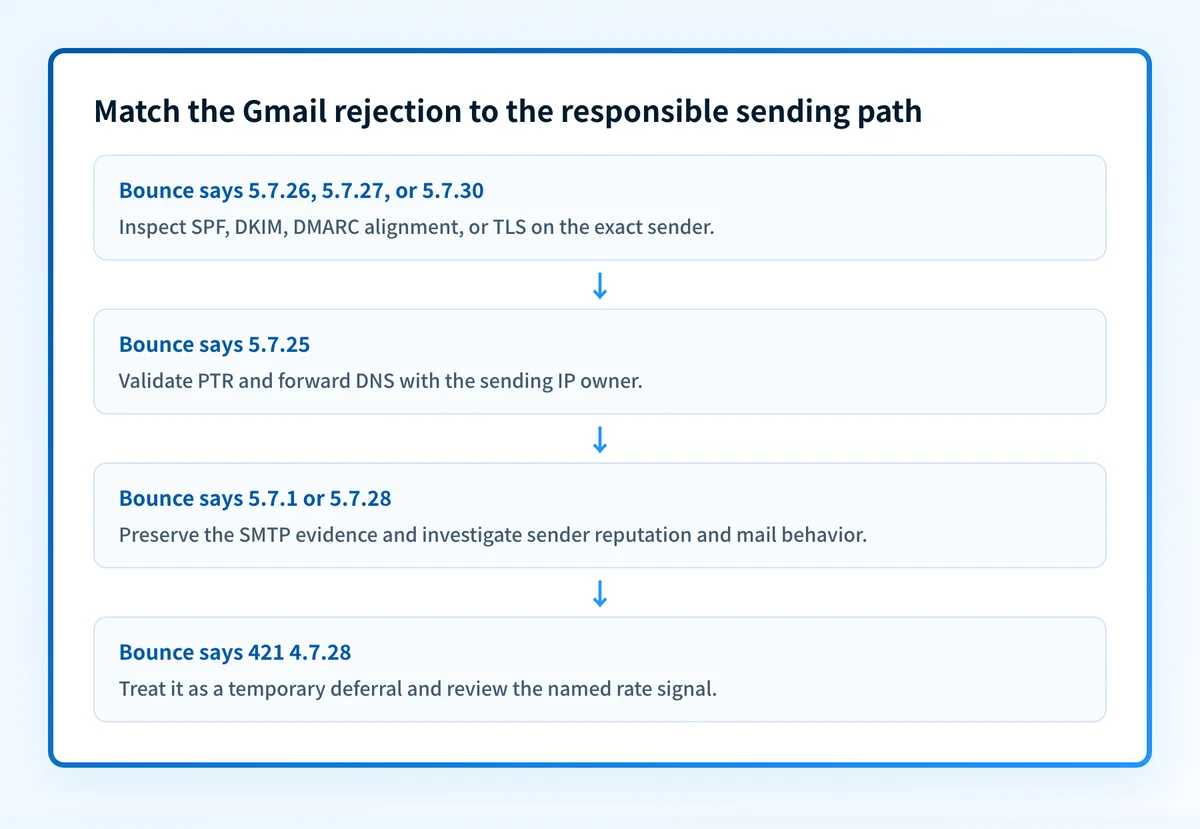
Google's Gmail SMTP errors and codes distinguishes authentication, TLS, reverse DNS, formatting, and reputation failures. If the code is 5.7.26, 5.7.27, or 5.7.30, inspect the sender's authentication or transport configuration. If it is 5.7.25, work with the owner of the sending IP and its reverse DNS. If it is a 5.7.1 or 5.7.28 reputation message, preserve the evidence and review sending practices before making DNS changes.
Use automatic DNS publishing only when the sender account is authorized to update the correct DNS zone and its generated values match the selected domain. Use manual DNS when your DNS provider, change-control process, or security policy requires review. A dedicated IP is relevant only when the provider has assigned that IP to your production sending path. It does not repair an SPF, DKIM, DMARC, TLS, or message-format failure by itself.
How do I configure SPF and DKIM for Gmail?
1. Read the complete rejection from the sending service
Open the delivery event, SMTP log, or bounce notification for the failed message. Record the SMTP code and preserve the text exactly. Google documents these separate 5.7.26 variants:
This email has been blocked because the sender is unauthenticated. Gmail requires all senders to authenticate with either SPF or DKIM.The (E)MAIL FROM domain [_domain-name_] has an SPF record with a hard fail policy (-all) but it fails to pass SPF checks with the ip: [_ip-address_].Unauthenticated email from domain-name is not accepted due to domain’s DMARC policy. Contact the administrator of _domain-name_ domain if this was legitimate email.The first message points to missing authentication. The second points to a sending IP that does not pass the envelope sender domain's hard-fail SPF policy. The third means the visible From domain's published DMARC policy rejected mail that did not pass aligned SPF or DKIM.
2. Identify the domain and service in scope
Compare the visible From domain, envelope MAIL FROM domain, DKIM d= domain, and the sender that produced the bounce. SPF evaluates the envelope sender path, while DMARC requires alignment between the visible From domain and a passing SPF or DKIM identity. RFC 9989's DMARC alignment rules explain why a valid but unrelated SPF or DKIM result may still fail DMARC.
If a vendor sends mail on your behalf, use that vendor's current domain-authentication instructions to generate its own records. Do not add a second SPF TXT record at the root domain. SPF mechanisms must be combined into the existing single SPF record after checking each provider's documented include value.
3. Publish the generated DNS records
Publish only the records generated for the selected sender account and domain. The shapes below are illustrative only.
SPF record type: TXT
SPF host: yourdomain.com
SPF value, illustrative only:
v=spf1 include:sender.example -allDKIM record type: CNAME or TXT, as generated by the sender
DKIM host, illustrative only:
selector1._domainkey.yourdomain.comDKIM value, illustrative only:
selector1.example-sender.invalidDo not publish these examples. Copy the exact host and value generated in the sending service for your account and domain.
Some DNS interfaces automatically append yourdomain.com to the host field. Entering a full domain where the provider expects only the relative host can create selector1._domainkey.yourdomain.com.yourdomain.com. Check the final fully qualified DNS owner after saving.
Before altering SPF, preserve every existing mechanism required by legitimate senders. Before adding DKIM, check whether the selector already exists. Do not overwrite an active selector unless you are following the sender's documented key-rotation process.
4. Verify the sender's domain-authentication status
Return to the sending provider and use its documented verification status for the selected domain. A vendor status indicates that the provider can currently find or accept the DNS configuration. It does not prove that a particular production route is signing messages or using the expected return path.
For a 550 5.7.27 rejection, Gmail says: “This message was blocked because it didn’t pass SPF authentication. Gmail requires bulk email senders to authenticate their email with SPF.” For 550 5.7.30, Gmail says: “This message was blocked because it didn’t pass DKIM authentication. Gmail requires bulk email senders to authenticate their email with DKIM.” Match the code to the protocol before changing records.
5. Send a real message through the same production path
Send a new test message through the exact system that generated the bounce. Use a mailbox where you can inspect the raw source. Check the receiver-added Authentication-Results field, which RFC 8601 defines as an authentication assessment with a trust boundary.
Look for the SPF and DKIM result, then compare the passing identity with the visible From domain. If the message uses DKIM to satisfy DMARC, confirm that the d= domain aligns with the From domain. Keep a redacted copy of the headers with the change record.
How does this setup affect DMARC?
DMARC applies the visible From domain's policy after evaluating aligned SPF or DKIM. A sender can pass SPF for one domain and DKIM for another, yet still fail DMARC if neither passing identifier aligns with the visible From domain.
Use Palisade's DMARC checker to inspect the published DMARC record after the DNS change. A public record check cannot show whether the actual sender uses the intended return path, whether Gmail accepted a specific message, or whether future mail will pass alignment.
If the bounce says your domain's DMARC policy rejected the message, compare the message's aligned SPF and DKIM results before weakening the DMARC policy. The correct repair may be authenticating the missing sender, not changing a policy that protects legitimate mail.
How do I validate the setup?
Check public DNS
Query the authoritative DNS server and at least one public resolver for the exact SPF, DKIM, and DMARC owners. Confirm that the fully qualified name has no duplicated zone suffix and that the answer matches the selected sender account.
dig +short TXT yourdomain.com
dig +short TXT _dmarc.yourdomain.com
dig +short CNAME selector1._domainkey.yourdomain.com
Check the vendor status
Review the sender provider's current verification state for the domain. If it reports an error, compare its expected record with the authoritative DNS response. A green vendor indicator is not a delivered-message check.
Inspect a delivered message
Send a fresh message through the same path and inspect its raw headers. Confirm SPF and DKIM results, the relevant authenticated identities, and DMARC alignment. Test each materially different route separately, including marketing, transactional, and mailbox-hosted mail.
Review DMARC reports
After aggregate reports arrive, check whether the sender appears as an authenticated and aligned source. Palisade's DMARC Agent can analyze aggregate-report data, identify sending sources and alignment issues, and create prioritized remediation tickets. It can propose the next policy step when the evidence supports it, while a human reviews the evidence and applies any DNS policy change.
Troubleshooting
Gmail reports 5.7.26 but SPF looks published
Compare the bounce's specific 5.7.26 text with the envelope sender and sending IP. An SPF record ending in -all can correctly reject an IP that your provider did not authorize. Add only the provider's documented authorization to the existing SPF record, then retest the same route.
Gmail reports 5.7.29
Google documents 550 5.7.29 as: “This message was blocked because it wasn’t sent over a TLS connection. Gmail requires all bulk email senders to use TLS/SSL for SMTP connections.” This is an SMTP transport setting on the actual sender path. A DNS authentication change cannot prove or repair TLS negotiation.
Gmail reports 5.7.25
Google documents 550 5.7.25 when the sending IP lacks a PTR record or its forward DNS does not reference that IP. The reverse DNS owner is usually the IP provider or sending platform. Ask that owner to validate the PTR and forward-confirmed DNS for the production IP. The 550 5.7.25 page has the exact bounce wording and the checks to run.
Gmail reports a 5.7.1 or 5.7.28 reputation message
Treat this as message or IP evidence, not proof of a permanent domain block. Google says spam rate is calculated daily and that bulk senders with a user-reported spam rate above 0.3% are ineligible for mitigation. It says eligibility returns when spam rates remain below 0.3% for seven consecutive days in its sender-guidelines FAQ. Reduce unwanted mail, investigate the compromised or poor-performing source, and retest after the sender behavior changes.
Gmail returns 421 4.7.28
Do not classify this as a rejection. Google documents 421 4.7.28 as: “Gmail has detected an unusual rate of email. To protect our users from spam, email has been temporarily rate limited.” Allow compliant retry behavior and investigate the rate signal named in the response, which can concern an IP, netblock, SPF domain, DKIM domain, URL domain, or repeated Message-ID:.
Check the DMARC record behind the Gmail rejection
Inspect the published DMARC record before changing the policy that may have rejected unaligned mail. Run the sending domain through Palisade's DMARC checker, then compare the result with the rejected message's SPF, DKIM, and visible From-domain evidence.
A public DMARC record check cannot prove why Gmail rejected one message, repair an SPF or DKIM configuration, monitor later DNS drift, or control Gmail's private reputation decision. If the same domain has multiple production senders, Palisade is DMARC software that can analyze DMARC aggregate reports and identify sources that still need remediation. Start with Palisade.
Evidence
Sources and further reading
Questions readers ask
Frequently asked questions
Why is Gmail rejecting emails from my domain?
Gmail can reject a message because the sending path is unauthenticated, fails a hard-fail SPF policy, fails the sender domain's DMARC policy, lacks TLS or PTR, has message-format problems, or has a reputation issue. Read the complete SMTP response. Google's three 5.7.26 variants identify different causes, so do not treat every 5.7.26 response as the same SPF problem.
How do I stop Gmail from rejecting emails?
Fix the requirement named in the bounce, then retest the identical sending path. Google maps 5.7.26 to authentication or DMARC alignment, 5.7.27 to SPF, 5.7.30 to DKIM, 5.7.29 to TLS, and 5.7.25 to PTR. Reputation-driven 5.7.1 and 5.7.28 responses require sending-behavior and reputation evidence, not only DNS changes.
Is my domain blocked by Gmail?
You cannot look that up, because Google does not publish a domain-level block status or a lookup for one. Gmail's published responses say that a message was blocked or that mail from a sending IP was blocked, which are decisions about that message or that IP. Read the full SMTP response you received and treat it as evidence about one sending path, not a verdict on the whole domain.
Why is my domain Gmail not receiving emails?
Two different problems share that wording, so separate them first. If Gmail is rejecting mail you send, use the SMTP-code diagnosis in this article and fix the requirement the bounce names. If nobody can send mail to your domain, that is an inbound routing problem: check your public MX records with the DNS lookup tool, then read the receiving mail service's routing logs.
Does a passing SPF record stop Gmail rejections?
No, a passing SPF record does not stop Gmail rejections on its own. SPF still fails when the actual sending IP is not authorized, and it can pass without aligning with the visible From domain, which is what DMARC requires. Gmail also rejects messages for DKIM, TLS, PTR, formatting, and reputation reasons that SPF has nothing to do with.

Written by
Dominic LandryDeliverability & DNS
Dominic Landry works on email deliverability and DNS configuration at Palisade, from SPF and DKIM records through to DMARC enforcement.
More from Dominic →