
GoDaddy DMARC record: how to add and verify it
To add a GoDaddy DMARC record, first confirm that GoDaddy is the authoritative DNS host for the domain. In Domain Portfolio, open the domain's DNS settings and publish one TXT record at _dmarc. Use the reporting address and policy for your own domain, start with p=none, then verify the public record, a delivered message, and aggregate reports before moving to quarantine or reject.
How to add a DMARC record in GoDaddy
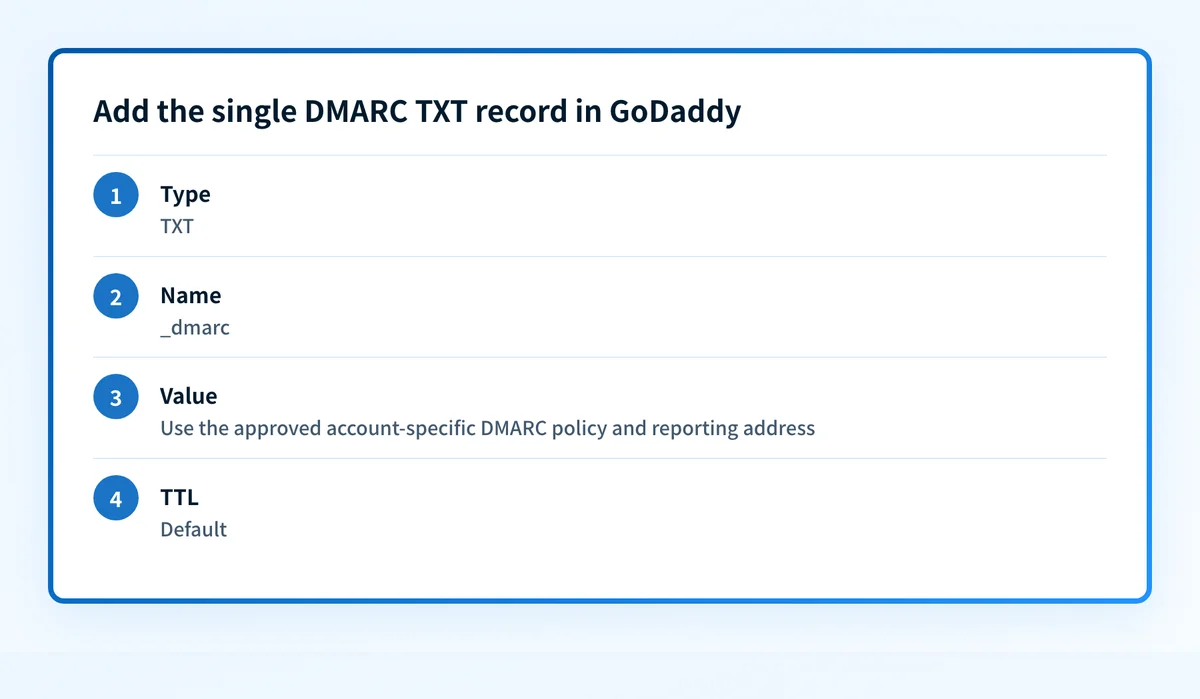
The record is one TXT entry at _dmarc. Confirm the authoritative DNS zone first, then publish one approved policy record.
01
Publish SPF and turn on DKIM first
DMARC only reads the results of SPF and DKIM, so a policy published before either exists reports your own mail failing and protects nothing. Get both in place, then come back.
02
Confirm GoDaddy holds the authoritative zone
GoDaddy's DNS screen edits the zone only when the domain's nameservers are GoDaddy's. If they point elsewhere, the record saved here is never served.
03
Add the TXT record
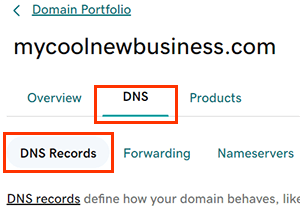
Open Domain Portfolio, pick the domain, open DNS, then Add New Record. Choose TXT, set the name to _dmarc, and paste the policy into the value field.
04
Publish exactly one DMARC record
One _dmarc TXT record per domain. A second one is not additive; receivers treat a name with two DMARC records as having no usable policy.
The record, field by field
v=DMARC1; p=none; rua=mailto:dmarc@yourdomain.comA monitoring record: nothing is blocked, and receivers start reporting who sends as your domain. Replace the reporting address with a mailbox you control, and do not publish this value unchanged.
| Type | TXT |
|---|---|
| Name | _dmarc, not @ and not the full domain. GoDaddy's own help says the Name is the prefix without the domain name, and @ means the root domain, which is where an SPF record goes rather than a DMARC one. |
| Value | The policy string, starting v=DMARC1 and then p=. |
| TTL | Leave at Default. |
Domain Portfolio, your domain, DNS, Add New Record is the path as GoDaddy labels it today. Provider dashboards get renamed, so the current official reference is GoDaddy: add a TXT record.
How to know the record actually works
GoDaddy can tell you the record saved. It cannot tell you a sender authenticates, which is a different question with a different check.
| Public DNS | Query _dmarc.yourdomain.com as a TXT record at a public resolver and compare the answer with what you saved. If another provider is authoritative for the zone, the record you added at GoDaddy will never appear here however correct it looks in the dashboard. |
|---|---|
| The saved record in GoDaddy | Reopen the DNS records list and confirm the Type, Name, Value, and TTL against the change you approved. This establishes the configured DNS data and nothing more: it says nothing about how a mail stream behaves. |
| A delivered message | Send a message from each production sender to a mailbox you control and read the Authentication-Results header the receiver added, then compare the SPF domain or DKIM d= domain with the visible From domain. Use the receiving system's result rather than assuming the DNS record made the message pass. |
| Aggregate reports | Group results by sending source and check which streams pass with alignment. Investigate anything you do not recognise, and any legitimate source that fails, before changing the policy. Receivers are not obliged to send every report, so silence from one is not proof of a broken record. |
The same setup, without the dashboard
Connect Palisade's MCP server to Claude, ChatGPT, Copilot, or any MCP client, and the record values stop being something you transcribe.
01
Add the domain
Your assistant calls create_domain and the domain starts being monitored. Adding a domain is free and never gated, so a whole portfolio can go in before anything is set up.
02
Get the exact records
get_dns_records returns each record to publish with its host, type, value, recommended TTL and whether it needs creating, replacing or deleting. It also reports the DNS host resolved from the domain's live nameservers, so your assistant is told this zone is on GoDaddy rather than guessing from the registrar.
03
Publish them where the zone lives
The Palisade MCP server has no tool that writes a record at GoDaddy. It hands your assistant the values, and your assistant publishes them with the DNS tooling it already has. In the Palisade app, Smart DNS Deployment is the other route: you authorise the connection in the provider's own window and approve each record, and Palisade writes it into your own zone.
04
Verify against live DNS
verify_domain re-checks from outside your account, so a record saved into the wrong zone or still inside its TTL shows as unverified rather than done. Setup is finished when every required record verifies.
Connecting takes one step and no API key to create first. The setup for each client is on the Palisade MCP server page.
What Palisade knows about your GoDaddy zone
The question worth asking before you connect anything, answered first.
| GoDaddy credentials | Never requested, never stored, never seen. Palisade has no field for a GoDaddy API token or password. |
|---|---|
| How the provider is identified | From the domain's live NS records. GoDaddy is recognised by nameservers under domaincontrol.com, and that lookup is public information about your domain rather than access to your account. Buying a domain at GoDaddy does not mean GoDaddy hosts its DNS. Plenty of GoDaddy registrations point their nameservers at Cloudflare or Route 53. |
| What the MCP server can change | Nothing in your zone. No tool in the server writes a record at an external provider; it returns the values and your own tooling publishes them. |
| If you want Palisade to publish instead | Smart DNS Deployment, in the Palisade app, covers 64 providers. You authorise the connection in the provider's own window, the access covers email-authentication records only, you approve each record, and you can disconnect at any time. |
| Your registrar and nameservers | Unchanged. Nothing is transferred and Palisade never takes over the zone. |
What publishing to GoDaddy looks like
You approve the exact record. The connection is authorised in the provider's own window, and nothing else in the zone is touched.



- Setting up acme-corp.com: its email-authentication records are unconfigured, and instead of setting them up by hand you choose Configure.
- Palisade recognises GoDaddy as the provider answering for the domain, and you authorise the connection in GoDaddy’s own window. No password is shared with Palisade, and access is scoped to email-authentication records only.
- The exact records are shown as a before-and-after diff: the SPF value gaining a sender, plus new DKIM and DMARC records. Nothing is published until you press Approve and publish.
- Every record is live and verified in your own zone, monitoring stays on, and nothing else in the zone was touched.
Publishing DMARC is the start, not the finish
A published record proves the policy exists. Whether your mail actually authenticates is a question the record UI never answers.
Drift, including the record you just published
A record that is edited, overwritten by another tool, or dropped during a GoDaddy change stops matching what Palisade generated. Monitoring keeps checking live DNS after the write, so a change that silently did not take becomes a task instead of something you learn from a bounce weeks later.
Senders that are failing authentication
Aggregate reports name the services sending as your domain and show which of them pass SPF and DKIM with alignment. A new marketing platform someone signed up for without telling you shows up here first.
Remediation as tasks, with the fix already drafted
Palisade opens a task for each failing source and record issue, ordered by priority, and a task can carry provider-specific instructions for the sender involved. The agent investigates every sender, drafts every fix, and proposes each policy step. You approve before anything ships.
Readiness to tighten the policy
Moving from p=none toward quarantine and then reject is safe only once the legitimate senders are accounted for. Palisade tracks when that is true for the domain and proposes the step rather than taking it.
When the GoDaddy record does not behave
The failure modes that come up on this provider specifically, and what each one actually means.
The record is missing from a public check
Confirm GoDaddy is actually authoritative for the zone, then confirm the record name is _dmarc rather than a fully qualified name GoDaddy appended the zone to a second time. If a different provider answers for the domain, make the change there instead of creating duplicate records in both places.
There is more than one DMARC TXT answer
Treat that as a configuration error rather than a redundancy: receivers that find two policy records discard both, so the domain reads as having no policy at all. Identify each record's owner, reporting destination, and intended policy, consolidate to one, then recheck the public answer and confirm the removed record's reporting destination is not still needed.
The record resolves but DMARC still fails
The DNS record can be perfectly valid while a sender has no aligned SPF or DKIM pass. Start from an affected delivered message and its receiver-added authentication results, then find the account that controls the return path or the DKIM signing domain. Do not loosen the policy until you know which legitimate stream is affected.
Aggregate reports are not arriving
Check the rua mailbox is valid, accepts external mail, and matches the saved DNS value, then confirm the record is publicly visible. If the reporting address is on a different domain, that domain has to authorise it or receivers will refuse to send anything. Some receivers never send reports at all, so absence from one is not proof of a problem.
GoDaddy DMARC: FAQ
GoDaddy already added a DMARC record. Should I replace it?
Edit it rather than replacing or duplicating it. Since April 2025 GoDaddy publishes a default DMARC record at p=quarantine on domains newly registered or transferred in, and its aggregate reports go to GoDaddy rather than to you. That default is a reasonable starting point, but you cannot see what it is catching, so change the rua address to a mailbox or monitoring service you control. Never add a second record alongside it: receivers that find two policy records discard both, which leaves the domain with no policy at all.
What goes in the GoDaddy Name field for a DMARC record?
_dmarc on its own. GoDaddy's help describes the Name field as the prefix without the domain name, and @ as the value meaning the root domain. A DMARC record never goes at the root, so @ is wrong here even though it is right for SPF. Typing the fully qualified _dmarc.yourdomain.com is also wrong, because GoDaddy appends the domain and the record lands at _dmarc.yourdomain.com.yourdomain.com, where nothing will ever look for it.
Can I use p=reject when I first publish DMARC?
You can, and it is the most reliable way to block your own invoices. p=reject tells receivers to refuse anything that fails authentication, and on a domain that has never published DMARC you do not yet know which legitimate services fail. Start at p=none, read the aggregate reports for a full sending cycle, fix each failing sender, then tighten in stages.
Do I need both SPF and DKIM for DMARC?
You need at least one of them to pass AND to align with the domain in the visible From header. RFC 9989 defines a DMARC pass as an aligned SPF pass or an aligned DKIM pass, so either alone is enough in principle. In practice publish both: SPF breaks on forwarding while DKIM survives it, so a domain with only one has mail that fails for reasons it cannot control. Senders of close to 5,000 or more messages to personal Gmail accounts in 24 hours are required to have both.
Does Palisade need my GoDaddy login or API key?
No. Palisade never asks for, stores, or sees a GoDaddy credential. Through MCP, your assistant publishes with the DNS tooling it already has and the keys stay on your side. In the Palisade app, Smart DNS Deployment has you authorise the connection in GoDaddy's own window instead, scoped to email-authentication records and revocable at any time.
My domain is registered at GoDaddy. Does that mean GoDaddy hosts the DNS?
Not necessarily, and this is the most common reason a correctly written record does nothing. Registration and DNS hosting are separate, and a GoDaddy domain whose nameservers point at another host is edited at that host. Palisade resolves the domain's live nameservers and reports the host that actually answers, so your assistant is aimed at the right dashboard before anything is typed.
The domain runs Microsoft 365 through GoDaddy. Does that change the record?
It changes who generates the SPF and DKIM values, not where DMARC goes. The DMARC record is still one TXT record at _dmarc in the authoritative zone. Microsoft 365 domains take their DKIM records from Microsoft, and GoDaddy publishes them, which is the same split every sending platform follows.
What happens if my nameservers are split while I move to GoDaddy?
Palisade reports no provider rather than the wrong one. Detection reads the domain's live NS records and only names a host when every nameserver belongs to it, so a zone half-delegated to GoDaddy and half somewhere else comes back with the provider unresolved. Your assistant is told to check the nameserver list and ask you, instead of picking a DNS tool that would write into the zone that is on its way out.
Will publishing these records disturb the mail that already works?
Not on its own, and Palisade flags the case where it might. Records come back with an action of create, replace or delete, an already_published flag so nothing live is rewritten with the value it already holds, and a warnings array that is normally empty. A warning means applying the set as-is could affect mail for the domain, and it is meant to be read and confirmed rather than applied silently.
Publishing the record on GoDaddy is the easy half
15-day full-product trial. Nothing is charged until it ends.