DMARC setup
How to set up DMARC

By Samuel Chenard · CEO & Co-Founder, Palisade · Reviewed August 21, 2026
To set up DMARC, publish a DNS TXT record named _dmarc.yourdomain.com with the value v=DMARC1; p=none; rua=mailto:dmarc@yourdomain.com, then read the aggregate reports it produces before tightening the policy to p=quarantine and p=reject. Publishing the record takes about five minutes. Reaching enforcement safely takes weeks, because that is how long it takes to find every service that sends mail as your domain and get it authenticating.
 ChatGPT
 Claude
 Gemini
 Perplexity
 Grok
Grok| DMARC setup at a glance | |
|---|---|
| Record type | TXT |
| Host / name | _dmarc. Some providers append the domain for you; others want the full _dmarc.yourdomain.com. |
| Starting value | v=DMARC1; p=none; rua=mailto:dmarc@yourdomain.com |
| Needs first | A published SPF record and DKIM signing. |
| Records per domain | Exactly one. Two records read as none. |
| Time to publish | Minutes, then up to an hour for the TTL to expire. |
| Time to enforcement | Weeks. Gated on sender evidence, not on how fast you edit DNS. |
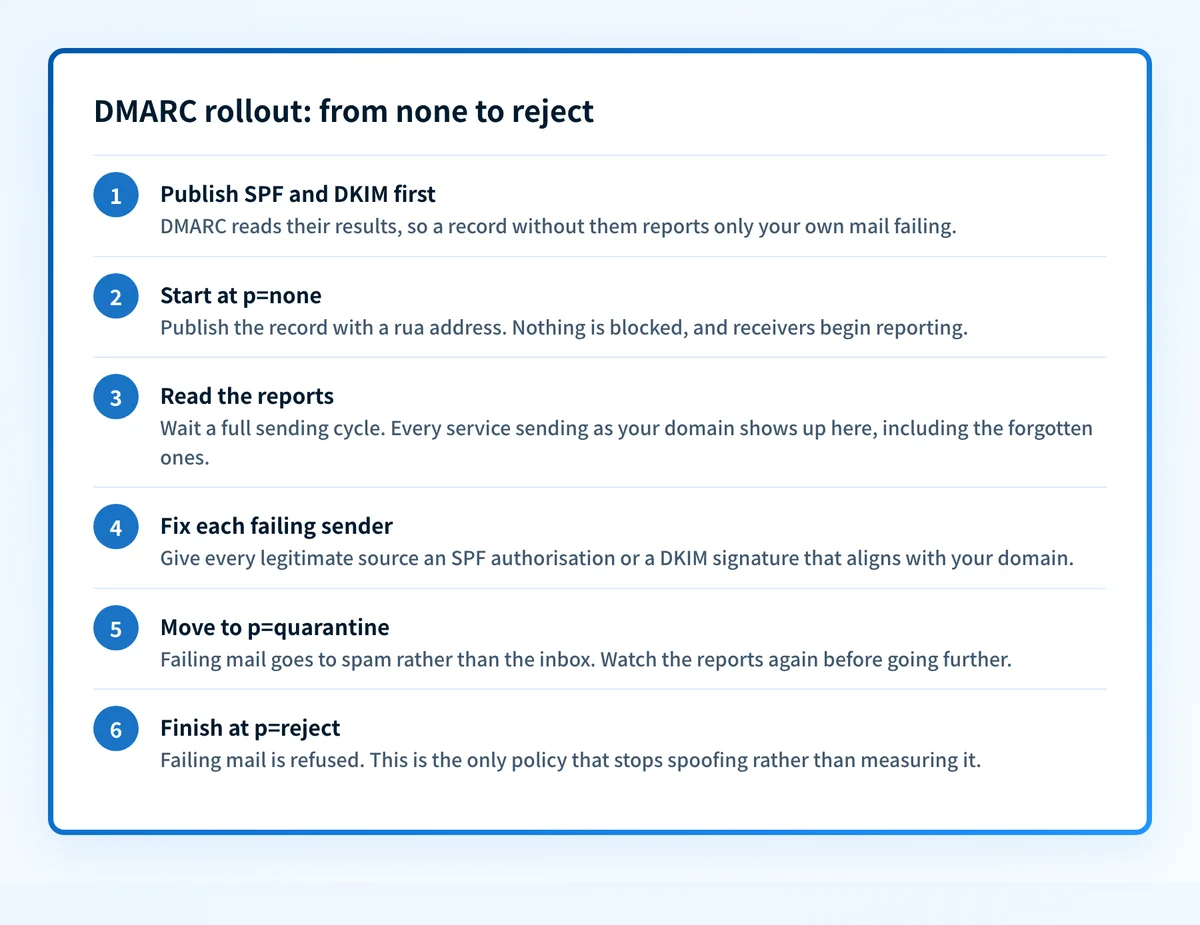
Step 1: Confirm SPF and DKIM are in place
DMARC performs no authentication of its own. It reads the results of SPF and DKIM, then asks a second question those two never ask: does the domain that passed match the domain a human sees in the From header? That second question is alignment, and it is the whole point of DMARC.
So a DMARC record on a domain with neither SPF nor DKIM is not a security control, it is a report of your own mail failing. Publish SPF, turn on DKIM signing at whichever platform sends your mail, and confirm both resolve before you go further.
See what your domain publishes today
SPF, DKIM, DMARC, and the alignment between them, in one lookup. Worth running before you change anything, so you know whether this is a first setup or a repair.
Step 2: Build the record
Three decisions produce a valid record: the policy to start on, the mailbox that receives reports, and whether subdomains inherit. Everything else is optional, and the generator leaves out the tags RFC 9989 retired.
Used to show the exact host name to publish. The record itself doesn't contain it.
Start at none to observe, then tighten once reports look clean.
Where daily XML summaries are sent. Comma-separate multiple addresses.
Advanced options (sp, alignment, ruf)
Subdomains inherit p unless you set this. Attackers love unused subdomains: reject is a strong choice once you're at enforcement.
Relaxed allows subdomain matches (mail.yourdomain.com signs for yourdomain.com). Strict requires an exact match. Most domains should stay relaxed.
Same idea for the SPF (Return-Path) domain.
Per-message failure samples. Rarely sent by large providers; contains message data.
Your DMARC record
Publish this as a TXT record in your DNS.
_dmarc.yourdomain.comv=DMARC1; p=none;Click the record to select all of it.
Record type: TXT · TTL: your provider’s default (e.g. 3600) is fine.
After you publish
- Add the TXT record at your DNS host and allow up to an hour for propagation.
- Verify it with the free DMARC checker.
- Watch your aggregate reports, fix SPF and DKIM for every legitimate sender, then step up to quarantine and reject.
Two of those choices matter more than the rest. p=none is where a first setup starts: receivers deliver everything as before and simply tell you what they saw, which is exactly what you want while you still have unknown senders. The rua address is where the daily aggregate reports go, and a record without one produces no evidence at all, which is the quiet way a DMARC project stalls for a year.
Aggregate reports arrive as XML, one file per receiver per day, and reading them by hand stops being practical almost immediately. Most people point rua at a monitoring service for that reason. If you point it at an address on a different domain, that domain has to publish an authorisation record before receivers will send anything, which is the third row in the mistakes table below.
Step 3: Publish it where your DNS lives
The record goes at whichever host answers for the domain, which is not always where you bought it. Run dig NS yourdomain.com, or use the DNS lookup, and match the result. There are three ways to get the record in once you know where it belongs.
Let Palisade publish it
Smart DNS Deployment covers 64 DNS providers. You authorise the connection in your provider's own window, so no credential reaches Palisade, then you approve the exact record before it is written into your own zone. Your registrar and nameservers do not move. How Smart DNS Deployment works.
Ask the assistant you already use
Connect the Palisade MCP server to Claude, ChatGPT, Copilot, or any MCP client, and get_dns_records returns each record to publish with its host, type, value, and recommended TTL, along with the DNS host resolved from the domain's live nameservers. No tool in the server writes a record at an external provider: it hands the values over, and your assistant publishes them with the DNS tooling it already has. Set up the MCP server.
Add the TXT record by hand
Every provider does the same thing with different labels: create a record, choose TXT, put _dmarc in the host or name field, paste the value, save. The click path and the one gotcha that puts people on the wrong screen differ per host.
On another host, the steps are the same and the labels differ. The host that answers for your nameservers is the one to edit.
Step 4: Verify it resolves
Saving a record proves the provider accepted it, not that the internet can see it. Check from outside your own account, because that is where the two common failures show up: a record sitting in a zone nothing is delegated to, and a record still inside the old TTL. If it does not resolve within an hour, the host is almost always the problem rather than the syntax.
Confirm the published record
Reads what your domain publishes right now and parses every tag, so a typo that makes receivers ignore the record shows up before you rely on it.
Step 5: Read the reports before you tighten anything
Reading the aggregate reports is the part that takes weeks, and the part that decides whether enforcement breaks your mail. Aggregate reports name every IP and service sending as your domain and show whether each one passed SPF and DKIM with alignment. Almost every domain finds senders nobody remembered: an invoicing tool, a recruiting platform, a form on the marketing site, a newsletter someone set up years ago.
Work through them one at a time. Each legitimate sender needs either an SPF authorisation or a DKIM signature that aligns with your domain, and the provider's own documentation is usually where that lives. Anything you do not recognise and cannot trace is the spoofing DMARC exists to stop, and it is the reason to keep going. To inspect one delivered message rather than the aggregate picture, see how to check DMARC alignment from a delivered message.
Step 6: Move the policy to enforcement
A domain sitting at p=none is not protected. It is instrumented. Receivers report on the spoofed mail and then deliver it anyway, so the only thing that changes at enforcement is that the spoofing actually stops.
p=noneMonitor
Failing mail is still delivered: you only collect reports.
p=quarantineContain
Failing mail is diverted to the spam or junk folder.
p=rejectBlock
Failing mail is refused outright and never arrives.
Move in stages and watch the reports at each one. p=quarantine sends failing mail to spam, which is recoverable if you missed a sender. p=reject refuses it, which is not. If you run subdomains that send mail, the sp tag sets their policy separately, so you can hold a subdomain at monitoring while the parent domain enforces.
One tag to ignore if an older guide recommends it: pct, which applied the policy to a percentage of failing mail. Receivers implemented it inconsistently and RFC 9989 retires it, along with rf and ri. Stage the rollout by moving the policy, not by sampling.
What goes wrong, and what to do about it
| Mistake | What happens | The fix |
|---|---|---|
| Record published, no rua address | Receivers have nowhere to send aggregate reports, so nothing accumulates and there is never evidence to justify enforcement. | Add a rua address before you publish. Reports are the input to every later decision. |
| Two DMARC records on one domain | A domain must publish exactly one policy record. Receivers that find two treat the domain as having none, so the policy silently stops applying. | Amend the existing record rather than adding a second one, then re-check what resolves. |
| Record added at the registrar, zone answered elsewhere | The record saves successfully and never resolves, because the nameservers answering for the domain belong to a different host. | Match dig NS yourdomain.com against the host you edited, then publish where those nameservers point. |
| Reporting address on another domain | Receivers refuse to send reports off-domain unless the receiving domain authorises it, so a reporting address elsewhere quietly returns nothing. | Publish the external destination authorisation record on the receiving domain, or report to an address on your own. |
| Straight to p=reject | Every legitimate sender that was never given aligned SPF or DKIM starts failing at once, and the mail it was sending is refused rather than delivered. | Publish p=none, read reports for a full sending cycle, fix each failing source, then tighten in stages. |
| Copied a record from another domain | Reporting addresses, subdomain policy, and alignment settings from someone else's domain rarely fit yours, and the reports go to them rather than to you. | Generate the record for your own domain and your own reporting mailbox. |
Setting up DMARC on Microsoft 365 or Google Workspace
The DMARC record itself is the same wherever your mail is hosted: one TXT record at _dmarc, published in DNS, not in the mail platform's admin console. What changes per platform is the DKIM setup that has to happen first, and where you turn it on.
Setting up DMARC for Microsoft 365 covers the custom-domain case and the onmicrosoft.com domains Microsoft handles differently. DMARC for Google Workspace covers the Admin console path and Gmail's sender requirements.
DMARC software that does the work
Publishing the record is the easy half. Palisade's agent reads the aggregate reports, names every service sending as your domain, drafts the SPF and DKIM fixes each one needs, and proposes the next policy step when the evidence supports it. You review and approve every change before it ships.
15-day full-product trial. Nothing is charged until it ends.
Questions readers ask
Frequently asked questions
What is a DMARC setup?
A DMARC setup is a single DNS TXT record published at _dmarc.yourdomain.com, plus the reporting and policy work that follows it. The record tells receiving mail servers what to do with messages that claim to be from your domain but fail SPF and DKIM alignment, and where to send daily reports about them. Publishing the record is the five-minute part. The setup is not finished until those reports show that every service you actually use passes authentication, because only then is it safe to ask receivers to block anything.
How do I set up DMARC correctly?
Publish SPF and enable DKIM first, then publish a DMARC record at p=none with a rua reporting address. Read the aggregate reports for at least one full sending cycle, which usually means two to four weeks, and fix every legitimate sender that fails SPF or DKIM alignment. Only then move the policy to p=quarantine, watch again, and finish at p=reject. The two errors that break real mail are publishing an enforcement policy before you have sender evidence, and publishing a record with no rua address, which produces no evidence at all.
Do I need to set up DMARC?
If you send business email from your own domain, yes. Since February 2024 Google and Yahoo have required senders of roughly 5,000 or more messages a day to publish a DMARC policy, and Microsoft applied matching requirements to consumer Outlook domains in 2025. Below those volumes the rules are softer, but a domain with no DMARC record can be spoofed by anyone and its unauthenticated mail increasingly lands in spam regardless of volume.
What should my DMARC policy be set to?
Start at p=none and finish at p=reject. p=none is monitoring: receivers still deliver everything, including spoofed mail, but they send you reports naming every source using your domain. p=quarantine sends failing mail to spam. p=reject refuses it outright, which is the only setting that actually stops spoofing. A domain parked at p=none passes an audit checklist while protecting nothing, so treat none as a stage rather than a destination.
How long does DMARC setup take?
Publishing the record takes about five minutes, and it resolves within the TTL, usually minutes and at most an hour. Reaching p=reject safely takes weeks rather than minutes. A domain with one mail platform and a couple of SaaS senders can often get there in two to three weeks; a domain with a long tail of marketing tools, invoicing systems, and forms takes longer, because each one has to be found in the reports and given aligned SPF or DKIM before you tighten the policy.
Is DMARC required now?
It is required by the large mailbox providers for bulk senders, and it is increasingly expected everywhere else. Google and Yahoo made a published DMARC policy a condition of bulk delivery in February 2024, and Microsoft followed for consumer Outlook domains in 2025. Several compliance frameworks and cyber-insurance questionnaires now ask for it too. What none of them require is enforcement: publishing p=none satisfies the letter of the bulk-sender rules while leaving the domain spoofable.
Can I set up DMARC without SPF and DKIM?
You can publish the record, but it will not do anything useful and it can hurt you. DMARC has no checks of its own: it evaluates the results of SPF and DKIM and asks whether the domain that passed aligns with the domain in the From header. With neither in place, every message fails, so the reports are noise and any move to quarantine or reject would block your own mail. Publish SPF, turn on DKIM signing at your mail platform, then add DMARC.
Where do I put the DMARC record if my registrar is not my DNS host?
At whichever host answers for the zone, which is not always where you bought the domain. Buying a domain at GoDaddy does not mean GoDaddy hosts its DNS, and plenty of registrations point their nameservers at Cloudflare or Route 53. Run dig NS yourdomain.com, or a DNS lookup, and publish the record wherever those nameservers point. Publishing it at the registrar while another host answers for the zone is the most common reason a record never resolves.