
Cloudflare DMARC: how to add a DMARC record
One TXT record at _dmarc, added in the Cloudflare dashboard, through DMARC Management, or from the AI assistant you already use. Whichever route you take, the record is the same DNS object, and what proves it worked is live DNS rather than the save confirmation.
How to add a DMARC record in Cloudflare
The record is one TXT entry at _dmarc. Confirm the authoritative DNS zone first, then publish one approved policy record.
01
Confirm Cloudflare answers for the zone
The DNS tab only edits records Cloudflare serves. On a full setup the domain's nameservers point at Cloudflare; on a partial setup another host is still authoritative and the record has to go there instead.
02
Check whether a record already exists
Look for an existing _dmarc entry before adding anything. If one is there, edit it rather than adding a second: receivers treat two DMARC records at the same name as having no usable policy.
03
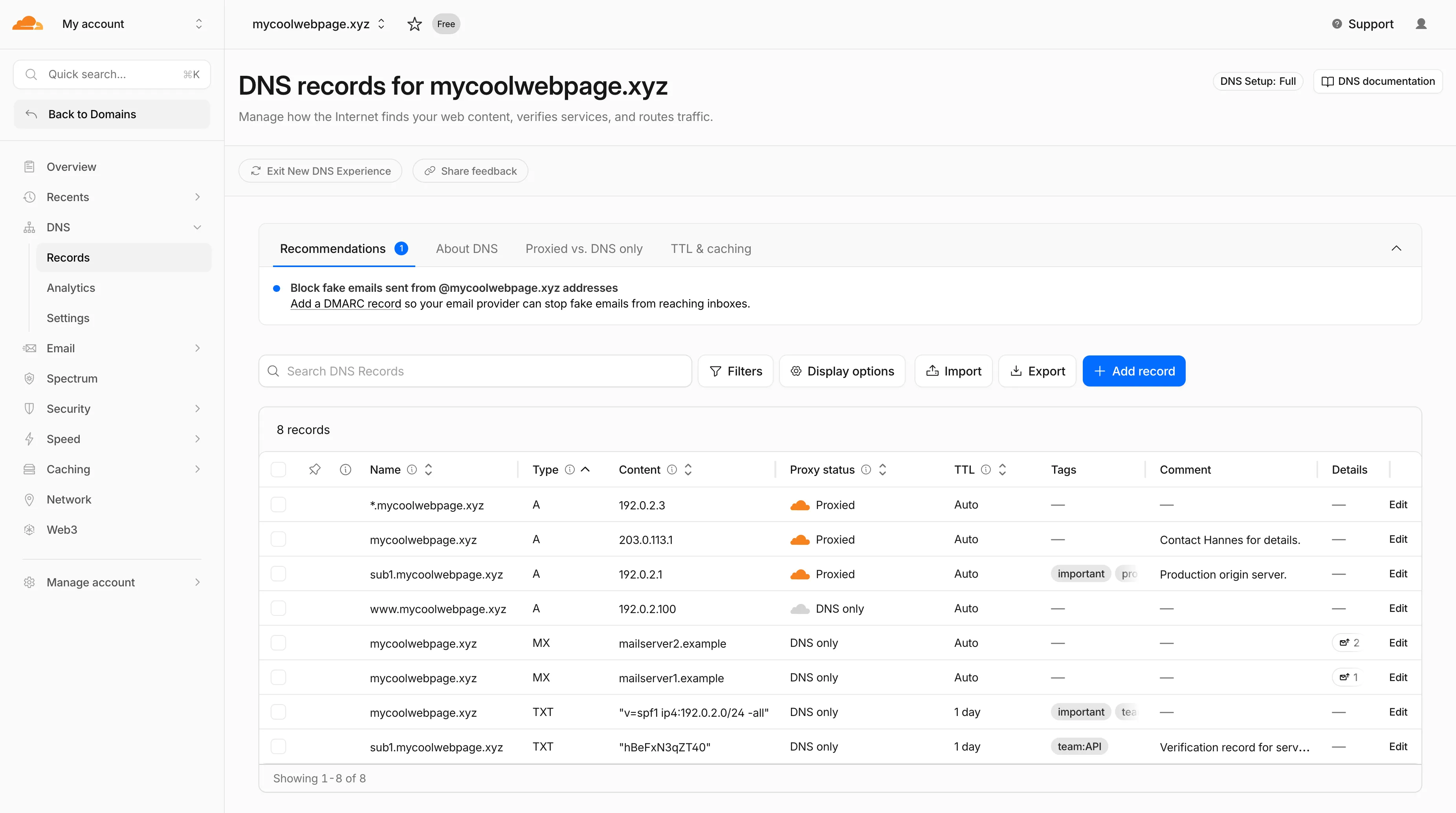
Add or edit the TXT record
Open DNS, then Records, then Add record. Choose TXT, set the name to _dmarc, and paste the policy into Content. Proxy status is an A, AAAA and CNAME setting, so a TXT record has none. For an eligible apex domain on Cloudflare DNS, DMARC Management under Email is an alternative that creates and maintains the record for you.
04
Publish exactly one DMARC record
Choose either the DNS record you manage directly or Cloudflare DMARC Management, not both. A second _dmarc record is not a backup; receivers discard both records when they find two.
The record, field by field
v=DMARC1; p=none; rua=mailto:dmarc@yourdomain.comA monitoring record: nothing is blocked, and receivers start reporting who sends as your domain. Replace the reporting address with a mailbox you control, and do not publish this value unchanged.
| Type | TXT |
|---|---|
| Name | _dmarc on its own. Cloudflare appends the zone, so typing the full _dmarc.yourdomain.com produces _dmarc.yourdomain.com.yourdomain.com. |
| Content | The policy string, starting v=DMARC1 and then p=. |
| Proxy status | Not offered. Proxying is an A, AAAA and CNAME setting, so a TXT record has none. |
| TTL | Auto is fine. |
Cloudflare dashboard, your domain, DNS, Records, Add record is the path as Cloudflare labels it today. Provider dashboards get renamed, so the current official reference is Cloudflare: create DNS records.
How to know the record actually works
Cloudflare can tell you the record saved. It cannot tell you a sender authenticates, which is a different question with a different check.
| Public DNS | Query _dmarc.yourdomain.com at a public resolver, not the root domain, and confirm exactly one DMARC policy record comes back with the value you approved. A duplicated zone suffix (_dmarc.yourdomain.com.yourdomain.com) is the usual cause of a record that saved but does not resolve. |
|---|---|
| Cloudflare | Confirm DMARC Management shows the intended domain and record state. Cloudflare documents that the first reports can take up to 24 hours, so an empty statistics view before then is not a failure. |
| A delivered message | Send a message through each production sender and read the Authentication-Results header a trusted receiver added. This is the only layer that shows whether a sender actually authenticates, which public DNS cannot tell you. |
| Aggregate reports | Read reports across enough normal sending to cover every known source. This is the evidence that decides whether it is safe to move past p=none, and nothing else substitutes for it. |
The same setup, without the dashboard
Connect Palisade's MCP server to Claude, ChatGPT, Copilot, or any MCP client, and the record values stop being something you transcribe.
01
Add the domain
Your assistant calls create_domain and the domain starts being monitored. Adding a domain is free and never gated, so a whole portfolio can go in before anything is set up.
02
Get the exact records
get_dns_records returns each record to publish with its host, type, value, recommended TTL and whether it needs creating, replacing or deleting. It also reports the DNS host resolved from the domain's live nameservers, so your assistant is told this zone is on Cloudflare rather than guessing from the registrar.
03
Publish them where the zone lives
The Palisade MCP server has no tool that writes a record at Cloudflare. It hands your assistant the values, and your assistant publishes them with the DNS tooling it already has. In the Palisade app, Smart DNS Deployment is the other route: you authorise the connection in the provider's own window and approve each record, and Palisade writes it into your own zone.
04
Verify against live DNS
verify_domain re-checks from outside your account, so a record saved into the wrong zone or still inside its TTL shows as unverified rather than done. Setup is finished when every required record verifies.
Connecting takes one step and no API key to create first. The setup for each client is on the Palisade MCP server page.
What Palisade knows about your Cloudflare zone
The question worth asking before you connect anything, answered first.
| Cloudflare credentials | Never requested, never stored, never seen. Palisade has no field for a Cloudflare API token or password. |
|---|---|
| How the provider is identified | From the domain's live NS records. Cloudflare is recognised by nameservers ending in ns.cloudflare.com, and that lookup is public information about your domain rather than access to your account. A domain on Cloudflare's partial (CNAME) setup keeps its old nameservers, so detection reports whoever still answers for the zone rather than Cloudflare. |
| What the MCP server can change | Nothing in your zone. No tool in the server writes a record at an external provider; it returns the values and your own tooling publishes them. |
| If you want Palisade to publish instead | Smart DNS Deployment, in the Palisade app, covers 64 providers. You authorise the connection in the provider's own window, the access covers email-authentication records only, you approve each record, and you can disconnect at any time. |
| Your registrar and nameservers | Unchanged. Nothing is transferred and Palisade never takes over the zone. |
What publishing to Cloudflare looks like
You approve the exact record. The connection is authorised in the provider's own window, and nothing else in the zone is touched.



- Setting up acme-corp.com: its email-authentication records are unconfigured, and instead of setting them up by hand you choose Configure.
- Palisade recognises Cloudflare as the provider answering for the domain, and you authorise the connection in Cloudflare’s own window. No password is shared with Palisade, and access is scoped to email-authentication records only.
- The exact records are shown as a before-and-after diff: the SPF value gaining a sender, plus new DKIM and DMARC records. Nothing is published until you press Approve and publish.
- Every record is live and verified in your own zone, monitoring stays on, and nothing else in the zone was touched.
Publishing DMARC is the start, not the finish
A published record proves the policy exists. Whether your mail actually authenticates is a question the record UI never answers.
Drift, including the record you just published
A record that is edited, overwritten by another tool, or dropped during a Cloudflare change stops matching what Palisade generated. Monitoring keeps checking live DNS after the write, so a change that silently did not take becomes a task instead of something you learn from a bounce weeks later.
Senders that are failing authentication
Aggregate reports name the services sending as your domain and show which of them pass SPF and DKIM with alignment. A new marketing platform someone signed up for without telling you shows up here first.
Remediation as tasks, with the fix already drafted
Palisade opens a task for each failing source and record issue, ordered by priority, and a task can carry provider-specific instructions for the sender involved. The agent investigates every sender, drafts every fix, and proposes each policy step. You approve before anything ships.
Readiness to tighten the policy
Moving from p=none toward quarantine and then reject is safe only once the legitimate senders are accounted for. Palisade tracks when that is true for the domain and proposes the step rather than taking it.
When the Cloudflare record does not behave
The failure modes that come up on this provider specifically, and what each one actually means.
The record is missing from a public lookup
Query _dmarc.yourdomain.com rather than the root domain, then compare the full TXT answer with what you intended and check for a duplicated zone suffix. Cloudflare appends the zone to the name field automatically, so entering the fully qualified name produces _dmarc.yourdomain.com.yourdomain.com.
Reports show a sending source I do not recognise
Start from the source detail in the statistics view and compare the IP, organisational domain, visible From domain, and authentication outcome against your own sender inventory. Do not authorise a source because it appears in a report: find the system owner and confirm it is expected before changing SPF, DKIM, or the policy.
There is an SPF lookup-limit warning
SPF evaluation stops at 10 DNS lookups, and Cloudflare surfaces a warning when a record exceeds it. Find the mechanisms and includes contributing to the count. If the SPF record delegates through an external CNAME it may not be editable in Cloudflare at all, so the correction belongs to whoever owns that external record.
A legitimate sender started failing after I tightened the policy
Compare the visible From domain against the SPF smtp.mailfrom domain and the DKIM d= domain. An SPF or DKIM pass that does not align with the From domain is not a DMARC pass. Return the policy to the last known-good value while you fix that sender's authentication, and do not delete the record as an improvised fix: that also removes the reporting you need to diagnose it.
Cloudflare DMARC: FAQ
Can I add a DMARC record in Cloudflare for free?
Yes. A DMARC record is a DNS TXT record, and editing DNS is available on every Cloudflare plan including the free one. DMARC Management, which collects and charts the reports for you, is also available to Cloudflare customers using Cloudflare DNS. The cost of DMARC is never the record; it is the work of getting every sender authenticated before you enforce.
Should I start a Cloudflare DMARC record with p=reject?
No. Start at p=none. Receivers deliver everything as before and report on every source using your domain, which is the evidence you need to find the senders nobody remembered. Publishing p=reject first refuses mail from any legitimate service that was never given aligned SPF or DKIM, and you find out from the people whose invoices stopped arriving. Move to p=quarantine, then p=reject, reading the reports at each step.
How long does Cloudflare take to show DMARC reports?
Cloudflare documents that the first reports can take up to 24 hours after you enable DMARC Management. That is separate from DNS visibility: a resolver may return the TXT record within minutes while the statistics view is still empty, so an empty view on the first day is not a sign the record is wrong.
Does Palisade need a Cloudflare API token?
No. Palisade never asks for, stores, or sees a Cloudflare token. Through MCP, your assistant publishes with whatever Cloudflare tooling it already has, and the credentials stay on your side. In the Palisade app, Smart DNS Deployment works the other way round: you authorise the connection in the provider's own window, and the access it grants covers email-authentication records only and can be revoked whenever you like.
I use Cloudflare's DMARC Management. Will publishing a record break it?
It can, if you replace the record instead of merging with it. DMARC Management adds a Cloudflare aggregate-report address to the record it maintains, and a hand-written replacement that omits that address stops Cloudflare's reporting. Palisade returns each record with an action of create, replace or delete plus a warnings array, so an assistant is told when a change would overwrite something already live rather than discovering it afterwards.
My domain is registered elsewhere but uses Cloudflare DNS. Which page applies?
This one. Detection reads the nameservers that answer for the domain, not the registrar on the invoice, and a domain registered anywhere at all reports as Cloudflare once its nameservers end in ns.cloudflare.com. The registrar matters for renewals; the DNS host is what decides where the record goes.
What happens if my nameservers are split while I move to Cloudflare?
Palisade reports no provider rather than the wrong one. Detection reads the domain's live NS records and only names a host when every nameserver belongs to it, so a zone half-delegated to Cloudflare and half somewhere else comes back with the provider unresolved. Your assistant is told to check the nameserver list and ask you, instead of picking a DNS tool that would write into the zone that is on its way out.
Can my assistant tell me whether the record is actually live?
Yes, and that is a separate step from publishing it. verify_domain checks live DNS from Palisade's side rather than trusting the write, so a record saved into the wrong zone or still inside its TTL shows as unverified. Polling the domain until every required record verifies is the point at which setup is genuinely done.
Publishing the record on Cloudflare is the easy half
15-day full-product trial. Nothing is charged until it ends.