Why does DMARC fail and how do I fix it?
 ChatGPT
 Claude
 Gemini
 Perplexity
 Grok
GrokIn brief
A DMARC fail means neither SPF nor DKIM passed in alignment with the visible From domain. Identify the source, repair it, and retest the same path.

DMARC fails when neither SPF nor DKIM produces a passing identifier that aligns with the domain in the visible From: header. Start with the delivered message and the sender that produced it. Repair that sender's authentication or domain alignment, then resend through the same route. Changing the DMARC policy does not repair the underlying authentication failure.
At a glance
Quick takeaways
- DMARC can pass through either aligned SPF or aligned DKIM. Both mechanisms do not need to pass.
- An SPF pass for an unrelated envelope sender domain does not satisfy DMARC alignment.
- A DKIM pass for an unrelated
d=signing domain does not satisfy DMARC alignment. - A DMARC policy requests receiver handling for failures. It does not correct SPF, DKIM, or alignment.
- A public DNS lookup shows the current published record, not the production sender, receiver decision, or future messages.
- Validate a repair with authoritative DNS, a new delivered message, and DMARC aggregate-report data after it accumulates.
What does the failure mean?
DMARC evaluation in RFC 9989 checks whether SPF or DKIM has passed and aligned with the visible From: domain. SPF alignment compares the authenticated envelope sender domain with From:. DKIM alignment compares the signing domain in d= with From:.
A trusted receiver-added authentication result may look like this:
Authentication-Results: receiver.example;
  spf=pass smtp.mailfrom=sender.example;
  dkim=pass header.d=mailer.example;
  dmarc=fail header.from=yourdomain.com
This is an illustrative redacted evidence shape, not a provider error string. RFC 8601 defines Authentication-Results, including fields such as smtp.mailfrom and header.d. Prefer results added by the receiving system over copied authentication headers from an unknown intermediary.
The fragment shows two passing authentication mechanisms and a DMARC failure at the same time. Neither authenticated domain aligns with yourdomain.com: sender.example supplied the SPF identity and mailer.example supplied the DKIM identity. The receiver therefore reports dmarc=fail for the visible From domain.
What usually causes it?
The envelope sender does not align with the visible From domain
A sending service can pass SPF for its own return-path domain while the recipient sees mail from your domain. RFC 7208 defines SPF evaluation against the envelope sender identity. DMARC requires that passing SPF identity to align with the visible From: domain before it can satisfy DMARC.
This often points to a sender that has not been configured with its own authenticated return path or custom MAIL FROM domain. Adding unrelated IP addresses to an SPF record does not repair an unaligned identity.
DKIM signs with an unrelated domain
A message can have a valid DKIM signature whose d= domain belongs to the sending platform rather than the visible From: domain. RFC 6376 defines the d= and s= tags in a DKIM signature. A valid signature is only useful to DMARC when its signing domain aligns.
If SPF passes but DMARC still fails, compare both identities before changing DNS. The guide to DMARC failing while SPF passes covers that result pattern in more detail.
SPF or DKIM fails for the affected sender
SPF can fail because the sender uses an IP address or envelope domain that its published SPF policy does not authorize. DKIM can fail because the selector record is unavailable, the key cannot be used, or the received message does not verify against the signature. These are separate failures. Use the receiver's results to determine which mechanism needs repair.
A published DNS record does not prove that an application selected that record, used the expected return path, or signed the message with the intended domain.
A forwarded or modified message has different authentication evidence
Forwarding can change the connection path, which can cause SPF failure because the forwarder's IP address is not authorized by the original envelope sender's SPF record. A message modified after DKIM signing can also verify differently at the recipient. This is an inference from the route until you compare the original delivery with the forwarded or modified copy.
A DMARC record is absent or malformed
A receiver cannot apply a domain's requested DMARC policy if it cannot retrieve and parse a valid DMARC record at the expected owner name. RFC 9989 specifies the _dmarc DNS record location and record syntax. A missing or malformed record is a DNS configuration problem. It is different from a message that fails SPF, DKIM, or alignment.
Do not lower or relax p= to treat a sender failure. That changes requested enforcement while leaving the failed sender unauthenticated or unaligned.
When this does not apply
This failure workflow does not apply when the receiver reports dmarc=pass. One mechanism can fail while DMARC still passes through the other aligned mechanism. Diagnose the failed SPF or DKIM path only if that separate result matters to the sender or to another requirement.
A missing or malformed DMARC record is also a different case from a message-level DMARC failure. Repair the public record first, then send a new message and inspect the receiver's result. Do not infer dmarc=fail from a DNS error alone.
If the rejection names TLS, rate limiting, recipient status, message content, or a private reputation rule while the message shows dmarc=pass, changing SPF, DKIM, or the DMARC policy will not repair the named problem. Follow the evidence in the rejection and use this workflow only when the receiver actually reports a DMARC authentication or alignment failure.
How do I diagnose the failure?
1. Preserve the receiver's message evidence
Save the raw source of a message sent through the exact path that failed. Record the visible From: domain, the envelope sender where available, the DKIM-Signature d= and s= values, and the receiver-added Authentication-Results.
Keep recipient addresses, message content, identifiers, and full headers out of shared tickets unless they are redacted. A rendered mailbox view can omit the fields needed to establish SPF and DKIM alignment.
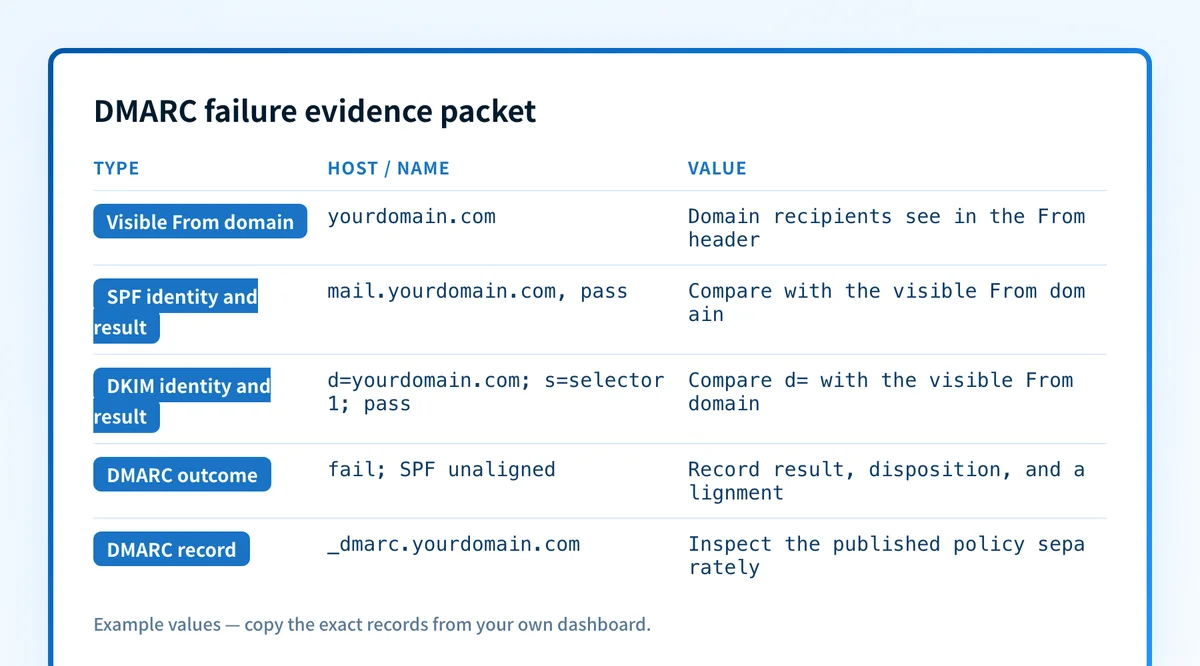
2. Build a labelled failure evidence packet
Collect one packet for each affected sender. It prevents a valid result from one application being mistaken for evidence about another.
Visible From domain: yourdomain.com
SPF envelope domain and result: sender.example, pass
DKIM d= domain, selector, and result: mailer.example, selector1, pass
DMARC result, disposition, and alignment: fail, none, SPF unaligned; DKIM unaligned
DMARC record owner and value: _dmarc.yourdomain.com, v=DMARC1; p=none
Message ID and time: redacted message ID, UTC timestamp
Sender application: approved sending application or service
Report or receiver evidence: aggregate-report row, receiver Authentication-Results, or both
This is illustrative only. Do not publish real message IDs, recipient data, selectors, account-generated DNS targets, private keys, or tokens. The packet separates message evidence from the record a domain publishes.
3. Compare the identifiers that DMARC evaluates
Use the identities in the failed message, then compare them with the visible From: domain.
Aligned example
From: alerts@yourdomain.com
SPF smtp.mailfrom: bounce.yourdomain.com
DKIM header.d: yourdomain.com
Unaligned example
From: alerts@yourdomain.com
SPF smtp.mailfrom: sender.example
DKIM header.d: mailer.example
Under relaxed alignment, related organizational domains can align. Under strict alignment, the identifiers must match exactly. RFC 9989 describes relaxed and strict identifier alignment.
4. Identify the source in DMARC aggregate reports
Find the aggregate-report row that matches the sending IP address, visible From: domain, and reporting interval. Record the reported SPF and DKIM results alongside the message evidence packet.
Aggregate reports identify observed sources and outcomes. They do not provide every original message header, prove a receiver's private decision, or predict how a later message will be handled. The DMARC learning hub explains how authentication, alignment, reports, and policy work together.
5. Check the relevant public DNS record
When the evidence points to a missing, malformed, or unexpected DMARC record, inspect the published record for the domain with the DMARC checker. If the message identifies an SPF or DKIM DNS failure, inspect the record named by that message instead.
A public check cannot prove which production application sent the message, which selector it used, or why one receiver made a particular delivery decision. Compare DNS results with the raw message before changing a sender setting.
6. Confirm the sending platform's status
Check the affected platform's documented authentication status and configuration. Confirm its authenticated domain, return-path setup, and DKIM configuration where the platform exposes them.
A green platform indicator is useful vendor evidence, but it is not a delivered-message check. If it conflicts with the receiver's raw message, investigate the actual account, route, or application that sent the failed mail.
How do I fix it?
Repair an SPF failure on the actual envelope sender
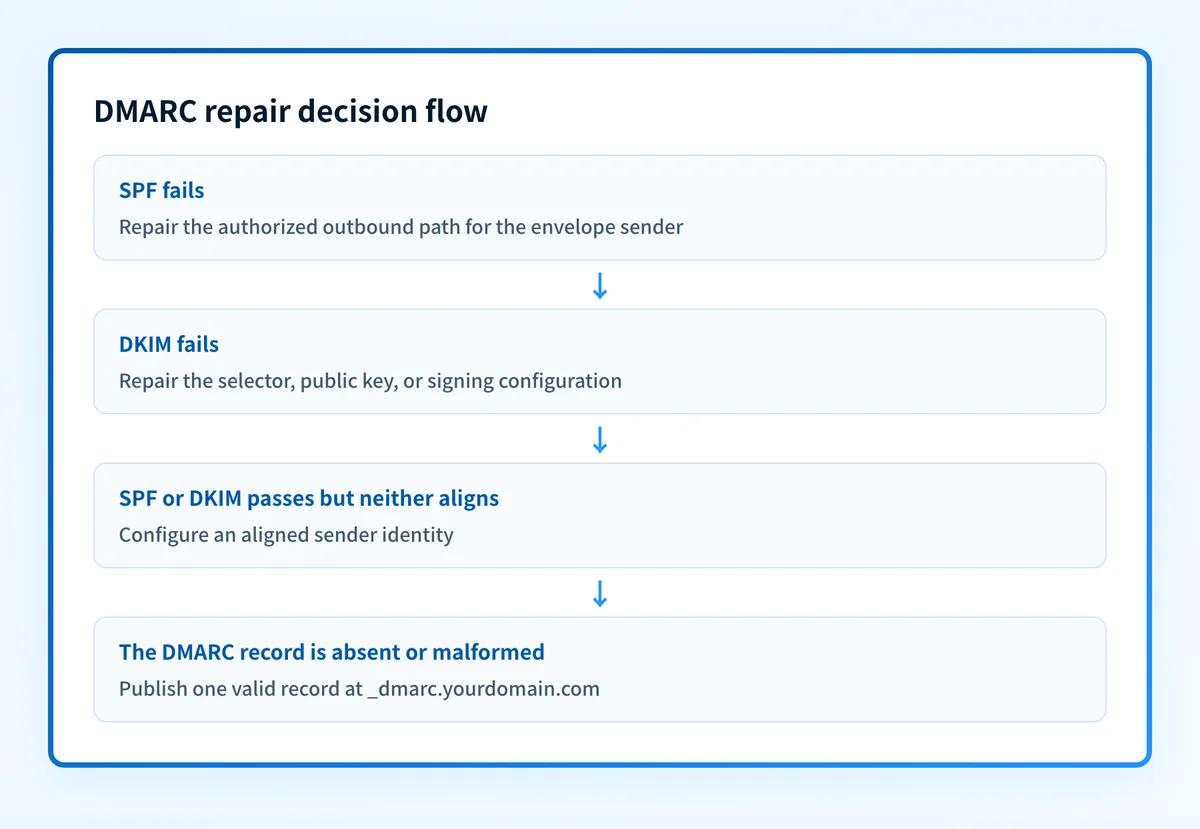
When SPF fails, correct the authorized outbound path for the envelope sender domain shown in the receiver evidence. Use the sending application's generated instructions for its own domain and sending route. Then send a new message through that same application.
This repair changes sender authentication. It does not change the DMARC policy.
Do not add a broad include mechanism or unrelated IP address without confirming that it belongs to the failing production path. An inaccurate SPF change can authorize mail you did not intend to authorize.
Repair a DKIM failure for the signing path
When DKIM fails, repair the selector lookup, public key publication, or signing configuration identified in the failed message. Publish only the selector record or CNAME target generated for your account by the sending platform.
Do not copy a selector, key, or CNAME target from another tenant. A DNS lookup alone cannot prove that the application is signing new mail correctly. Retest with a new delivered message after the record is available.
Configure an aligned sender identity
When SPF or DKIM passes but neither aligns, configure the affected source to use an authenticated domain that aligns with the visible From: domain. For SPF, this may mean a custom return-path or MAIL FROM domain. For DKIM, it means signing with an aligned d= domain.
This changes alignment and sender authentication. It does not change enforcement. The DMARC rejection troubleshooting guide explains how to handle a bounce after a receiver applies the published policy.
Publish a valid DMARC record when it is absent or malformed
When the DMARC record is missing or malformed, publish one valid record at _dmarc.yourdomain.com. Confirm the exact record against RFC 9989 and your domain's intended reporting and policy settings.
Illustrative only. Do not copy this value without choosing your own policy and reporting addresses.
_dmarc.yourdomain.com TXT "v=DMARC1; p=none; rua=mailto:dmarc-reports@yourdomain.com"
This repair changes reporting and requested enforcement behavior. It does not repair an SPF, DKIM, or alignment failure already shown in a message.
How do I validate the repair?
Validate the repair through the same application, route, content type, and recipient path that produced the failure.
First, confirm the relevant record at the authoritative DNS provider and at least one public resolver. Next, check the sending platform's status for the affected domain. Then inspect the receiver-added Authentication-Results in a newly delivered production-path message. Confirm that SPF or DKIM passes and aligns with the visible From: domain.
After aggregate-report data accumulates, check whether the same source continues to report DMARC failure. Keep the repaired message, DNS result, sender configuration change, and report evidence together. A passing DNS lookup or a green vendor status does not replace message-level validation.
Check the published DMARC record behind this failure
If the evidence packet points to a missing, malformed, or unexpected DMARC record, inspect the domain's public record before changing policy. This follows the DNS branch of the diagnosis, while the raw message still identifies whether SPF, DKIM, or alignment caused the failure.
A DMARC record check cannot prove the production sending path, repair a sender configuration, monitor future sources, or explain one receiver's private handling decision. For ongoing work, Palisade is agentic DMARC software. The agent investigates sources observed in aggregate reports, drafts fixes, and proposes each policy step. You approve before anything ships. When you approve a DNS change, Smart DNS Deployment writes the record into your own zone at your own provider.
Evidence
Sources and further reading
Questions readers ask
Frequently asked questions
Can DMARC fail when SPF passes?
Yes. SPF must pass for an envelope sender domain that aligns with the visible From: domain. An SPF pass for an unrelated sending-service domain does not satisfy DMARC.
Can DMARC pass when SPF fails?
Yes. A message can pass DMARC through an aligned, passing DKIM signature even when SPF fails. The reverse is also true when aligned SPF passes.
Does changing DMARC to p=none fix DMARC failure?
No. Changing p= changes the receiver handling requested for messages that fail DMARC. It does not repair SPF authorization, DKIM verification, or identifier alignment.
Does a valid DMARC record prove that messages pass DMARC?
No. A valid record proves only that public DNS returns a parseable DMARC policy. Inspect a delivered message and later aggregate-report evidence to verify the actual sender path.
Should I fix SPF or DKIM first?
Only fix the mechanism identified by the failed message and source evidence. If one mechanism already passes and aligns, it can satisfy DMARC while you investigate the other mechanism.

Written by
Samuel ChenardCEO & Co-Founder, Palisade
Samuel Chenard is the CEO and co-founder of Palisade, agentic DMARC software for IT teams and MSPs, from one domain to thousands.
More from Samuel →