What are business email compromise (BEC) attacks and how do you stop them?
 ChatGPT
 Claude
 Gemini
 Perplexity
 Grok
GrokIn brief
Business Email Compromise (BEC) attacks impersonate trusted people or vendors to redirect money or data. Learn the warning signs and controls.
Business Email Compromise (BEC) attacks use a trusted-looking email, account, or identity to persuade someone to send money, change payment details, disclose information, or take another high-risk action. The safest response is to verify any unusual financial or data request through a separate, known contact channel. Email authentication can reduce direct spoofing of your domain, but it cannot validate a payment request sent from a compromised account or a lookalike domain.
At a glance
Quick takeaways
- BEC is a targeted social-engineering attack that exploits trust in executives, vendors, employees, or business processes.
- A message can appear credible because an attacker has compromised a real account, spoofed a domain, or registered a similar-looking domain.
- An out-of-band verification process is the control that can stop a fraudulent payment or bank-detail change before approval.
- Multi-factor authentication helps reduce the risk of email-account takeover, but it does not make every message trustworthy.
- DMARC protects a domain from unauthorized use of its visible From domain when receivers apply the published policy.
- A passing public DNS check does not prove that every production sender authenticates correctly or that a receiver will deliver a message.
How Business Email Compromise attacks work
The FBI's Internet Crime Complaint Center describes Business Email Compromise as a sophisticated fraud that targets organizations involved in payments and transfers of funds. The attacker seeks a believable request, such as a changed bank account for a supplier invoice, a confidential employee-data export, or an urgent executive payment.
The email path behind a BEC attempt matters because the defenses differ.
An attacker may send a message from a compromised employee or vendor mailbox. In that case, the message can come from a legitimate domain and may pass normal authentication checks. The problem is that the account holder did not authorize the request.
An attacker may instead impersonate a domain. RFC 9989 defines DMARC as a protocol that evaluates whether SPF or DKIM passes with alignment to the visible From domain, then lets the domain owner publish requested handling for failures. DMARC helps receivers distinguish unauthorized mail that claims to be from a protected domain. It does not decide whether a real sender's request is commercially valid.
A third path uses a lookalike domain. For example, a fraudulent domain may differ from a supplier domain by one character. DMARC on the real supplier's domain does not control mail sent from that separate domain.
For the protocol controls behind these checks, visit the email authentication learning center. For the broader business impact, see how BEC threatens your business.
When the answer changes: use the evidence to choose the control
The practical response changes according to what the recipient can verify.
- If the request claims to come from your own domain but the sender address looks suspicious, inspect the domain's DMARC record and the delivered message headers. This can help identify direct-domain impersonation, but it cannot prove who sent the message.
- If the request comes from a known vendor or executive address, assume the mailbox could still be compromised. Pause the transaction and confirm the request using a phone number, contact directory, or approval channel that was already trusted.
- If payment instructions, bank details, or recipient details changed, require verification through a separate channel before changing records or releasing funds.
- If the message asks for credentials, use the organization's established reporting and incident process. Do not reply to the email to verify it.
- If a public domain is similar to a trusted supplier, compare the complete domain name with the supplier contact information already on file.
Do not change bank details or release a payment based only on an email thread, even when the sender name and wording appear familiar. Confirm the request through an independently verified contact method.
BEC and phishing overlap, but they are not interchangeable labels. Business email compromise versus phishing explains the distinction: phishing can target many recipients, while BEC commonly relies on a business relationship or approval workflow that makes the requested action plausible.
A worked BEC verification example
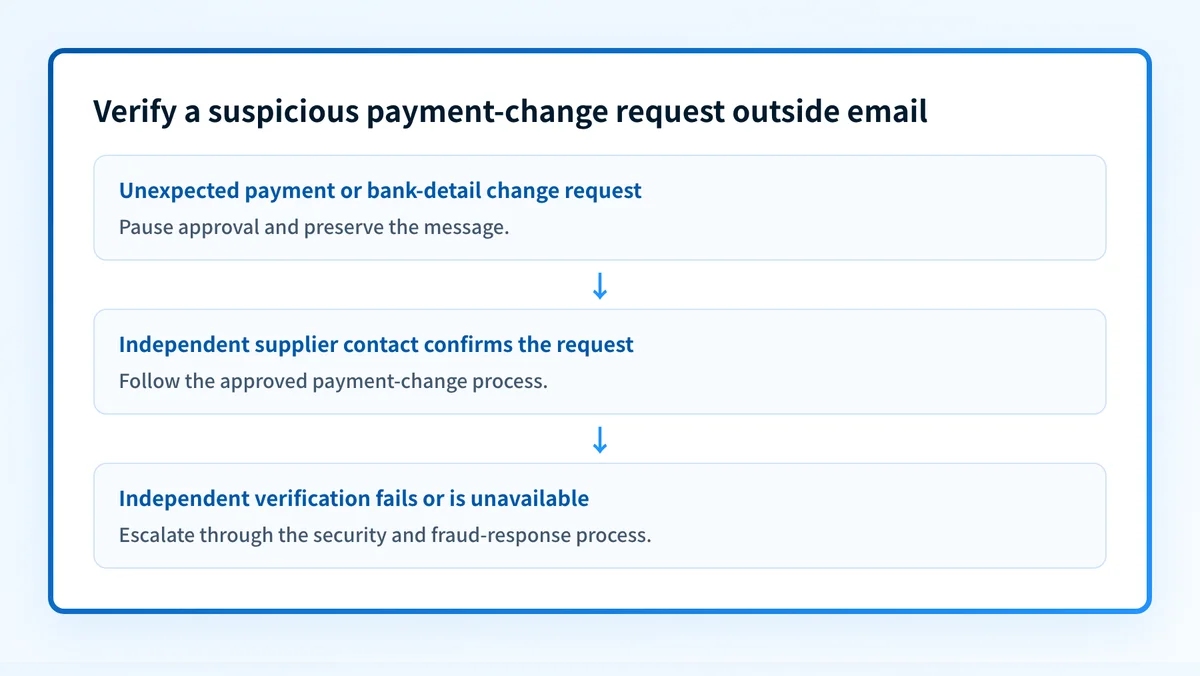
A finance employee receives a message that appears to be from a supplier and asks the company to send the next invoice payment to a new bank account. The right question is not, "Does this email look convincing?" The right question is, "Can the approved supplier contact independently confirm this change?"
Use a short, recorded verification rule that separates the email from the approval decision:
Request: Change supplier payment instructions
Do not approve from the email alone.
Verify through:
- A phone number or portal contact already recorded for the supplier
- A second authorized approver for the payment change
- The supplier's established account-management process
Record:
- Who verified the request
- Which independent contact method was used
- The date and approved change reference
This is an illustrative operational format. It is not a substitute for your organization's payment controls, contractual requirements, or incident-response process.
For messages that claim to use your domain, inspect the technical evidence as well. A delivered message's Authentication-Results header can show the receiver's authentication assessment. RFC 8601 defines the Authentication-Results header field. A header result is evidence about that message at that receiver. It does not validate the requested transaction, show all sending paths, or predict future delivery.
Practical next steps for a suspected BEC request
Start with the evidence you have, in this order:
- If you have a payment or data request, stop the approval process and use the independent verification rule. Preserve the message for the security or fraud-response team according to your internal process.
- If you have the received message, collect its full headers and compare the visible From domain, return-path domain, and authentication results. Do not forward unredacted sensitive content outside approved channels.
- If the message impersonates your domain, use the DMARC checker to inspect the public DMARC record. Compare the published policy with the domain your team expects to protect.
- If the record is missing or uses
p=none, do not move directly to a stronger policy based on that lookup alone. First inventory legitimate senders and confirm aligned SPF or DKIM results on real production messages. - If the request came from a real employee or vendor mailbox, investigate account access, mailbox rules, and the affected business process. A DMARC record cannot remediate a compromised mailbox.
Build a controlled path to DMARC enforcement
A public DMARC lookup can show whether your domain publishes a policy today. The unresolved operational question is which legitimate services still send mail for the domain and whether each path aligns.
Palisade is agentic DMARC software that analyzes DMARC aggregate-report data, identifies sending sources and authentication or alignment issues, and creates prioritized remediation tickets. It can propose the next policy step when the evidence supports it, while your team reviews the evidence and applies any DNS change.
Palisade does not validate an individual payment request, change your DMARC policy without human action, prove every future message will authenticate, or guarantee inbox placement.
Evidence
Sources and further reading
Questions readers ask
Frequently asked questions
Is Business Email Compromise the same as phishing?
No. Phishing is a broad category of deceptive messages that can seek credentials, data, or money. BEC is typically targeted at a business process or trusted relationship, such as an executive request or supplier payment change.
Can DMARC stop all BEC attacks?
No. DMARC can reduce unauthorized use of a domain's visible From domain when receivers apply the DMARC policy. It cannot stop messages from compromised legitimate accounts, lookalike domains, or fraud that succeeds through a separate communication channel.
Should a finance team call the number in a suspicious email?
No. Use a phone number or contact method already recorded in an approved supplier directory, contract, portal, or internal system. A number supplied in the suspicious message may reach the attacker.
Does multi-factor authentication prevent BEC?
No. Multi-factor authentication helps protect accounts from unauthorized access, but BEC can also use spoofed domains, lookalike domains, or deception that does not require access to the victim's mailbox.
What should a team preserve after spotting a BEC attempt?
Preserve the message and its full headers through the organization's approved security process, along with the transaction request, the verification result, and any related account or payment changes. Keep sensitive customer data, credentials, private keys, and tokens out of unapproved systems.

Written by
Ian BussieresCTO & Co-Founder, Palisade
Ian Bussieres is the CTO and co-founder of Palisade, agentic DMARC software for IT teams and MSPs.
More from Ian →