Business email compromise vs phishing
 ChatGPT
 Claude
 Gemini
 Perplexity
 Grok
GrokIn brief
Business email compromise vs phishing: classify a suspicious request by its identity and payment or access objective before acting, using the message.
Business email compromise and phishing should be assessed by the evidence in the message, the identity it claims, and the action it requests. Do not treat either label as a finding on its own. A suspicious email can involve impersonation, a credential request, a payment request, or several of these at once. The safe operational response is to preserve the evidence and verify the request through a trusted, separate channel.
At a glance
Quick takeaways
- A threat label does not prove who sent a message or whether a requested transaction is legitimate.
- A claimed executive, vendor, customer, or employee identity needs independent verification before a sensitive action.
- A request for credentials, MFA approval, payment details, or a bank-account change needs evidence from the exact message and business process.
- A reply to the suspicious email thread is not an independent verification channel.
- Email authentication results can help assess domain authorization, but they do not prove the sender's real-world identity or payment instructions.
- Preserve the original message, headers, request details, and verification record before changing accounts or payment data.
How the distinction works in practice
Use the terms only after you have separated the message's identity evidence from its requested outcome.
Identity evidence includes the visible From address, reply address, display name, sending domain, message headers, and the result of a delivered-message authentication check. These details can show that a message uses an unexpected domain or that a domain did not authenticate as expected. They do not establish that a payment request, bank-account change, or executive instruction is genuine.
Outcome evidence includes what the recipient is being asked to do. Examples include entering credentials, approving an MFA prompt, opening a file, changing a vendor record, sending a payment, or disclosing information. The requested action determines which internal owner and verification process should be involved.
This distinction matters because one message can contain more than one signal. A request may claim to come from a known person while also directing the recipient to a credential page. Another may contain no link or attachment but request a change to payment instructions. Record the observable facts first. Apply a threat label only when your incident process has enough evidence to support it.
For broader context on controls and response planning, see the email security learning hub. A separate guide on how business email compromise can threaten a business covers the operational consequences that can follow a fraudulent request.
When the answer changes
The same apparent message type can require different handling depending on the requested action and the evidence available.
If the message asks for credentials, an MFA approval, or access to a service, treat identity and account-access evidence as the immediate priority. Preserve the full message and use the organization's approved account-recovery or security-reporting path. Do not enter credentials or approve an unexpected authentication request while the message remains unverified.
If the message asks for a payment, a bank-account update, gift-card purchase, invoice change, or release of sensitive data, treat the transaction as the immediate priority. Stop the requested change until the requester is verified through contact information obtained from a trusted system, contract record, vendor master record, or previously known phone number.
If the message appears to come from a known domain, do not treat domain familiarity as transaction approval. An authenticated message can still contain a request that conflicts with the established payment process. Conversely, an unauthenticated message is an important signal, but it does not by itself identify the person or system that sent it.
Use this decision rule:
- When the evidence concerns the sender's domain or message path, inspect the message and authentication evidence.
- When the evidence concerns access, credentials, or payment authority, verify the request through a separate trusted business channel.
- When both conditions apply, preserve the message and involve both the security owner and the business owner before any action.
Do not change payment instructions, release funds, reset access, or disclose sensitive information based only on an email thread. Use a contact route that was not supplied by the message under review.
A two-axis classifier for suspicious requests
The following classifier is an explanatory aid, not an official incident taxonomy. It helps route a message to the right verification step before someone acts.
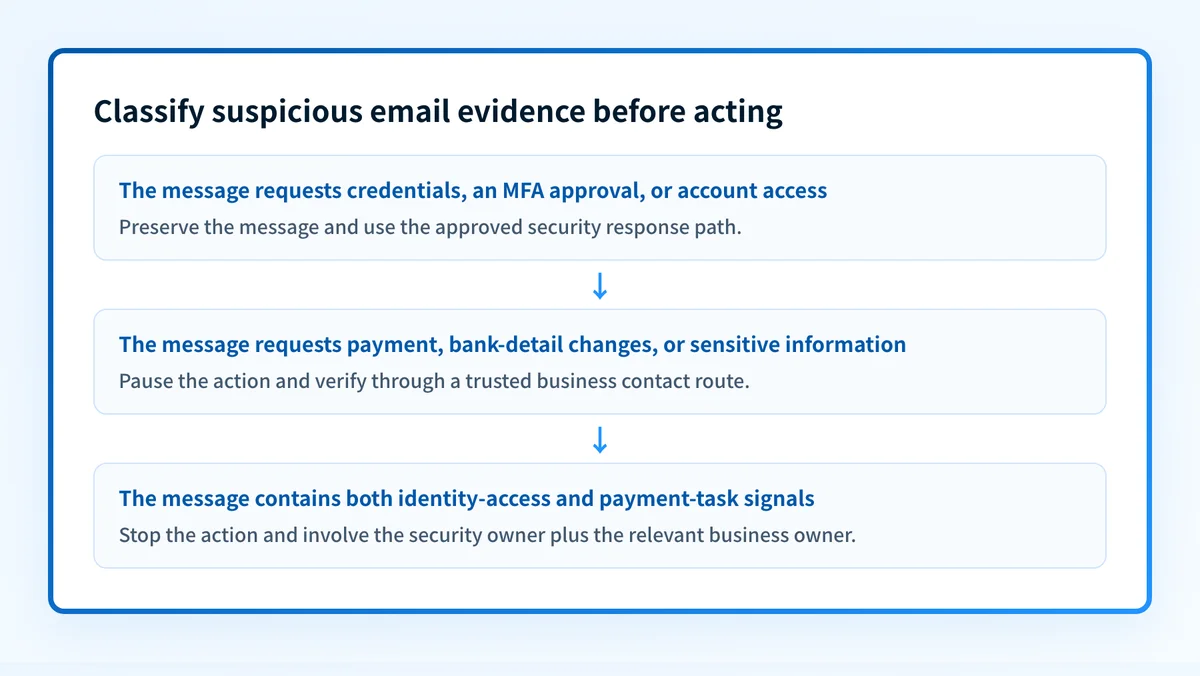
Illustrative only: classify the evidence before acting
Identity or access signal:
- Unexpected sender domain
- Credential request
- MFA approval request
- Reply address differs from known contact details
Payment or business-task signal:
- Request to change bank details
- Request to pay an invoice
- Request to release confidential information
- Request that bypasses the normal approval path
Decision:
- Identity or access signal only: preserve the message and use the security response path.
- Payment or business-task signal only: verify through a trusted business contact route.
- Both signals: stop the action and involve security plus the relevant business owner.
A worked example can make the boundary clearer. Assume a recipient receives an invoice-related email from a familiar display name. The email asks that future payments use new banking details and includes a phone number for confirmation.
The payment-task signal is the instruction to alter payment details. The claimed identity is not verified by the display name, the email thread, or the contact number included in the message. The correct next step is to use approved vendor contact details held outside that message to confirm the change. Preserve the original email and provide it to the security team if the request cannot be verified.
A different example is an email that directs a recipient to sign in to view a document. The immediate evidence object is the link destination, the message headers, and the requested credential action. Do not use the link to investigate. Preserve the message and inspect it through the approved security process. The anti-phishing software comparison guide can help when the unresolved task is evaluating protection tools rather than classifying one message.
What to do with the evidence you have
Start with the evidence available to the recipient.
- If you have the full suspicious message, preserve the original message and its headers. Record the visible From address, reply address, recipient, subject, requested action, links, attachments, and the time received.
- If the message requests a payment or vendor-data change, pause the transaction and contact the known requester through an independently sourced channel. Record who verified the request and which trusted contact record was used.
- If the message requests credentials or account access, do not interact with its links or attachments. Use the organization's established security-reporting and account-support process.
- If you only have a sending domain, inspect its published posture with a public checker. That can help identify published DNS controls, but it cannot prove the production message path, sender identity, receiver decision, or future delivery outcome.
- If a real message was delivered, compare the authentication results in that exact message with the expected sending domain and approved service. A DNS record alone cannot prove that an application signed the message or used the expected return path.
Check the email-security signals around the request
If you need a high-level view of a domain's publicly visible email-security posture, use Palisade's email security score tool after preserving the suspicious message and pausing the requested action.
Check a domain's email-security score
A public domain check cannot determine whether a specific payment request is genuine, prove the sender's real-world identity, inspect a private mailbox decision, or replace verification through an approved business contact channel.
Evidence
Sources and further reading
Questions readers ask
Frequently asked questions
What is a red flag for a business email compromise?
A request to change payment details, release funds, disclose sensitive information, or bypass an established approval process is a red flag that needs independent verification. Treat the request as unverified until a trusted contact route confirms it.
Who is liable for business email compromise?
Liability cannot be determined from an email alone. It depends on the jurisdiction, contracts, payment method, parties involved, and the facts of the event. Preserve evidence and involve the appropriate legal, finance, insurance, and incident-response owners.
What is an example of a business email compromise?
An example is an email that appears to come from a vendor contact and asks an accounts-payable employee to use new bank details for future payments. The safe response is to pause the change and confirm it using contact information from a trusted vendor record rather than the email.
How common is business email compromise?
A current frequency claim needs a current primary-source report with a stated period, population, and measurement method. Do not use an unsourced number to decide whether a suspicious payment or access request needs verification.
Does email authentication prove that a payment request is legitimate?
No. Email authentication can provide evidence about domain authorization for a delivered message. It does not confirm the sender's real-world identity, authority to request a transaction, or the correctness of payment instructions.

Written by
Ian BussieresCTO & Co-Founder, Palisade
Ian Bussieres is the CTO and co-founder of Palisade, agentic DMARC software for IT teams and MSPs.
More from Ian →