How to block phishing emails: filters, rules, and limits
 ChatGPT
 Claude
 Gemini
 Perplexity
 Grok
GrokIn brief
Sender blocks, mailbox rules, and spam reports stop known senders. None stop a spoofed domain, which needs DMARC enforcement at the organization level.
To block phishing emails, use the controls at the layer you manage: report the message as phishing, block the displayed sender, create a narrow mailbox rule for a repeat pattern, and ask your mail administrator to investigate organization-wide campaigns. No single personal block stops phishing as a category. Attackers can change addresses, domains, accounts, links, and message wording, so blocking works best as a set of controls rather than one permanent list.
At a glance
Quick takeaways
- Report phishing when the message is deceptive, not merely unwanted.
- A sender block usually affects one mailbox and one displayed address.
- Use rules only when the matching condition is specific and verified.
- Organization-wide filtering belongs with the mail or security administrator.
- Blocking a message does not secure an account after someone has interacted with it.
- Recognition habits are still needed because filters do not catch every attempt.
What does blocking a phishing email actually change?
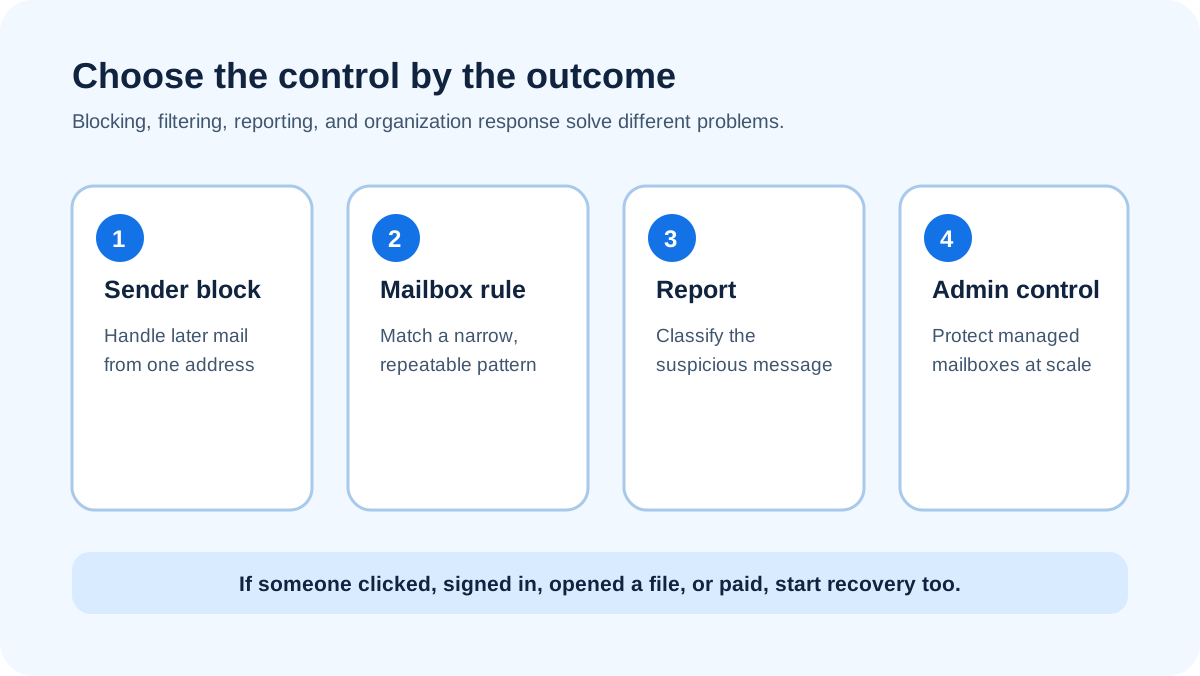
"Block" can mean several different actions. A personal sender block tells your mailbox how to handle later messages associated with one address. A spam or phishing report gives the provider a classification signal about the message. A mailbox rule applies conditions you choose. An organization-wide mail rule, gateway policy, or quarantine action affects a wider group of recipients.
Those actions do not have the same scope. Blocking billing-alert@example.invalid does not automatically block a new address, a compromised real account, a lookalike domain, or a message sent through a different channel. The Federal Trade Commission notes that spam filters keep many phishing messages out, but attackers keep trying to bypass them, so recipients still need a safe verification habit (FTC phishing guidance).
Start by identifying the outcome you want:
- Stop later mail from the same displayed address in your own mailbox.
- Teach the provider that the message is deceptive or abusive.
- Move a stable, repeat pattern away from the inbox.
- Protect a workplace or school from a campaign reaching several people.
- Contain an incident after someone clicked, signed in, opened a file, or paid.
Block the displayed sender for repeat mail
Use the mailbox provider's sender-blocking control when one address repeatedly sends unwanted mail. Open the provider's own message menu, not a button inside the message. Confirm that the command names the sender you intend to block before submitting it.
A sender block is narrow by design. It can reduce repeat messages from that address without creating a broad rule that catches unrelated mail. That makes it a reasonable response to persistent nuisance mail. It is weaker against phishing campaigns because the attacker can rotate addresses or send from an account that was taken over.
Do not block an entire domain merely because one message looks suspicious unless you administer the mailbox and have verified that the domain has no legitimate use. A broad block can hide password resets, invoices, support messages, or security alerts that people still need. For a work mailbox, collect the original message and ask the mail administrator to decide whether the condition should apply to one address, a domain, a link, an attachment, or another campaign indicator.
Blocking also differs from recognition. If the main problem is deciding whether a request is deceptive before acting, use the separate guide on how to avoid phishing emails.
Report phishing instead of treating it as ordinary junk
Use the provider's phishing report when the message impersonates a person or organization, asks for credentials or money, directs you to a suspicious site, or tries to cause another harmful action. The Cybersecurity and Infrastructure Security Agency tells recipients not to click links or attachments in suspicious messages and to use a trusted reporting route (CISA phishing guidance).
A report and a block can happen together, but they answer different questions. The block changes how your mailbox treats the displayed sender. The report classifies the message for the provider or your organization. Neither action proves who sent it, guarantees removal from other inboxes, or closes an incident after credentials or money were exposed.
For Outlook-specific mechanics, including the differences among current clients, follow how to report a phishing email in Outlook. If you are deciding which organization should receive the report, use where to send a phishing email. The broader phishing-reporting decision guide explains how to verify a route before submitting evidence.
Build a narrow rule for a stable pattern
A mailbox rule is useful when you can describe a recurring pattern without relying on a guess about intent. Good conditions are observable: a verified sending address, a domain your organization has decided to block, a specific recipient alias that should never receive external mail, or a campaign marker confirmed by the security team.
Weak conditions create collateral damage. Do not filter on a common word such as "invoice," "security," or "password." Legitimate messages use those words. Do not create a rule that deletes mail silently while you are still investigating. Route uncertain matches to a review folder or quarantine controlled by the responsible team.
Use a written rule record before changing a work mailbox:
Owner: mailbox user or mail administrator
Observed pattern: exact address, domain, header, link, or attachment marker
Evidence: original message and related reports
Action: report, move, quarantine, reject, or delete
Scope: one mailbox, group, or organization
Exception: known legitimate sender or business process
Review date: date the rule should be reassessed
The record makes a broad condition visible before it hides legitimate mail. It also gives the administrator a way to remove a temporary campaign rule later.
Use organization controls for organization-wide campaigns
If several people received related messages, a personal rule is too small. Send the original message through the organization's reporting path. The security or mail team can search for related recipients, compare sender and link indicators, remove or quarantine matching mail, block known infrastructure, and review whether anyone interacted.
Administrators should use the evidence available in their own environment. A copied screenshot may omit the sender address, reply address, link destination, attachment details, and routing headers. Preserve the original message according to policy. Do not forward a live attachment around the company to ask whether it looks dangerous.
An organization-wide block should have an owner, scope, exception process, and removal condition. A rushed rule that rejects a supplier's whole domain can interrupt business. A condition tied only to visible From text can also miss a lookalike or catch mail the organization actually requested.
Know what a sender block cannot stop
A sender block cannot prevent a new address from contacting you. It cannot stop the same request over text message, chat, phone, or social media. It cannot make a link safe, undo a download, revoke a session, recover a payment, or determine whether a real account was compromised.
It also cannot validate a business claim. An email may come from an authenticated service and still contain a fraudulent request because a real account was taken over or a legitimate platform was abused. Conversely, an unexpected message may be legitimate. Verify the claimed event through an account, website, phone number, or person you reach independently.
This boundary is why blocking and avoiding are separate tasks. Blocking changes message handling. Avoidance changes what you trust and how you verify a request.
If someone already interacted with the message
Do not treat a block as incident recovery. If someone entered a password, shared a one-time code, approved a sign-in, opened a suspicious attachment, installed software, changed payment details, or sent money, escalate through the relevant account, security, finance, or fraud process.
Use a trusted service surface to change credentials or review account activity. Contact a bank or payment provider through known contact information when money is involved. Preserve the message, time, destination, and the action taken. A report can still help, but containment now comes first.
The FTC directs people who disclosed personal information to its identity-theft recovery service and accepts fraud reports through ReportFraud.ftc.gov (FTC phishing guidance). Follow the process that matches what was exposed rather than repeating the pre-click advice.
Evidence
Sources and further reading
Questions readers ask
Frequently asked questions
Can I permanently block all phishing emails?
No. You can block addresses, report deceptive messages, create narrow rules, and use organization filtering, but attackers can change identities and channels. Treat blocking as exposure reduction. Keep independent verification, strong account protection, reporting, and incident response in place for messages that still arrive.
Is blocking a sender the same as reporting phishing?
No. A sender block changes handling for later mail associated with that address in your mailbox. A phishing report submits the suspicious message to the provider or organization for classification and review. Use the action that matches the risk, and use both when the interface and policy support it.
Should a phishing rule delete matching messages automatically?
Only when the condition is verified, the scope is understood, and the responsible owner accepts the risk. During an investigation, quarantine or a review folder is safer because silent deletion can hide legitimate mail and remove evidence the security team needs.
Why do phishing emails return after I block one address?
Because the block usually matches that address, while a campaign can rotate addresses, domains, sending services, or compromised accounts. Report the new message and look for a stable, verified campaign indicator before broadening a rule.
Does blocking protect me after I clicked?
No. Blocking may change future mail handling, but it does not revoke credentials, close sessions, remove software, recover funds, or inspect a device. Start the recovery or incident process for the action you took, then report and block the message as separate steps.

Written by
Ian BussieresCTO & Co-Founder, Palisade
Ian Bussieres is the CTO and co-founder of Palisade, agentic DMARC software for IT teams and MSPs.
More from Ian →