Paypal phishing scam email
 ChatGPT
 Claude
 Gemini
 Perplexity
 Grok
GrokIn brief
Paypal phishing scam emails should be verified outside the message. Learn how to separate an impostor email from an unfamiliar PayPal request.
A PayPal phishing scam email is a message that impersonates PayPal to pressure you to click a link, call a listed number, open an attachment, share information, or pay. Do not use the message to verify its claim. Open PayPal independently in your browser or app instead. If there is an unfamiliar invoice or money request in your account, do not pay it and use PayPal's reporting guidance for that request.
At a glance
Quick takeaways
- Do not click links, call phone numbers, or download attachments in a suspected PayPal impostor message.
- Open PayPal independently rather than through the email's buttons or instructions.
- An email that claims a payment occurred and an unfamiliar in-account invoice are separate situations.
- An unfamiliar invoice or money request is not a reason to pay or contact the number shown in the request.
- In U.S. PayPal guidance, suspected impersonation emails can be forwarded to
phishing@paypal.com. - A message that passes SPF or DKIM is not, by itself, proof that the payment claim or request is honest.
How a PayPal phishing scam email works
A PayPal-branded phishing message often tries to create urgency around a payment, account limitation, refund, security alert, or invoice. The attacker wants the recipient to act through a channel they control, such as a link, attachment, or phone number in the message.
PayPal's guidance for reporting suspicious messages says not to click links, call phone numbers, or download attachments in messages from PayPal imposters. That advice matters because a convincing logo, sender display name, or payment-related wording does not establish who controls the destination behind a link or number.
The safe decision starts outside the message. Type the PayPal address into your browser yourself, or open the PayPal app directly. Then compare the message's claim with activity visible in your account. This is a PayPal-specific application of the broader checks in Palisade's phishing email example guide.
When the answer changes
The key distinction is whether you are looking at a suspicious email claim or an actual unfamiliar invoice or money request visible after you opened PayPal independently.
If you cannot find matching activity in PayPal, treat the email as a suspected impersonation message. Do not reply to it, use its links, or call its phone number. Use PayPal's suspicious-message reporting guidance instead.
If you do find an unfamiliar invoice or money request in PayPal, do not assume that its presence makes it legitimate. PayPal's invoice and money request scam guidance says to verify through the PayPal website or app, not pay an unfamiliar request, and not use phone numbers or links in the request.
Neither branch is a private fraud determination. A message can make a false claim about an activity that does not exist, while a real request can still be unwanted or suspicious. The decision rule is about choosing a safe verification and reporting path before you disclose information or send money.
For the wider threat category, see Palisade's email security learning hub and threats and impersonation guidance.
A worked PayPal phishing decision rule
Use this decision rule when an email says that a PayPal payment, invoice, refund, account restriction, or security event needs your attention.
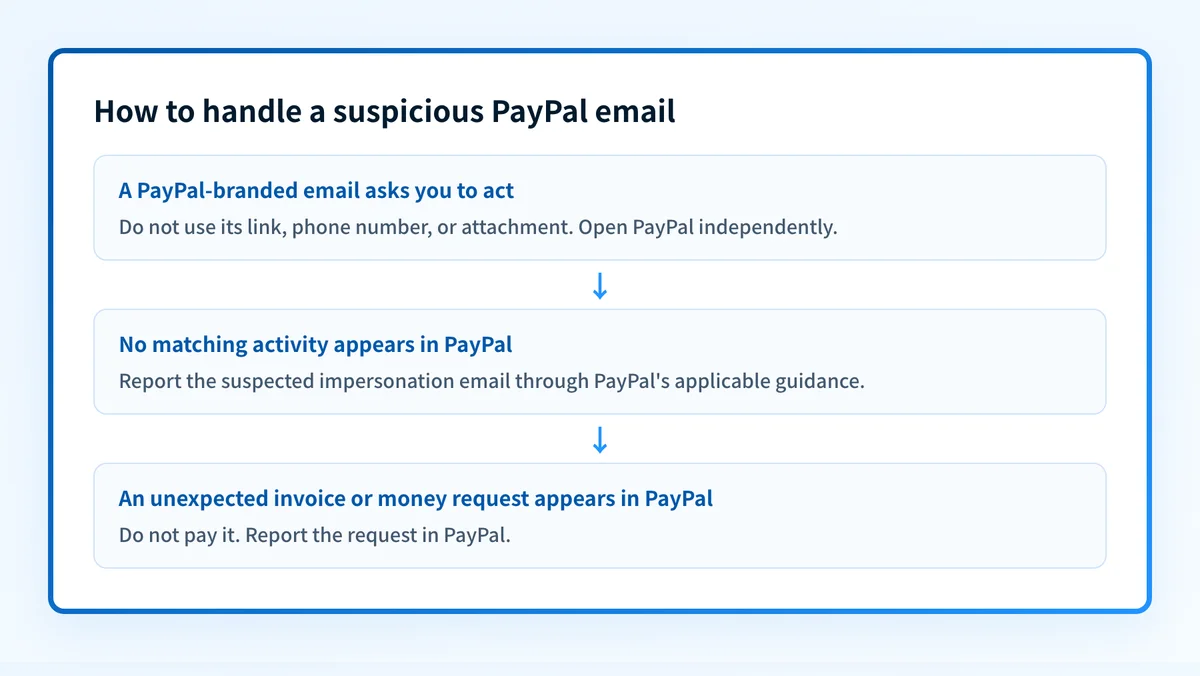
- On receiving a suspicious PayPal-branded email: do not click, call, reply, or download an attachment.
- Verify independently: open PayPal through the app or a typed address, never the email's link.
- If no matching activity appears in PayPal: report the suspected email through PayPal's applicable guidance.
- If an unexpected invoice or money request appears in PayPal: do not pay it; report the request through PayPal.
A sender display name such as "PayPal" can be chosen by an attacker. The visible text of a link can also differ from its actual destination. Those clues can justify caution, but they do not replace independent verification in PayPal.
Email authentication has a similar boundary. SPF and DKIM help receivers evaluate whether a message was authorized to use certain sending identities, but they do not prove that every message's business claim is genuine. Why phishing emails can pass SPF and DKIM explains why authentication results must be interpreted within their limits.
What to do with the evidence you have
If you only have the email, leave its links, attachments, and phone numbers unused. Open PayPal independently and look for the transaction or account activity the message claims exists.
If no matching activity appears, report the suspected email. PayPal's U.S. suspicious-message guidance directs users to forward suspicious emails to phishing@paypal.com. That address is stated in U.S. guidance, so do not assume it applies in every country or region. Use PayPal's local security or help resources when your account is outside that scope.
If you find an unfamiliar invoice or money request after opening PayPal independently, do not pay it. PayPal's instructions for cancelling or reporting a suspicious invoice or money request document the reporting route through the PayPal website or app.
Do not contact a phone number supplied in an unfamiliar invoice or money request. Use PayPal independently to find support and reporting options.
If you already clicked a link, entered credentials, shared a code, downloaded an attachment, or sent money, the pre-click decision is no longer enough. Follow the recovery-focused actions in what to do after clicking a phishing link.
Evidence
Sources and further reading
Questions readers ask
Frequently asked questions
Can someone access your bank account through PayPal?
Only if you provide access or payment information through a fraudulent process, or if an attacker gains access to an account connected to your bank. Do not enter bank details, PayPal credentials, or one-time codes after following an unexpected email link. Open PayPal independently and review the account activity first.
What is an example of a PayPal scam email?
An example is an email claiming that you must urgently call a number, click a link, or cancel a payment that you do not recognize. The safe response is the same even if the message looks convincing: do not use the email's contact details, then verify the claim through PayPal independently.
Where do I report PayPal phishing emails?
In the United States, PayPal's suspicious-message guidance says to forward suspected impersonation emails to phishing@paypal.com. For an unfamiliar invoice or money request found in PayPal, use PayPal's website or app reporting instructions for that request. Check local PayPal guidance if your account is outside the United States.
How to spot fake PayPal payment notifications?
Check whether the notification tries to make you use its own link, attachment, phone number, or urgent instruction. Then open PayPal independently and look for matching activity. An unmatched email claim should be reported as a suspected impostor message, while an unfamiliar request visible in PayPal should not be paid and should be reported in PayPal.
Does a PayPal logo prove that an email is real?
No. A logo, familiar wording, and a PayPal-looking sender name can be copied into a phishing email. Verify the claimed payment or account event only after opening PayPal independently.
Can SPF or DKIM prove a PayPal email is safe?
No. SPF and DKIM provide authentication evidence about parts of the email path, but they do not prove that an invoice, payment notice, or support request is honest. Use them as limited technical evidence, then verify payment-related claims in PayPal itself.

Written by
Ian BussieresCTO & Co-Founder, Palisade
Ian Bussieres is the CTO and co-founder of Palisade, agentic DMARC software for IT teams and MSPs.
More from Ian →