Norton phishing protection: what Scam Protection confirms
 ChatGPT
 Claude
 Gemini
 Perplexity
 Grok
GrokIn brief
Norton phishing protection includes advertised Scam Protection on selected plans, but Norton does not document phishing-email coverage or guarantees.
Norton phishing protection cannot be confirmed as phishing-email protection from the available Norton product information. Norton lists "Scam Protection" on selected consumer plans, but the product page does not explain whether it detects or blocks phishing emails, which email apps it covers, or what it guarantees. Treat the plan label as an indication of a security feature, not proof that every phishing email will be stopped.
At a glance
Quick takeaways
- Norton lists "Scam Protection" on several consumer security plans.
- The available Norton product information does not document phishing-email detection or blocking coverage.
- A plan label does not prove coverage for a particular email service, app, attachment, link, QR code, or browser flow.
- Norton also lists features called "Safe Web", "Safe Search", and "Smart Firewall", without describing their phishing-email behavior on the available support page.
- Endpoint or browser protection is separate from an organization's email-security controls.
- Assess a domain's email-security posture separately from software installed on an individual device.
What Norton phishing protection currently confirms
Norton's US product page lists the feature name "Scam Protection" for Norton Mobile Security, Norton AntiVirus Plus, Norton 360 Standard, Norton 360 Deluxe, and Norton 360 with LifeLock Select Plus. The same product material describes Norton AntiVirus Plus and Norton 360 plans as including "Antivirus, malware, ransomware, and hacking protection" alongside "Scam Protection."
That establishes a narrow point: Norton presents Scam Protection as part of selected consumer security offerings. It does not establish the scope of protection for phishing emails.
The available product page does not state:
- Which email providers or email clients are covered.
- Whether Norton scans email content, attachments, links, QR codes, or downloaded files.
- Whether protection applies before an email is opened, after a link is selected, or only in a browser.
- Which operating systems, plans, or settings enable the feature.
- How a user reviews a blocked item or handles a false positive.
- That all phishing attempts will be detected or prevented.
For the underlying threat, see what phishing is. Norton-branded lures belong in the wider category of email threats and impersonation, but a product name in a message does not by itself identify the message as legitimate or malicious.
When the answer changes
The answer changes only when Norton publishes documentation for the exact feature, plan, operating system, and email path you use.
Use this decision rule:
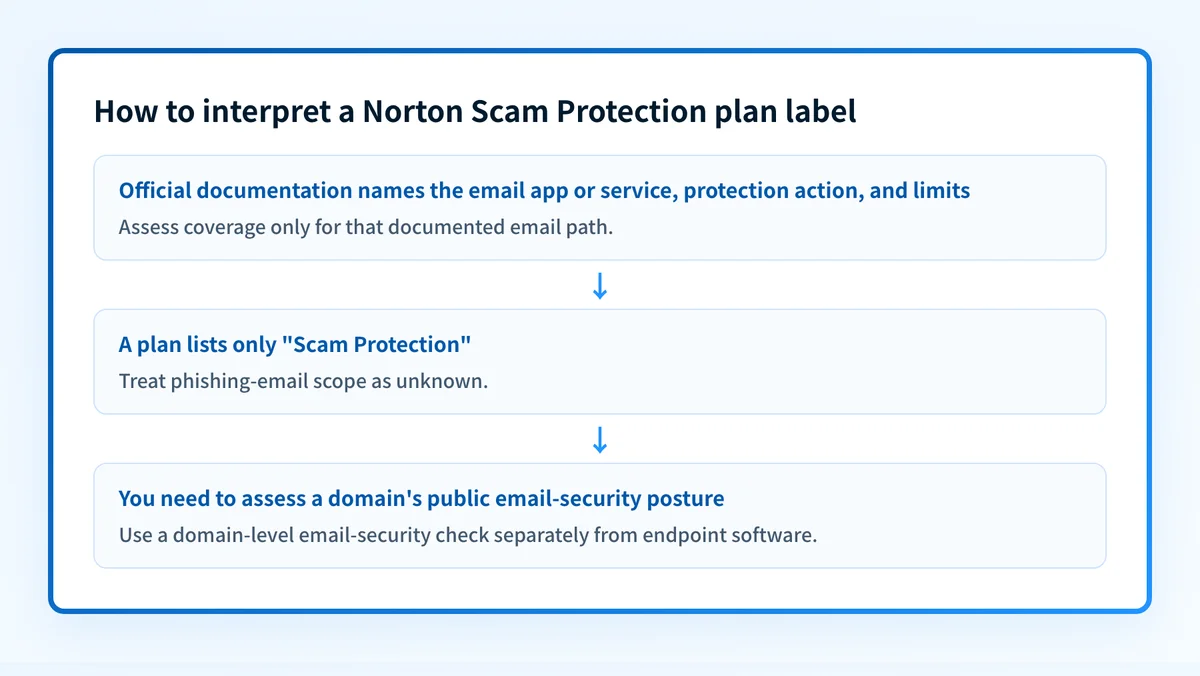
- If Norton documentation names the email app or service, the protection action, and the limits, use that documentation to assess the stated coverage.
- If the documentation only names a plan feature such as "Scam Protection", assume the email-specific scope is unknown.
- If a suspicious message is already open, evaluate the message and its destination independently. A product-plan label cannot establish that a specific message is safe.
- If you administer an organization's domain, assess sender authentication and domain-level controls separately from consumer endpoint software.
For an organizational evaluation of phishing controls, anti-phishing software for business covers the comparison task more directly than a consumer-plan feature label.
Do not treat a security product name, an apparent Norton notification, or an email's branding as proof that a message is legitimate. The available Norton material does not document warning strings, notification examples, or a fake-notification response workflow.
Worked example: what a plan label does and does not prove
The following is a quoted feature-label example, not a configuration record or a promise of email coverage:
Plan feature shown by Norton: "Scam Protection"
Confirmed from the product page:
- The plan lists "Scam Protection".
Not confirmed from that label alone:
- Phishing-email scanning or blocking
- Supported email providers or clients
- Attachment, link, QR code, or browser coverage
- Detection accuracy or guaranteed prevention
- Warning, block, or remediation behavior
A customer considering Norton for phishing protection should look for an official feature page that connects the exact product feature to the email scenario in question. For example, documentation would need to state whether protection applies to a specific mail app, whether it evaluates links before or after selection, and what happens when it identifies a suspected scam.
Without that documentation, the sound conclusion is limited: the plan advertises Scam Protection, while its phishing-email scope remains unpublished in the available product material.
The same restraint applies to apparent Norton notices. A message or pop-up that uses Norton's name is not validated by the name alone. The available Norton pages do not document fake-notification causes, examples, or a reporting process, so this article cannot provide a vendor-specific handling procedure for them.
Check the control layer that matches your evidence
Start with the evidence you actually have.
- For a Norton subscription question, check the official plan page and product support documentation for the exact plan, device, and feature setting.
- For a suspicious email, follow your organization's established security-reporting procedure or use the mail provider's own reporting controls. Preserve only the information your security team requires.
- For a domain-level assessment, use an email security score check to inspect the public security signals associated with a domain.
- For broader organizational controls, read email security before treating endpoint software as a substitute for mail-path protections.
Read the email-security controls behind the message
If the unresolved question is how an organization protects its sending domain and inbound mail environment, review Palisade's email security guide. It separates domain and mail-flow controls from individual-device security software, so you can evaluate the right layer for the problem.
Review email security controls
That guide cannot confirm the behavior of a Norton plan, repair a suspicious message, or prove that a device-level product will block a particular phishing attempt.
Evidence
Sources and further reading
Questions readers ask
Frequently asked questions
Does Norton protect against phishing emails?
Norton does not state whether its protection covers phishing email. It advertises a feature called "Scam Protection" on several consumer plans, but its product pages never say what that feature covers, which mail apps it works with, or what it does when it finds something. Check Norton's current documentation for your exact plan before you rely on it for email.
Why am I getting fake Norton notifications?
Scammers copy well-known security brands because an urgent-looking warning gets people to click, and Norton's name is a common choice. Norton does not publish examples of these fakes or a process for reporting them, so treat any unexpected Norton alert as untrusted. Do not click it, and open your Norton subscription directly instead to see whether the same notice is really there.
Does Scam Protection guarantee that phishing attempts will be blocked?
No, and Norton does not claim it does. Its product page names the feature but publishes no detection coverage, no limits, and no description of how it behaves on a particular email path. Assume there are gaps, and keep your own process for reporting suspicious messages.

Written by
Ian BussieresCTO & Co-Founder, Palisade
Ian Bussieres is the CTO and co-founder of Palisade, agentic DMARC software for IT teams and MSPs.
More from Ian →