Pixm phishing protection
 ChatGPT
 Claude
 Gemini
 Perplexity
 Grok
GrokIn brief
Pixm phishing protection is browser-layer protection that Pixm says uses AI computer vision to stop credential phishing from email, SMS, LinkedIn, and.
Pixm phishing protection is browser-layer phishing protection that Pixm says is designed to protect credentials where they are entered: in the browser. According to Pixm's product site, it stops phishing attacks in the browser with AI computer vision and is intended to address vectors that include LinkedIn and SMS as well as corporate email. This positions it as one layer in a wider phishing-defense program, not as a replacement for email authentication or email-security controls.
At a glance
Quick takeaways
- Pixm describes its product as browser-layer protection for credential phishing.
- Pixm says it uses AI computer vision to stop phishing attacks in the browser.
- Pixm says the product can address phishing vectors such as LinkedIn, SMS, and corporate email.
- Browser-layer phishing protection focuses on the webpage or credential-entry moment, not only on the original message.
- Pixm says stopped threats and targeted users can be reviewed through its web portal or a SOC integration.
- A browser-focused control does not replace email-domain authentication, mailbox filtering, or user reporting processes.
How Pixm phishing protection works
Phishing commonly attempts to move a person from a message, post, or text to a fraudulent page that requests a password, MFA code, or other credential. Pixm describes its approach as protecting credentials in the browser and stopping browser phishing with AI computer vision.
The available product description supports the intended protection point, but it does not establish Pixm's specific technical architecture. It does not confirm which browsers or operating systems are supported, whether the product uses a browser extension or another endpoint model, or the exact detection and blocking behavior. Those details require current Pixm documentation or a product-specific listing.
The distinction matters because the original phishing vector is not always email. A credential theft attempt can begin with an email link, a direct message on LinkedIn, an SMS message, or another route. Pixm specifically names “LinkedIn, SMS and others” among the browser-delivered phishing vectors it aims to cover. For the broader definition and common attack pattern, see what phishing is.
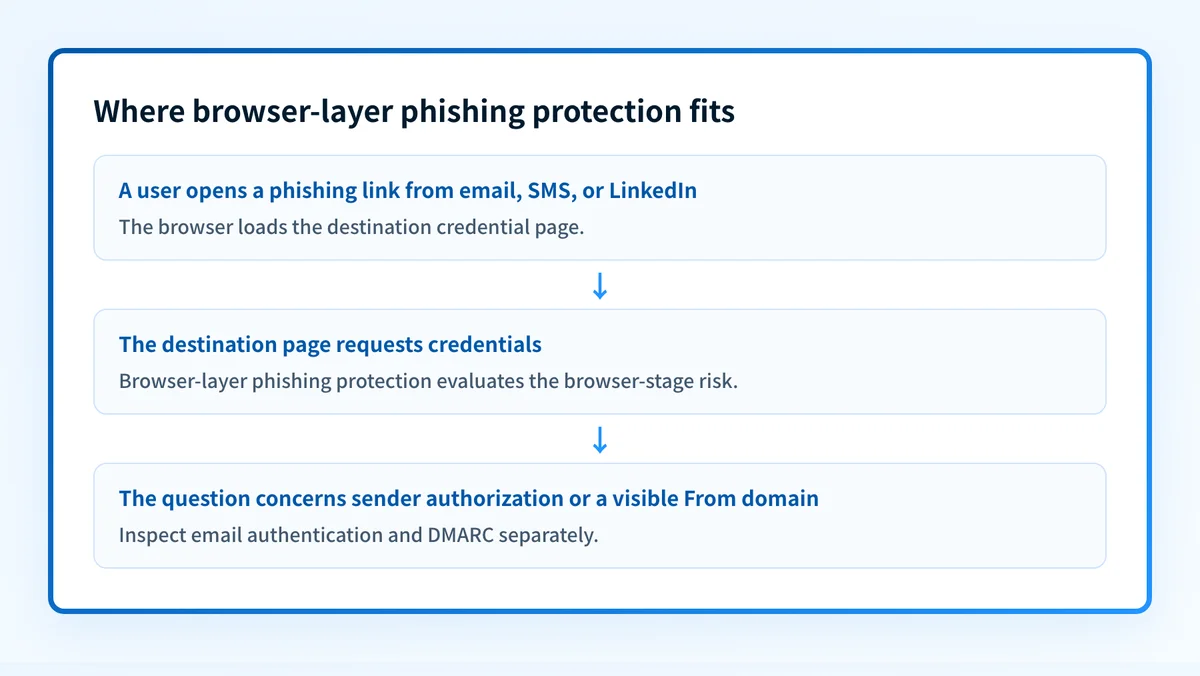
Browser-layer protection belongs within the wider set of controls covered in the email security guide. Email authentication can help a receiver assess whether a message legitimately uses a domain, while browser-layer protection addresses a later point in the attack path: the page a user reaches.
When browser-layer phishing protection changes the answer
Browser-focused protection is most relevant when the risk includes users reaching credential-harvesting pages from channels beyond the corporate inbox. Pixm's stated positioning covers that situation because it names LinkedIn, SMS, and other vectors in addition to corporate email.
Use this decision rule:
- If the question is whether a suspicious webpage could capture a user's credentials after they open it, browser-layer phishing protection is the relevant control category.
- If the question is whether a sender is authorized to use a visible From domain, inspect email authentication and DMARC instead.
- If the question is whether a receiving mailbox accepted, spam-foldered, or rejected a message, the receiving provider's own logs or dashboard are the relevant evidence.
- If the question is whether a user received a phishing message through a non-email channel, email controls alone do not cover the entire path.
Do not treat a browser-focused phishing control as proof that every phishing page will be detected or that every future credential theft attempt will be stopped. The supplied Pixm material does not document detection rates, false-positive rates, or coverage percentages.
Pixm says organizations can access stopped threats and targeted-user information through its web portal or through a SOC integration. That statement supports a review capability at a high level, but it does not document exact alert fields, policy settings, logging methods, retention, or integration procedures.
For a comparison framework that separates controls by the evidence they inspect, see anti-phishing software for business.
A worked phishing-control example
Consider an employee who receives a text message that appears to come from a familiar service. The message leads to a page that asks for a work email address and password.
Illustrative phishing path
SMS message
  -> user opens a link
  -> browser loads a credential-request page
  -> browser-layer phishing protection evaluates the page
  -> security team reviews any stopped threat or affected-user evidence
Separate email-domain controls:
  -> evaluate mail that uses the organization's visible From domain
  -> publish and enforce DMARC only after legitimate sources are validated
In this example, the text message is outside the corporate email path. A DMARC record for the organization's domain may help defend that domain against unauthorized email use, but it does not inspect the SMS link or determine whether the destination webpage is fraudulent.
The same separation applies to email. If an attacker sends a lookalike-domain message that passes through a recipient's mailbox, authentication results alone do not describe every page the recipient might open. Conversely, a browser-level stop does not identify whether the sender used an authorized domain or whether the organization's DMARC policy is correctly published.
Pixm says deployment can use a licensed installer, with automatic updates and no agents to manage. Treat that as Pixm's vendor claim, not as deployment instructions. The available information does not verify device-management compatibility, installation steps, supported platforms, or administrator approval requirements.
Choose the next check based on your evidence
Start with the evidence you actually have.
- If you have a suspicious URL or an email that links to one, preserve the message or URL according to your incident process and use the organization's security tooling to investigate it. A public email-domain check cannot determine whether the destination page is malicious.
- If you need to assess the email-domain controls that sit alongside browser protection, run the sending domain through Palisade's Email Security Score checker. It can help identify published email-security controls.
- If the incident involves a message claiming to use your domain, review your DMARC posture and the sending path. The threats and impersonation hub provides the wider context for phishing, impersonation, and related risks.
- If you are evaluating a browser-focused product, ask the vendor for current documentation that confirms supported browsers, operating systems, deployment model, alert evidence, SOC integration details, and the process for handling false positives.
Assess the email-domain layer beside browser protection
Pixm's stated browser focus addresses credential-phishing pages after a user reaches the browser. Check your email domain separately to identify whether published authentication and security controls need attention.
Check your email security score
An email-domain score cannot test Pixm's browser behavior, prove that a phishing page was blocked, monitor a device fleet, or replace evidence from an affected user's browser and security logs.
Evidence
Sources and further reading
Questions readers ask
Frequently asked questions
Does Pixm phishing protection only cover email phishing?
No, Pixm covers more than email. It says its browser phishing protection is meant to handle vectors including LinkedIn and SMS as well as corporate email. Pixm does not publish a full list of the channels and platforms it supports, so confirm the ones you care about with the vendor.
Does Pixm phishing protection replace DMARC?
No, the two controls do different jobs and one cannot stand in for the other. Pixm describes browser-layer protection against credential phishing. DMARC is an email-authentication policy that lets a domain owner state how receivers should handle messages that fail DMARC.
Can a browser-focused phishing tool prove an email was legitimate?
No, a browser-focused tool cannot settle that, because it only sees the browser stage. To judge whether an email legitimately used a visible From domain, you need message-authentication evidence from the headers and, where it applies, DMARC analysis.
Can administrators review threats that Pixm stopped?
Yes, administrators can review them. Pixm says stopped threats and the users targeted can be reached through its web portal or fed into a SOC. Pixm does not publish which views, fields, or integration methods that involves, so ask the vendor before you plan around it.
Does Pixm publish its supported browser list on its product homepage?
No, Pixm does not list supported browsers on its homepage. The page states the browser-focused positioning but names no browsers, operating systems, or deployment-management platforms. Ask Pixm directly if you need that list before a rollout.

Written by
Ian BussieresCTO & Co-Founder, Palisade
Ian Bussieres is the CTO and co-founder of Palisade, agentic DMARC software for IT teams and MSPs.
More from Ian →