What is phishing and what are the types of phishing attack?
 ChatGPT
 Claude
 Gemini
 Perplexity
 Grok
GrokIn brief
What is phishing? It is a deceptive message or site that steals data or prompts harmful actions. Learn common attack types and prevention steps.
Phishing is a social-engineering attack that uses a deceptive email, text, call, social-media message, or website to make someone disclose information, open a harmful attachment, or visit a malicious site. The attacker commonly seeks passwords, financial details, or access to an account. A convincing sender name does not prove that a message is legitimate, so verify an unexpected request through a contact method you already trust.
At a glance
Quick takeaways
- Phishing uses deception to prompt an unsafe action, such as entering a password or opening an attachment.
- Email phishing can impersonate a person or organization, but phishing also occurs through text messages, calls, social media, and websites.
- Spear phishing is targeted at a particular person or organization, while bulk phishing casts a wider net.
- Report suspicious messages through your organization's security process instead of replying to the message.
- Use a known website, phone number, or contact to verify an unexpected request.
- SPF, DKIM, and DMARC help reduce direct spoofing of a domain, but they do not stop attacks sent from lookalike domains or compromised accounts.
How phishing works
The Cybersecurity and Infrastructure Security Agency's phishing guidance describes phishing as attacks that use email, text messages, social media, or malicious websites to solicit personal information or persuade people to download malicious software.
A phishing attempt usually has four parts:
- A sender identity that looks familiar, such as a colleague, supplier, executive, or service provider.
- A reason to act quickly, often an account problem, payment request, document review, or security alert.
- A requested action, such as following a link, opening an attachment, sharing a code, or replying with information.
- A destination that captures credentials, money, information, or access.
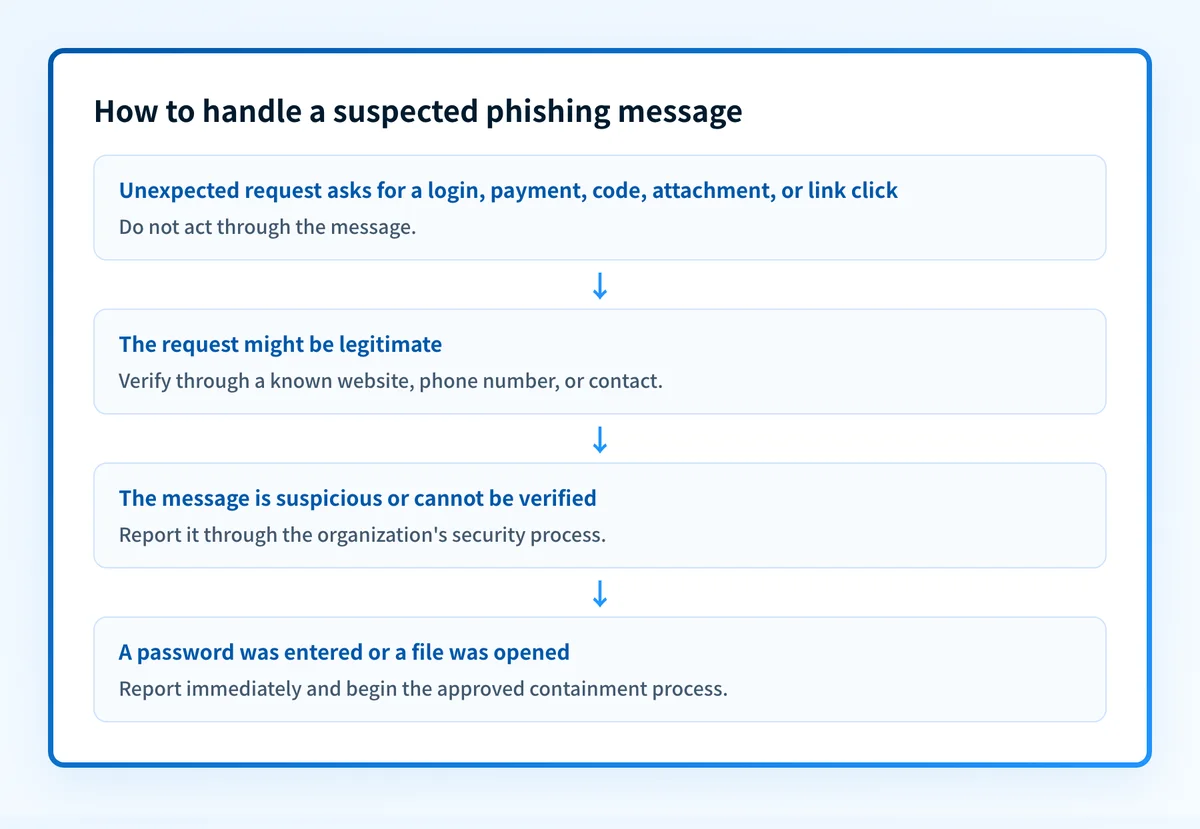
The message can be polished and still be fraudulent. The Federal Trade Commission's phishing guidance advises people to contact the organization through a phone number or website they know is real, rather than using the contact details in the unexpected message.
For more on the controls around email-borne threats, visit the email threats learning hub.
When phishing risk changes
Phishing is a category of attack, so the delivery method and target change the practical risk.
- Bulk phishing sends a general lure to many recipients. The attacker relies on scale and a familiar brand or common service. When the same message also qualifies as unwanted bulk mail, see spam vs phishing for the classification boundary.
- Spear phishing tailors a message to a person, role, project, or organization. It may imitate a known colleague or business partner.
- Whaling targets high-profile individuals, such as executives or notable figures within an organization. The attacker exploits the target's authority or access rights to reach sensitive corporate information or financial data.
- Angler phishing impersonates a brand's customer-support account on social media, replying to public complaints to pull the customer into sharing credentials or account details.
- Clone phishing copies a genuine email the target already received and resends it with the link or attachment swapped for a malicious one. Detailed below.
- Smishing delivers the lure through SMS or another text-based channel.
- Vishing uses a phone call or voicemail to request information, payment, or an authentication code.
- Business email compromise can involve an impersonated or compromised business account and a request for money, account changes, or sensitive information.
A message that passes authentication can still be phishing if it comes from a compromised legitimate account. Conversely, a failed authentication result can indicate spoofing without proving the sender intended to steal information. See the three dangerous email impersonation attacks for the distinction between common impersonation patterns.
Clone phishing
Clone phishing replicates a genuine, previously delivered email that contained an attachment or link, then resends it from an address mimicking the original sender with the attachment or link swapped for a malicious one. The copy often poses as a follow-up or corrected version of the original message, so it exploits the trust established through the earlier correspondence.
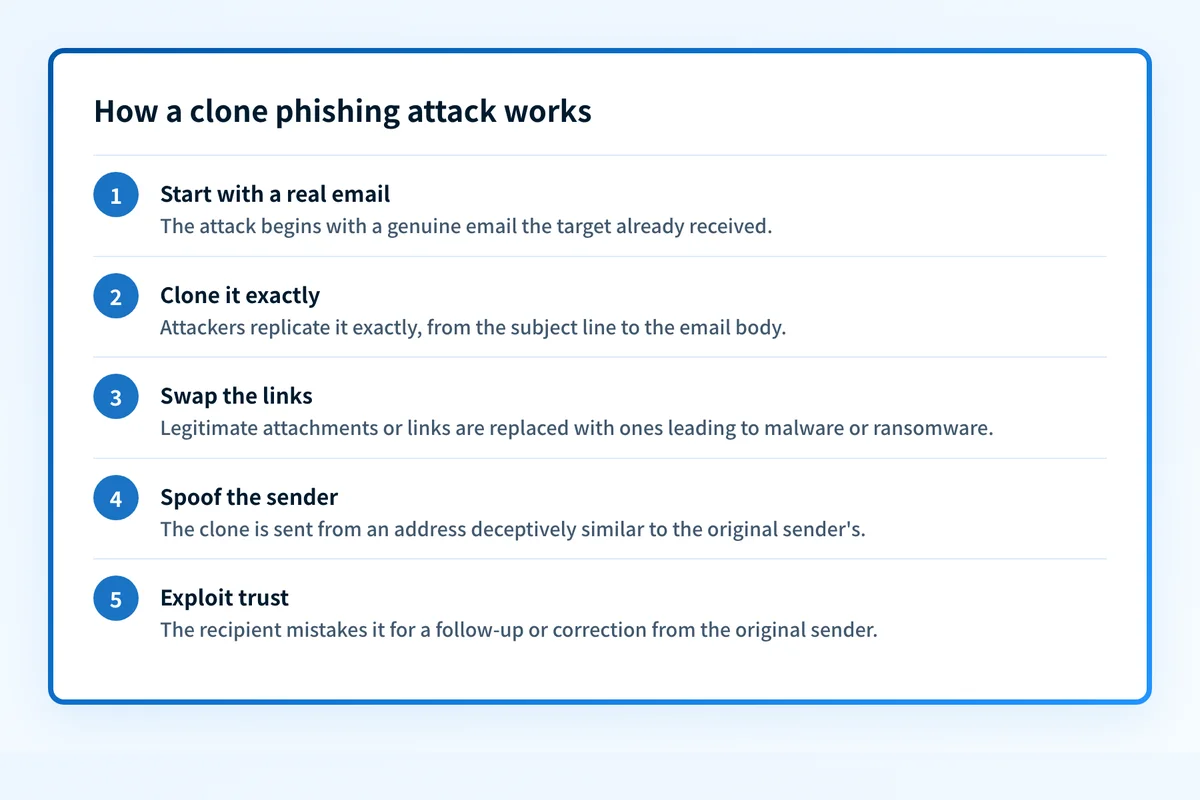
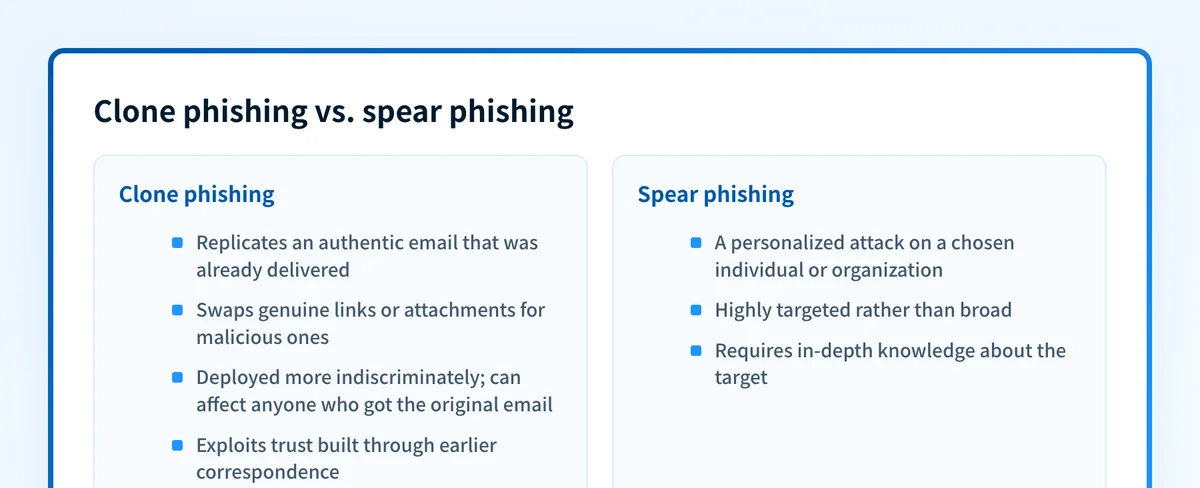
Clone phishing differs from spear phishing in targeting. Spear phishing is built around one person or organization and needs in-depth knowledge of the target. A clone can be sent more indiscriminately, to anyone who received the original email. Both rely on trust and human error.
Common clone lures include a link to a supposed software update that installs malware, an offer of gifts or prizes behind a harmful link, and clones aimed at personal email addresses, which often lack the security controls of corporate mail.
The clone arrives one of three ways: spoofing the original sender's exact domain, which DMARC at p=reject blocks; a lookalike domain; or a genuinely compromised account. The last two pass email authentication, so they need human verification of the sender and the swapped link. A website reputation check on that URL adds a second signal, but blocklists are backward-looking, so a clean result is not proof the link is safe.
A worked phishing decision example
Consider an unexpected email that says a shared document needs immediate review and includes a link. The evidence is the message's request, its actual URL, and whether the sender independently confirms the request.
Observed message:
"Review the updated payment details today"
Requested action:
Open a link and sign in
Safe decision:
Do not use the message link.
Open the supplier's known website or call a known contact.
Report the message through the organization's security process.
The wording alone does not prove phishing. A genuine supplier might send a real payment update. The unsafe step is trusting the message's link or reply address as the way to verify it.
If the message includes a URL, use the Palisade phishing link checker to inspect that URL before opening it. A URL check can identify public signals about the address, but it cannot prove a site is safe, inspect a private mailbox-provider decision, or replace confirmation from the supposed sender.
Do not forward a suspicious attachment to personal accounts or open it on a production device to investigate it. Follow your organization's incident process.
Practical prevention and reporting steps
Start with the evidence you have.
- You only have a suspicious message: do not click links, open attachments, reply, or provide codes. Report it using the reporting method your organization specifies, then delete or quarantine it according to that process.
- You have an unexpected request from a known organization: independently open its known website or use a known phone number. Do not use the link or number in the message.
- You clicked a link or entered a password: report the incident immediately. Change the affected password through the real service, end active sessions where the service supports it, and follow your security team's containment instructions.
- Your organization is being impersonated: identify the visible From domain, preserve redacted message headers and examples, and review whether your legitimate senders authenticate and align.
Teams choosing the inbound protection layer can use the anti-phishing software comparison to separate suite-native controls, dedicated email security, and sender-domain authentication.
Teams building the wider operational model can use the anti-phishing program guide to assign owners, define reporting and triage, and measure recurring improvements.
For domain owners, phishing attack protection: the controls that actually work covers the wider control set.
Keep track of impersonation evidence as your domain changes
A public record check can show what DNS publishes today, but it cannot inventory every production sender, prove that a delivered message aligned, or show a receiver's private filtering decision. Once a team needs to track DMARC aggregate-report data across domains, the remaining work is identifying legitimate sources, investigating authentication or alignment failures, and deciding when evidence supports a policy change.
Palisade is agentic DMARC software that analyzes DMARC aggregate-report data, identifies sending sources and authentication or alignment issues, and creates prioritized remediation tickets. It can propose a next policy step from the evidence, while a human reviews the evidence and applies the DNS change.
Palisade does not automatically change a DMARC policy, prove that every future message will authenticate, or guarantee inbox placement.
Evidence
Sources and further reading
Questions readers ask
Frequently asked questions
Is phishing only sent by email?
No. Phishing can arrive through email, text messages, phone calls, social-media messages, and malicious websites. The defining feature is the deceptive attempt to get someone to disclose information or take an unsafe action.
Is spear phishing more dangerous than bulk phishing?
Not always, but spear phishing is targeted and may use details about the recipient or organization to make the request believable. Treat both types as suspicious when they ask for credentials, payment, codes, or unexpected file access.
Can DMARC stop phishing?
No. DMARC helps reduce unauthorized email that directly uses your domain in the visible From field when receivers enforce the policy. It does not stop lookalike domains, compromised accounts, text-message phishing, or malicious websites.
Does DMARC stop clone phishing?
Only partly. DMARC at p=reject blocks clones that spoof the original sender's exact domain, but a clone sent from a lookalike domain or a genuinely compromised account passes authentication. Those need human verification of the sender address and the swapped link.
Should I reply to a suspicious email to check whether it is real?
No. Do not reply to a suspicious email to check whether it is real; use a known phone number, website, or established contact method instead. Replying can confirm that an address is active and keeps the verification inside the attacker's communication channel.
What should I report after a phishing attempt?
Report the suspicious message through your organization's security process and preserve the relevant evidence, such as the sender address, subject, URL, and redacted headers. If you entered credentials or opened a harmful attachment, report that immediately so the organization can contain the incident.

Written by
Ian BussieresCTO & Co-Founder, Palisade
Ian Bussieres is the CTO and co-founder of Palisade, agentic DMARC software for IT teams and MSPs.
More from Ian →