Phishing attack protection: the controls that actually work
 ChatGPT
 Claude
 Gemini
 Perplexity
 Grok
GrokIn brief
Phishing attack protection combines phishing-resistant MFA, DMARC enforcement, user training, and reporting; no single control stops every attempt.
Phishing attack protection is layered: no single control stops every attempt. The Cybersecurity and Infrastructure Security Agency (CISA), the NSA, the FBI, and MS-ISAC recommend phishing-resistant multi-factor authentication, DMARC enforcement on outbound mail, user training to recognize the message indicators below, and a defined reporting path. Individually each control has known gaps; together they cut off the credential theft and malware delivery that phishing exists to enable.
At a glance
Quick takeaways
- Phishing splits into two attacker goals: stealing credentials for network access, and delivering malware for follow-on activity, according to the joint CISA, NSA, FBI, and MS-ISAC phishing guide.
- Phishing-resistant MFA (FIDO or PKI-based) is the strongest single control; SMS, voice, and push notifications without number matching remain phishable.
- DMARC set to reject blocks exact-domain spoofing before delivery, but RFC 9989 states it does not stop visually similar lookalike domains or display-name spoofing.
- Spam filters catch many phishing emails but not all of them, according to the FTC, so filtering alone is not sufficient protection.
- CISA lists five common indicators of a phishing attempt: a mismatched sender address, a generic greeting, a spoofed hyperlink, spelling or layout errors, and an unexpected attachment.
- Individuals and organizations report phishing through different channels: individuals forward messages to reportphishing@apwg.org, while organizations use report@cisa.gov or the FBI's Internet Crime Complaint Center.
How a phishing attack works
CISA defines phishing as a form of social engineering in which attacks "use email or malicious websites to solicit personal information by posing as a trustworthy organization," such as a fake message from a credit card company claiming there is a problem with an account, per CISA's guidance on avoiding social engineering and phishing attacks. The message borrows a trusted identity to get the recipient to act before checking.
Behind that identity theft, attackers work toward one of two goals. The joint phishing guidance published by CISA with the NSA, FBI, and MS-ISAC splits phishing into credential theft, used to gain initial access to a network, and malware delivery, used for follow-on activity once a device is compromised, per the CISA phishing guidance on stopping the attack cycle. Which goal a message is working toward changes which control actually stops it. Phishing sits alongside a wider set of manipulation techniques covered on the email threats and impersonation hub, and it shares tactics with the broader category described in the most common social engineering attacks.
When the recommended control changes
The right control depends on which part of the phishing attack you are positioned to stop: the message itself, the sign-in it targets, the domain it spoofs, or the file it delivers.
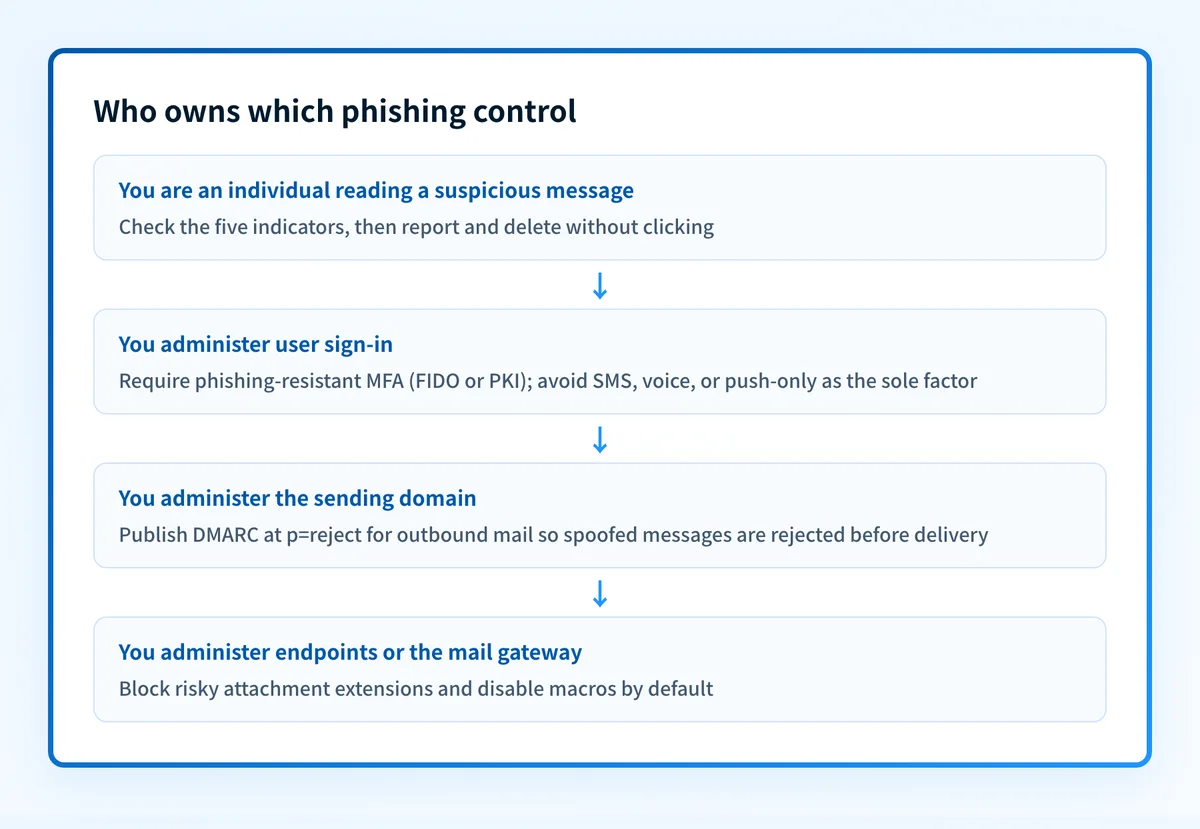
For individuals, CISA's small-business guidance states that activating strong MFA "is the best way that small businesses can protect their internet facing business accounts from phishing related threats," paired with annual phishing awareness training, DNS filtering, anti-virus software, and automatic software updates. Not all MFA is equal, though. The same guide calls FIDO and PKI-based MFA "phishing resistant," while flagging SMS or voice codes, which can be intercepted or phished through a fake login portal, and push notifications without number matching, which users sometimes approve out of fatigue.
For domain owners, the guide's credential-protection mitigations include enabling DMARC on received email, monitoring internal mail against a traffic baseline, and hardening credentials, alongside setting DMARC to reject on the mail the organization sends. On the reject setting, spoofed messages using that domain are "rejected at the mail server prior to delivery," and DMARC reports notify the domain owner when someone is forging it. Section 2.2 of the DMARC specification is explicit about the boundary of that protection: DMARC "is designed to prevent the unauthorized use of the Author Domain of an email message, a technique known as 'spoofing'," but it "can only be used to combat specific forms of exact-domain spoofing directly" and "does not address the use of visually similar domain names or abuse of the RFC5322.From human-readable display name," per RFC 9989 Section 2.2 on DMARC's anti-phishing scope. A domain publishing DMARC enforcement has closed one phishing avenue, not the whole category.
For endpoint and mail-gateway administrators, the malware-delivery side of the same guide recommends denylists at the email gateway, blocking file extensions such as .scr, .exe, .pif, and .cpl, restricting administrator rights, using application allowlists, and blocking macros by default.
Worked example: what to check in a suspicious message
CISA's five indicators of a phishing attempt give a fast, repeatable check before opening anything:
CISA's phishing-attempt indicators; any one is reason to slow down:
- Sender's address does not match the claimed organization.
- Generic greeting with no specific signature.
- Hyperlink text does not match its actual destination.
- Spelling or layout errors in the message.
- An attachment you were not expecting.
Do not click an "unsubscribe" link in a message you suspect is phishing. CISA's Recognize, Resist, Delete guidance treats that link as part of the same attack, not a way to opt out of it, and notes that AI-written phishing can now read with correct grammar and spelling, so a clean-looking message is not proof of legitimacy, per CISA's Recognize, Resist, Delete guidance.
A domain owner's enforcement side of the same problem is a DNS record, not a checklist:
v=DMARC1; p=reject; rua=mailto:dmarc-reports@yourdomain.comThis is an illustrative shape, not a record to publish as-is; the p=reject tag is what triggers the mail-server rejection behavior described above, and rua is where aggregate reports about attempted spoofing are delivered.
What to do next, based on where you are
If you have not clicked anything yet
Forward the suspicious email to reportphishing@apwg.org, or forward a phishing text to SPAM (7726). File a report at ReportFraud.ftc.gov, per the FTC's guidance on how to recognize and avoid phishing scams. Organizations should report to CISA at report@cisa.gov or the 24/7 line at (888) 282-0870, or file with the FBI's Internet Crime Complaint Center, per the CISA phishing guidance cited above. Then delete the message without clicking any link inside it.
If you already entered credentials or opened a file
Change the password on that account immediately and check for sign-ins you do not recognize. If you gave a scammer personal information such as a Social Security number or financial details, the FTC directs recovery through IdentityTheft.gov. Report the message through the same channels listed above either way, since the report also helps the platform or domain owner respond.
Filtering will not catch everything before it reaches this point. The FTC is explicit that spam filters keep out many phishing emails, "But scammers are always trying to outsmart spam filters, so extra layers of protection can help." That is the case for training, phishing-resistant MFA, and DMARC enforcement together, rather than any one of them alone. Microsoft 365 mailboxes get a related layer by default: spoof intelligence and anti-phishing policies, an option to honor a sender's own DMARC policy, and implicit authentication that adds sender reputation and behavioral signals to SPF, DKIM, and DMARC, per Microsoft's anti-phishing protection documentation for Microsoft 365. Defender for Office 365 adds impersonation protection, Campaign Views, and attack simulation training on top of that baseline.
Check what your domain currently exposes
DMARC enforcement stops spoofed messages that use your exact sending domain, but it says nothing about your broader authentication posture, such as whether legitimate senders are aligned or whether your MX and DNS configuration have other gaps a phishing-style spoofing attempt could exploit. Run the domain through Palisade's email security score to see the current authentication and DNS posture before deciding what to fix first.
Check your domain's email security score
A domain score does not train a user to recognize the indicators above, catch a lookalike domain your organization does not own, or stop a message after someone has already clicked it. Those depend on the training, reporting, and endpoint controls covered above, tied together as an ongoing program rather than a one-time check, as covered in building an email security program. For a wider comparison of vendor tools that filter or flag phishing before it reaches a mailbox, see how to compare anti-phishing software.
Evidence
Sources and further reading
- CISA: Avoiding social engineering and phishing attacks
- CISA, NSA, FBI, MS-ISAC: Phishing guidance, stopping the attack cycle
- CISA: Recognize, Resist, Delete (Secure Our World)
- FTC: How to recognize and avoid phishing scams
- Microsoft: Anti-phishing protection in Microsoft 365
- RFC 9989: Domain-based Message Authentication, Reporting, and Conformance (DMARC)
Questions readers ask
Frequently asked questions
What is the best way to protect against a phishing attack?
For individuals and small businesses, CISA's joint guidance with the NSA, FBI, and MS-ISAC states that activating strong MFA "is the best way that small businesses can protect their internet facing business accounts from phishing related threats," combined with annual training, DNS filtering, endpoint protection, and automatic software updates. For organizations that own a sending domain, add DMARC set to reject on outbound mail, since that stops spoofed messages using the exact domain before they are delivered.
What should you never open in spam mail?
CISA's Recognize, Resist, Delete guidance says not to click links or attachments in a message you suspect is phishing, including an "unsubscribe" link, and to delete it instead. The joint federal phishing guidance separately recommends blocking specific attachment file types at the mail gateway, including .scr, .exe, .pif, and .cpl, since attackers commonly use those extensions to deliver malware.
How do I know if I got phished?
There is no single confirmed sign; the clearest evidence is your own action on the message. If you entered credentials on a site linked from the email, opened an attachment you were not expecting, or handed over personal information, treat the account as compromised. The FTC directs anyone who gave a scammer personal information to IdentityTheft.gov, and CISA recommends reporting the message regardless, through report@cisa.gov for organizations or reportphishing@apwg.org for individuals.
What are the 4 P's of phishing?
No CISA, FTC, or Microsoft source defines a "4 P's of phishing" framework. If you have seen the term elsewhere, treat it as unverified shorthand rather than official guidance, and use CISA's five documented indicators of a phishing attempt instead: a mismatched sender address, a generic greeting, a spoofed hyperlink, spelling or layout errors, and an unexpected attachment.
Is MFA enough to stop phishing on its own?
No, not every form of MFA holds up against phishing. CISA's joint guidance with the NSA, FBI, and MS-ISAC calls FIDO and PKI-based MFA "phishing resistant," but flags SMS or voice codes, which can be intercepted or phished through a fake login portal, and push notifications without number matching, which users sometimes approve without checking. The type of MFA in use determines whether it actually blocks a credential-phishing attempt.

Written by
Ian BussieresCTO & Co-Founder, Palisade
Ian Bussieres is the CTO and co-founder of Palisade, agentic DMARC software for IT teams and MSPs.
More from Ian →