ESET anti-phishing protection is non-functional
 ChatGPT
 Claude
 Gemini
 Perplexity
 Grok
GrokIn brief
ESET anti-phishing protection is non-functional when its product-specific status needs diagnosis. Identify the product, symptom, and official support path.
ESET anti-phishing protection is non-functional only when the relevant ESET product identifies a specific protection failure or when a reproducible symptom shows the feature is not operating as expected. The query alone does not establish the product, operating system, browser, warning, or cause. Start by preserving the exact status text and identifying the installed ESET product, then use ESET's product-specific documentation or support path.
At a glance
Quick takeaways
- "Anti-phishing protection is non-functional" is not enough information to identify a safe repair.
- The exact ESET product, version, operating system, and symptom determine which documentation applies.
- A browser, endpoint, or URL-protection issue is separate from DMARC, SPF, and DKIM authentication.
- Do not change security settings based on a generic fix that does not match the displayed ESET status.
- ESET directs users to search its help pages, documentation, guides, and FAQs before using its support path.
- A domain email-security assessment does not test whether ESET endpoint protection is active.
What the message does and does not establish
A report that ESET Anti-Phishing protection is non-functional establishes a need for product-specific diagnosis. It does not, by itself, establish that phishing email reached a mailbox, that a browser extension failed, or that a domain's email authentication is misconfigured.
Phishing is an attempt to obtain information or induce an unsafe action through impersonation or deceptive content. Palisade's explanation of phishing covers that broader threat. Endpoint and browser protections can be part of a layered defense, but a single endpoint status does not describe every protection layer.
The available public ESET support entry points direct users toward documentation and assistance rather than providing one universal remediation sequence. ESET Help asks users to "Search through ESET help pages, documentation, guides, and FAQs." ESET Support provides Knowledgebase and Technical Support paths.
That distinction matters because the same wording may refer to different products or environments. Without the exact product-specific page, it is not safe to infer:
- Whether the relevant feature is an endpoint, browser, email-client, or network control.
- Whether a setting is enabled, disabled, excluded, unavailable, or reporting an error.
- Whether an update, browser component, policy, license state, or another condition is involved.
- Which navigation path or repair action ESET currently documents.
When the answer changes
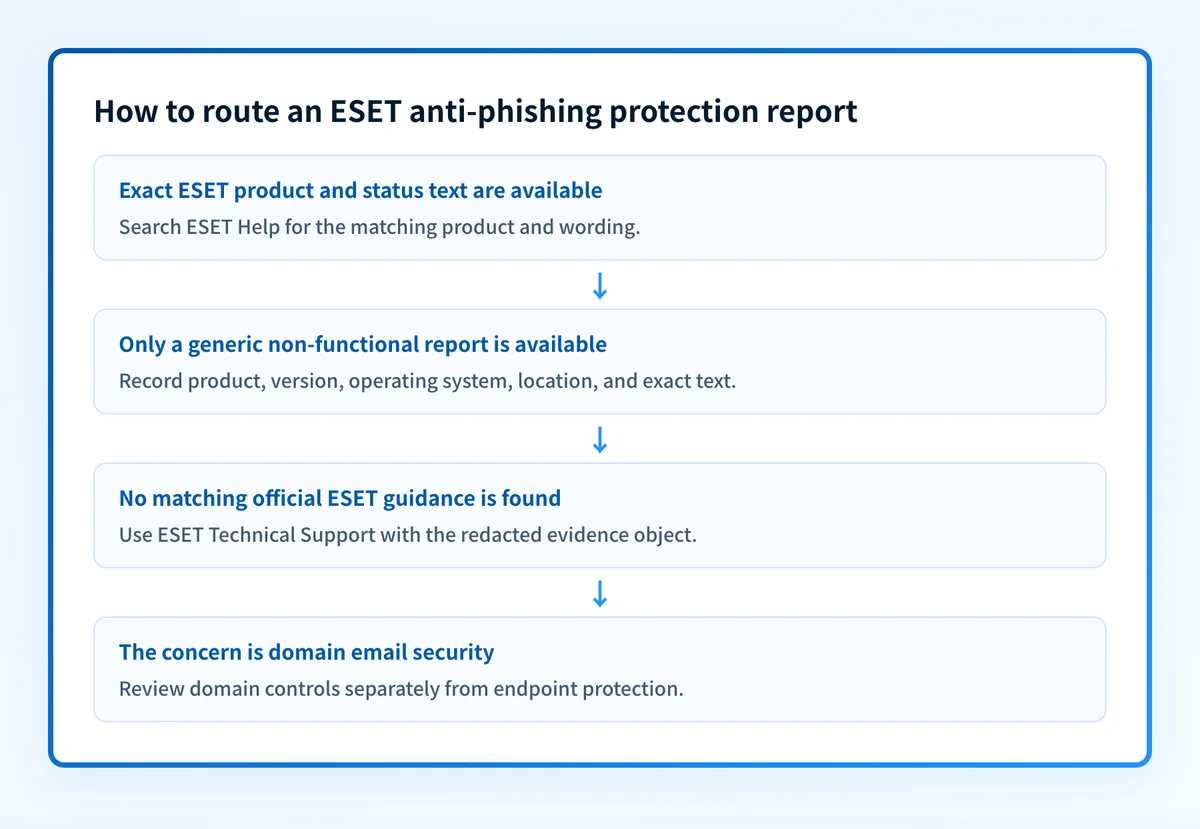
Use this decision rule before taking action:
- If you have an exact ESET warning or status, search that text with the ESET product name on ESET Help.
- If you know the product but do not have the exact symptom, record the product name, version, operating system, and where the warning appears before searching the product documentation.
- If the issue occurs only in a browser or on one endpoint, keep the investigation scoped to that device and its documented ESET configuration.
- If the concern is phishing messages that use your organization's domain, inspect sender authentication and domain controls separately. An endpoint anti-phishing status does not prove a DMARC, SPF, or DKIM failure.
- If no matching official documentation resolves the symptom, use ESET's Technical Support path with the product and exact observed message.
Do not disable phishing-related protection, add exclusions, or apply registry or policy changes from an unrelated product guide. A mismatch can reduce protection without resolving the displayed condition.
Threats and impersonation resources can help place the symptom in a broader security review. They do not replace ESET's product documentation for a protection-state warning.
Worked evidence example
Collect a short, factual evidence object before looking for a fix. Do not include account credentials, license keys, private URLs, customer data, or unredacted email contents.
ESET product: [exact installed product name]
Product version: [version shown by the product]
Operating system: [name and version]
Where the issue appears: [product window, browser, or endpoint context]
Exact status text: "[copy exactly]"
When observed: [date and time with time zone]
Scope: [one endpoint or multiple endpoints]
Recent change: [only if known and documented]
This is a diagnostic record, not proof of the cause. It makes it possible to match the issue to the correct ESET documentation and avoid treating a generic phrase as a universal error code.
For example, a report with only "non-functional" should stop at identification and evidence capture. A report that adds the exact product name and exact status text can be searched against ESET's documented help content. If the wording appears only after a particular browser action, that context belongs in the support request. If it appears across managed endpoints, document the scope but do not assume the cause is a shared policy until ESET's guidance supports that conclusion.
What to check next
Choose the next action based on the evidence you have.
- With the exact ESET status text: search ESET Help using the text and product name. Use only a page that names the same product and platform.
- With a product name but no clear symptom: capture the product version, operating system, and location where the issue appears. Then search the matching ESET documentation.
- With no matching documentation: submit the collected evidence through ESET Support. Include the observed scope and exact text rather than a paraphrase.
- With a separate concern about your domain's email controls: review email security as a distinct control area. Domain authentication helps receivers evaluate mail that uses your domain, while endpoint anti-phishing software addresses a different part of the threat path.
Review the separate email-security controls
If the ESET issue prompted a wider review of phishing defenses, start with the controls that protect your sending domain and mail flow.
Review email security controls
This guide cannot diagnose, repair, or confirm ESET Anti-Phishing protection. It covers domain-level email-security controls, which need separate evidence and validation.
Evidence
Sources and further reading
Questions readers ask
Frequently asked questions
Does this message prove that ESET is blocking phishing protection?
No. The phrase alone does not identify the ESET product, the protection component, or the condition behind the status. Use the exact displayed text with the matching product documentation.
Should I disable ESET Anti-Phishing protection to clear the warning?
No. Do not disable a protective control based on a generic warning description. First find the official ESET guidance for the exact product, platform, and status text.
Can a DMARC record fix ESET Anti-Phishing protection?
No. DMARC is a domain-based email authentication policy. It is separate from an ESET endpoint or browser protection state, although both can contribute to a broader phishing-defense program.
Can an email-security score test ESET protection?
No. A public domain assessment can review domain-facing email-security signals. It cannot inspect ESET software installed on an endpoint or confirm that its anti-phishing feature is functional.
What information should I provide to ESET Support?
Provide the exact ESET product name, version, operating system, where the status appears, the exact status text, when it occurred, and whether it affects one endpoint or multiple endpoints. Exclude credentials, license keys, private URLs, and customer data.

Written by
Ian BussieresCTO & Co-Founder, Palisade
Ian Bussieres is the CTO and co-founder of Palisade, agentic DMARC software for IT teams and MSPs.
More from Ian →