What are the 3 types of email impersonation attacks?
 ChatGPT
 Claude
 Gemini
 Perplexity
 Grok
GrokIn brief
Email impersonation attacks commonly use an exact domain, a lookalike domain, or a free-mail account. Learn how each type works. Learn what to verify.
The three common types of email impersonation attacks are exact-domain spoofing, lookalike-domain impersonation, and free-mail impersonation. Exact-domain spoofing falsely uses a real organization's domain. Lookalike-domain attacks use a similar but separate domain. Free-mail attacks use an account from a legitimate provider while copying a trusted name. DMARC can help domain owners protect their own domain, but it cannot stop every lookalike or free-mail message.
At a glance
Quick takeaways
- Exact-domain spoofing attempts to send mail that appears to use a legitimate domain without authorization.
- Lookalike-domain impersonation uses a separately registered domain that resembles a trusted one.
- Free-mail impersonation uses an address from a legitimate provider, often with a misleading display name.
- DMARC evaluates whether SPF or DKIM authenticates and aligns with the visible From domain.
- A message that passes its own provider's checks can still be an impersonation attempt if it uses a different domain.
- Unusual payment, payroll, credential, or bank-detail requests need independent verification through a known channel.
How the three email impersonation attack types work
The three labels describe the sender identity an attacker puts in front of the recipient. They are useful for deciding what evidence to inspect and which controls can help.
Exact-domain spoofing
Exact-domain spoofing uses the organization's real domain in the visible From address. For example, an attacker might try to send a message that appears to be from finance@yourdomain.com without using an authorized sending service.
DMARC in RFC 9989 checks whether SPF or DKIM passes with an identifier aligned to the visible From domain. A domain owner can publish a DMARC policy requesting how receivers handle messages that fail this validation. A receiver still makes its own final delivery decision.
This is the category where the domain owner has the most direct control. A domain with a properly deployed DMARC policy can make unauthorized use of its exact domain harder to accept at receiving systems. For the broader security context, see the Palisade email security learning hub.
Lookalike-domain impersonation
Lookalike-domain impersonation uses a different domain that resembles a real one. The attacker may alter a character, add a word, substitute a similar-looking character, or use a domain that suggests a supplier or executive relationship.
For example, yourdoma1n.com is separate from yourdomain.com, even if a recipient reads it as familiar. Microsoft describes spoofing as a message that uses a forged sender address or display name to make the sender appear to be someone else in its spoof intelligence documentation.
DMARC for yourdomain.com cannot control a DMARC record published by the owner of yourdoma1n.com. That message may authenticate for the attacker's separate domain. The practical check is the actual address and domain, not only the display name.
Free-mail impersonation
Free-mail impersonation uses an account from a legitimate email provider, such as an address created through a public mail service. The attacker may set a display name that matches an executive, colleague, customer, or vendor.
The sending provider can authenticate the message for the attacker's free-mail account. That does not establish that the sender is the person named in the display name or that a payment request is genuine. The Cybersecurity and Infrastructure Security Agency's business email compromise guidance recommends verifying requests to change payment information or transfer funds through a known phone number or in-person contact.
When the answer changes
These categories can overlap. A message can use a copied display name and a lookalike domain at the same time. It can also use a compromised legitimate mailbox rather than a newly created address. In that case, the visible sender may be genuine, while the request or message content is unsafe.
Use this decision rule:
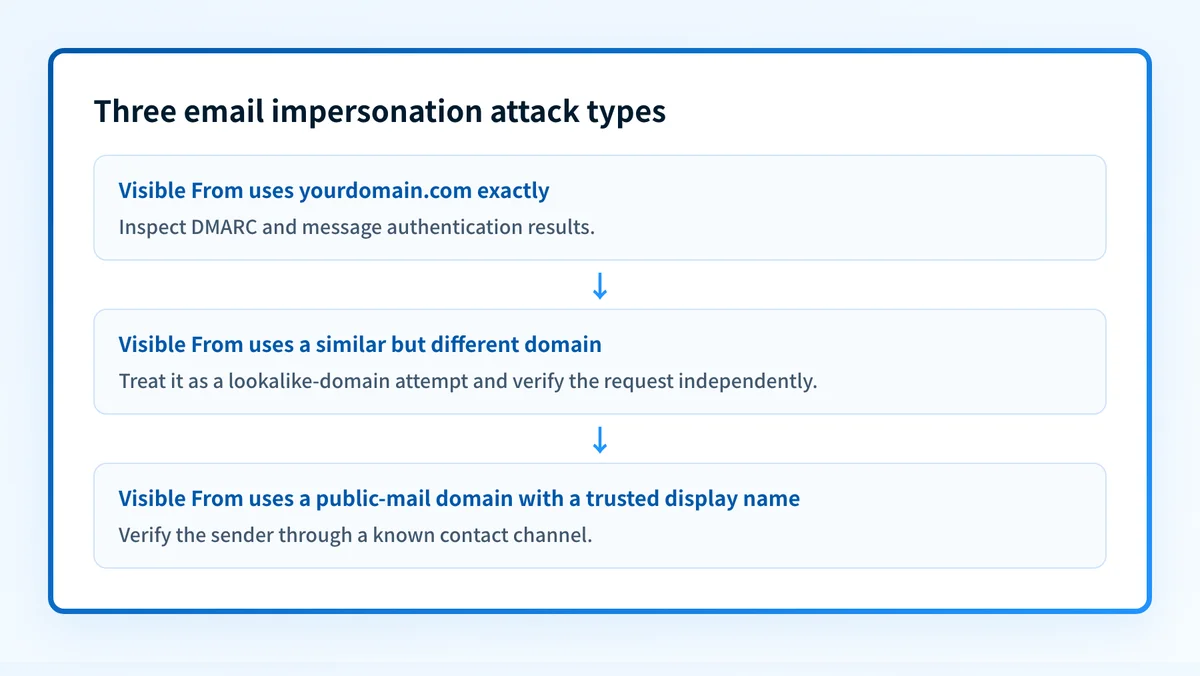
- If the visible From domain exactly matches the domain being protected, investigate whether the message has an aligned SPF or DKIM pass and whether the domain's DMARC policy applies.
- If the visible From domain is similar but different, treat it as a separate-domain impersonation issue. Compare every character in the domain and verify the request outside email.
- If the visible From address belongs to a public mail provider but claims to be a business contact, verify the relationship and request through a known contact method.
- If the message came from a known address but requests an unusual action, do not assume authentication proves the request is authorized. Escalate through the organization's payment or incident process.
A worked sender-identity example
A recipient should compare the display name, visible From address, and authentication result. The following is illustrative only. Do not treat it as a complete message header or publish unredacted production headers.
Display name: Jordan Lee, Finance
From: Jordan Lee <finance@yourdoma1n.com>
Authentication-Results: mx.receiver.example;
  dkim=pass header.d=yourdoma1n.com;
  dmarc=pass header.from=yourdoma1n.com
This example can pass DMARC for yourdoma1n.com because the DKIM domain and visible From domain align. It still does not authenticate as yourdomain.com.
RFC 8601 defines the Authentication-Results header field for recording message authentication assessments. When an operator has a delivered message, its raw headers are stronger evidence than the display name alone. Compare the header.from value with the exact domain the business expects to use.
For an exact-domain claim, a different result might look like this:
Display name: Jordan Lee, Finance
From: Jordan Lee <finance@yourdomain.com>
Authentication-Results: mx.receiver.example;
  spf=fail smtp.mailfrom=unrelated.example;
  dkim=fail;
  dmarc=fail header.from=yourdomain.com
The second example indicates an authentication failure for the visible From domain. The receiver's final handling still depends on its local policy and the DMARC policy it discovers.
What to do with the evidence you have
If you only have a suspicious message, inspect the full sender address, preserve the message, and use your organization's incident-reporting process. Verify sensitive requests through a phone number or contact record you already know, not a number supplied in the email.
If you administer the domain used in an exact-domain attempt, inspect the public DMARC record and compare it with the intended policy. Palisade's DMARC checker accepts a domain name and shows the public record it can find. It cannot inspect a particular message or identify whether a lookalike domain is affiliated with your organization.
If you have raw message headers, compare the visible From domain with the Authentication-Results values. A DMARC result can help distinguish an exact-domain authentication failure from a message that authenticated for a separate lookalike domain.
For ongoing domain protection, review DMARC aggregate reports to identify legitimate sending sources, authentication failures, and alignment issues before raising the policy. What is an impersonation attack and how can you stop it? explains broader prevention measures beyond a single sender check.
Inspect the DMARC record behind an exact-domain attempt
If a suspicious message claims to be from your own domain, check the public DMARC record before changing DNS. Compare the lookup with the delivered message's authentication results and with the sending sources your organization has approved.
A public-record check cannot prove why a particular receiver accepted a message, identify a separate lookalike domain, or show whether every production sender is aligned.
Once reports accumulate, Palisade is agentic DMARC software that analyzes DMARC aggregate-report data, identifies sending sources and authentication or alignment issues, and creates prioritized remediation tickets. It can propose the next policy step based on the evidence, while a human reviews the evidence and applies any DNS change.
Palisade does not control a receiver's private delivery decision, block every lookalike domain, or prove that future messages will authenticate.
For a provider-specific implementation of these authentication checks, see What is email impersonation and how can you prevent it in 2025?.
Evidence
Sources and further reading
Questions readers ask
Frequently asked questions
Can DMARC stop lookalike-domain attacks?
No. DMARC for your domain governs messages that use your domain in the visible From address. A lookalike domain is a separate domain with its own DNS and authentication configuration.
Is a free-mail address always malicious?
No. Many legitimate people and small businesses use public email providers. Treat an unexpected request, misleading display name, or unusual payment instruction as a reason to verify the sender independently.
Does a DMARC pass prove an email is safe?
No. A DMARC pass shows that SPF or DKIM authenticated and aligned with the visible From domain under the applicable evaluation. It does not prove the sender's real-world identity or the safety of the requested action.
What should an employee do after receiving a suspected impersonation email?
Preserve the message and report it through the organization's security process. Verify any payment, payroll, credential, or bank-detail request through a known phone number or established contact channel.
Which impersonation type can a domain owner address with DMARC?
Exact-domain spoofing. DMARC lets the owner publish handling preferences for messages that fail DMARC while using the owner's visible From domain. It does not give the owner control over unrelated domains or public-mail accounts.

Written by
Ian BussieresCTO & Co-Founder, Palisade
Ian Bussieres is the CTO and co-founder of Palisade, agentic DMARC software for IT teams and MSPs.
More from Ian →