What is an impersonation attack and how can you stop it?
 ChatGPT
 Claude
 Gemini
 Perplexity
 Grok
GrokIn brief
An impersonation attack poses as a trusted person or domain to obtain money, data, or access. Learn how to identify, contain, and reduce email.
An impersonation attack is a phishing attack in which someone pretends to be a trusted person, company, or domain to make a recipient send money, disclose information, or take another unsafe action. Stopping it requires two responses: verify unusual requests through a separate channel, then reduce forged-domain mail with DMARC and mail-provider impersonation controls. Those controls reduce risk, but they do not prove every message or request is legitimate.
At a glance
Quick takeaways
- An impersonation attack can copy a person's display name, a company domain, or both.
- A message can be an impersonation attempt even when it has correct spelling and professional formatting.
- Confirm unexpected payment, credential, payroll, or bank-detail requests through a known phone number or another trusted channel.
- DMARC helps receivers identify mail that forges a domain in the visible From address.
- Look-alike domains can pass their own authentication, so DMARC alone does not stop every impersonation attempt.
- Mail-provider anti-phishing controls can protect selected people and domains, then quarantine or otherwise handle detected impersonation attempts.
How an impersonation attack works
Email impersonation relies on a recipient recognizing a name, role, supplier, or domain and acting before checking the request. Microsoft describes business email compromise as phishing that uses forged trusted senders, such as financial officers, customers, or partners, to persuade recipients to approve payments, transfer funds, or reveal data. Microsoft's anti-phishing guidance distinguishes this from broad phishing because the message is tailored around a trusted identity.
The identity can be imitated in more than one way:
- Display-name impersonation uses the name of an executive, colleague, or vendor while sending from a different address.
- Domain impersonation uses a domain that looks similar to the real one, such as a changed character or different top-level domain.
- Direct domain spoofing forges the legitimate domain in the visible From address.
DMARC addresses direct domain spoofing. Under RFC 9989, DMARC evaluates whether SPF or DKIM passes with alignment to the visible From domain. A domain owner can publish a policy requesting how receivers handle messages that fail that evaluation. It does not tell a receiver that a separately registered look-alike domain is trustworthy or fraudulent.
For a broader view of these controls, see the email security learning hub.
When the answer changes
The safest response depends on what the attacker is imitating and what evidence you have.
If the visible From domain is your own domain, inspect DMARC, SPF, and DKIM first. A DMARC failure can support a spoofing finding, but a receiver still applies its own local handling. Microsoft notes that a composite authentication failure does not automatically mean a message is blocked because its systems consider other signals as well. See Microsoft's explanation of anti-spoofing protection.
If the sender uses a look-alike domain, a valid DMARC record on your real domain will not authenticate or reject that other domain. The message may use correctly configured authentication for its own domain while attempting to deceive the recipient. This is why recipient verification and domain-impersonation controls matter alongside DMARC.
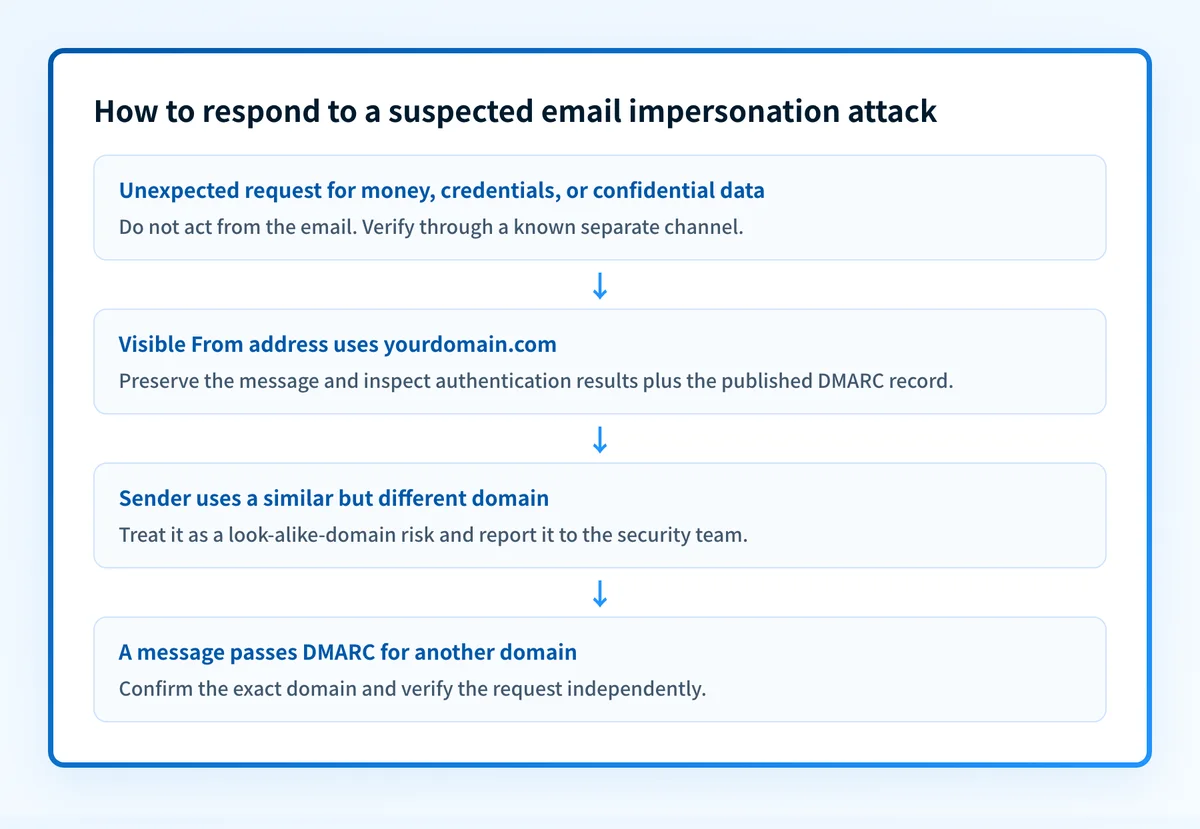
Use this decision rule:
- If the request is unexpected and concerns money, credentials, payroll, tax records, bank details, or confidential data, stop and verify it through a contact method already known to be legitimate.
- If the address claims to use your domain, preserve the message and examine its full headers and authentication results before drawing conclusions.
- If the domain is similar to a trusted domain, report it to the security team or mail administrator. Do not reply to the message to verify it.
- If the message contains a link, do not use the link as the verification path. Find the organization's site or contact details independently.
A worked email-impersonation check
Start with the message evidence rather than the display name. In a delivered email, Authentication-Results records a receiver's authentication assessment. RFC 8601 defines this header field and its properties, including smtp.mailfrom and header.d.
From: Finance Director <finance-director@yourdomain.com>
Reply-To: payments-review@similar-domain.example
Authentication-Results: receiver.example;
  dmarc=fail header.from=yourdomain.com;
  spf=fail smtp.mailfrom=similar-domain.example;
  dkim=none
This is illustrative only. Do not publish message headers that contain customer addresses, message IDs, or other sensitive information.
In this example, the visible From domain is yourdomain.com, while the return path is a different domain and DMARC fails. That combination should lead to containment and investigation, not a reply or payment action. The header does not establish who sent the message, whether a mailbox was compromised, or why a particular receiver made its final delivery decision.
A contrasting example is a look-alike domain:
From: Finance Director <finance-director@yourdoma1n.example>
Authentication-Results: receiver.example;
  dmarc=pass header.from=yourdoma1n.example;
  spf=pass smtp.mailfrom=yourdoma1n.example;
  dkim=pass header.d=yourdoma1n.example
A pass here can mean that the sender authenticated yourdoma1n.example, not that it is your organization. Compare the exact domain spelling with a known address, and verify the request outside the email thread. For executive-targeted attacks, see what a whaling attack is and how to stop it.
What to do next, based on your evidence
If you have a suspicious message, preserve it and report it through your organization's incident process. Do not click links, open attachments, or continue the conversation. Contact the supposed sender through a known phone number, internal directory entry, or a separate, established conversation. If money has already moved or credentials were submitted, escalate immediately under the incident-response process.
If you administer the affected domain, validate four layers before treating a control as effective:
- DNS: Query the authoritative DNS service and a public resolver for the published DMARC record.
- Vendor: Confirm the mail provider's current anti-phishing and impersonation policy settings.
- Message: Send a test through the real production path and inspect the delivered message's
Authentication-Results. - DMARC: Review aggregate reports after they accumulate to identify sources that fail authentication or alignment.
Do not move a DMARC policy toquarantineorrejectbased only on a DNS lookup. A published record does not prove that every legitimate production sender aligns.
Microsoft 365 administrators can configure anti-phishing policies for specified users and domains, then choose an action for detected impersonation, including quarantine. The Microsoft configuration guide documents the available settings and their scope. Other mail platforms have different controls, so use the provider's current documentation for the actual policy path.
Check the domain controls behind a suspected spoof
If a suspicious email claims to come from your domain, inspect the domain's public DMARC, SPF, DKIM, and related security configuration before changing DNS. Compare the result with the message headers and your provider's detection records.
Check the email security configuration
A public configuration check cannot prove who sent an individual message, detect a look-alike domain, monitor future attacks, or explain a receiver's private delivery decision.
If the public record is correct but reports show unknown sources, missing alignment, or later DNS drift, Palisade is agentic DMARC software that analyzes aggregate-report data, identifies sending sources and authentication or alignment issues, and creates prioritized remediation tickets. It can propose the next DMARC policy step for human review, but it does not automatically change the policy or guarantee delivery.
Evidence
Sources and further reading
Questions readers ask
Frequently asked questions
Is an impersonation attack the same as phishing?
No. Impersonation is a type of phishing that focuses on appearing to be a specific trusted person, organization, or domain. A generic phishing message may imitate a broad service, while an impersonation attack usually uses a relationship, role, or look-alike identity to increase trust.
Can DMARC stop every impersonation attack?
No. DMARC helps receivers handle messages that forge the visible From domain and fail aligned SPF or DKIM. It does not stop a separately registered look-alike domain, a compromised legitimate mailbox, or a fraudulent request sent through another channel.
Should a recipient trust a message that passes DMARC?
No. A DMARC pass confirms aligned authentication for the visible From domain under the receiver's evaluation. It does not confirm that a payment request is authorized, that the sender's mailbox is uncompromised, or that a similar-looking domain belongs to the expected organization.
What is the first action after receiving a suspected impersonation email?
Do not reply, click, open attachments, or act on the request. Preserve the message and verify the request with the supposed sender through a trusted, separate channel. Then report it through the organization's security or incident-response process.
Can a copied display name identify an impersonation attempt?
Only sometimes. A copied display name can be a warning, but it is not enough to prove fraud because legitimate messages can use familiar names. Check the full sender address, inspect headers when available, and independently verify unusual requests.
Do mail-provider impersonation controls replace employee verification?
No. Provider controls can detect and act on configured user or domain impersonation signals, but they can miss attacks or create false positives. Independent verification remains necessary for high-risk requests.

Written by
Ian BussieresCTO & Co-Founder, Palisade
Ian Bussieres is the CTO and co-founder of Palisade, agentic DMARC software for IT teams and MSPs.
More from Ian →