What is a whaling attack and how can you stop it?
 ChatGPT
 Claude
 Gemini
 Perplexity
 Grok
GrokIn brief
What is a whaling attack? It is targeted phishing aimed at senior leaders. Learn how to verify requests and reduce email impersonation risk.
A whaling attack is a targeted phishing attack aimed at high-ranking people, such as executives, finance approvers, and board members. The attacker uses a convincing request, often involving money, credentials, or sensitive data, to make the target act quickly. Stop it with independent verification for high-risk requests, email protections that detect spoofing and impersonation, and domain authentication that makes direct spoofing of your domain harder.
At a glance
Quick takeaways
- Whaling is targeted phishing against high-ranking members of an organization, according to CISA's definition.
- A message can impersonate a real person with a lookalike domain that still passes SPF, DKIM, and DMARC.
- Finance and payroll changes need verification through known contact details outside the email thread.
- DMARC helps receivers evaluate mail that falsely claims to use your domain, but it does not stop compromised accounts or lookalike domains.
- Microsoft 365 can apply impersonation protection and spoof controls, with the final action determined by your configured policy.
- Review suspicious requests before replying, opening attachments, following links, or changing payment details.
How a whaling attack works
Whaling relies on trust and context. An attacker may pose as a chief executive, legal adviser, supplier, or finance leader and send an urgent request for a transfer, payroll file, password, or login approval. NIST's phishing guidance identifies urgency, requests for sensitive information, and suspicious sender addresses as common warning signs. It recommends verifying a request through known contact information, rather than contact details supplied in the message.
The attacker can use several sending paths:
- A forged message that claims to be from your domain. SPF, DKIM, and DMARC help a receiving system evaluate this type of spoofing.
- A lookalike domain or similar display name. Microsoft's impersonation guidance distinguishes this from domain spoofing because a lookalike can be a real registered domain and may pass normal authentication checks.
- A compromised mailbox that sends from a legitimate account. Authentication checks may pass because the account is authorized to send.
- A reply-chain or supplier compromise that makes the request appear to continue an expected conversation.
For related defenses against forged use of your own domain, see how to stop spoofing attacks.
When the answer changes
The right control depends on what the message is trying to make someone do.
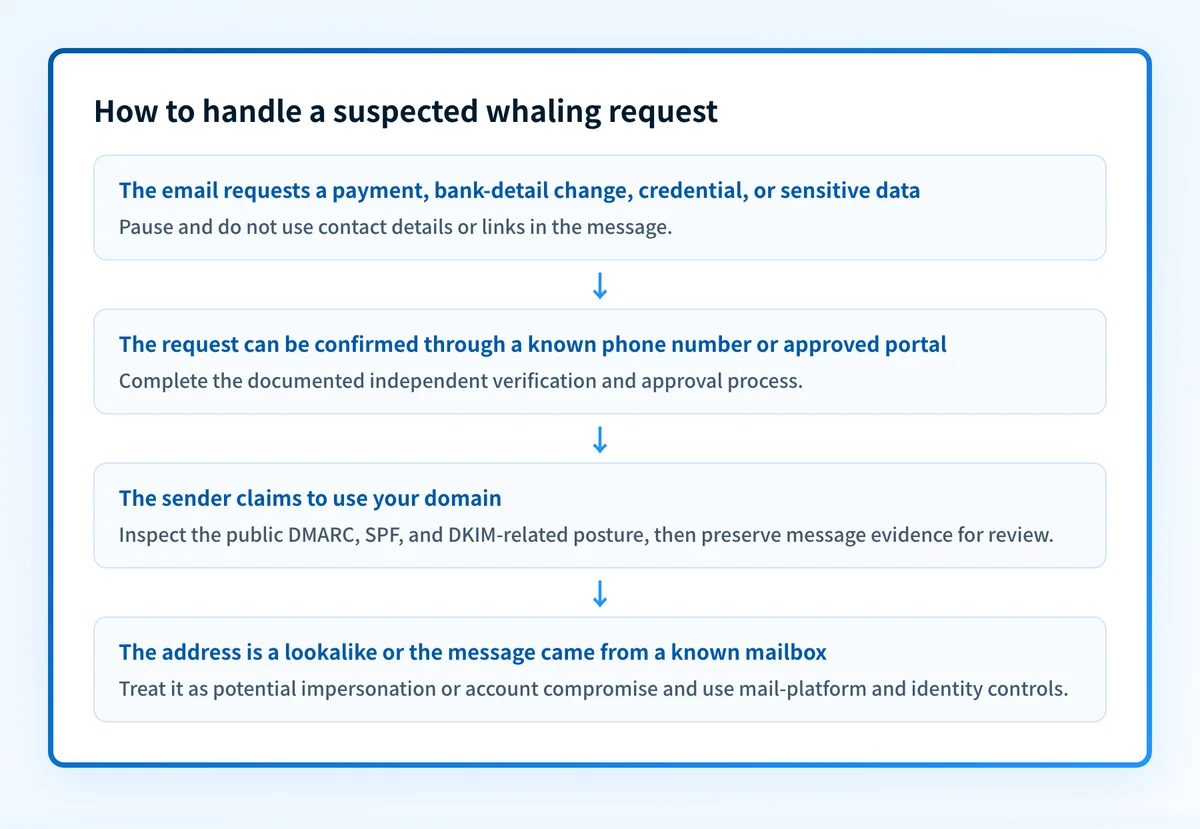
- If the message requests a payment, bank-detail change, payroll export, or gift-card purchase, pause the workflow and verify the request through a known phone number, an established vendor portal, or another approved channel. Do not use a phone number, link, or reply address supplied in the message.
- If the sender address is close to an executive's or supplier's address, treat it as potential impersonation even if email authentication passes. Lookalike-domain mail can pass SPF, DKIM, and DMARC for the attacker's domain.
- If the message appears to be from your own domain but authentication fails, inspect the sender domain's SPF, DKIM, and DMARC posture and preserve the original message for the mail-security team.
- If the message came from a real internal or supplier mailbox, treat it as a possible account compromise. Domain authentication cannot establish whether an authorized account holder sent a particular request.
Do not change payment instructions based only on an email, including a message that appears to come from a known executive or supplier. Use an independently established approval path.
For the broader problem of someone posing as a trusted person, read what an impersonation attack is and how to stop it. For a prevention-focused walkthrough of the same threat, see how to prevent whaling phishing.
A worked whaling-request check
Use a short, repeatable check before approving a high-risk request. This is a decision rule for the recipient and approver, not proof that a message is safe.
Request: Change supplier bank details before payment
1. Do not reply to the email or use its links or phone number.
2. Contact the supplier through a known number or approved portal.
3. Confirm the change with the established supplier contact.
4. Require the documented approval for the payment change.
5. Preserve the original message and report it for review.
A request that clears this check may still need the normal financial approval process. A request that fails it should not be completed through the email thread.
If the suspected message is available, retain the original message and its full headers for the mail-security team. The visible display name alone is weak evidence. The sending address, reply address, links, attachment type, authentication results, and mail-gateway verdict can help establish what happened. Do not forward sensitive payroll data, credentials, or unredacted customer information while reporting the message.
Whaling also requires controls beyond email filtering. Restrict who can approve payment changes, keep supplier contacts current in an approved system, and make escalation paths clear for executives and finance staff. Targeted email attacks are hard to stop because an attacker can tailor a request to a real role or relationship. A documented verification process gives staff a safe alternative to acting on urgency.
What to do next with the evidence you have
If you have a suspicious email, report it through your organization's mail-security process and verify any business request independently. If the sender used a lookalike address or a compromised account, investigate that incident through your mail platform and identity controls.
If the message claims to come from your domain, inspect the public authentication records for that exact domain. Palisade's email security score checks publicly visible DMARC, SPF, and DKIM-related posture to help identify a missing or weak domain control.
A public DNS check cannot prove that the suspicious message used your production sending path, that an individual message passed authentication, that a mailbox account is uncompromised, or that a receiver will block future phishing.
Keep spoofed use of your domain visible
A one-time record check can show what your domain publishes today, but it does not identify every legitimate sender that still fails alignment or show later changes to your sending inventory. That is the ongoing gap after a whaling attempt uses your brand as the lure.
Palisade is agentic DMARC software that analyzes DMARC aggregate-report data, identifies sending sources and authentication or alignment issues, and creates prioritized remediation tickets. It can propose when a domain appears ready for a stronger DMARC policy, while a human reviews the evidence and applies any DNS change.
Palisade does not stop a compromised mailbox, repair every sender automatically, or guarantee that a receiver will block a whaling message.
Evidence
Sources and further reading
Questions readers ask
Frequently asked questions
Is whaling the same as spear phishing?
No. Whaling is a targeted phishing attack aimed at high-ranking people in an organization. Spear phishing is a broader term for phishing tailored to a specific person, team, or organization.
Can DMARC stop every whaling attack?
No. DMARC can help receivers evaluate mail that falsely claims to use your domain, especially when SPF or DKIM does not align with the visible From domain. It does not stop a lookalike domain, a compromised mailbox, or a fraudulent request sent through a legitimate account.
Should an executive verify a wire request by replying to the email?
No. Verify the request through a known contact method or approved vendor portal. A reply can go to an attacker-controlled address or continue a compromised conversation.
Can a lookalike domain pass email authentication?
Yes. A lookalike domain can have valid SPF, DKIM, and DMARC records for that domain. Authentication can therefore pass even when the domain was chosen to resemble a trusted organization.
What should employees preserve after reporting a whaling email?
Preserve the original message and its full headers when your reporting process allows it. Avoid forwarding credentials, sensitive attachments, private keys, tokens, or unredacted customer data outside approved incident-response channels.

Written by
Ian BussieresCTO & Co-Founder, Palisade
Ian Bussieres is the CTO and co-founder of Palisade, agentic DMARC software for IT teams and MSPs.
More from Ian →