What is whaling phishing and how can you prevent it?
 ChatGPT
 Claude
 Gemini
 Perplexity
 Grok
GrokIn brief
Whaling phishing is a targeted impersonation attack against executives or people who can approve payments. Learn how to verify and reduce the risk.
Whaling phishing is a targeted impersonation attack that uses the authority of an executive or other senior official to pressure someone into sending money, disclosing sensitive information, or changing business details. It is a form of spear phishing, often associated with business email compromise. Prevent it with an out-of-band verification rule for high-risk requests, account security, and email authentication that limits spoofing of your own domain.
At a glance
Quick takeaways
- Whaling phishing targets executives, executive assistants, finance staff, and other people who can approve sensitive actions.
- A message can impersonate a leader through a lookalike address, a forged From domain, or a compromised legitimate mailbox.
- Urgency, secrecy, changed payment details, and a request to bypass normal approval are warning signs.
- Verify payment, banking, credential, and sensitive-data requests through a known independent channel.
- SPF, DKIM, and DMARC help protect a domain from direct spoofing, but they do not prove that a message is safe.
- A compromised mailbox can send mail that passes email authentication.
How whaling phishing works
Whaling uses information about an organization to make a fraudulent request appear routine. An attacker may use public staff pages, press releases, social posts, vendor names, or details exposed in an earlier email compromise. The message then poses as a chief executive, finance leader, legal contact, supplier, or another trusted authority.
The US Cybersecurity and Infrastructure Security Agency's guidance on business email compromise describes attacks that use social engineering to induce a payment or disclosure. In a whaling attempt, the authority of the impersonated person is part of the lure. The recipient may be told that a wire transfer, vendor-bank change, document release, or credential reset must happen immediately and without normal review.
The sender address deserves inspection, but it is only one signal. A lookalike domain can resemble a legitimate company domain. A reply-to address can direct responses elsewhere. A compromised real mailbox can contain correct signatures, prior conversation history, and internal vocabulary.
Email authentication addresses one part of this problem. RFC 9989 defines DMARC as a way for a domain owner to publish handling preferences for mail that fails DMARC validation. DMARC passes when SPF or DKIM passes with a domain aligned to the visible From domain. It can reduce successful direct spoofing of a protected domain, but it does not determine whether a request is authorized or whether a legitimate account has been compromised.
For broader controls around malicious email, use the Palisade email security learning hub. For the attack mechanics behind these requests, see what a whaling attack is and how to stop it.
When the answer changes
The right response depends on what the suspicious message asks you to do and how it was sent.
Treat the request as high risk when it asks for any of these actions:
- A wire transfer, gift-card purchase, invoice payment, or vendor-bank detail change.
- Credentials, multifactor authentication codes, tax records, payroll details, contracts, or customer data.
- A new communication channel, especially one supplied by the message itself.
- An exception to an approval, purchasing, or confidentiality process.
- Immediate action combined with secrecy or pressure.
Do not process a changed bank account or high-value payment from an email instruction alone. Confirm it through the approved vendor contact and the organization's existing approval process.
A message that fails DMARC is useful evidence of potential spoofing when it uses your domain, but a passing result does not approve the transaction. The FBI's business email compromise guidance also recommends independently verifying payment-related requests and changes to payment instructions.
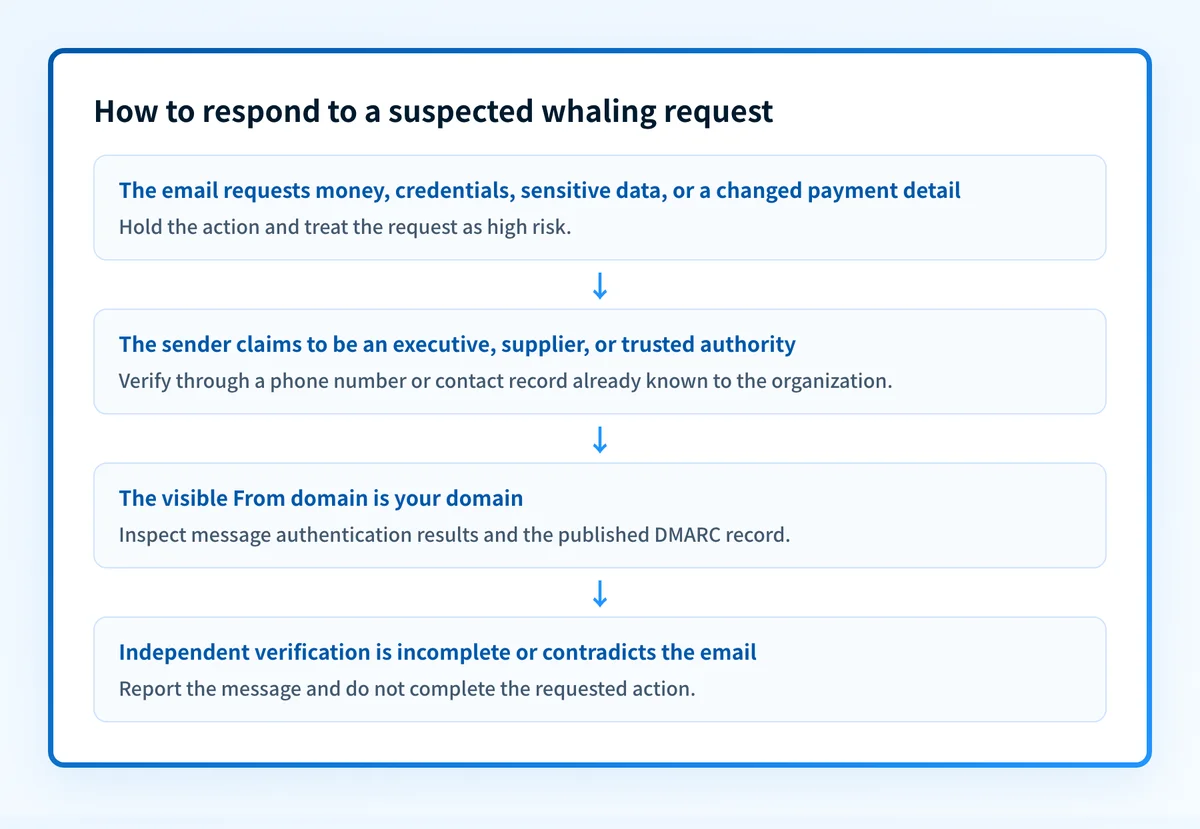
A worked whaling verification example
A finance employee receives a message that appears to be from the CFO. It requests an urgent supplier payment and includes new bank details. The message may look plausible, but the request changes where money will go.
Use the evidence in this order:
Request: Urgent payment to a new bank account
Known risk: Payment instruction changed by email
Independent check: Call the CFO or supplier using a number in the approved directory
Authentication check: Inspect the visible From domain and message authentication results
Decision: Hold payment until the independent contact confirms the request
If the visible From address uses your organization's domain, inspect the delivered message headers. RFC 8601 defines the Authentication-Results header field, which can report results such as spf, dkim, and dmarc. Those results can help establish whether the message authenticated as expected, but they must be read alongside the exact From domain and the known-channel verification.
A simplified header pattern might look like this:
Authentication-Results: receiver.example;
  spf=pass smtp.mailfrom=yourdomain.com;
  dkim=pass header.d=yourdomain.com;
  dmarc=pass header.from=yourdomain.com
This pattern is not a safety verdict. It may be consistent with legitimate mail, but it can also appear when an attacker controls a legitimate account or an authorized sending path. The payment remains on hold until the independent confirmation is complete.
What to do after a suspected whaling message
First, preserve the message and report it through the organization's security process. Do not forward it externally with sensitive content exposed. Security staff may need the original message, its headers, the sender and reply-to addresses, URLs, attachment names, and the action requested.
Next, use the established communication channel to verify the request. For a supplier change, contact the supplier through the approved vendor record. For an executive request, call or message the executive through the company directory or another known channel.
Then review the applicable controls:
- Require separate approval for high-value payments and vendor-bank changes.
- Use phishing-resistant multifactor authentication where the organization supports it, particularly for executive, finance, administrator, and email accounts.
- Review mailbox forwarding rules, delegated access, OAuth applications, and recent sign-in activity after suspected account compromise.
- Train employees on the organization's exact verification process, not only on visual signs in suspicious messages.
- Publish and maintain SPF, DKIM, and DMARC for domains that send mail. The guide to preventing phishing attacks covers the wider prevention program.
Check the DMARC record that protects your domain
Inspect the domain's published DMARC record before assuming direct spoofing is blocked. Compare the public result with the sender domain in the suspicious message and with the authentication results from the delivered message.
A public DMARC check cannot confirm that an executive approved a payment, identify a compromised mailbox, or explain why a specific receiver accepted a message.
Track the sending sources that still need remediation
If your domain sends mail through several business applications, a record check alone cannot show which legitimate sources fail alignment or whether a new sender later appears. Palisade is agentic DMARC software that analyzes DMARC aggregate-report data, identifies sending sources and authentication or alignment issues, and creates prioritized remediation tickets. It can propose the next DMARC policy step, while your team reviews the evidence and applies any DNS change.
Palisade does not authorize payments, change a DMARC policy without human action, or prove that every future message is legitimate.
Evidence
Sources and further reading
Questions readers ask
Frequently asked questions
Is whaling phishing the same as business email compromise?
No. Whaling phishing is a targeted form of phishing that impersonates or targets a senior figure. Business email compromise is a broader category of fraud that can include executive impersonation, supplier impersonation, and compromised email accounts.
Can a whaling email pass DMARC?
Yes. A message sent from a compromised legitimate mailbox can pass SPF, DKIM, and DMARC. Authentication results help assess domain authorization, but they do not confirm that a payment request is legitimate.
Should employees reply to verify an executive request?
No. A reply can go to an attacker-controlled address or remain inside a compromised conversation. Verify through a phone number, directory entry, or separate trusted channel that existed before the request.
Does DMARC stop lookalike-domain attacks?
No. DMARC protects the domain that publishes the DMARC policy. It does not stop an attacker from registering a different domain that resembles the organization's name. Recipients still need to inspect unusual requests and follow verification controls.
What should happen after a suspected whaling payment is sent?
Contact the financial institution and the organization's incident-response and finance teams immediately. Preserve the message and related records, then follow the organization's fraud-response process. The FBI advises prompt reporting of business email compromise incidents through its reporting channels.

Written by
Ian BussieresCTO & Co-Founder, Palisade
Ian Bussieres is the CTO and co-founder of Palisade, agentic DMARC software for IT teams and MSPs.
More from Ian →