What is quishing (QR code phishing) and how do you stop it?
 ChatGPT
 Claude
 Gemini
 Perplexity
 Grok
GrokIn brief
Quishing is QR code phishing that hides a malicious link in a scannable image. Learn how to identify it and reduce the risk of credential theft.
Quishing is phishing that uses a QR code to hide a destination URL from the person receiving it. A scan can open a fake sign-in page, payment page, or file-download prompt on a phone. Stop it by treating an unexpected QR code as an untrusted link, reaching important services through a known address or app, and using phishing-resistant MFA so a fake sign-in page cannot reuse credentials or a session.
At a glance
Quick takeaways
- Quishing is phishing delivered through a QR code, also called QR code phishing.
- A QR code can appear in an email, attachment, printed notice, sticker, or message.
- Scanning a code opens a URL, but the risk usually comes from entering credentials, approving a request, or downloading a file afterward.
- DMARC helps prevent exact-domain spoofing of your own domains, but it does not determine whether a QR code's destination is safe.
- Phishing-resistant MFA can reduce the value of credentials collected on a lookalike sign-in page.
- A public DNS check can show published email-authentication records, but it cannot prove that an inbound QR code is harmless.
How quishing works
A quishing attack gives a person a reason to scan a QR code. The code may claim to open a voicemail, review a document, reset an account, pay an invoice, or complete a security task. Instead of showing a clickable text link, the message puts the destination inside a scannable image.
After the scan, the phone opens the encoded URL. The next page can imitate a legitimate service and request a password, MFA approval, payment details, or a download. The QR code is the delivery mechanism. The fraudulent page or follow-up action causes the compromise.
The FBI advisory on QR-code spearphishing describes state-sponsored actors using QR codes in spearphishing emails to direct targets to credential-harvesting infrastructure. It also describes adversary-in-the-middle activity that can capture session information after a victim completes a real-time sign-in flow.
QR codes create an inspection problem because the destination is encoded as an image rather than presented as readable link text. A recipient may also scan on a mobile device, away from the browser, endpoint, or corporate-network controls used on a work computer. Those conditions do not make every QR code malicious. They mean the recipient needs a reliable way to establish where the code leads before providing information.
When a QR code should change your response
The practical decision rule is based on the requested action and the context, not on whether the QR code looks polished.
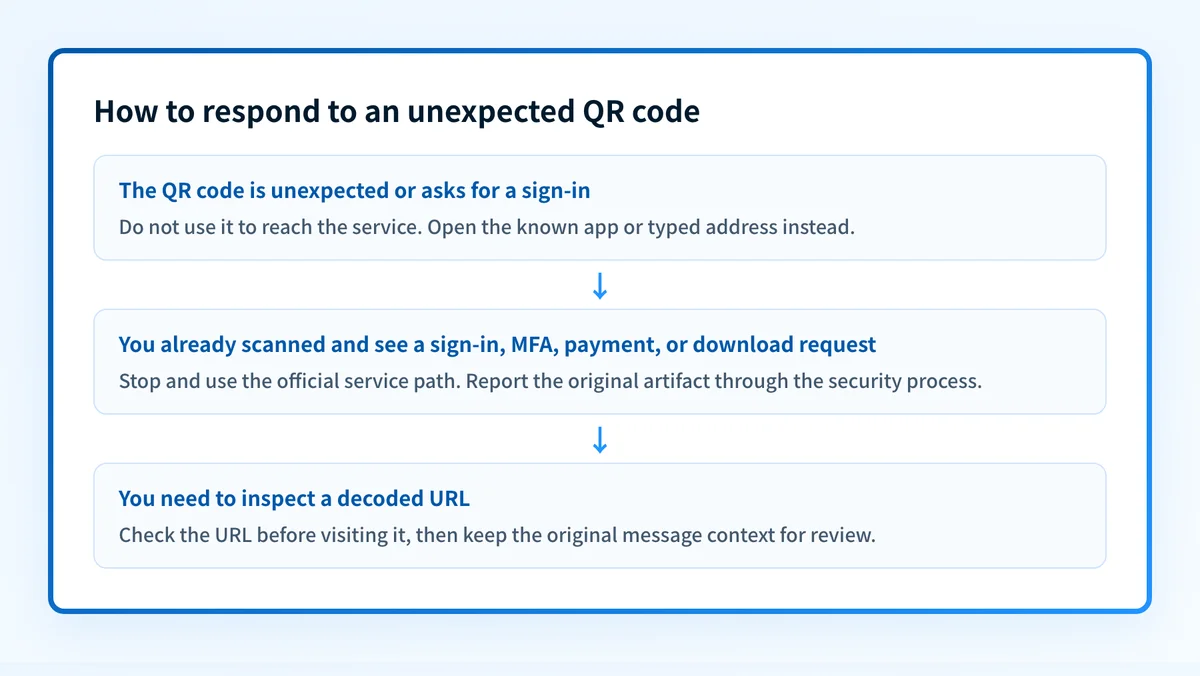
Treat the code as suspicious when it arrives unexpectedly, asks you to sign in, asks for payment details, asks you to approve MFA, or appears as a sticker placed over another code. Do not use the code to reach a service in those cases. Open the service's official app, use a saved bookmark, or type the known address yourself.
A QR code can also be legitimate, such as one printed by a service you deliberately chose to use. Even then, pause if the resulting page asks for credentials in a context where you did not expect to authenticate. The source of the code and the destination page both matter.
Phishing-resistant MFA changes the outcome when an attacker tries to collect credentials through a lookalike site. Phishing-resistant MFA is designed to bind authentication to the legitimate relying party, rather than treating any page that requests a code or approval as equivalent. It does not make a malicious QR code safe, but it can prevent a stolen password from completing the same sign-in path.
DMARC addresses a separate problem. As explained in Does DMARC stop phishing?, DMARC helps domain owners reduce unauthorized use of their exact visible From domain. An attacker can still send a QR-code phishing message from an attacker-controlled domain, a lookalike domain, or a compromised legitimate account. Authentication status is evidence about domain authorization, not a safety verdict on the QR code or its destination.
Worked example: assess a QR-code request
Suppose an email says that a voicemail is waiting and instructs you to scan a QR code to listen. The email arrived without a voicemail notification you expected, and the code opens a page asking for your work password.
Use this decision rule:
Unexpected QR code + request to sign in or approve MFA
= do not scan again or enter credentials
Open the known voicemail or collaboration service directly.
If the message claims to be from an internal team, report it through the team's
established security process and preserve the original message for review.
The key evidence is the mismatch between the claimed task and the requested authentication. A genuine notice may still be worth checking, but check it through the service you already use. Do not let the QR code choose the destination for you.
If you have already scanned a code, stop before entering credentials or downloading anything. If credentials, an MFA approval, or a session-related prompt were provided, follow your organization's incident process promptly. The affected identity provider, endpoint-management team, or security team has the evidence needed to review account activity and revoke sessions where appropriate.
What to do next, based on the evidence you have
If you only have a suspicious QR code, do not scan it to investigate. Preserve the email, attachment, image, or physical location details and send them to the security team or reporting channel your organization uses. A security team can inspect the original artifact without relying on the recipient's phone session.
If you have the destination URL after scanning but have not opened it further, use the Palisade phishing link checker to inspect the URL before visiting it. A URL check can provide a point-in-time signal. It cannot prove that a destination is safe, show what a page will request after login, or replace review of the original message and its sender context.
If you manage domains, also check whether your organization has reduced exact-domain spoofing exposure. The email security learning center covers the broader controls around email-borne threats. Public DNS and authentication checks can show what a domain publishes today, but they do not show whether a particular inbound message is legitimate or whether a recipient's device is protected.
Check the public email-security posture behind your domain
A quishing email can arrive from a lookalike or attacker-owned domain, but attackers also benefit when they can impersonate a trusted brand. Check your domain's public email-security posture, then compare the result with the sending paths your team actually authorizes.
Check your email security score
A public score checks published DNS evidence. It cannot decode an inbound QR code, identify every production sender, monitor later changes, or prove how a mailbox provider handled a specific message.
For ongoing DMARC work, Palisade is DMARC software that analyzes DMARC aggregate-report data, identifies sending sources and authentication or alignment issues, and creates prioritized remediation tickets. It can propose the next policy step when evidence supports it, while a human reviews the evidence and applies the DNS change. That work helps reduce exact-domain spoofing. It does not inspect QR images or guarantee that future phishing messages will be blocked.
Evidence
Sources and further reading
Questions readers ask
Frequently asked questions
Is quishing only delivered by email?
No. A quishing lure can appear in an email, document, message, poster, letter, or sticker. The defining feature is that the phishing destination is encoded in a QR code.
Does scanning a malicious QR code infect a phone?
No. Scanning a QR code usually opens its destination URL. Harm often occurs only after the person enters credentials, approves an authentication request, submits payment information, or downloads and opens a file.
Can DMARC stop QR code phishing?
No. DMARC helps receivers evaluate whether a message is authorized to use its visible From domain. It does not inspect a QR image or determine whether the encoded URL is malicious.
Should I enter credentials after scanning a QR code?
No, if the code was unexpected or the request to sign in is unusual. Open the relevant service through its known app, bookmark, or typed address instead.
Does phishing-resistant MFA make QR codes safe?
No. Phishing-resistant MFA does not validate a QR code or its destination. It can reduce the chance that credentials gathered through a lookalike site can be used to authenticate to the legitimate service.

Written by
Ian BussieresCTO & Co-Founder, Palisade
Ian Bussieres is the CTO and co-founder of Palisade, agentic DMARC software for IT teams and MSPs.
More from Ian →