What is angler phishing and how can you stop it?
 ChatGPT
 Claude
 Gemini
 Perplexity
 Grok
GrokIn brief
Angler phishing uses fake social-media support accounts to exploit public complaints. Learn how to verify support and limit email impersonation.
Angler phishing is a brand-impersonation scam that targets people who publicly ask for help on social media. A criminal account poses as customer support, replies or sends a direct message, and tries to move the conversation to a fraudulent login page or request sensitive information. Stop it by verifying support through the brand's official website, refusing credential or payment requests in unsolicited messages, and reporting the impersonating account.
At a glance
Quick takeaways
- Angler phishing depends on a fake support identity and a public signal that someone needs help.
- A display name, logo, or familiar tone does not authenticate a social-media account.
- Verify a support contact by starting from the company's official website or app, not from a reply or direct message.
- Do not send passwords, multi-factor authentication codes, recovery codes, or payment details to an account that contacted you first.
- DMARC can reduce email spoofing of a domain, but it cannot remove a fraudulent social-media profile.
- Organizations need both customer-facing verification guidance and a process for reporting impersonation.
How angler phishing works
The defining pattern is the support pretext. A person posts about a billing problem, outage, delivery issue, or account-access problem. A look-alike account then presents itself as the company and offers help.
The attacker wants the conversation to leave the public thread. A direct message can contain a link to a counterfeit sign-in page, a request for account details, or instructions to disclose a one-time verification code. The Federal Trade Commission's guidance on impersonator scams advises people to verify unexpected contacts independently and not use contact details supplied by the unexpected message.
A fake account can look convincing because social platforms allow names, profile images, and public replies that resemble those of a real business. Those cues are not proof of account ownership. The useful question is narrower: did you reach the organization through a contact path the organization publishes and controls?
For the broader defense context, see Palisade's email security learning hub. Angler phishing is social-media impersonation, but it may coexist with email impersonation, fake websites, or phone calls that use the same brand.
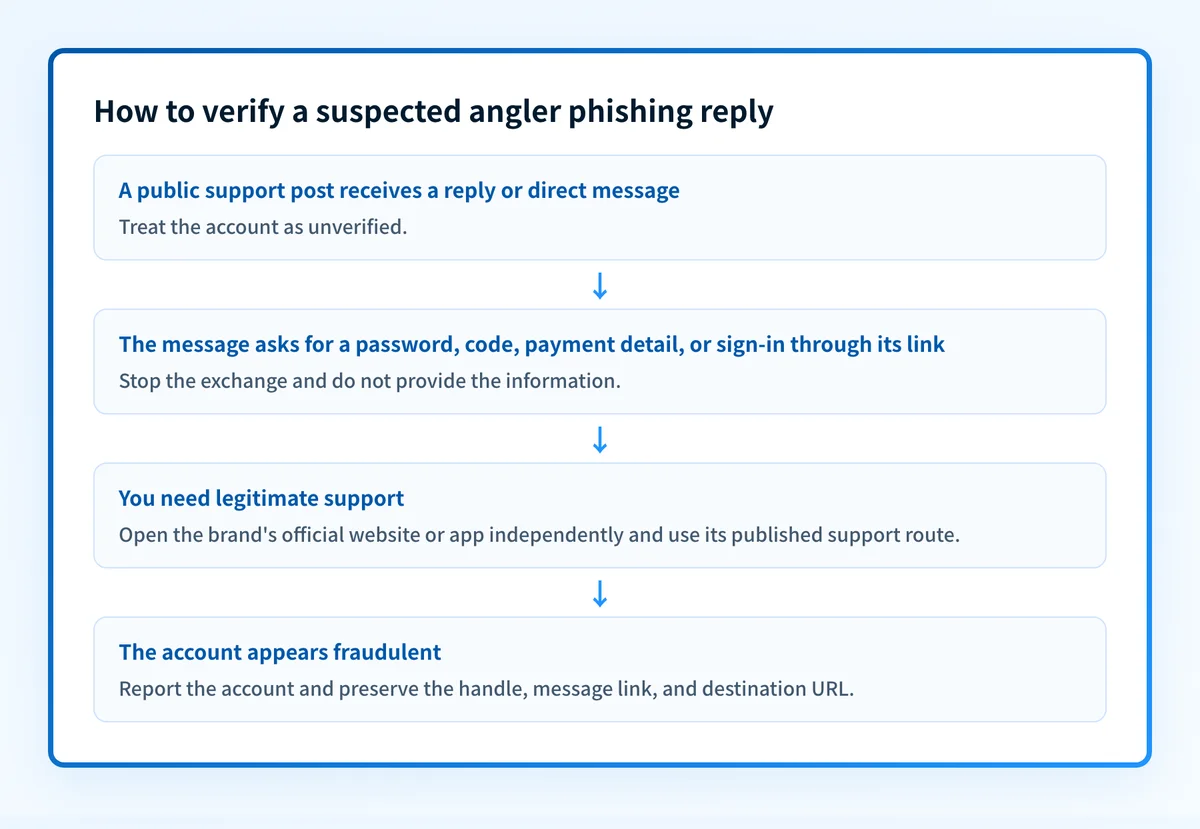
When the answer changes
A real support account may reply to a public post or ask to continue a case through a private channel. That fact alone does not establish fraud. Treat the contact as unverified until you independently confirm the account and the requested action.
Use this decision rule:
- If the account asks for a password, recovery code, multi-factor authentication code, or full payment-card data, stop the exchange. The Cybersecurity and Infrastructure Security Agency's phishing guidance advises against providing sensitive information in response to suspicious messages.
- If the account sends a link, do not sign in through that link. Open the brand's known website or app yourself and find support from there.
- If the issue needs account-specific information, start a new support request through the official site, authenticated app, or published phone number.
- If the brand confirms that the account is official, still share only the information required for the support case and follow the organization's published process.
A worked verification example
Suppose a customer posts: "My service is down. Can someone help?" An account with a similar name replies and asks the customer to direct message an email address and a one-time code.
The customer should not continue in the direct message. Instead, they should open the provider's official website by typing the known address or using a saved bookmark, then locate the support route published there.
Public reply received: "Send us your email address and verification code by DM."
Safe response:
1. Do not send the code or follow a supplied link.
2. Open the provider's official website or authenticated app independently.
3. Start a support case through the published channel.
4. Report the suspected impersonating account to the social platform.
5. Preserve the account handle, message link, and screenshots for the provider's security team.
The one-time code matters because it can approve a sign-in, password reset, or other account action. It is authentication evidence, not customer-support information.
For organizations, publish a short support-verification policy where customers can find it before an incident. State the official account handles, the approved ways to open a case, and the categories of information support will never request through social media.
Do not ask customers to post account details in a public thread. A public reply can acknowledge the issue and direct the customer to a verified support route, but it should not collect credentials or payment information.
What to do next, based on the evidence you have
If you received a suspicious reply or direct message, verify it through the brand's official site, report the account through the social platform, and notify the real organization through its published support channel. Include the profile URL, handle, message text, and any destination URL. Do not include passwords, codes, or other secrets in the report.
If your organization is the impersonated brand, document your official support accounts and train support staff to send customers only to controlled support paths. Keep an incident record that captures the impersonating handle, affected platform, reported URLs, report reference, and customer communications.
If the campaign also uses email that appears to come from your domain, inspect the domain's published DMARC record with Palisade's DMARC checker. A public DNS check can show the current record, but it cannot prove that a particular social-media account is fraudulent, identify every production sender, or show a mailbox provider's private delivery decision.
Email authentication is a supporting control. DMARC uses aligned SPF or DKIM authentication to help domain owners express handling preferences for failing mail. It does not govern social-media identities or take down fraudulent profiles. For that distinction, see does DMARC stop phishing?.
A stronger login process also helps limit the value of stolen passwords. Phishing-resistant MFA addresses a separate control: how users authenticate when a phishing attempt tries to capture credentials.
Check the email domain used alongside the impersonation
If a suspicious campaign includes email from a domain you control, inspect its published DMARC record before treating email spoofing as confirmed or changing DNS.
A public DMARC lookup cannot remove a fake social-media account, prove the source of a direct message, monitor future impersonation, or guarantee that every legitimate message will authenticate.
For ongoing DMARC work, Palisade is agentic DMARC software that analyzes aggregate-report data, identifies sending sources and authentication or alignment issues, and creates prioritized remediation tickets. It can propose the next DMARC policy step when the evidence indicates readiness, while a human reviews the evidence and applies the DNS change.
Palisade does not control social-media accounts, remove impersonators, or guarantee inbox placement. It helps teams investigate the email-authentication side of domain impersonation after DMARC reports accumulate.
Evidence
Sources and further reading
Questions readers ask
Frequently asked questions
Is angler phishing the same as ordinary phishing?
No. Angler phishing is a phishing pattern built around fake customer-support contact on social media after a person publicly signals that they need help. It can still use familiar phishing techniques, such as counterfeit sign-in pages or requests for sensitive information.
Can an official-looking profile be trusted?
No. A familiar name, profile image, badge, or writing style is not enough to prove that an account controls a brand's support channel. Verify the contact through the organization's official website, app, or other published route.
Should I reply to a suspected fake support account?
No. Do not provide account information or continue through a link or direct-message channel chosen by the account. Preserve the evidence, report the account to the platform, and contact the real organization through an independently verified channel.
What information should support never request in a direct message?
Support should not ask for passwords, multi-factor authentication codes, recovery codes, or full payment-card details through an unsolicited direct message. If an account requests those items, end the exchange and verify support independently.

Written by
Ian BussieresCTO & Co-Founder, Palisade
Ian Bussieres is the CTO and co-founder of Palisade, agentic DMARC software for IT teams and MSPs.
More from Ian →