What is spear phishing and how do you defend against it?
 ChatGPT
 Claude
 Gemini
 Perplexity
 Grok
GrokIn brief
Spear phishing is a targeted email attack that impersonates someone you trust. Learn how it works, why it succeeds, and how to defend against it.
Spear phishing is a targeted phishing attack aimed at a specific person, team, or company, rather than a mass audience. Instead of blasting millions of generic emails, the attacker researches one target and crafts a message so tailored (using your name, job title, vendors, or recent activity) that it looks like it came from someone you already trust. That precision is exactly what makes it dangerous.
A typical example: you receive an email that appears to be from your CFO, referencing a real project and asking you to approve a wire transfer or share a document. It's urgent, it's specific, and it's a trap.
Spear phishing vs. regular phishing
Regular phishing is a volume game, the same lure sent to huge lists, hoping a small percentage bite. Spear phishing inverts the odds:
- Audience: phishing targets everyone; spear phishing targets one named individual or role.
- Personalization: phishing is generic ("Dear customer"); spear phishing references real people, projects, and context.
- Payload: phishing often chases passwords; spear phishing frequently aims at wire fraud, credential theft for lateral movement, or business email compromise.
- Detection: spam filters catch bulk lures more easily; a well-researched spear phishing email can sail through because it looks legitimate.
How does spear phishing work?
Spear phishing attacks follow a calculated playbook:
- Reconnaissance: the attacker gathers intel from LinkedIn, company websites, press releases, social media, and past breaches to learn who reports to whom and how they communicate.
- Crafting the bait: using that research, they build a message that feels legitimate: often impersonating a colleague, a supplier, or a service you use. It may spoof the exact sending domain or use a lookalike domain that's off by one character.
- The hook: the message includes a call to action: click a link, open an attachment, approve a payment, or reset a credential.
- The sting: if the target complies, the attacker moves money, harvests credentials, or plants malware to expand access.
Why spear phishing is a serious problem
Because it defeats the "does this look like spam?" instinct, spear phishing drives some of the costliest cybercrime on record. According to the FBI's 2023 Internet Crime Report, phishing and spoofing were the most-reported crime type, with 298,878 complaints that year. The business email compromise category (where targeted, spear-phishing-style impersonation is the primary tactic) accounted for 21,489 complaints and roughly $2.9 billion in reported losses in 2023 alone. The FBI's BEC public service announcement puts cumulative global exposure at more than $55 billion between 2013 and 2023.
The damage isn't only financial. A successful attack can expose customer data, hand over credentials that enable deeper intrusions, and erode trust in your brand once a breach becomes public.
How to defend against spear phishing
Defense works best in two layers: people and email authentication.
People and process
- Verify out of band. For any payment or credential request, confirm through a second channel, a phone call to a known number, not a reply to the email.
- Inspect the sender. Check the full address, not the display name. A domain off by one letter is a red flag.
- Hover before you click. Preview link destinations, and run anything suspicious through a phishing link checker before opening it.
- Enable multi-factor authentication (MFA). Stolen passwords are far less useful when a second factor is required.
- Train continuously. Short, regular exercises keep employees alert to new lures.
The technical backbone that stops attackers from spoofing your exact domain is SPF, DKIM, and DMARC. When DMARC is set to p=reject, mailbox providers refuse messages that fail authentication and claim to be from your domain, closing the door on the most convincing spear phishing lures.
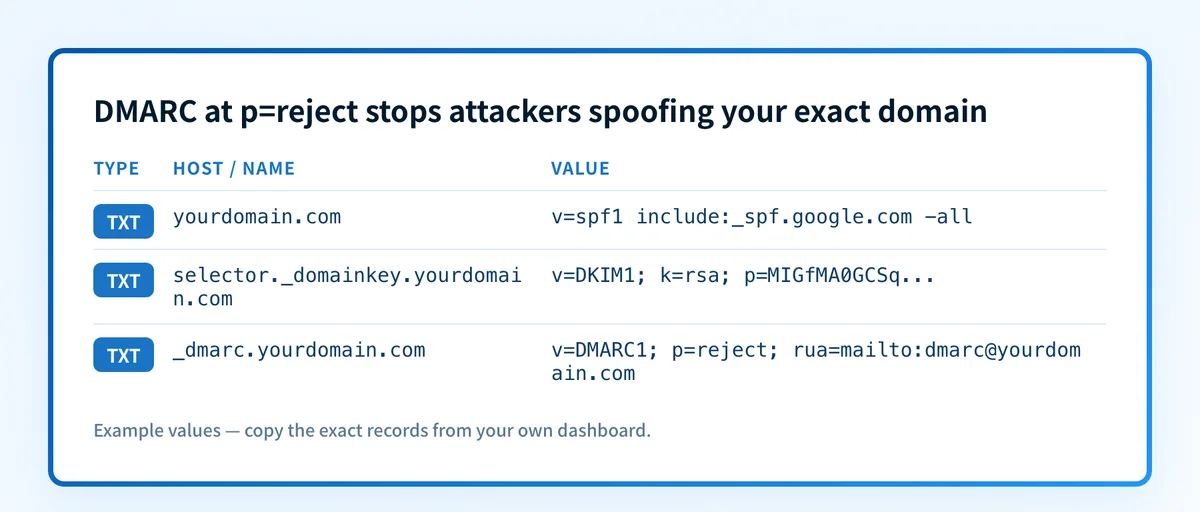
You can check whether your domain is publishing these records correctly with our free Email Security Score, and generate an enforced policy with the DMARC checker. Authentication won't stop lookalike-domain attacks on its own, but it removes the easiest and most convincing option from an attacker's toolkit.
Evidence
Sources and further reading
- FBI IC3 2023 Internet Crime Report for the phishing, spoofing, and business email compromise complaint and loss figures.
- FBI IC3 business email compromise public service announcement for cumulative global BEC exposure between 2013 and 2023.
Related reading
Questions readers ask
Frequently asked questions
Can email authentication stop every spear phishing attack?
No. SPF, DKIM, and DMARC at p=reject stop attackers from spoofing your exact domain, which shuts down the most convincing lures. They do not block lookalike domains (like yourcompany-support.com) or messages sent from a compromised third-party account, so authentication has to be paired with user training and MFA.
How is whaling different from spear phishing?
Whaling is a subtype of spear phishing that targets high-value individuals: executives, finance leaders, or anyone who can authorize large payments. The technique is the same; the difference is the seniority of the target and the size of the potential payout.
What should I do if I think I received a spear phishing email?
If you think you received a spear phishing email, do not click links or reply. Verify any request through a separate, trusted channel, then report the message to your IT or security team so they can warn others and check whether the sender's domain was spoofed. Preserve the email header. It helps investigators trace the true origin.
Does a lookalike domain fail DMARC?
Not necessarily. DMARC only protects the domains you own and publish records for. A lookalike domain is a different domain the attacker controls, so it can pass its own authentication. Detecting these requires domain monitoring and user awareness, not just DMARC.
Are small businesses really targeted?
Yes, small businesses are targeted. Attackers often view smaller organizations as softer targets with fewer controls but real access to funds and supplier relationships. BEC complaints in the FBI data span businesses of every size across all 50 states.

Written by
Ian BussieresCTO & Co-Founder, Palisade
Ian Bussieres is the CTO and co-founder of Palisade, agentic DMARC software for IT teams and MSPs.
More from Ian →