What is an email header?
 ChatGPT
 Claude
 Gemini
 Perplexity
 Grok
GrokIn brief
What is an email header? Learn what message headers show, how Received and Authentication-Results work, and how to validate a delivered email.

An email header is the structured metadata at the start of an email message. It carries fields such as From, To, Date, and Subject, plus delivery trace and authentication information that mail systems add as a message moves between servers. Headers help an operator investigate a delivered message, but a sender-supplied field alone does not establish who sent it.
At a glance
Quick takeaways
- An Internet email message has a header section followed by a body, as defined by RFC 5322.
- Fields such as
FromandSubjectdescribe the message but can be supplied by the sender. - SMTP relays add
Receivedfields that can help reconstruct the server-to-server delivery path. Authentication-Resultsrecords an authentication service's evaluation of SPF, DKIM, DMARC, or other methods.- Authentication results are meaningful only when you trust the server that added them.
- A delivered-message header is evidence for that message path, not proof that every future message will authenticate or reach the inbox.
Who is affected?
Anyone who sends, receives, supports, or investigates email may need to read a header. For a recipient, the header can explain why a message was filtered or show which server delivered it. For an IT team, it is message-level evidence for an SPF, DKIM, or DMARC investigation. For an MSP, it can connect a delivery incident to a specific client domain or sending service.
RFC 5322 defines the Internet Message Format. It describes a message as a header section followed by a body, with header fields made of a field name, a colon, and a field body. The standard defines common fields such as From, To, Date, Message-ID, and Subject, but extensions can add other fields. RFC 5322's header-field rules apply to the message format, not to every mailbox provider's interface.
A mail client often shows only a small subset of fields. The raw header can include additional routing and authentication details. Treat it as sensitive operational evidence because it can contain addresses, server names, message identifiers, and IP addresses. Redact recipient addresses, identifiers, and internal hostnames before sharing a header outside the team that needs it.
What are the requirements?
Header fields follow the Internet Message Format
RFC 5322 requires a message header to be a sequence of header fields. Each field has a field name, a colon, and a field body. Field names are printable US-ASCII characters except space, control characters, and colon. The standard also defines folding rules that allow a long field to continue on later physical lines.
From: alerts@yourdomain.com
To: recipient@example.net
Subject: Illustrative delivery notice
Date: Tue, 11 Aug 2026 12:00:00 +0000
Message-ID: <example-12345@yourdomain.com>
The values above are illustrative only. From identifies the author address presented to the recipient, while Message-ID identifies a particular message. Neither field independently proves that a domain authorized the message. Authentication checks use other inputs and policies.
A field can appear in a message because RFC 5322 defines it, because an SMTP server adds it, or because a receiving system adds operational data. Read each field according to its source and purpose. Do not treat every line in a raw header as equally trustworthy.
SMTP relays prepend Received fields
When an SMTP server receives a message for further transmission, RFC 5321 requires it to insert a Received time stamp trace record at the beginning of the message content. Because each new trace record is prepended, the oldest visible server trace is usually lower in the header and the newest is near the top.
Received: from outbound.yourdomain.com (outbound.yourdomain.com [192.0.2.10])
        by mx.example.net with ESMTPS id example123
        for <recipient@example.net>; Tue, 11 Aug 2026 12:00:00 +0000
This is an illustrative trace, not a record to publish. Start near the bottom of the Received chain and work upward when reconstructing the route. A trace line describes what the receiving server says it received. Lines added before a message reaches infrastructure you trust can be forged, so a chain is not a complete forensic finding on its own.
For the transport label in the example, see what ESMTPS means.
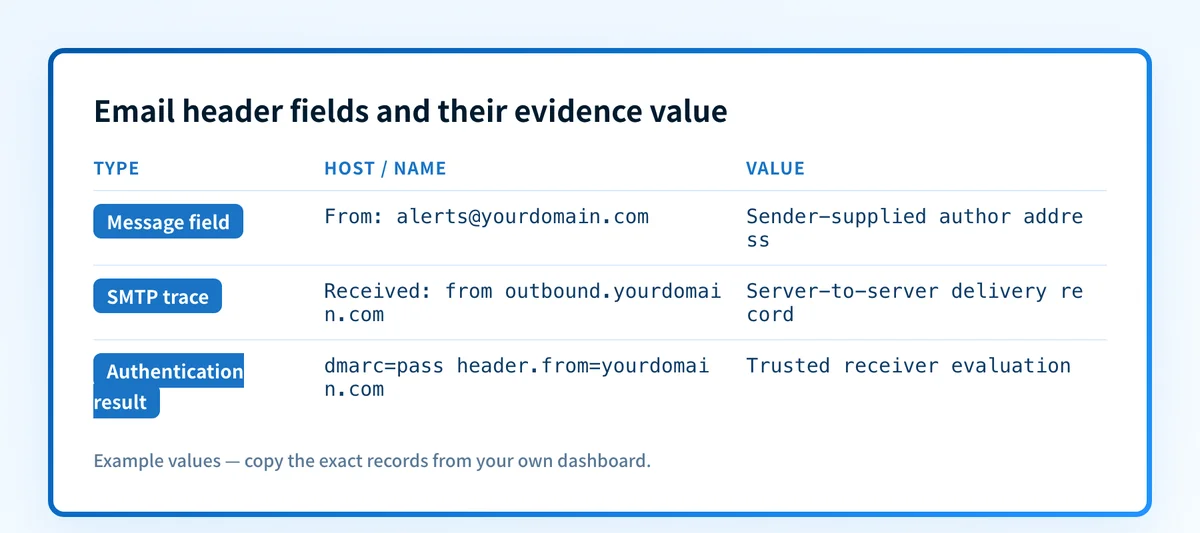
Authentication services report their own results
Authentication-Results is a trace field for an authentication service to report the results of checks it performed. RFC 8601 specifies syntax such as an authentication service identifier, a method result, and optional properties. Common methods include SPF, DKIM, and DMARC.
Authentication-Results: mx.example.net;
  spf=pass smtp.mailfrom=mail.yourdomain.com;
  dkim=pass header.d=yourdomain.com;
  dmarc=pass header.from=yourdomain.com
This example is illustrative only. smtp.mailfrom identifies an SPF-related identity, header.d identifies a DKIM signing domain, and header.from identifies the domain evaluated for DMARC. A result of dkim=pass means the authentication service evaluated a valid DKIM signature under its own rules. It does not, by itself, establish DMARC alignment with the visible From domain.
RFC 8601 also defines a trust boundary: a receiver must decide which authentication services it trusts. A sender can insert text that resembles an authentication result before delivery. Give weight to results added by the mailbox provider or other receiving infrastructure you trust, rather than relying on an unverified line lower in the header.
When does the requirement take effect?
There is no single new compliance date for email headers. RFC 5322 was published as an Internet Standard in October 2008 and obsoleted RFC 2822. RFC 5321, published in October 2008, defines SMTP trace requirements including Received records. RFC 8601, published in May 2019, defines the Authentication-Results header field and obsoleted RFC 7601.
These standards define message and trace behavior. They do not set a universal deadline requiring every sender to deploy SPF, DKIM, or DMARC. Mailbox-provider sender rules can impose separate requirements, thresholds, and enforcement dates. Keep those rules separate from the header syntax itself.
How do I implement the requirement?
1. Send a controlled message through the production path
Send a test message from the exact application, ESP, or relay that sends production mail. Use a safe recipient mailbox where you can open the original source. A message sent from a different test system does not validate the production sending path.
2. Export the raw message source
Use the mailbox provider's documented option to view the original message or message source. For Gmail, View message headers in Gmail documents the "Show original" path. Copy the full header before forwarding the message, because forwarding can add fields and change the evidence.
3. Read message fields and trace fields separately
Identify the From, Date, Subject, and Message-ID fields first. Then find Received records and read the server trace from the earliest trusted record toward final delivery.
Do not assume the visible sender address is authenticated. It is an RFC 5322 author field. Authentication evidence belongs in trusted Authentication-Results records and in the underlying SPF, DKIM, and DMARC evaluation.
4. Compare authentication identities with the visible domain
Locate spf=, dkim=, and dmarc= within the trusted Authentication-Results field. Compare header.from with the From domain. If DMARC fails, inspect the reported SPF and DKIM identities before changing DNS or a sending platform.
A passing DNS record does not establish that the application used that record. If header evidence shows a different return-path domain or DKIM signing domain, investigate that specific production configuration. The email authentication learning hub has related guidance on the protocol layer.
How do I validate compliance?
Validation needs evidence from more than one layer.
- DNS: confirm the domain's public SPF, DKIM, and DMARC records through authoritative DNS and a public resolver when the investigation concerns published authentication controls.
- Vendor: check the sending provider's current domain-authentication status if it provides one. A green status is not proof of a delivered message.
- Message: inspect a real delivered message from the production path and its trusted
Authentication-Resultsfield. - DMARC: review aggregate-report data after it accumulates to identify sending sources and recurring alignment failures.
If the header shows an authentication failure and Gmail blocks the message, compare the finding with Gmail's unauthenticated-sender guidance. If the issue is Outlook spam placement, use the delivered message and provider evidence alongside guidance for emails going to spam in Outlook. Authentication supports delivery decisions, but it does not guarantee inbox placement.
Track the sending sources a single header cannot show
A header explains one delivered message. It does not inventory every system using the domain, show later alignment drift, or establish when the domain is ready for a stricter DMARC policy.
Palisade is agentic DMARC software that analyzes DMARC aggregate-report data, identifies sending sources and authentication or alignment issues, and creates prioritized remediation tickets. It can propose a next policy step based on the evidence, while a human reviews the evidence and applies any DNS change.
Palisade does not change the DMARC policy automatically, guarantee delivery or inbox placement, or prove that every future message will authenticate.
Evidence
Sources and further reading
Questions readers ask
Frequently asked questions
Is the From address in an email header proof of the sender?
No. The From field is an author address in the message header and can be supplied by the sender. Check trusted Authentication-Results evidence, especially the DMARC result and the header.from identity, before treating it as authentication evidence.
Should I read Received headers from the bottom up?
Yes. SMTP servers prepend new Received trace records, so the earliest visible trace is usually lower in the header. Start with the earliest trusted record, then follow the records upward toward final delivery.
Can an Authentication-Results header be forged?
Only an untrusted one can be treated as sender-supplied text. RFC 8601 requires receivers to establish a trust boundary for authentication services. Use results added by the mailbox provider or infrastructure you trust.
Does SPF pass mean DMARC passes?
No. SPF can pass for an envelope domain that does not align with the visible From domain. DMARC evaluates alignment as well as SPF or DKIM authentication results.
Can an email header prove why a message went to spam?
Not always. A header can show message-level authentication and routing evidence, but mailbox providers use private filtering signals that may not appear in the header. Inspect the provider's available delivery evidence as well.

Written by
Samuel ChenardCEO & Co-Founder, Palisade
Samuel Chenard is the CEO and co-founder of Palisade, agentic DMARC software for IT teams and MSPs, from one domain to thousands.
More from Samuel →