What is email impersonation and how can you prevent it in 2025?
 ChatGPT
 Claude
 Gemini
 Perplexity
 Grok
GrokIn brief
Email impersonation is a forged or misleading email identity. Learn how it differs from phishing and how to reduce spoofing risk with practical prevention.
Email impersonation is the use of a misleading email identity to make a message appear to come from a person, brand, or domain it does not legitimately represent. It can support phishing, payment fraud, or credential theft, but impersonation describes the false identity while phishing describes the attempt to obtain something from the recipient. Reduce the risk with authenticated sending domains, protected accounts, and user controls that verify unusual requests.
At a glance
Quick takeaways
- Email impersonation uses a false or misleading sender identity to borrow trust.
- Phishing often uses impersonation, but phishing can also use other lures.
- SPF, DKIM, and DMARC help a receiving system evaluate whether mail using a visible From domain is authenticated and aligned.
- DMARC does not stop attackers from registering lookalike domains or impersonating a display name.
- Multifactor authentication helps limit account takeover, which can otherwise turn a legitimate mailbox into an impersonation channel.
- A public DNS check confirms a published record, not the authentication result of every production message.
How email impersonation works
An email message can contain several identity signals. The visible From address is the identity most recipients see. The SMTP envelope sender, DKIM signing domain, Reply-To address, and display name can each differ from it. An attacker may forge a visible From address, choose a familiar display name, use a lookalike domain, or compromise a real mailbox.
The DMARC specification defines a way for domain owners to publish a policy for messages that use their visible From domain. DMARC evaluates SPF and DKIM results and requires alignment between at least one passing authentication identifier and the visible From domain. A receiver then applies its own handling decision.
Email impersonation and phishing overlap, but they are not the same thing:
- Email impersonation is the identity deception. A message may falsely claim to be from a finance executive, supplier, or company domain.
- Phishing is a social engineering attempt to obtain credentials, money, data, or another action from the recipient.
- Business email compromise can involve a compromised legitimate account, a forged identity, or both. Domain authentication cannot establish whether a request for payment is legitimate.
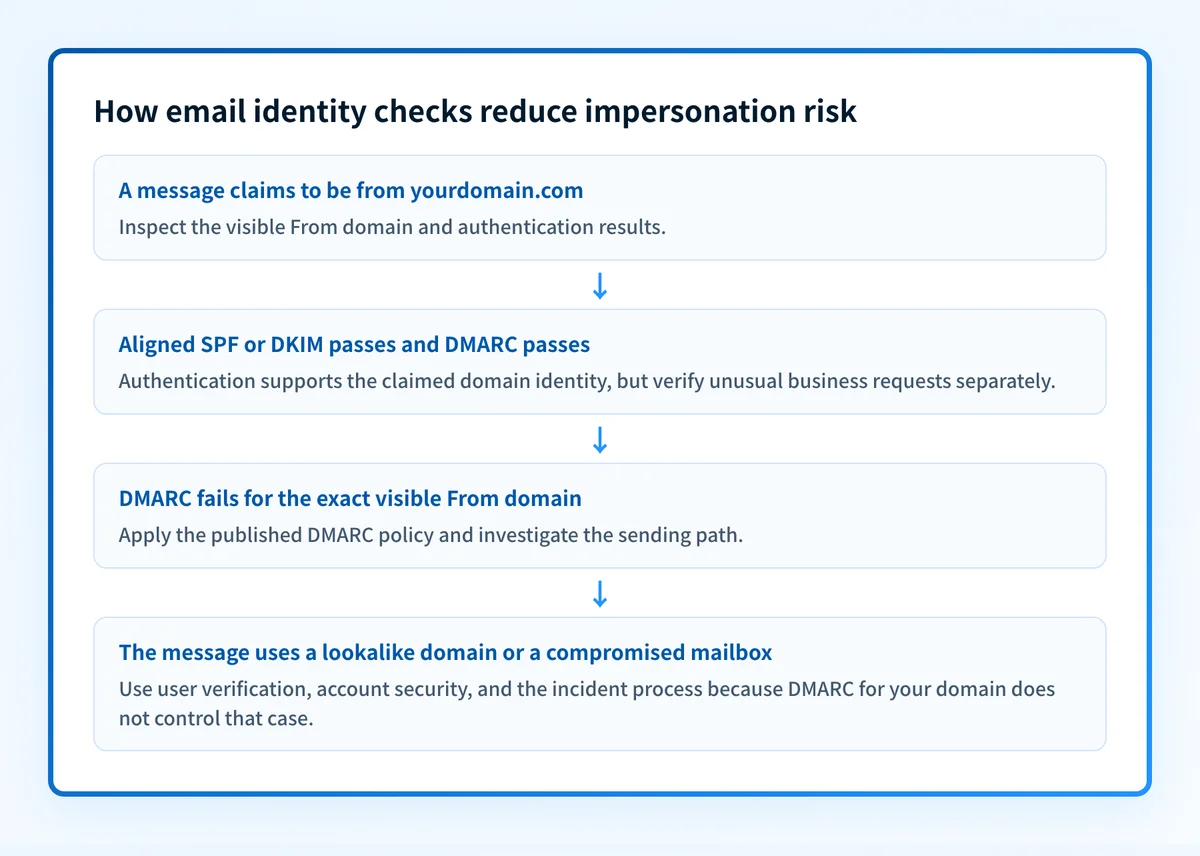
When email impersonation protection changes
The appropriate control depends on the identity signal an attacker is abusing.
If the attacker is sending mail that uses your exact visible From domain, publish and enforce DMARC only after legitimate sending paths have been identified and aligned. DMARC gives receivers an authenticated basis for handling mail that fails the policy. It does not make a forged message disappear everywhere, because receivers retain local policy decisions.
If the attacker uses a lookalike domain, such as a differently spelled domain, your DMARC record does not control that domain. Report the abuse through the receiving provider or relevant domain and hosting channels, and ensure employees have a process to verify requests involving credentials, bank details, or payment changes.
If a genuine employee mailbox is compromised, the message can authenticate correctly because it originates from an authorized system. Account protections, access review, and multifactor authentication matter in that case. NIST guidance on digital identity describes authentication controls, including the use of multi-factor authenticators.
Use this decision rule:
- Exact visible From-domain spoofing: inspect SPF, DKIM, and DMARC publication and alignment.
- Lookalike domain or display-name deception: inspect the full sender address and independently verify the request.
- Mail from a real but unexpected mailbox: treat it as a possible account compromise and use the organization's incident process.
- Suspicious links or attachments: use the mail security process and inspect the message without opening unknown content.
Do not move a DMARC policy toquarantineorrejectuntil legitimate production senders have been inventoried and tested. A policy change can disrupt mail that still lacks aligned SPF or DKIM.
A worked identity and authentication check
The following is an illustrative authentication result for a message whose visible From address is billing@yourdomain.com. RFC 8601 defines the Authentication-Results header field used to communicate message authentication results.
Authentication-Results: receiver.example;
  dkim=pass header.d=yourdomain.com;
  spf=pass smtp.mailfrom=mail.yourdomain.com;
  dmarc=pass header.from=yourdomain.com
This result supports a narrow conclusion: the receiver recorded a passing DKIM result aligned with yourdomain.com, and a passing SPF result for an aligned envelope domain. The recorded DMARC result is pass.
It does not prove that the sender's payment request is legitimate, that the mailbox was not compromised, or that every receiver will produce the same result. Compare the header with the actual message path, including any forwarding service or gateway.
A DMARC record can express the domain owner's requested handling for authentication failures:
v=DMARC1; p=none; rua=mailto:dmarc-reports@yourdomain.comThis illustrative record requests aggregate reports and makes no handling request beyond p=none. It is a starting point for collecting evidence, not proof that every sending service is aligned. RFC 9989's DMARC record requirements explain the record syntax and policy discovery process.
What to do next based on your evidence
If you have only a suspicious email, preserve the message and inspect its full headers through your security process. Compare the visible From address, Reply-To address, and authentication results. Do not rely on the display name alone.
If you own the domain shown in the visible From address, inventory every system that sends mail for it. Validate DNS through the authoritative source and a public resolver. Then confirm the sending vendor's authentication status and send a real message through each production path. Review the delivered message's Authentication-Results header. Once aggregate reports accumulate, use them to find sources and alignment failures that a single test cannot reveal.
If the issue is spam or malicious content rather than a forged domain identity, an email filtering guide is a better starting point. If a sender's requirements affect your legitimate bulk mail, review Google's stricter email sender rules alongside your own production evidence.
Check whether your visible From domain publishes DMARC
If an attacker is using your exact visible From domain, inspect the published DMARC record before deciding whether DNS is part of the problem.
A public check can show the record currently visible in DNS. It cannot prove which production senders pass alignment, repair a compromised mailbox, monitor later sender changes, or explain a receiver's private filtering decision.
If aggregate reports reveal several sources or recurring alignment failures, Palisade is agentic DMARC software that analyzes aggregate-report data, identifies sources and authentication issues, and creates prioritized remediation tickets. It can propose the next policy stage after a human reviews the evidence and applies the DNS change.
Palisade does not filter mail, take over compromised accounts, or autonomously change your DMARC policy.
Evidence
Sources and further reading
Questions readers ask
Frequently asked questions
Is email impersonation the same as phishing?
No. Email impersonation is the use of a false or misleading identity. Phishing is an attempt to obtain credentials, money, data, or another action. A phishing message often impersonates a trusted person or organization, but the terms describe different parts of the attack.
Can DMARC prevent all email impersonation?
No. DMARC helps receivers evaluate mail that uses your domain in the visible From address. It does not control lookalike domains, display-name deception, or messages sent through a compromised legitimate mailbox.
Does a DMARC pass mean an email is safe?
No. A DMARC pass means the receiver recorded aligned SPF or DKIM authentication for the visible From domain. It does not validate the business request, the message content, or the security of the sender's account.
What should I check in a suspicious email?
Check the full sender address, Reply-To address, visible From domain, and available authentication results. For payment, credential, or banking requests, verify the request through a separate trusted channel.
Can a legitimate mailbox send an impersonation email?
Yes. A compromised mailbox can send mail through an authorized service and may pass domain authentication. Account security controls and incident response are required alongside SPF, DKIM, and DMARC.

Written by
Ian BussieresCTO & Co-Founder, Palisade
Ian Bussieres is the CTO and co-founder of Palisade, agentic DMARC software for IT teams and MSPs.
More from Ian →