Secure email gateway for Office 365: what is confirmed
 ChatGPT
 Claude
 Gemini
 Perplexity
 Grok
GrokIn brief
Secure email gateway Office 365 information is not confirmed by Microsoft's public homepage. Learn what to verify before selecting email controls.
A secure email gateway for Office 365 cannot be identified from Microsoft's public homepage alone. Microsoft says Microsoft 365 includes "advanced security," but that statement does not name a gateway product, define its protections, confirm licensing, or show how mail is routed. Before treating a Microsoft 365 control as a secure email gateway, verify the exact product documentation, entitlement, configuration, and delivered-message evidence for the domain.
At a glance
Quick takeaways
- Microsoft's public homepage says Microsoft 365 includes "advanced security," without identifying a secure email gateway product or its behavior.
- A security product name does not prove that protection is enabled for a specific Office 365 tenant.
- A gateway decision needs evidence of the actual mail path, not only a vendor feature list.
- Email authentication is an adjacent control, not proof that a gateway is filtering or protecting mail.
- A public DNS or security check cannot reveal a receiver's private filtering decision or future message handling.
- Use the wider email-threats learning hub to assess controls beyond one product category.
What a secure email gateway claim needs to establish
"Secure email gateway" is often used as a category label, but a useful Office 365 claim needs more than that label. It must establish which Microsoft product or service is in scope, what traffic it evaluates, what protection is included, and how an administrator confirms that the intended mail path uses it.
Microsoft's Microsoft 365 homepage states: "Microsoft 365 delivers cloud storage, advanced security, and Microsoft Copilot in your favorite apps, all in one plan." That is a broad product statement. It does not document a Microsoft secure email gateway name, mail-flow architecture, protection policy, quarantine behavior, licensing boundary, or connector configuration.
That distinction matters when an IT team is selecting controls. A category name cannot answer operational questions such as:
- Does the tenant have the relevant feature or entitlement?
- Does inbound or outbound production mail pass through the intended control?
- Which messages are covered, bypassed, or handled by another system?
- What evidence shows that a delivered message followed the expected path?
- Which authentication results did the recipient receive?
When the answer changes
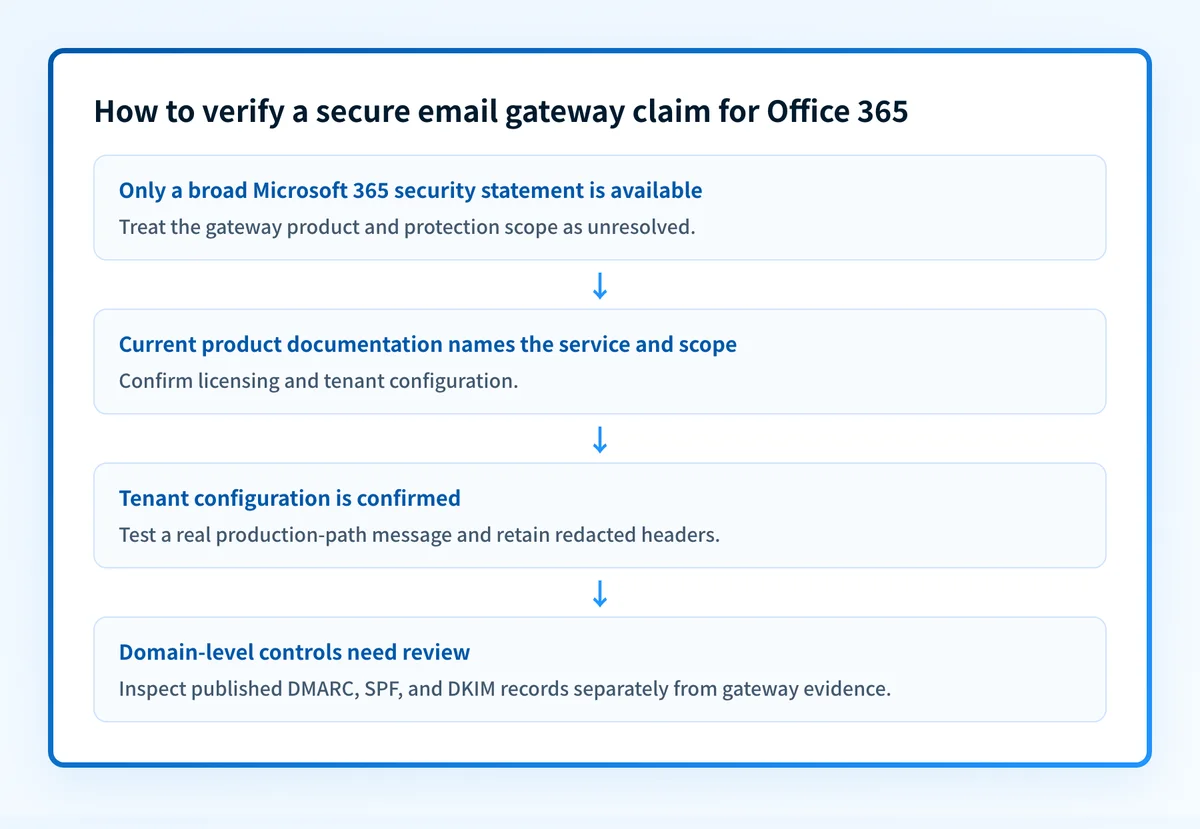
The answer changes when current Microsoft documentation establishes the exact product and the tenant's configuration. Until then, do not infer a gateway capability from the phrase "advanced security."
Use this decision rule:
- If you only have a marketing-level Microsoft 365 statement, treat the secure email gateway question as unresolved.
- If you have current Microsoft product and licensing documentation, identify the documented service and its stated scope.
- If an administrator can show tenant configuration, confirm that the documented service is enabled for the intended users and domains.
- If you have a delivered production message and its full headers, inspect the actual authentication and handling evidence for that path.
- If you only have a public DNS result, use it for domain-level checks. Do not use it as proof of gateway processing, tenant configuration, or a recipient's private filtering decision.
DKIM is one adjacent authentication control. It helps a receiving system evaluate whether a message has a valid cryptographic signature associated with a domain, but a DKIM result does not establish which gateway processed the message. See DKIM for Office 365 for the Office 365-specific topic.
Do not change mail routing or disable an existing mail-security control based on a category label or a public lookup. Confirm the production path and retain an approved rollback plan before making mail-flow changes.
A worked evidence record for an Office 365 review
Record the evidence separately so a product claim does not become a deployment claim.
Question: Is a documented secure email gateway active for your Office 365 mail path?
Product documentation:
- Exact Microsoft product name: [confirm from current Microsoft documentation]
- Stated protection scope: [confirm from current Microsoft documentation]
- Licensing or entitlement: [confirm from current Microsoft documentation]
Tenant evidence:
- Tenant or policy status: [administrator-confirmed]
- Protected domains or users: [administrator-confirmed]
- Intended inbound and outbound path: [administrator-confirmed]
Message evidence:
- Test sender: alerts@yourdomain.com
- Recipient: test-recipient@yourdomain.com
- Full delivered headers: [redacted copy retained internally]
- Authentication-Results: [inspect the delivered message]
- Observed handling: [inbox, junk, quarantine, rejection, or other documented result]
Domain evidence:
- DMARC record: _dmarc.yourdomain.com
- SPF record: yourdomain.com
- DKIM selector: selector1._domainkey.yourdomain.com
The first three sections establish different facts. Product documentation describes a service. Tenant evidence shows whether administrators configured it. Message evidence shows what happened to one delivered message. Domain evidence shows publicly published authentication records.
Do not publish full message headers, private routing details, tokens, or customer addresses when collecting this information. Redact personal data before sharing diagnostic evidence outside the organization.
What to check next
Start with the evidence you actually have.
If you have a Microsoft 365 subscription description or homepage statement, locate current Microsoft documentation that names the relevant email-security product and states its coverage. Confirm the licensing and configuration terms in that documentation before choosing a routing design.
If you administer the tenant, collect the current status from the relevant Microsoft security and mail-flow controls, then test a message through the same production path used by employees or applications. Keep the delivered message's raw headers for the review. A configuration screen alone does not show that an application used the expected sender identity or route.
If your question is about domain-level email security, use Palisade's email security score tool to inspect publicly visible security and authentication signals. Compare the result with the domain's intended DNS configuration and the headers from a real message.
For a wider product-category decision, email security software can help separate the question of required controls from the unverified assumption that a particular Office 365 deployment already provides them.
Verify the Office 365 email-security evidence
Use Palisade's email security guide to review the domain-level controls that sit alongside mail filtering, including the evidence that DNS records and delivered messages can provide.
A domain-level review does not identify a Microsoft gateway product, prove tenant licensing or policy status, show a third-party route, or guarantee inbox placement.
Evidence
Sources and further reading
Questions readers ask
Frequently asked questions
What is Microsoft's secure email gateway?
Microsoft does not sell a product called a secure email gateway. Its homepage says Microsoft 365 includes "advanced security," but it never names a secure email gateway, describes a mail-flow architecture, or sets out what gets filtered. Check Microsoft's current product documentation for the specific email-security service and licence your tenant holds.
What is a secure email gateway?
A secure email gateway is a system that mail passes through before it reaches or leaves your mailboxes, so messages can be scanned, filtered, quarantined, or blocked on the way. It is a category of control rather than one product, and different vendors cover different traffic. For an Office 365 review, what matters is which service your tenant actually routes mail through and what that service is licensed to do.
Does Office 365 have secure email?
Microsoft 365 does include email security features, but Microsoft's homepage only says "advanced security" and never lists which ones you get. What is actually running depends on your plan, your licences, and how the tenant is configured. Check Microsoft's current documentation for your plan, then confirm with an administrator what is switched on.
Can a public DNS check prove that Office 365 email protection is active?
No, because a DNS check reads records such as DMARC, SPF, and DKIM and nothing beyond them. It cannot show a tenant's security-policy status, the route production mail takes, a receiver's private filtering decision, or how your next message will be handled. Confirm those with the tenant configuration and a real delivered message.
Does DKIM prove that a secure email gateway processed a message?
No, because DKIM only tells a receiver that a message carries a valid signature tied to a domain. It names no system in the delivery path, so it cannot show which gateway handled the message or whether your intended controls were active at all. Read the full delivered headers if you need to trace the route.

Written by
Samuel ChenardCEO & Co-Founder, Palisade
Samuel Chenard is the CEO and co-founder of Palisade, agentic DMARC software for IT teams and MSPs, from one domain to thousands.
More from Samuel →