Email security software: how to choose a category fit
 ChatGPT
 Claude
 Gemini
 Perplexity
 Grok
GrokIn brief
Email security software covers four types: secure email gateways, API-connected tools, native provider controls, and the DMARC layer. Find your fit.
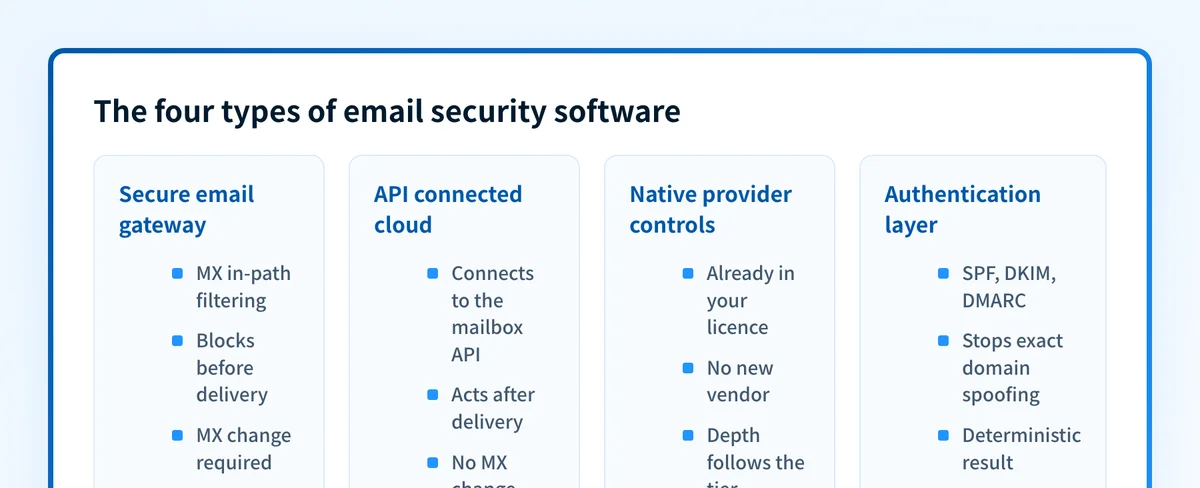
Email security software is one label for four different kinds of product: a secure email gateway that filters mail before it reaches the mailbox, an API-connected tool that inspects mail after delivery in a cloud tenant, the native controls already included with Microsoft 365 or Google Workspace, and the authentication layer that tells receivers which mail may claim your domain. They stop different attacks and fail in different ways, so pick the type before the vendor.
At a glance
Quick takeaways
- Email security software is a category label. Its four types are rarely substitutes for each other.
- The dividing question is where a control sits relative to delivery: in front of the mailbox, inside it after delivery, inside the provider, or in DNS.
- Several email security platforms sell more than one deployment mode, so confirm which mode a proposal covers.
- Inbound filtering protects your users. Domain authentication protects everyone who receives mail claiming to be from you.
- Turn on what your provider already includes before buying a layer on top of it.
Who this comparison is for
This is for an IT admin, security lead, or MSP technician narrowing the category before building a shortlist. It compares product types and names vendors only as examples of a type. For head to head vendor pages, use the comparison hub. It does not cover archiving, encryption at rest, or data loss prevention, which are sold beside these products.
For a ranked read on specific products rather than the categories, see the eight options compared.
If a vendor calls itself a gateway, check what an email security gateway actually means. The label alone does not tell you how a product is deployed.
How the options were evaluated
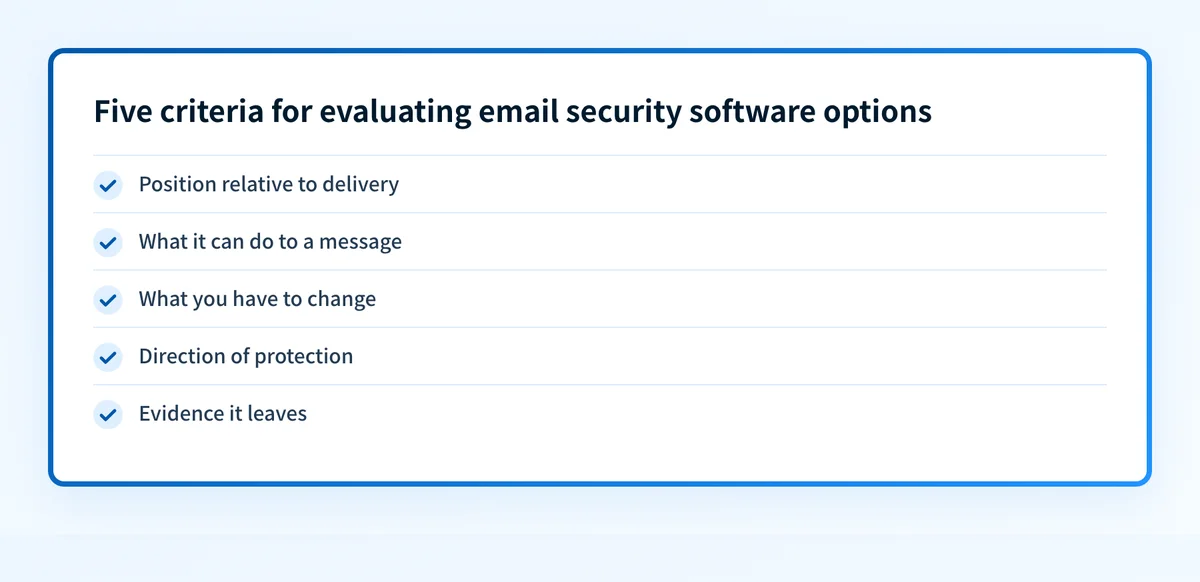
Five criteria separate the types, checked against current first-party vendor documentation on 2026-08-12.
- Position relative to delivery. Before the mailbox, after the message lands, or never at all.
- What it can do to a message. Block, quarantine, rewrite, claw back after delivery, or only report.
- What you have to change. An MX record, a tenant permission grant, a license tier, or a DNS record.
- Direction of protection. Mail arriving at your users, or mail sent to other people using your domain.
- Evidence it leaves. Quarantine logs, message trace, tenant alerts, or aggregate reports from receivers.
Secure email gateway
A gateway sits in front of the mailbox. You point your MX record at the vendor, the vendor inspects and filters, and only surviving mail reaches your mail system. Barracuda's Email Gateway Defense documentation states the prerequisite plainly: "Before you can use Email Gateway Defense, you must modify your domain's MX records to point to Barracuda Networks mail servers", and warns that any record still pointing elsewhere can interfere with its ability to filter. Mimecast and Proofpoint sell the same shape.
The model buys one enforcement point that works regardless of what runs behind it. On-premises Exchange, a hybrid migration, several platforms across acquired companies: a gateway covers them the same way and can refuse a message before any user account is involved.
The cost is that you have joined your mail flow. An MX cutover is a change window, a vendor outage becomes an organization-wide delivery event, and a false positive sits in a quarantine the user cannot see. Gateways are a reasonable answer when pre-delivery blocking is a requirement and an expensive one when it is not.
API-connected cloud email protection
The API model connects to Microsoft 365 or Google Workspace with granted permissions instead of a routing change. Abnormal states its deployment as "Deploy in 60 seconds via API. No MX changes." Cloudflare's API and BCC or journaling modes put a product in the same position, beside the mail path rather than in it.
Two things follow. These tools read the mailbox and the tenant, not only the message, so they can learn who normally emails whom and flag payload-free impersonation a content filter has nothing to match on. Abnormal names "novel BEC, AI-generated lures", account takeover, and invoice and payment fraud as its targets. They also act after delivery, pulling a message back out of the mailbox once a verdict changes.
That is also the tradeoff: the message reaches the mailbox before anything pulls it back, an exposure window for anyone who reads mail quickly. The model also needs a supported cloud provider and a broad tenant permission grant.
Native provider controls
Both large cloud providers ship email security systems you already pay for. Microsoft documents a ladder: the built-in security features for all cloud mailboxes "prevent broad, volume-based, known email attacks", while Defender for Office 365 Plan 1 "protects email and collaboration features from zero-day malware, phishing, and business email compromise (BEC)" and Plan 2 adds simulations, hunting, and automated investigation.
Google Workspace exposes named settings an admin switches on, including "Protect against domain spoofing based on similar domain names", "Protect against spoofing of employee names", and "Protect against any unauthenticated emails". For each one the admin chooses whether the action is a warning, a move to spam, or quarantine.
Starting here costs no migration, and the tuning is work any product would need. Teams still buy a layer on top because capability is tied to license tier and default policies are often left as they shipped, so check what is actually enabled in your tenant first. Microsoft's own guidance also sends admins back to SPF, DKIM, and DMARC records in DNS so the service can more accurately protect against spoofing attacks.
The email authentication layer
The fourth type protects different people. Filters decide what reaches your users. Authentication decides what the rest of the internet does with mail claiming to come from your domain, including mail your gateway never sees because it was never addressed to you.
RFC 9989 defines the mechanism: DMARC "permits the owner of an email's Author Domain to enable validation of the domain's use", to state a handling preference for mail that fails validation, and to "request reports about the use of the domain name." Two limits in the same document matter at buying time. A receiving organization "can choose to honor the Domain Owner's requested message handling for validation failures, but it is not required to do so", and "a DMARC pass by itself does not guarantee that delivery to the recipient's inbox would be safe or desirable."
This layer is not an inbound filter and cannot be scored as one. It is the only one of the four that reduces impersonation of your brand in other people's inboxes. How DMARC works covers the record and the alignment rule.
How to choose
1. Write down the mail systems you actually have
Count every mail platform in the organization, including the ones from acquisitions. A single cloud tenant opens the API option. Anything mixed or on-premises usually does not.
2. Decide whether pre-delivery blocking is a requirement
If an auditor or your own risk position says a malicious message must never reach a mailbox, that is a gateway requirement. If the concern is fraud that reads like ordinary correspondence, post-delivery detection matches the threat better.
3. Enable and tune the native controls first
Compare the policy state in your tenant against the settings each provider documents. A layer bought to cover a control you own but left switched off is the most common wasted line here.
4. Publish and maintain authentication either way
No filtering type stops someone sending as your domain to your customers. That work is SPF, DKIM, and DMARC, and it continues after the filter is chosen.
5. Compare the evidence, not the detection claims
Ask what an analyst can retrieve six weeks later: which messages were held, on what basis, who released them, and how the sender authenticated. Detection rates are vendor-measured; evidence is what you use during an incident.
Where authentication tooling fits
Palisade belongs to the fourth type only. It automates DMARC and email authentication: it reads the aggregate reports receivers send back, identifies the systems sending as your domain, drafts the SPF and DKIM fixes, and proposes each policy step for a person to approve. Palisade's documentation describes it as an email deliverability monitoring and DMARC compliance platform.
It is not a gateway and not an API filter. It never sits in the mail path, so it cannot block, quarantine, or release an inbound message, and it will not stop a phishing email reaching your users. If inbound filtering is the open problem, the other three types are where to look. To see where a domain stands on authentication before any of these decisions, run the email security score tool and review the published records.
Evidence
Sources and further reading
- Microsoft Defender for Office 365 overview
- Google Workspace advanced phishing and malware protection settings
- Cloudflare Email Security documentation
- Proofpoint Core Email Protection
- Barracuda Email Gateway Defense MX record documentation
- Abnormal inbound email security
- RFC 9989: Domain-based Message Authentication, Reporting, and Conformance
Questions readers ask
Frequently asked questions
Is a secure email gateway still needed with Microsoft 365?
Not always. Microsoft documents built-in protection for all cloud mailboxes plus two Defender for Office 365 tiers, so a single-tenant organization may already be covered by what it licenses. A gateway earns its place when mail must be filtered before delivery, or when mail systems outside the tenant need one enforcement point.
Does an API-connected platform replace a gateway?
Not exactly. It removes the MX change and adds post-delivery remediation, but the message still lands in the mailbox before anything acts on it. A strict pre-delivery blocking requirement, or a mail system with no API integration, still points to the in-line path.
Can email security software stop someone spoofing my domain to my customers?
No. Inbound filtering only inspects mail addressed to your users, and mail sent from elsewhere to your customers never touches it. That abuse is the job of SPF, DKIM, and DMARC on your domain, and even then RFC 9989 notes receivers are not required to honor a published policy.
What is the difference between an email security platform and an email security service?
Usually the delivery model rather than the technology. A platform is software your team configures and operates. A service adds people and a defined scope of work, such as tuning policies or reviewing quarantine. Compare what the contract commits someone else to do.
Where should a small team start?
With the controls your mail provider already includes, enabled and tuned, then authentication on every sending domain. Neither costs extra. Add a gateway or an API-connected system once you can name the attack the current setup misses.

Written by
Samuel ChenardCEO & Co-Founder, Palisade
Samuel Chenard is the CEO and co-founder of Palisade, agentic DMARC software for IT teams and MSPs, from one domain to thousands.
More from Samuel →