Best email security: 8 options compared
 ChatGPT
 Claude
 Gemini
 Perplexity
 Grok
GrokIn brief
Best email security: 8 options checked on deployment model, threats named and published pricing, from first-party vendor pages read on 12 August 2026.
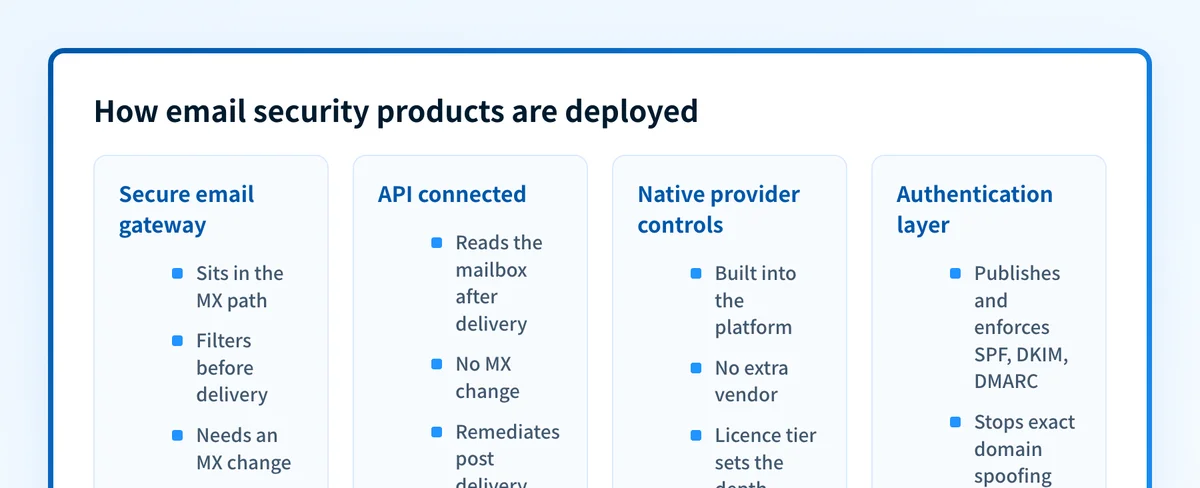
There is no single best email security product. The right one depends on where you want protection to sit: a gateway or API filter that inspects inbound mail, the filtering already included with Microsoft 365 or Google Workspace, or the authentication layer that stops your own domain being spoofed. This comparison records what eight options publish on their own pages, seven inbound vendors plus the authentication layer, covering which deployment models they document and which of them show a price. Detection quality cannot be tested from a vendor page, so nothing here is ranked on it.
At a glance
Quick takeaways
- Deployment is a setting inside most of these products. Proofpoint, Mimecast, Barracuda, Abnormal and Cloudflare each document a connection that leaves MX records alone.
- Three of the eight options publish a list price. Microsoft, Google and Palisade. The other five show none.
- Microsoft 365 already gives you a filtering baseline. Anti-malware, anti-spam and anti-phishing protection is on by default and cannot be switched off.
- Filtering and domain authentication are separate purchases, even when one vendor sells both.
- Ask what an administrator can do with a verdict. That decides what a false positive costs.
- Every fact below was read from a vendor page on 12 August 2026.
Who this comparison is for
An IT admin, security lead or MSP technician told to pick a product, who wants the shortlist cut down by checkable facts. It assumes mail runs on Microsoft 365 or Google Workspace. If "email security gateway" is doing the work in your requirements document, read what an email security gateway is first, because the label covers several architectures. Head-to-head evaluations of authentication platforms sit on the comparison hub.
This page compares named options. If you have not yet settled on which kind of product you need, start with the category guide to email security software, which separates the four types by where each one sits in the mail flow. Picking the type first cuts most of the list below before you read a single vendor page.
How the options were evaluated
Each option was read on its own product or documentation pages on 12 August 2026. Review sites and marketplace listings were excluded. Four things were recorded, and nothing beyond them was inferred:
- Deployment model. Whether the vendor documents an MX-routed gateway, an API connection, post-delivery inspection, or a choice among them.
- Threats named. The categories the vendor claims to address, in its own words.
- Published pricing. Whether a price appears on the vendor's own page. Discounts, minimums and contract terms are not knowable from outside.
- Admin control. What an administrator can do with a verdict once the product has produced one.
Criterion: what you already own
Microsoft documents anti-malware, anti-spam and anti-phishing protection as included in all organizations with cloud mailboxes, and on by default through the default threat policies. An admin cannot turn them off, but can override them with preset or custom policies. See Microsoft's built-in security features for cloud mailboxes. Measure a product against that baseline, not against zero.
Criterion: admin control over the verdict
Google documents three actions an administrator picks per setting: keep the message in the inbox with a warning, move it to spam, or hold it in admin quarantine for review before release. See Google's advanced phishing and malware protection settings. Put the same question to every vendor on your shortlist.
The options, one by one
Listed alphabetically, from each vendor's own page.
Abnormal Security
Abnormal's inbound email security page states "Deploy in 60 seconds via API. No MX changes." and describes the product as built for attacks with no payload and no prior signature. Abnormal positions itself as combining with Microsoft or Google to replace a secure email gateway, which is the vendor's position rather than a tested outcome. Its platform page lists native API integrations with Microsoft 365, Google Workspace, Okta, CrowdStrike and Splunk, "no agents, no proxies", and eleven further modules.
Barracuda Email Protection
Barracuda's Email Protection page states that the product connects to Microsoft 365 or Google Workspace with no mail exchange (MX) changes and is operational in minutes rather than weeks. Barracuda names phishing, malware, spam, account takeover, domain fraud with DMARC and post-delivery weaponization among the threats covered, and names Barracuda IQ and Bailey as its detection and explanation technology.
Cloudflare Email Security
Cloudflare's Email Security documentation documents three deployment approaches: an API connection, post-delivery inspection through BCC or journaling, and pre-delivery placement through MX or inline. Cloudflare says the service uses AI, threat intelligence and security rules to analyze every incoming email, and names phishing, malware, business email compromise, vendor email fraud and spam. The page states no price.
Google Workspace and Gmail
Google Workspace pricing publishes per-seat prices for the Business tiers and lists "Phishing and spam protection that blocks more than 99.9% of attacks" on every one of them, which is Google's own figure. Data loss prevention, S/MIME encryption and context-aware access are listed under Enterprise, which is quoted by sales. The advanced protections are administrator settings rather than a separate product.
Microsoft Defender for Office 365
Microsoft documents a ladder rather than one product. Its Defender for Office 365 overview says Plan 1 "protects email and collaboration features from zero-day malware, phishing, and business email compromise (BEC)" through Safe Attachments, Safe Links, impersonation protection and Real-time detections. Plan 2 "adds phishing simulations, post-breach investigation, hunting, and response, and automation", naming Threat Explorer, Campaigns and Automated Investigation and Response.
Mimecast Advanced Email Security
Mimecast's Advanced Email Security page presents two paths to one product. The MX-based path routes all incoming mail through Mimecast's gateway first and intercepts threats in line. The API path connects in minutes, with no MX record changes and no mail flow disruption. Mimecast names phishing, business email compromise, ransomware and zero-day exploits. Which capabilities differ between the two paths is not stated, so ask.
Proofpoint Core Email Protection
Proofpoint's Core Email Protection page lists "Flexible Deployment via API or SEG", so the gateway question here is a configuration decision rather than a choice between suppliers. The page names phishing, business email compromise, ransomware and account takeover, describes post-delivery detection with automated remediation, and covers sandboxing for URLs and attachments. It integrates with Microsoft 365 and Google environments.
How pricing was handled
Three of these options publish a price. Microsoft's Defender for Office 365 page lists Plan 1 at $2.00 per user per month and Plan 2 at $5.00 per user per month, both paid yearly on an auto-renewing annual subscription. Google publishes per-seat prices on its Workspace pricing page, though the currency and any promotional rate depend on your region. Palisade publishes its plans and prices, including a free tier.
The others publish nothing. Barracuda's plans page names three tiers, Advanced, Premium and Premium Plus, with a feature comparison and no cost figure. Mimecast's product index lists eight products with no price beside any of them, and Proofpoint's page routes buyers to a demo request. Abnormal and Cloudflare show no price on the pages cited above. Quoted pricing is normal in this segment and says nothing about cost.
Where Palisade fits
Filtering and domain authentication are bought separately, even from one supplier. Mimecast, for instance, sells DMARC Analyzer as its own product beside Advanced Email Security on its product index.
Palisade sits in that authentication row and nowhere else. Palisade's documentation covers DMARC, SPF, DKIM, BIMI and MTA-STS, domain onboarding, hosted DNS records, aggregate report processing, sender classification and PSA ticketing. It does not filter, sandbox, rewrite links in or quarantine inbound mail, so it replaces none of the products above. Its narrow job is your own domain: hosted DMARC publishes and maintains the record through a CNAME delegation, so a policy move needs no further DNS edit, and the documentation requires resolving the senders list before enforcement. If DMARC is new to you, start with what DMARC is.
How to choose
- You run Microsoft 365 and have not configured what you own. Set up the built-in policies and measure first. Defender for Office 365 Plan 1 or Plan 2 is the smallest documented step up.
- You need inspection in the delivery path. Proofpoint, Mimecast and Cloudflare each document an MX or inline deployment. Expect a quote rather than a price.
- You cannot change mail flow. Abnormal, Barracuda, Cloudflare, Mimecast and Proofpoint all document a connection that leaves MX records untouched.
- Attackers are spoofing your domain rather than reaching your users. That is the authentication layer, and a separate purchase from every filtering product above.
- You are not sure which layer is failing. Run a domain through the free email security score before shortlisting anyone.
Evidence
Sources and further reading
Every page below was read on 12 August 2026.
- Proofpoint Core Email Protection.
- Mimecast Advanced Email Security and the Mimecast product index.
- Barracuda Email Protection and its plans page.
- Abnormal inbound email security and the Abnormal platform page.
- Microsoft Defender for Office 365 overview, built-in security features for cloud mailboxes and the Defender for Office 365 plans and pricing page.
- Cloudflare Email Security documentation.
- Google Workspace pricing and advanced phishing and malware protection.
- Palisade documentation, hosted DMARC and Palisade pricing.
Questions readers ask
Frequently asked questions
What is the best email security software?
No product is best for every organization, because these products do different jobs. Microsoft and Google secure the mailbox you already pay for. Proofpoint, Mimecast, Barracuda, Abnormal and Cloudflare add inspection in the delivery path or through an API. Palisade works on domain authentication, which none of the others replaces. Decide which layer your evidence points at, then compare only those products.
Do I still need email security software if I use Microsoft 365?
Not automatically. Microsoft documents anti-malware, anti-spam and anti-phishing filtering as on by default for every organization with cloud mailboxes, and those policies cannot be turned off. Configure them, apply the preset security policies, then see what still gets through. Defender for Office 365 Plan 1 and Plan 2 add impersonation protection, Safe Links, Safe Attachments, hunting and automation.
Is a secure email gateway still required?
Not in every case. Barracuda, Abnormal, Cloudflare, Mimecast and Proofpoint all document a connection that needs no MX record change, and Cloudflare documents post-delivery inspection by BCC or journaling. A gateway remains the documented option when you want mail inspected before delivery, or when you route mail for systems other than Microsoft 365 and Google Workspace.
Does email security software stop someone spoofing my domain?
Not by itself. Inbound filtering protects the mailboxes you own. It does nothing about mail an attacker sends to other people using your domain in the visible From address. That is what DMARC, with SPF and DKIM alignment, is for, and it is a separate purchase from every filtering product here.
Which email security companies publish public pricing?
Microsoft publishes per-user list prices for Defender for Office 365, Google publishes per-seat Workspace prices, and Palisade publishes its plans. Proofpoint, Mimecast, Barracuda, Abnormal and Cloudflare publish no price on their own product pages, routing buyers to a quote or a demo instead.

Written by
Taylor TabusaCo-Founder & Head of Business Development, Palisade
Taylor Tabusa is the co-founder and Head of Business Development at Palisade, helping managed service providers turn email security into a practical, valuable service.
More from Taylor →