Pharming vs phishing
 ChatGPT
 Claude
 Gemini
 Perplexity
 Grok
GrokIn brief
Pharming vs phishing: phishing uses a deceptive lure, while pharming redirects users to a fraudulent site through technical means. Learn the difference.
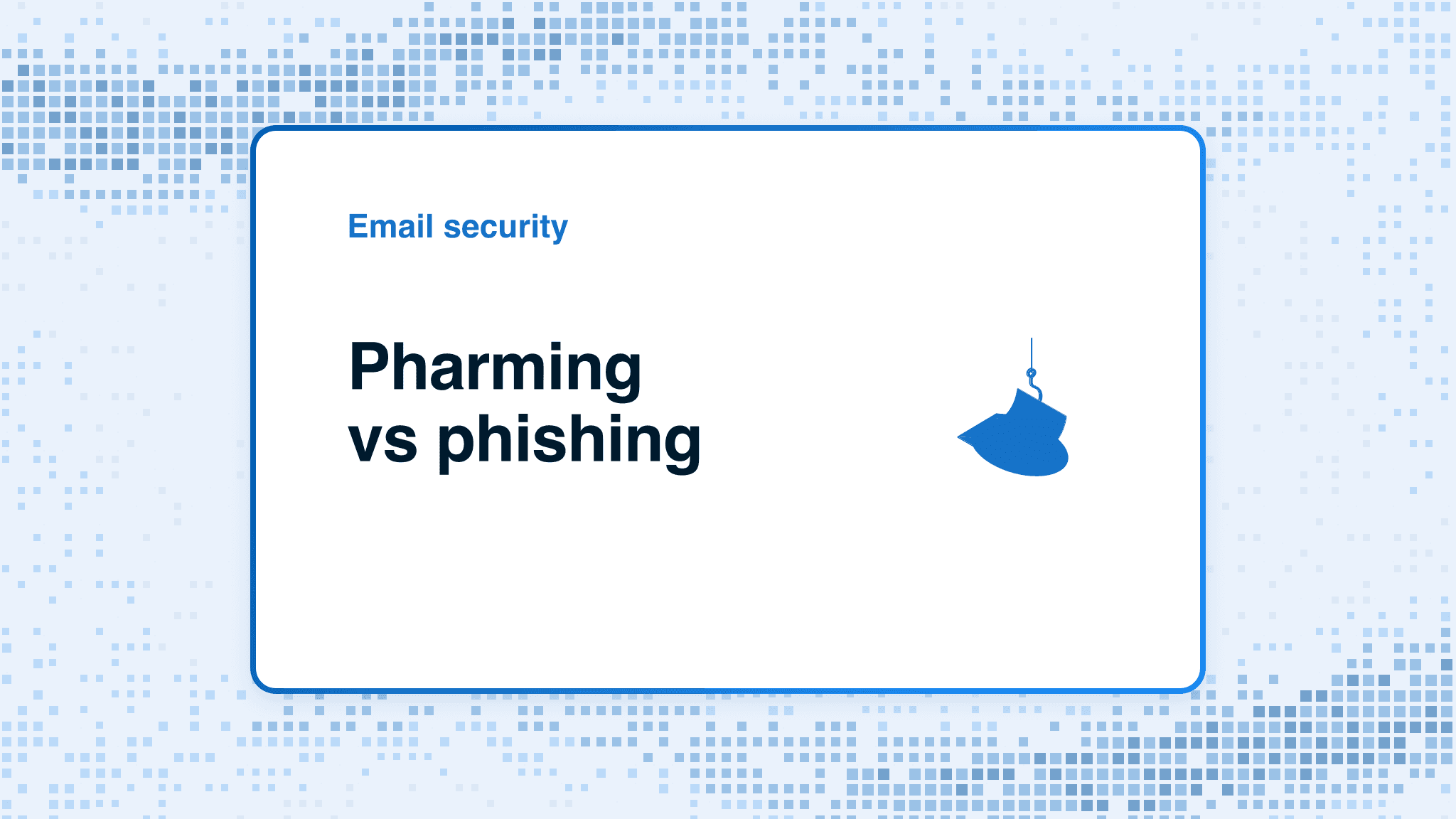
Phishing and pharming can both lead to stolen credentials, but the initial path differs. Phishing uses a deceptive message or prompt to make someone act. Pharming uses technical redirection to send someone to a fraudulent site, sometimes after they use an address or route they trust. A real incident can contain both mechanisms, so classify the evidence before assuming the redirect's cause.
At a glance
Quick takeaways
- Phishing is a social-engineering lure that tries to persuade a person to click, download, reply, approve, or disclose information.
- Pharming redirects a person to a fraudulent site through technical means rather than relying only on a deceptive prompt.
- A counterfeit sign-in page alone does not establish whether an event was phishing, pharming, or both.
- Stop before entering credentials or approving a request, then verify the organization through a separately obtained route.
- Spoofing can make a phishing message look credible, but identity impersonation does not by itself prove pharming.
- Public SPF, DKIM, and DMARC checks can show a domain's published authentication posture. They cannot investigate a browser redirect or fraudulent website.
Who this comparison is for
This comparison is for someone triaging a suspicious sign-in page, unexpected redirect, or deceptive message. It helps security teams, IT administrators, and affected users describe what they observed so the investigation starts with the right evidence.
Use it when the question is, "Did someone lure the user to this page, or did a trusted route send the user somewhere unexpected?" The answer affects what evidence to preserve. A suspicious message calls for sender, link, attachment, and request evidence. An unexpected redirect can require browser, endpoint, router, network, or DNS evidence.
The terms can overlap. Do not force an event into one category when the available evidence supports both. Record the observed path and mark the root cause as needs-human when there is no confirmed technical finding.
For the broader message-led threat, see what phishing is. For the related question of a forged identity, see what email spoofing is.
How the options were evaluated
The comparison uses stable definitions from NIST and was checked on 2026-08-12. The key criterion is the attack path observed before the person reached the fraudulent site:
- Initial mechanism: a deceptive communication, technical redirection, or evidence of both.
- Evidence available: the message, the address entered, the destination reached, and any endpoint or network observations.
- Immediate response: whether the person must stop an interaction and verify a request independently.
- Investigation boundary: what the observed evidence can establish and what still needs human technical investigation.
- Domain-owner follow-up: whether a public email-authentication check has a relevant but limited role.

Pharming
Pharming is the better label when technical means redirect a person to a fake site that masquerades as a legitimate one. NIST's glossary says the redirection can involve a compromised infrastructure service, such as DNS, or the subscriber's endpoint.
- Best fit: An event where a person typed or used a familiar address or trusted route but reached an unexpected destination.
- Relevant evidence: NIST's pharming definition describes technical redirection to a fake site and identifies infrastructure services and endpoints as possible locations for the mechanism.
- Tradeoff: The term does not prove that DNS caused the event. A suspicious page, by itself, cannot distinguish a DNS issue from an endpoint, browser, router, network, or other redirection path.
A public DNS lookup can establish what is published at the time of the query. It cannot prove which resolver, device, or network path a user used during an incident. Keep that distinction clear when assigning the technical investigation.
Phishing
Phishing is the better label when a convincing email, text, social message, or other communication tries to persuade someone to take a harmful action. NIST describes phishing messages that can induce people to follow harmful links, download malicious software, transfer funds, log in, or submit sensitive information.
- Best fit: An event that begins with an unexpected request, message, attachment, link, sign-in prompt, or payment instruction.
- Relevant evidence: NIST phishing guidance advises verifying a request through known contact information or a public company site, rather than relying on contact details supplied in the message.
- Tradeoff: A deceptive message does not establish why a later browser redirect occurred. It may be the full attack path, or it may be one part of a wider incident.
Business email compromise and phishing are also distinct. Business email compromise often centers on impersonation and payment or account actions, while phishing describes the deceptive effort to obtain an action or disclosure.
How to choose
Choose phishing when the first observed path is a deceptive prompt. Choose pharming when a legitimate address or trusted route appears to redirect the person to a fraudulent destination. Record both when evidence supports a lure and a later technical redirection.
option: pharming
checked_on: 2026-08-12
best_fit: "Unexpected redirection from a familiar address or trusted route"
verified_evidence:
  - "NIST defines pharming as technical redirection to a fake site"
  - "Possible mechanisms include infrastructure services or the subscriber endpoint"
open_question: "Which browser, endpoint, DNS, router, or network mechanism caused this event?"
option: phishing
checked_on: 2026-08-12
best_fit: "A deceptive message or prompt that asks a person to act"
verified_evidence:
  - "NIST describes messages that induce harmful clicks, downloads, transfers, logins, or disclosures"
  - "Independent verification is safer than using contact details in the suspicious message"
open_question: "Did the message itself deliver the user to the fraudulent site, or did a separate redirect occur?"
option: Palisade public email-authentication evidence
checked_on: 2026-08-12
best_fit: "A domain owner reviewing public SPF, DKIM, and DMARC posture after a reported email-based event"
verified_evidence:
  - "The Email Security Score reviews public domain signals"
open_question: "Did the reported message authenticate on its actual production path, and did a redirect involve an endpoint or network?"
Use a needs-human escalation when a user reports an unexpected redirect but cannot provide the address entered, the destination reached, or relevant device and network details. The mechanism remains unknown until the responsible security or IT team can inspect the applicable evidence.

What email authentication can and cannot address
SPF, DKIM, and DMARC concern email identity and message handling. RFC 9989 defines DMARC as a way for a domain owner to publish requested handling for messages that fail DMARC validation, while receivers apply their own local policy.
That makes domain authentication relevant when a reported phishing message appears to use an organization's sender domain. It does not make DMARC browser, endpoint, router, resolver, or fraudulent-site forensics. Stronger authentication can reduce unauthorized use of a domain in email, but it does not prove that every future message will authenticate or guarantee delivery.
Email security controls work in layers. A domain owner should separate the question "What does our domain publish?" from "What happened on this user's device and browser?" Those questions need different evidence.
Review public email-authentication signals you control
If you administer the domain named in a suspicious email, use the Email Security Score to inspect public SPF, DKIM, and DMARC signals. This is a useful starting point for a domain-authentication review when the available input is a public domain.
The result is a point-in-time view of public DNS evidence. It cannot determine why a browser redirected, inspect an endpoint compromise, remove a fraudulent site, prove a production sending path, or reveal a receiver's private filtering decision. Compare any public result with the actual message headers and your organization's reporting process before drawing an incident conclusion.
For teams evaluating recurring DMARC work across domains, Palisade comparisons can help frame the operating-model question. Palisade is agentic DMARC software that analyzes DMARC aggregate-report data, identifies sending sources and authentication or alignment issues, and proposes a next policy step for human review. It does not autonomously change DMARC policy, investigate browser redirects, or prevent pharming and phishing incidents.
Evidence
Sources and further reading
Questions readers ask
Frequently asked questions
Is pharming the same as phishing?
No. Phishing uses a deceptive prompt to persuade a person to act. Pharming uses technical redirection to send a person to a fraudulent site. Both can lead to credential theft, and one incident can include both mechanisms.
Can a phishing email lead to pharming?
Yes. A phishing message can be part of a wider incident that later includes technical redirection. The message alone does not prove that the redirect was pharming. Preserve the message and investigate the redirect with the relevant browser, endpoint, network, or DNS evidence.
Does a fake login page prove pharming?
No. A fake login page proves that the destination is suspicious or fraudulent. It does not reveal how the person arrived there. Check whether the initial path was a deceptive prompt, a trusted address that redirected elsewhere, or both.
Does DMARC prevent pharming?
No. DMARC applies to email-message authentication and requested receiver handling for DMARC failures. It does not investigate or control browser, endpoint, router, DNS-resolver, or web-site redirection.
Should I change my DNS records after an unexpected redirect?
Only after the responsible technical team has evidence that a DNS configuration or DNS infrastructure issue caused the redirect. Changing DNS records based only on a suspicious page can create service disruption and may leave the actual cause unresolved.

Written by
Ian BussieresCTO & Co-Founder, Palisade
Ian Bussieres is the CTO and co-founder of Palisade, agentic DMARC software for IT teams and MSPs.
More from Ian →