What is an email security gateway?
 ChatGPT
 Claude
 Gemini
 Perplexity
 Grok
GrokIn brief
An email security gateway inspects mail before it reaches recipients. It runs in front of the mailbox, alongside it via an API, or inside the platform.
An email security gateway is a mail server or cloud service that inspects email before it reaches recipients, then delivers, tags, quarantines, or rejects each message according to policy. Google's Workspace documentation defines the equivalent role plainly: "An inbound mail gateway is a mail server that processes inbound email in some way, before messages are delivered to recipients." Many gateways handle the outbound direction too, applying loss-prevention and encryption policy on the way out. The label describes where a product sits in mail flow, not one fixed architecture.
At a glance
Quick takeaways
- A gateway inspects mail and applies a delivery, tag, quarantine, or reject decision. Most work on inbound mail, and many also apply policy to outbound.
- "Gateway" names a role in mail flow. Three deployment models are common, and they behave differently.
- Routing mail through a gateway first changes the source IP your mailbox platform sees, which weakens the platform's own filtering until you configure for it.
- Microsoft and Google both publish a setting that recovers the original sender IP from behind a gateway.
- A gateway protects mail arriving at your organization. It does nothing about your domain being spoofed to everyone else.
- Evaluate a gateway against your documented mail path, not against the product category.
What an email security gateway does
Google describes what email security gateways do in practice: inbound gateways "typically check for spam, archive messages, and scan for harmful attachments or software" (checked 2026-08-14). Whatever the vendor calls it, the functional core is the same. The gateway receives a message, evaluates it against configured policy and detection logic, and produces one of a small set of outcomes.
The same applies in reverse where a gateway also handles outgoing mail. Google's outbound equivalent "can block outgoing messages that could be spam or messages with harmful content" and supports "compliance requirements by archiving messages, enforcing policies, and creating an audit trail" (checked 2026-08-14).
Those outcomes matter more than the detection method, because they are what your team operates day to day:
- Deliver. The message reaches the mailbox unchanged.
- Tag. The message is delivered with a header, subject prefix, or banner marking it suspicious.
- Quarantine. The message is held, and someone has to release it.
- Reject. The gateway refuses the message at SMTP time, and the sender gets a bounce.
How an email security gateway works
For the common case, where the gateway sits in front of the mailbox, the sequence is the same every time:
- DNS points at the gateway. The MX record for your domain resolves to the gateway's servers rather than to your mailbox platform, so sending servers deliver there first.
- The gateway accepts the SMTP connection. It can refuse the message outright at this point, which is what produces a bounce to the sender rather than a silent quarantine.
- It inspects the message. Envelope and headers, body content, URLs, and any attachments, against configured policy and whatever detection the product provides.
- It applies a verdict. Deliver, tag, quarantine, or reject.
- It relays what survives. Anything cleared is handed to your mailbox platform, which then applies its own filtering to a message that now appears to come from the gateway.
The three deployment models
An email security gateway's behavior is set by where it sits in mail flow, not by the category label.
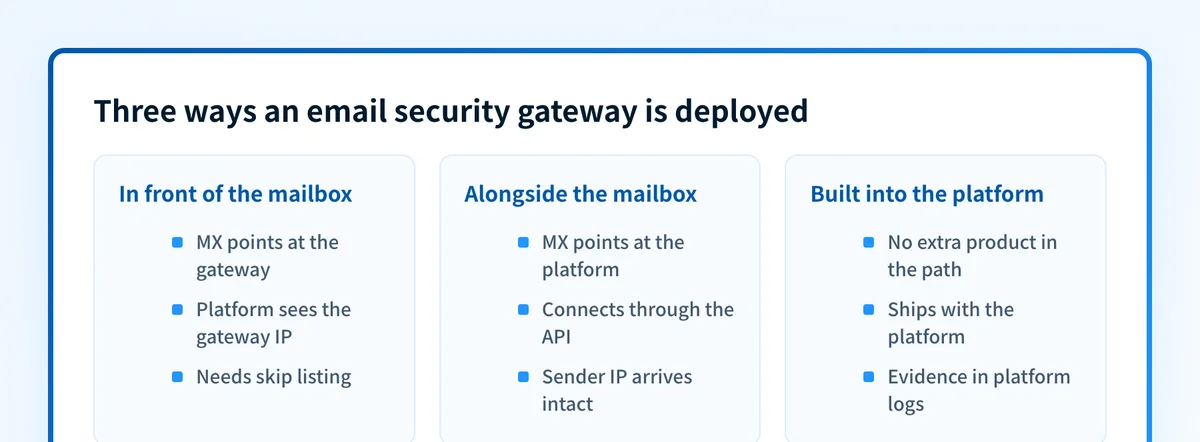
| Model | MX points at | What the mailbox platform sees | What you must configure |
|---|---|---|---|
| In front of the mailbox | The gateway | The gateway's IP as the sender | Skip listing, so the platform recovers the real source |
| Alongside the mailbox | The mailbox platform | The original sender, unchanged | API access and permissions for the gateway |
| Built into the platform | The mailbox platform | The original sender, unchanged | Policy in the platform's own admin console |
In front of the mailbox. The MX record for your domain points at the gateway. It accepts mail from the internet, inspects it, then relays what survives to your mailbox platform. This is the classic secure email gateway, and it is the model that changes the most about how the rest of your mail stack behaves.
Alongside the mailbox. The MX record still points at your mailbox platform. The gateway connects through the platform's API, sees messages after they are delivered, and can retract one from a mailbox after the fact. Mail reaches the platform on its original path, so the platform's own filtering sees what it would normally see.
Built into the platform. No separate product sits in the path at all. Microsoft 365 and Google Workspace both ship inbound filtering, configured in their own admin consoles, with evidence in their own logs.
What changes when mail routes through a gateway first
Put a gateway in front of your mailbox platform and every message arrives from the gateway, not from the sender. Microsoft is direct about the consequence and about whose behavior it is:
As you can see, the message adopts the source IP of the last hop that sits in front of Microsoft 365. The message arrives in Microsoft 365 with a different source IP address. This behavior isn't a limitation of Microsoft 365; it's simply how SMTP works.
That single hop degrades everything downstream that reasons about sender reputation. Both major platforms publish a fix, and both require you to configure it.
Microsoft calls its version Enhanced Filtering for Connectors, also known as skip listing, which "preserves the source IP address and sender information" (checked 2026-08-14). Microsoft's own before-and-after table shows what it recovers: domain authentication moves from implicit anti-spoof heuristics to "Explicit, based on the source domain's SPF, DKIM, and DMARC records in DNS." In other words, without skip listing, a gateway in front of Microsoft 365 stops your senders' SPF, DKIM, and DMARC results being evaluated the way they otherwise would be.
Google's equivalent is the Inbound gateway setting. "Gmail recognizes that inbound gateway IP addresses aren't originating, source IP addresses," and it walks the headers to find the first public IP that is not on your gateway list. There is a trap attached: when the same IP sits in both the Gateway IPs list and an email allowlist, "the allowlist entry doesn't affect message delivery or spam filters." Allowlisting the gateway does nothing, because you have to allowlist the original sender instead.
One more configuration detail catches teams out. Microsoft warns that once Enhanced Filtering is on, you must disable any mail flow rule that sets the spam confidence level to -1 for messages on that connector. That rule is a common shortcut for "trust everything from our gateway," and leaving it in place tells Microsoft 365 to skip filtering entirely on exactly the mail you just went to the trouble of re-evaluating.
How to evaluate an email security gateway
A product name tells you which category a vendor sells into. It does not tell you what will happen to your mail. Evaluate the specific deployment against seven questions:
| Verify | Evidence that satisfies it |
|---|---|
| Where it sits in the production mail path | The vendor's current documentation for your deployment, not a diagram from a sales deck |
| Which messages it receives, and which it never sees | Your own mail-flow map, including internal and platform-to-platform traffic |
| What each verdict does | The policy configuration, stated as deliver, tag, quarantine, or reject |
| Who owns quarantine release | A named owner and a documented escalation path |
| Whether the platform still filters correctly behind it | Skip listing configured, confirmed in the platform's own headers |
| What evidence it records per message | A retrievable log entry for a test message, and its retention period |
| What happens during a gateway outage | The documented behavior, whether mail queues or inspection is bypassed |
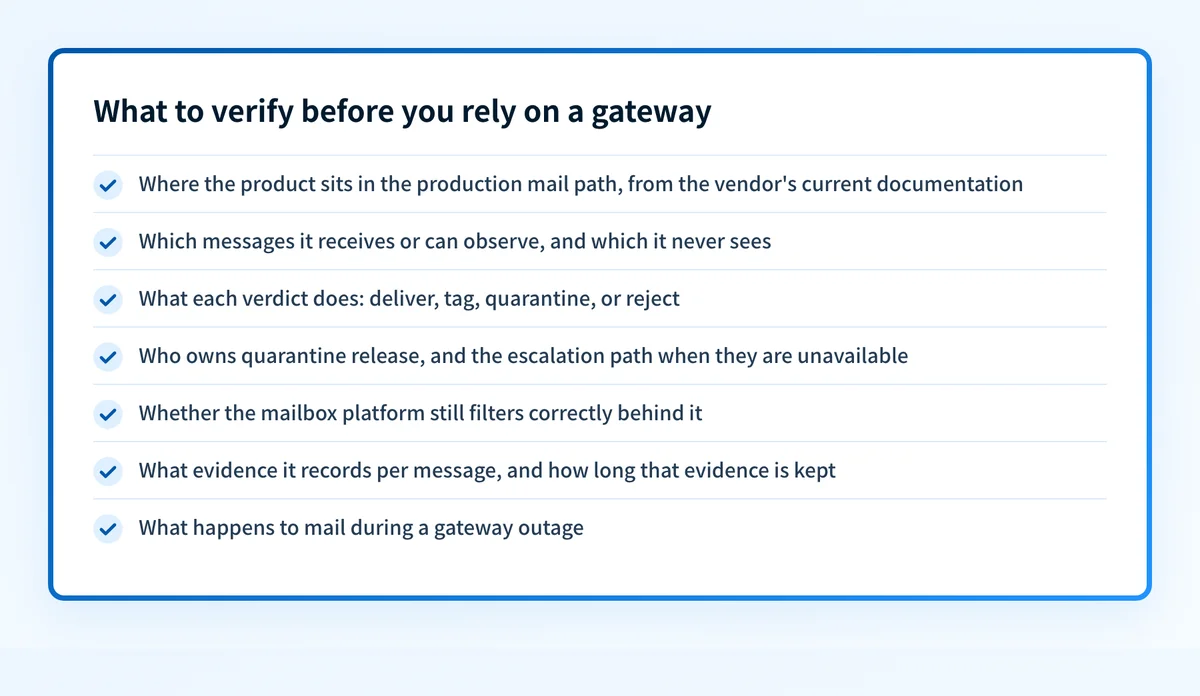
Two of those are skipped most often. Whether the platform still filters correctly behind it is the skip-listing question above, and it is invisible until you look for it. What happens during a gateway outage decides whether your mail queues or your inspection silently stops, and the answer belongs in your documentation before you need it.
For a comparison of the products in this space against suite-native controls, see the anti-phishing software comparison. For the operational view of how a gateway fits with authentication and user reporting, see how secure email gateways protect an organization.
Where the gateway's protection ends
A gateway inspects mail arriving at your organization. That is a real and useful boundary, and it is only half the problem.
Nothing a gateway does affects a message that spoofs your domain and is sent to your customers, your suppliers, or your partners. That mail never touches your infrastructure. The only controls that reach it are the ones you publish in DNS for other receivers to evaluate: SPF, DKIM, and the policy you set with DMARC. RFC 9989 defines DMARC as the mechanism a domain owner uses to publish that policy and to ask receivers for reports on what they saw.
The two controls answer different questions and neither proves the other is working:
- "Can we inspect suspicious mail before our users act on it?" is the gateway's question.
- "Can other receivers tell our real mail from someone impersonating us?" is the authentication question.
A worked evidence example
Suppose someone tells you the organization "has an email security gateway." The useful next question is not whether the label sounds complete. It is which evidence you can actually produce.
Question: Does this gateway protect our production mail path?
Evidence available:
- Product name:          Example Email Security
- Deployment model:      MX points at the gateway
- Vendor documentation:  Current, tenant-specific
- Configuration status:  Console shows enabled
- Skip listing:          Not configured
- Delivered message:     Test message from a production sender
- Security logs:         Available for that same message
Assessment:
- The enabled status supports a configuration claim, nothing more.
- The message and its matching logs show one observed path.
- Skip listing is unconfigured, so the mailbox platform is
  filtering against the gateway IP rather than the real sender.
- Nothing here establishes handling for every future message.
Four kinds of evidence get mixed together in conversations like this: the product name, the vendor's documentation, the current configuration state, and a real message with its logs. Only the last one shows what happened. Even then, one message does not establish continuous coverage or how a different receiver would decide.
Assess the controls around your email domain
A posture check is a reasonable starting point when the open question is broader than one gateway.
Check your email security score
A public check cannot prove a gateway's deployment, inspect private mail-flow logs, confirm a receiver's decision, or guarantee that future messages will be protected. It reads what your domain publishes and flags areas worth an internal review.
Keep the outbound half of the problem visible
Once a gateway review is done, the inbound side has an owner and a documented path. The outbound side usually does not. Every service that sends as your domains, and every one of them that still fails DMARC alignment, sits outside what a gateway can see.
Palisade is agentic DMARC software that analyzes DMARC aggregate-report data, identifies sending sources and authentication or alignment issues, and creates prioritized remediation tickets. It proposes the next policy step from the evidence it has. Your team reviews that evidence and applies any DNS or policy change.
Palisade does not operate as an email gateway, filter inbound phishing messages, change DMARC policy on its own, or guarantee delivery or inbox placement.
Evidence
Sources and further reading
Questions readers ask
Frequently asked questions
Is an email security gateway the same as a secure email gateway?
Yes. The two names describe the same role, and vendors use them interchangeably along with the abbreviation SEG. Neither name tells you the deployment model, so ask whether the product sits in front of the mailbox, connects through an API, or is built into the mailbox platform.
Do Microsoft 365 and Google Workspace need a separate email security gateway?
Both platforms ship their own inbound filtering, so a separate gateway is an added layer rather than a missing one. The case for adding one rests on gaps you can name in your own environment. If you do add one in front of the platform, configure Microsoft's Enhanced Filtering for Connectors or Google's Inbound gateway setting, or the platform's filtering will evaluate your gateway's IP instead of the real sender's.
Does an email security gateway replace DMARC?
No. A gateway inspects mail coming to you. DMARC, SPF, and DKIM govern how other receivers evaluate mail claiming to come from your domain. A gateway cannot stop your domain being spoofed to someone else's inbox, and DMARC cannot tell you whether an attachment is malicious.
What is the difference between a secure email gateway and an integrated cloud email security product?
Deployment, mostly. A gateway in the traditional sense takes the MX record and inspects mail before your platform ever sees it. Integrated cloud email security, sometimes abbreviated ICES, leaves the MX record alone and connects through the platform's API, which means it sees messages after delivery and can retract one from a mailbox. The second model avoids the source-IP problem described above, because mail reaches the platform on its original path.
What breaks if I put a gateway in front of Microsoft 365 without configuring it?
Microsoft 365 sees your gateway as the source of every message, so IP reputation and anti-spoof heuristics work against the wrong address. Enhanced Filtering for Connectors restores the original source and moves domain authentication to explicit SPF, DKIM, and DMARC evaluation. If you also left a mail flow rule setting the spam confidence level to -1 on that connector, Microsoft 365 skips filtering on that mail entirely.
Can a gateway guarantee that no phishing reaches the inbox?
No. A gateway applies configured controls to the messages it processes, and a verdict on one message does not predict every future one. Lookalike domains and mail from genuinely compromised accounts pass many automated checks, which is why user reporting and a named investigation owner stay part of the control set.

Written by
Samuel ChenardCEO & Co-Founder, Palisade
Samuel Chenard is the CEO and co-founder of Palisade, agentic DMARC software for IT teams and MSPs, from one domain to thousands.
More from Samuel →