How do secure email gateways protect an organization?
 ChatGPT
 Claude
 Gemini
 Perplexity
 Grok
GrokIn brief
Secure email gateways protect an organization by applying inbound controls before mail reaches users: policy checks, threat detection, and quarantine.
Secure email gateways can protect your organization by applying inbound-mail security controls before messages reach users, such as policy checks, threat detection, quarantine, and filtering. They are only one control boundary. DMARC, SPF, and DKIM help receivers evaluate whether a visible From domain is authenticated, while user reporting gives security teams evidence of suspicious mail that passed or was misclassified.
At a glance
Quick takeaways
- A secure email gateway evaluates email traffic before or as it reaches the mailbox environment.
- Sender authentication and inbound threat filtering answer different questions.
- DMARC evaluates alignment between the visible From domain and SPF or DKIM authentication results.
- Users need a clear way to report suspicious messages that reach their inboxes.
- A gateway decision does not prove that every malicious message will be blocked.
- Validate gateway controls with production-path messages, vendor evidence, and incident reporting.
How the control boundaries work
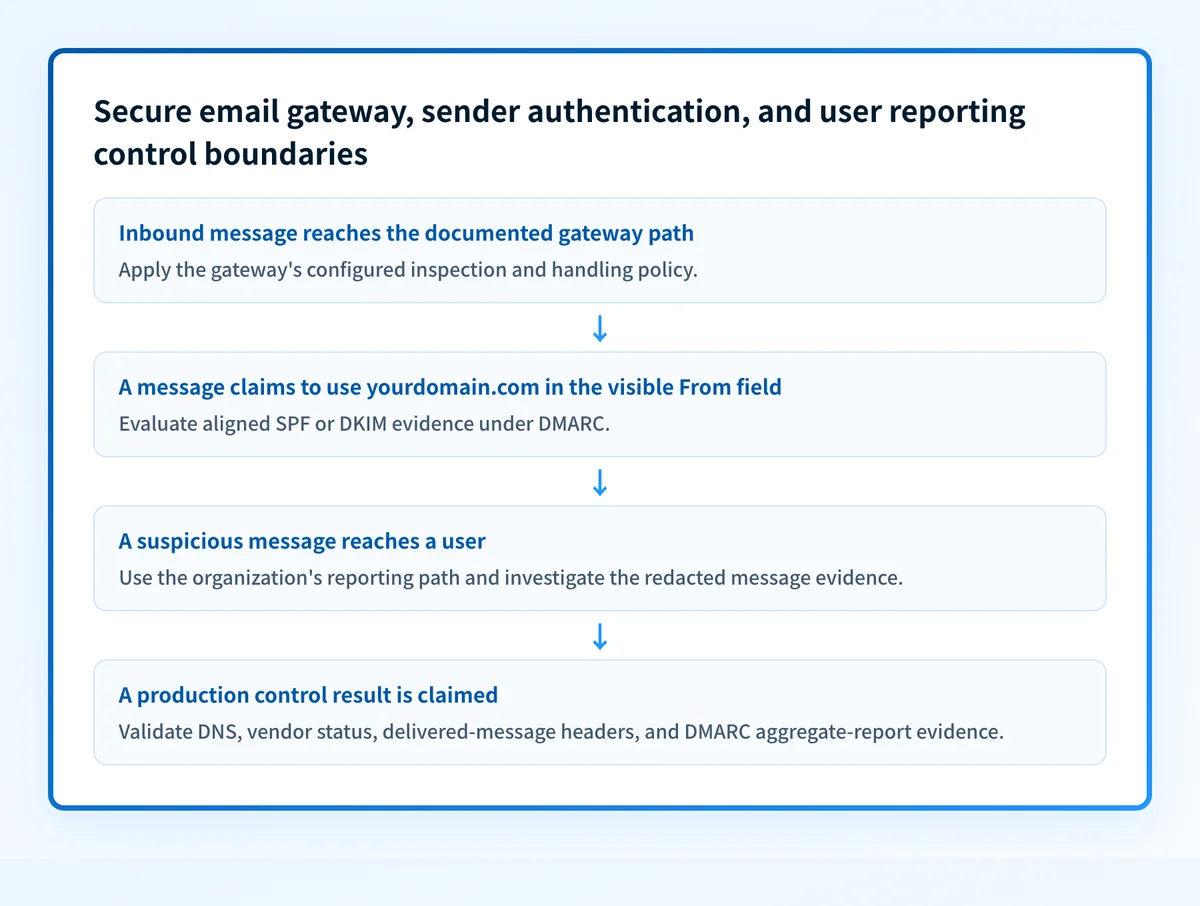
A gateway, sender authentication, and user reporting each answer a different question, and no one of them substitutes for another. The gateway is the inbound control: it inspects messages and applies the organization's configured handling, such as delivery, quarantine, rejection, or further review. For the definition and the three deployment models a gateway can use, see what an email security gateway is.
Sender authentication is different. RFC 9989 defines DMARC as a way for a domain owner to publish policy and reporting preferences for messages using that domain in the visible From field. DMARC builds on SPF and DKIM results and their alignment with the visible From domain. A DMARC result can help a receiver distinguish authorized use of a domain from spoofing, but it does not inspect an attachment, determine whether a URL is harmful, or make a final inbox-placement guarantee.
DKIM has a narrower role still. RFC 6376 defines DKIM as a cryptographic signature mechanism for email. A valid DKIM result can provide message-integrity and domain-identifier evidence, but it is not a phishing verdict.
User reporting covers the gap between automated controls and what employees see. A reported message can give the security team an example to investigate, a false-positive signal, or evidence that an attacker is adapting. It does not replace gateway policy or sender authentication.
For the definition, the three deployment models, and what to verify before relying on one, see what an email security gateway is.
When a gateway changes the outcome
A secure email gateway can reduce exposure when it has a documented enforcement point for the messages your organization receives and its policies match the threat or risk you are evaluating. The answer changes when a message bypasses that path, when a policy allows delivery, or when the control is operating only in a monitoring or post-delivery mode.
Use this decision rule:
- If the question is "Can we inspect suspicious inbound messages before users act on them?", evaluate the gateway's documented mail-flow placement, policies, quarantine process, and alerting.
- If the question is "Can receivers verify mail that claims to be from our domain?", evaluate SPF, DKIM, and DMARC for the exact visible From domain.
- If the question is "What should an employee do with a suspicious delivered message?", define a reporting path and an investigation owner.
- If the question is "Did this production message actually authenticate and take the expected route?", inspect its delivered headers and the relevant vendor or mailbox evidence.
Do not change MX records or gateway routing based only on a product demonstration. Confirm the provider's current mail-flow documentation and retain a tested rollback path before changing production delivery.
A gateway can work alongside sender authentication, but neither proves the other is correctly configured. An inbound filter may quarantine a spoofed message even when the sending domain has no DMARC policy. Conversely, a DMARC pass may identify authorized domain use while a malicious message still needs content or URL evaluation.
What a gateway inspects, and what that decision covers
Coverage varies by product, and the only authoritative list is the one in your vendor's current documentation. Google's description of the role names the common core: inbound gateways "typically check for spam, archive messages, and scan for harmful attachments or software" (Set up an inbound mail gateway, checked 2026-08-14). In practice the inspections group into a handful of categories, and each produces a different kind of decision with a different blind spot.
| What it inspects | Decision it produces | What that decision does not cover |
|---|---|---|
| Bulk and spam characteristics | Deliver, tag, or quarantine by score | A targeted message written for one recipient has none of the bulk signals |
| Attachments and embedded files | Strip, quarantine, or reject | A malicious file introduced after delivery, or one shared by link instead |
| URLs in the message body | Rewrite, warn, or block at click time | A link that is benign at scan time and weaponised afterwards |
| Display name and header patterns | Flag likely impersonation | A genuine account that has been compromised, which needs no impersonation |
| Recipient and policy rules | Route, hold, or apply an exception | Anything the rule's own scope excludes |
Two limits apply to the whole table. A gateway only ever sees the mail that routes through it, so internal mailbox-to-mailbox traffic and mail sent from an already-compromised account inside the tenant may never reach it. And every row describes handling for messages it processed, not a guarantee about the next one.
A practical control evaluation checklist
Evaluate the controls as separate, testable responsibilities.
Inbound gateway control
- Work through the gateway evaluation checklist, then test a permitted
  message and a policy-triggering message through the same production path.
Sender authentication control
- Identify the visible From domains used by each sending service.
- Check for aligned SPF or DKIM results in real delivered-message headers.
- Review DMARC aggregate-report evidence before changing DMARC policy.
User reporting control
- Publish the reporting method available to employees.
- Assign an owner who can review reported messages and act on findings.
- Feed confirmed false positives and false negatives into the relevant control review.
This checklist reflects the different evidence each control needs. The gateway line is short because the gateway evaluation checklist covers that control in full, including mail path, quarantine ownership, evidence retention, and outage behaviour. RFC 8601 defines the Authentication-Results header field, which can show authentication results in a delivered message. That message evidence is more specific than a public DNS lookup because it reflects one actual sending path.
For outbound-domain protection, how to stop email spoofing and protect your brand explains why domain authentication belongs in the wider control set.
What to validate after deployment
Start with the evidence you have.
If you have a suspicious delivered message, preserve a redacted copy and inspect the delivered headers, message route, authentication results, and the user-reporting record. Check the gateway's documented event or quarantine evidence for that same message where available.
If you have only a domain name, check the published DMARC record and compare it with the intended policy. A public lookup can inspect DNS publication. It cannot prove the production sending path, show continuous state, explain a gateway decision, or predict a receiver's private placement decision.
For a working deployment claim, validate four layers:
- DNS: query authoritative DNS and at least one public resolver for the published authentication records.
- Vendor: confirm the gateway or sending provider's current status for the relevant configuration.
- Message: send a real message through the exact production path and inspect its headers.
- DMARC: review aggregate-report data after reports have accumulated.
Keep sender authentication work visible after the gateway review
A gateway review can show how inbound mail is handled, but it does not inventory every service that sends as your domains or show which production sources still fail DMARC alignment. Palisade is DMARC software that analyzes DMARC aggregate-report data, identifies sending sources and authentication or alignment issues, and creates prioritized remediation tickets. It proposes the next policy step for human review. Your team reviews the evidence and applies any DNS or policy change.
Palisade does not operate as an email gateway, filter phishing messages, change DMARC policy autonomously, or guarantee delivery or inbox placement.
For how two named vendors describe their own inbound controls, see Abnormal email security and Avanan email security.
Evidence
Sources and further reading
- RFC 9989: Domain-based Message Authentication, Reporting, and Conformance
- RFC 6376: DomainKeys Identified Mail
- RFC 8601: Message Header Field for Indicating Message Authentication Status
- Google Workspace: Set up an inbound mail gateway - Google's description of what an inbound gateway does.
- Palisade DMARC checker
Questions readers ask
Frequently asked questions
What does a gateway not scan?
Anything that does not route through it. Internal mail between two mailboxes on the same platform may never cross the gateway, and neither does mail sent from a compromised account that already sits inside the tenant. Messages that spoof your domain and go to other organizations never touch your infrastructure at all.
Who owns the quarantine release queue?
Someone has to, and the answer belongs in your documentation before the first release request arrives. A quarantine with no named owner becomes a queue nobody drains, and legitimate mail sits in it while senders assume delivery. Name the owner, the escalation path when they are unavailable, and the record kept for each release.
Does DKIM mean an email is safe?
No. DKIM provides signature-based authentication evidence under the DKIM protocol. A valid DKIM signature does not determine whether the message content, attachment, or linked destination is safe.
Should users report suspicious email that reached the inbox?
Yes. User reports provide evidence for the security team to investigate, especially when a suspicious message was delivered or when a legitimate message was handled incorrectly. The reporting process should have a documented owner and escalation path.
Can a DMARC checker prove a gateway is protecting our mail?
No. A DMARC checker can inspect public DNS records for a domain. It cannot prove mail routing, gateway policy execution, a receiver's private decision, or the result for a particular delivered message.

Written by
Samuel ChenardCEO & Co-Founder, Palisade
Samuel Chenard is the CEO and co-founder of Palisade, agentic DMARC software for IT teams and MSPs, from one domain to thousands.
More from Samuel →