Is noreply@email.apple.com legitimate?
 ChatGPT
 Claude
 Gemini
 Perplexity
 Grok
GrokIn brief
Apple documents noreply@email.apple.com for some Business Manager notices, but the address alone proves little. Learn how to verify a message safely.
Apple documents noreply@email.apple.com as the sender for device order progress report messages, which go to users holding the Administrator, Site Manager, or Device Enrollment Manager role. That narrow official use does not prove that every message displaying the address is legitimate. The visible From field can be forged, and an authentic message can still be misunderstood or contain a link you should verify. Check trusted receiver-added authentication and confirm the claimed event in an Apple surface you open independently.
At a glance
Quick takeaways
- Apple has documented
noreply@email.apple.comfor Apple Business Manager administrator notifications. - That documentation is not a complete Apple sender-address allowlist.
- A visible From address is a message claim, not receiver-verified authentication evidence.
- An aligned DMARC pass can support domain identity but cannot prove the message's business claim.
- Verify the event independently and report suspicious Apple mail to
reportphishing@apple.com.
What has Apple actually documented about the address?
Apple's published Apple Business Manager guide says administrator email messages from Apple Business Manager use noreply@email.apple.com (Apple Business Manager guide, PDF). That is direct evidence for a specific product and recipient role. It is not evidence that every consumer receipt, support case, security alert, or Apple Account notification should use the same address.
The distinction matters because community answers often turn one observed sender into a universal allowlist. Apple's own security guidance does not instruct recipients to trust a message because its visible sender matches a memorized address. It tells people to examine mismatches and suspicious requests, avoid following suspicious links, and contact Apple directly when uncertain (Apple social-engineering guidance).
So the precise answer is conditional. The address has a documented legitimate use. The individual message still needs its own evidence.
What should I verify in a worked header example?
Suppose an Apple Business Manager administrator receives a notice displaying this envelope information:
From: Apple Business Manager <noreply@email.apple.com>
Subject: Managed Apple Account update 630184
Date: Tue, 25 Aug 2026 13:42:10 +0000
The administrator then obtains the original message headers from the receiving mailbox. The following is an illustrative result, not a header copied from an Apple message:
Authentication-Results: mx.recipient.example;
 dkim=pass header.d=email.apple.com;
 spf=pass smtp.mailfrom=bounce.email.apple.com;
 dmarc=pass header.from=email.apple.com
Start by asking who added that field. RFC 8601 Section 1.2 describes an authentication service's trust boundary and warns that the mere presence of Authentication-Results is not enough. A sender can insert a lookalike field before delivery. Use the field added by a receiver you trust (RFC 8601, Section 1.2).
Next, read the identifiers. RFC 8601's registered properties map a DKIM result to header.d and an SPF result to smtp.mailfrom or smtp.helo (RFC 8601, Section 2.7.2). In this hypothetical result, both authenticated identifiers sit under email.apple.com, and the reported DMARC result passes for the visible From domain.
DMARC alignment compares the authenticated identifier with the RFC5322 From domain. RFC 9989 Sections 4.4.1 and 4.4.2 define DKIM and SPF alignment, and Section 4.1 says a message passes DMARC when at least one supported mechanism both authenticates and aligns (RFC 9989, Section 4.4). The example reports both, but one aligned pass would be enough for DMARC.
Read receiver-added results and compare identifiers with visible From.
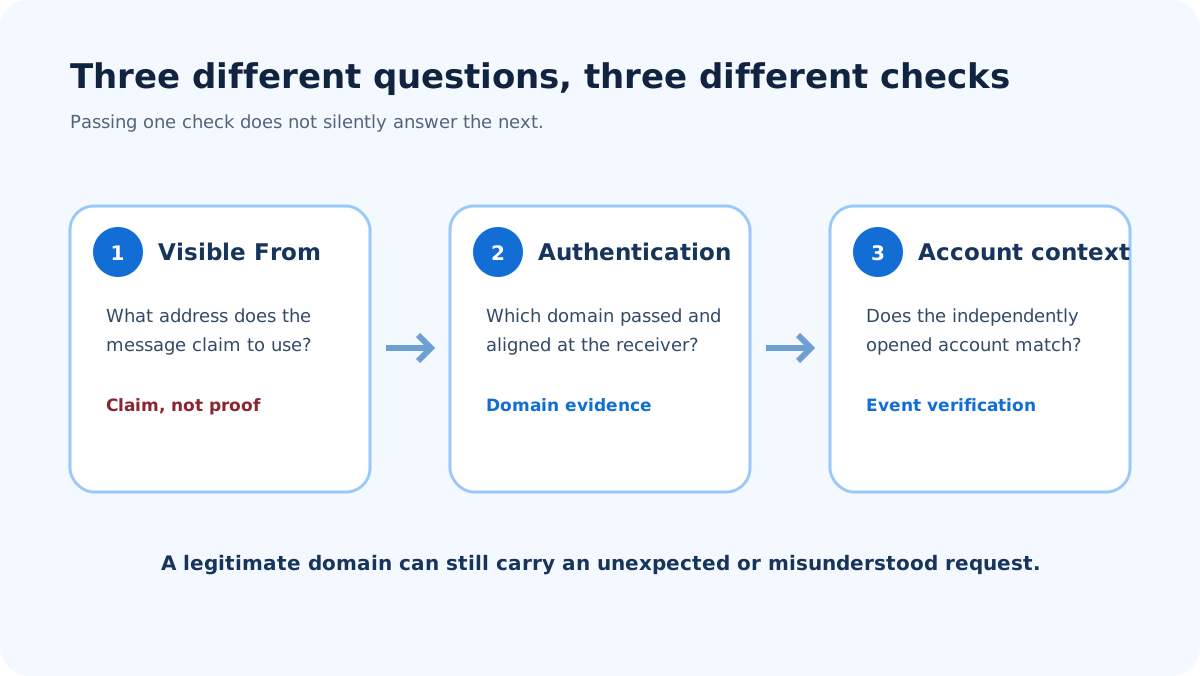
Verify the event outside the message even when authentication aligns.
What does that header evidence prove?
The hypothetical result supports a limited conclusion: the trusted receiver reports authentication and alignment for the same domain shown in From. It does not prove that update 630184 exists, that the recipient expected it, or that every URL in the body is safe. It also cannot be reused to validate a different message.
The opposite needs care too. An SPF failure does not automatically prove phishing because forwarding can change the SMTP path. A DKIM failure can reflect message modification. A missing result may reflect how the receiving system exposes headers. Security teams should analyze the actual path instead of inventing a verdict from one token.
If raw headers are available, the Email Header Analyzer can parse the supplied authentication fields. It cannot access private Apple Account or Business Manager activity, establish the sender's intent, or inspect a destination merely because it appears in a header.
How do I verify the message safely?
Match the recipient and product context
Ask whether the mailbox belongs to an Apple Business Manager administrator and whether the subject relates to activity that product performs. A consumer who has never administered Apple Business Manager should not use the product guide as proof that an unrelated receipt or account alert is genuine.
Open the expected Apple surface independently
Use a bookmark, a typed official address, or the relevant Apple app or device Settings. Do not use the message link. Match the claimed update, device, purchase, role, or case number. If nothing matches, contact Apple through an independently obtained support route.
Review the complete request
Apple says support will never ask for a password, device passcode, or two-factor authentication code. Its guidance also says support will not ask a person to tap Accept in a two-factor prompt or disable security controls (Apple social-engineering guidance). A message or follow-up caller making one of those requests should be treated as suspicious regardless of the displayed address.
Preserve and report suspicious evidence
Apple asks people to forward suspicious email purporting to be from Apple to reportphishing@apple.com. Work mail may also need an internal security report. Preserve the original message and headers under the organization's handling rules, and redact personal data before sharing beyond the authorized team.
What does "noreply" mean here?
noreply is the local part before the @. It signals that the mailbox is not intended for a conversation. It does not authenticate the domain, prevent delivery, or guarantee that a reply will bounce. Different systems may discard a response, route it to an unmonitored mailbox, or generate an automated notice.
Do not reply as a verification test. A reply stays inside the channel chosen by the message and can confirm that your address is active. Use the product's documented support or account route instead.
When does this answer not apply?
The documented Apple Business Manager use does not apply to every Apple service, every country, or every kind of notification. It does not prove that Apple will always use the address, and it does not justify blocking every Apple message that uses another address. Vendor sending systems change, and a complete allowlist would require current product-specific evidence from Apple.
This page also cannot validate a forwarded screenshot. Screenshots omit routing and authentication fields and can be edited. Obtain the original message from the receiving mailbox when header analysis is warranted.
Nor does a saved contact settle the question. Mail clients can display an address-book name beside a newly received message, which may make the sender look familiar without adding authentication evidence. Verify the original message and the claimed activity each time. If the request concerns a product you do not use or an administrator role you do not hold, that mismatch is important context for escalation.
Evidence
Sources and further reading
Questions readers ask
Frequently asked questions
Is noreply@email.apple.com a real Apple address?
Yes, in a narrow documented context. Apple's Business Manager guide identifies it as the sender for administrator messages. That does not authenticate an individual email or make it a universal address for every Apple service.
Can I trust a message because DMARC passes?
No. An aligned DMARC pass supports the domain identity reported by a trusted receiver. It does not prove that the claimed event happened, that the recipient expected it, or that every request and destination is safe.
Should I reply to noreply@email.apple.com?
No. The local part indicates that replies are not the intended support path, and a reply is not a useful authenticity test. Open the relevant Apple product or support route independently.
Does Apple publish a complete email sender list?
Not in the sources supporting this page. The official evidence confirms one Business Manager use, not a complete cross-product allowlist. Verify the product context and the individual message instead of relying on a memorized list.
Can a forged message display the exact address?
Yes, the visible From field can be forged, but exact-domain forgery of this address is the case DMARC handles. email.apple.com publishes v=DMARC1; p=reject, and apple.com publishes p=quarantine; sp=reject, so a receiver honouring those policies rejects mail that fails authentication while claiming the domain. That pushes real attacks toward lookalike domains and display-name spoofing instead, neither of which DMARC evaluates. A pass still says the domain authorised the message, never that its claim is true. Use receiver-added authentication as supporting evidence and verify the claimed activity in an Apple surface opened independently.
Should I report a suspicious message using this address?
Yes. Apple asks recipients to forward suspicious mail purporting to be from Apple to reportphishing@apple.com. Work recipients should also follow their organization's security-reporting process.

Written by
Samuel ChenardCEO & Co-Founder, Palisade
Samuel Chenard is the CEO and co-founder of Palisade, agentic DMARC software for IT teams and MSPs, from one domain to thousands.
More from Samuel →