Apple phishing email: how to verify and report it
 ChatGPT
 Claude
 Gemini
 Perplexity
 Grok
GrokIn brief
Apple never asks for your password or a verification code by email. Check the claim in Settings or at appleid.apple.com, then report the message to Apple.
Treat an unexpected Apple email as unverified until you confirm its claim outside the message. Do not use its links, call a number it provides, open an attachment, or share an Apple Account password or verification code. Instead, use a trusted Apple device or type an official Apple address yourself. Apple asks recipients to forward suspicious email claiming to be from Apple to reportphishing@apple.com.
At a glance
Quick takeaways
- A familiar Apple logo, display name, or visible From address is not proof by itself.
- Apple says its support representatives will never ask for your password or device passcode.
- Never share or enter a six-digit verification code because an unsolicited message or caller asks.
- Verify a purchase, device, case, or security event through an Apple surface you opened independently.
- Forward suspected Apple phishing to
reportphishing@apple.comand follow any internal security process.
What does an Apple phishing email look like?
Apple's current social-engineering guidance identifies several observable signs: a sender address that does not match the claimed company, a link whose URL does not match the company website, a message that looks different from legitimate company mail, a request for personal information, or an unsolicited attachment (Apple: recognize and avoid social engineering). Any one detail can have an innocent explanation, so use it to trigger verification rather than announce a verdict.
Here is a fictional worked example using a domain that cannot be registered:
From: Apple Account Security <case@apple-account-review.invalid>
Subject: Purchase 630184 will be approved in 27 minutes
We detected a USD 1,149 Mac purchase. Call +1 202-555-0147 now
and read the six-digit code sent to your device to cancel it.
The useful evidence is concrete. The sender uses apple-account-review.invalid, not an Apple-controlled domain. The message combines a 27-minute countdown, a high-value purchase, an unsolicited phone number, and a request for a six-digit code. The transaction identifier 630184 provides something to compare with independently opened account activity. None of those values comes from a real campaign.
An authentic-looking address would not remove the need to verify. The visible From field is supplied as part of a message and can be forged. Receiver-added authentication results may provide stronger domain evidence, but they do not prove that the claimed purchase exists, that the reply address is safe, or that a link leads where its label says.
Record concrete mismatches before deciding.
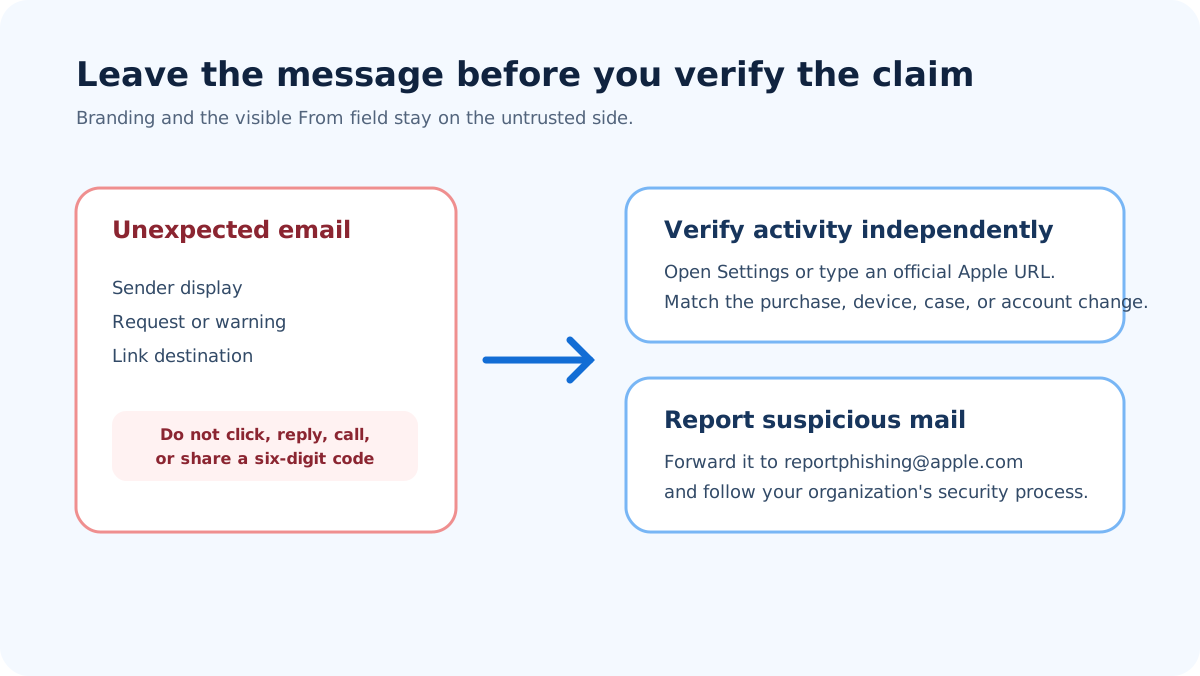
Verify through a trusted Apple surface.
How do I verify the claimed Apple activity?
Check the event without using the email
Use a trusted Apple device, an established Apple app, or a typed official Apple URL. Look for the claimed purchase, subscription, device, password change, or support case. If the message claims a receipt, compare it with purchase history. Apple's guidance for legitimate App Store and iTunes Store purchase emails says genuine receipts include the current billing address and will not ask for a full credit-card number or card security code (Apple purchase-email guidance). The page is region-labelled, so field names can vary by country.
Compare the request with what Apple says it will not ask
Apple says support will never ask for an Apple Account password, device passcode, or two-factor authentication code. It also says support will never ask a person to tap Accept in a two-factor dialog or disable security features such as two-factor authentication, Find My, or Stolen Device Protection (Apple social-engineering guidance). A request for any of those actions is enough to stop the conversation and use an independent support route.
Apple's current two-factor documentation describes a six-digit verification code shown on a trusted device or sent to a trusted phone number when signing in on a new device or browser (Apple two-factor authentication). The code authorizes access. It is not a ticket number to read to someone who contacted you.
Inspect destinations without visiting them
On a desktop mail client, view the destination the client exposes without clicking. On an iPhone or iPad, Apple's own guidance is to touch and hold the link, which shows its destination without navigating to it. A lookalike such as apple-support.example.net belongs to example.net, not Apple. The important part is the registrable domain, not the occurrence of the word "apple" somewhere to its left or in the path.
The Palisade phishing link checker inspects a URL's public threat signals without you visiting it, though a clean result is not proof the destination is safe.
Do not sign in after following an unexpected message link merely to see whether the page works. A phishing site can relay credentials to the real service and ask for the code immediately.
Use headers as supporting evidence
An authorized security team can inspect raw headers. RFC 8601 Section 1.2 explains that Authentication-Results must be interpreted within the receiver's trust boundary because a sender can add an untrusted field with the same name (RFC 8601, Section 1.2). A pass for an unrelated domain does not authenticate Apple. A pass for an aligned Apple domain can support domain identity, but the recipient should still verify the claimed account activity.
The guide on why phishing passes SPF and DKIM explains that boundary in more depth.
How do I report an Apple phishing email?
Apple directs people to forward suspicious emails that purport to be from Apple to reportphishing@apple.com. Preserve the original message if your mail client supports forwarding it as an attachment, and follow your organization's security-reporting method as well. Apple's page provides different reporting routes for suspicious FaceTime calls, SMS messages, and iCloud spam, so use the route that matches the medium (Apple reporting instructions).
Do not reply to the suspected sender. Do not forward an active attachment to colleagues for informal review. If the message targets a work account or device, the security team may need the original headers, delivery logs, account events, and endpoint evidence.
What if I already clicked or shared information?
Close the suspicious page without entering more information. If you entered an Apple Account password, change it through a trusted Apple surface, review trusted devices and account information, and contact Apple through its official support route. If you disclosed a verification code, approved an unexpected sign-in, installed software, or sent money, escalate immediately. A work device or work account also belongs in the organization's incident process.
Do not wait for an email reply from the suspected sender. Preserve the URL, time, message, and any account alert. Avoid deleting browser history, mail, or device evidence if your security team has an established preservation procedure.
The Apple two-factor authentication email guide can help distinguish an expected code notification from an event you did not initiate. The Private Relay Apple ID guide is about address privacy and does not validate a message claiming to be Apple.
When does this guidance not apply?
This page does not decide whether every Apple-branded message is fraudulent. Real receipts and account alerts can be unexpected, and regional templates can differ. Independent account activity and a trusted support route settle the business context more reliably than a screenshot or remembered template.
It also does not apply to a known internal security simulation once the authorized training team confirms the exercise through its established channel. Even then, employees should use the normal reporting action; the lesson should not require unsafe clicking or credential entry.
Evidence
Sources and further reading
Questions readers ask
Frequently asked questions
Can an Apple phishing email show an Apple address?
Yes. A visible From address can be forged, and a lookalike domain can be easy to miss. Use trusted receiver-added authentication as supporting evidence and verify the claimed event through an Apple surface you open independently.
Does Apple ask for a six-digit verification code by email?
No. Apple's guidance says support will never ask for a two-factor authentication code. A six-digit code is used to authorize a sign-in on a new device or browser, so keep it private.
Are billing details proof that an Apple receipt is real?
No. Current billing details can support a legitimate-receipt assessment, but copied personal data can appear in fraud. Match the purchase in independently opened Apple purchase history and never provide full card details or a security code by email.
Should I forward a suspicious Apple email to Apple?
Yes. Apple asks recipients to forward suspicious mail purporting to be from Apple to reportphishing@apple.com. A workplace message may also need to go through the organization's security-reporting route.
Can I safely call the number in an Apple security email?
No. Use Apple's official support path opened independently. A phone number inside an unexpected message keeps you inside the sender's chosen channel and may connect you to the attacker.
Will reporting the email secure a compromised account?
No. Reporting helps send the message to Apple, but it does not change a password, remove an unknown trusted device, reverse a payment, or inspect a work endpoint. Complete the relevant account and incident-response steps separately.

Written by
Ian BussieresCTO & Co-Founder, Palisade
Ian Bussieres is the CTO and co-founder of Palisade, agentic DMARC software for IT teams and MSPs.
More from Ian →