Private Relay Apple ID: What the Email Address Means
 ChatGPT
 Claude
 Gemini
 Perplexity
 Grok
GrokIn brief
Private Relay Apple ID addresses end in @privaterelay.appleid.com. See what the relay means, how to spot one, and what senders must register to reach it.
A Private Relay Apple ID email address is an alias Apple creates when a person uses Sign in with Apple and chooses to hide their email. The address ends in @privaterelay.appleid.com, and Apple forwards mail to the person's verified inbox only when it comes from an address the app registered as a source. Store and use the relay address as the user's contact address. Do not treat it as invalid, try to derive the hidden inbox, or confuse it with iCloud Private Relay for web traffic.
At a glance
Quick takeaways
- A Sign in with Apple relay address ends in
@privaterelay.appleid.com. - The relay hides the person's underlying email address from the app.
- Apple requires participating developers to register the outbound email sources that use the relay, matched by envelope-sender domain under SPF or by DKIM
d=against the headerFrom. An unregistered source bounces. - iCloud Private Relay protects web traffic and is a different feature.
- Preserve the relay address in the user record and send only expected, consented messages.
- Diagnose failures with the exact bounce, application record, and sending-source configuration.
What a Private Relay Apple ID address does
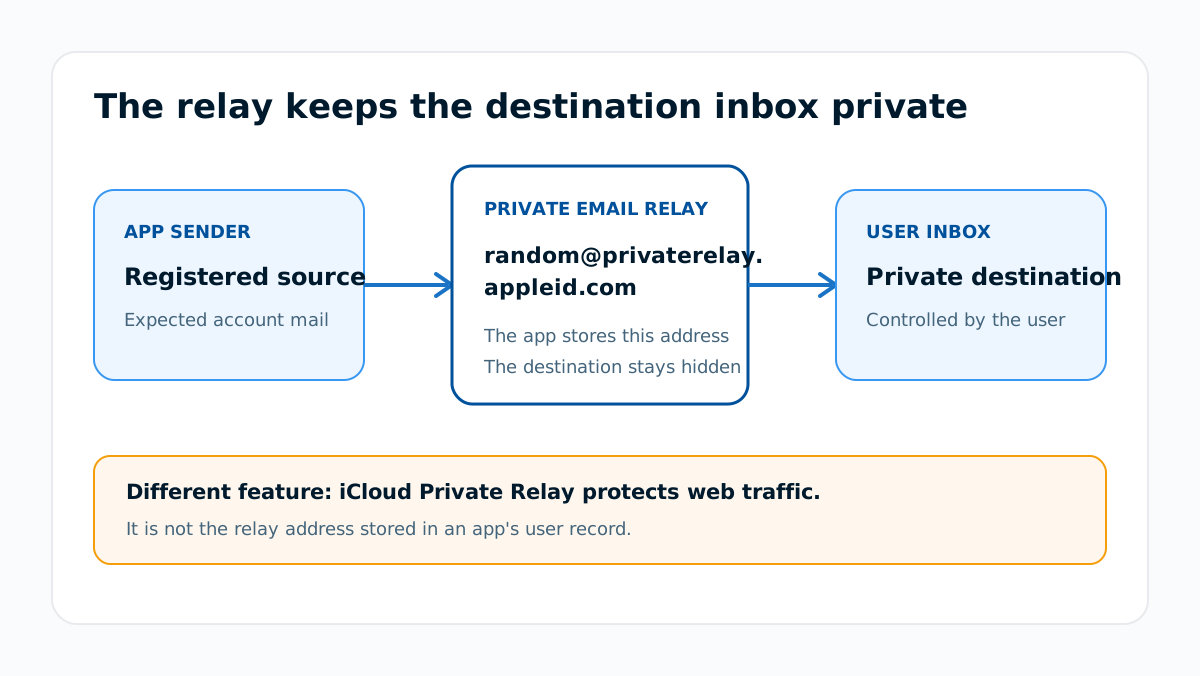
Apple's developer guidance for its private email relay describes a relay between an app and the private email address attached to a person's Apple Account. The app receives and stores the relay address instead of the hidden address. Apple forwards eligible mail sent to that relay address.
The relay is scoped to the app relationship. It is not a public directory entry and does not encode the destination inbox in a form the sender should reverse. Treat it like an email alias whose forwarding rules are controlled by Apple and the user.
The naming is the trap here. Apple calls this option Hide My Email inside Sign in with Apple, and it also calls a separate iCloud+ feature Hide My Email. They are not the same thing. An address created through Sign in with Apple is locked to the one app or website that created it, which Apple states directly: "only the app or website you created the account with can use this unique email address to communicate with you." An iCloud+ address is created ad hoc by the user for any site, app, or personal use.
What does private relay mean in this context?
The phrase is overloaded across Apple products:
- Private email relay for Sign in with Apple: the app sees an address at
privaterelay.appleid.comand sends eligible account mail to it. - Hide My Email with iCloud+: the user can create random forwarding addresses for sites, apps, and personal use.
- iCloud Private Relay: part of an iCloud+ subscription, it protects your privacy when you browse the web in Safari. It is not an email address at all, and never appears in an app's user table.
Do not confuse a generated relay address with Apple's fixed sender addresses. If a received message displays noreply@email.apple.com, use the exact sender-address verification guide and inspect the original message rather than applying relay rules.
How to check a private relay email
1. Inspect the complete stored address
Check whether the account address ends exactly in @privaterelay.appleid.com. Do not decide from the display name, the word "Apple," or a partial screenshot.
2. Match it to the application user record
Use the stable user identifier and account record produced by your Sign in with Apple integration. The relay address is contact data for that account, not a reliable key for joining unrelated user records.
3. Confirm the sending source is registered
Apple tells developers to register the domains and email addresses that will communicate with users through the relay, and it checks that registration along two different paths. Which one applies to you depends on who owns your bounce domain, so check the right field.
SPF path. Apple requires that "the domain in the envelope sender (also known as the MAIL FROM, bounce, or Return-Path address) must be registered", must pass SPF, and must match the registered domain exactly. Note the field: this is the envelope sender, not the visible From header.
DKIM path. If your email service provider owns the envelope sender, as Apple notes is the case with Amazon SES, Mailchimp and SendGrid, you must sign with DKIM instead. There the d= value is matched against the domain in your header From address, that domain must be registered, and the signature has to cover the From: header.
This is the step most senders get wrong, because an ESP's bounce domain differs from the visible From domain by default. Comparing only the From address will show a match while the relay is failing you on the SPF path. Apple states the consequence plainly: "if you don't register all the source domains or emails that you use, email sent to the private relay service will result in a bounce message." Registration is capped at 32 email sources for an individual account and 100 for an organization.
4. Preserve the complete delivery result
If mail fails, keep the SMTP response, timestamp, envelope sender, visible From address, recipient relay address, and sending service. A generic address check cannot show whether Apple accepted this application-to-relay path.
5. Retest the same application path
Send one expected account message from the same production source after correcting a confirmed registration or sender mismatch. Do not test from a personal mailbox and assume that result proves the application path.
This evidence order is more useful than changing the address. The email deliverability hub covers the broader distinction between SMTP acceptance, forwarding, and final mailbox placement.
How senders should handle the relay address
Store the exact relay address Apple returned. Use it for messages the person expects from the app, honor consent and unsubscribe state, and keep it attached to the correct application account.
Do not replace it with a guessed personal address. Do not merge two user records only because one later reveals a different email. A person can change forwarding choices, and separate Apple app relationships can have separate relay addresses.
If delivery fails, begin with the returned evidence. Apple's developer guidance says participating email sources must be registered for the relay. A mismatch between the actual production sender and that configuration is therefore a concrete branch to check. The final inbox provider can still make its own delivery decision after forwarding.
For syntax, domain, or mailbox-level evidence outside the Apple relay, follow the steps for checking email address deliverability. That process cannot reveal the hidden destination or override Apple's forwarding rules.
Evidence
Sources and further reading
Questions readers ask
Frequently asked questions
Is a Private Relay Apple ID address a real email address?
Yes. It is a working relay address for an eligible Sign in with Apple app relationship, though it hides the person's underlying inbox.
Is Private Relay Apple ID the same as iCloud Private Relay?
No. The email relay forwards messages to a hidden inbox. iCloud Private Relay protects Safari browsing and related internet traffic.
Can I reply to mail sent to my Private Relay address?
Yes. Apple states that the addresses "automatically forward to your personal email inbox" and that "you can read and respond directly to emails sent to these addresses" while your real address stays private.
Why does my iPhone call this Hide My Email rather than Private Relay?
Only because Apple uses "Hide My Email" for the option inside Sign in with Apple as well as for the separate iCloud+ feature. The address you get from Sign in with Apple is the one ending in @privaterelay.appleid.com, and it works only with the app or website that created it.
Should an application reject addresses ending in privaterelay.appleid.com?
No. Store the address as returned by Sign in with Apple and make sure the production sending source satisfies Apple's relay configuration.
Can an ordinary email verifier prove that relay forwarding works?
No. A verifier can inspect general address or domain signals, but it cannot prove that a particular app sender is registered, that the user still permits forwarding, or that the final inbox accepted the message.

Written by
Dominic LandryDeliverability & DNS
Dominic Landry works on email deliverability and DNS configuration at Palisade, from SPF and DKIM records through to DMARC enforcement.
More from Dominic →