Dots in Gmail Addresses: Do They Matter?
 ChatGPT
 Claude
 Gemini
 Perplexity
 Grok
GrokIn brief
No, dots do not matter in a personal Gmail address: every dotted or period variant reaches one inbox. Work and school Gmail addresses are the exception.
Dots in a personal Gmail address, also called periods, do not create a different mailbox. Google says jane.smith@gmail.com and janesmith@gmail.com go to the same inbox when the account ends in @gmail.com. That rule does not apply to every email provider or to Gmail addresses issued by a work, school, or other organization. Keep the address a person entered, and normalize a separate comparison key only when you need to detect duplicate personal Gmail accounts.
At a glance
Quick takeaways
- Personal
@gmail.comaddresses ignore dots in the part before@. - A dotted and undotted personal Gmail address are not two separate Gmail accounts.
- Work, school, and organization addresses hosted by Google can treat dots as meaningful.
- Other email providers can assign different mailboxes to addresses that differ only by dots.
- Store the original address for delivery, consent, support, and audit records.
- If account uniqueness matters, compare a separate Gmail-specific normalized value.
How Gmail handles dots in an address
Google's Gmail address guidance says dots do not matter in personal Gmail addresses. Mail addressed to dotted variants of the same characters reaches one account. Google also says another person cannot register a dotted version of an existing personal Gmail address.
This is provider behavior, not a general email rule. RFC 5322 permits dots inside an unquoted local part, but the standard does not require every provider to merge dotted variants. The domain after @ owns the mailbox behavior.
That distinction matters when you compare the address with an email alias. A Gmail dot variant is the same personal Gmail account under Google's rule. An alias at another provider can be a separately configured address, even when it reaches the same inbox.
When the answer changes
Do not remove dots from every email address. Google limits this behavior to personal Gmail accounts and says dots can change an address used through work, school, or another organization. A provider at another domain may also treat first.last@example.com and firstlast@example.com as two different mailboxes.
Use the complete domain as the first decision point:
- For an address ending exactly in
@gmail.com, a dot-insensitive comparison can help detect duplicate account records. Google's guidance covers@gmail.comonly, so treat any other Google-hosted domain as outside the rule until its own operator confirms otherwise. - For a managed Google domain, preserve every character and follow that organization's address rules.
- For any other domain, assume the dots matter unless the provider documents otherwise.
- For delivery, keep using the address the person supplied. A comparison key is an internal control, not a replacement address.
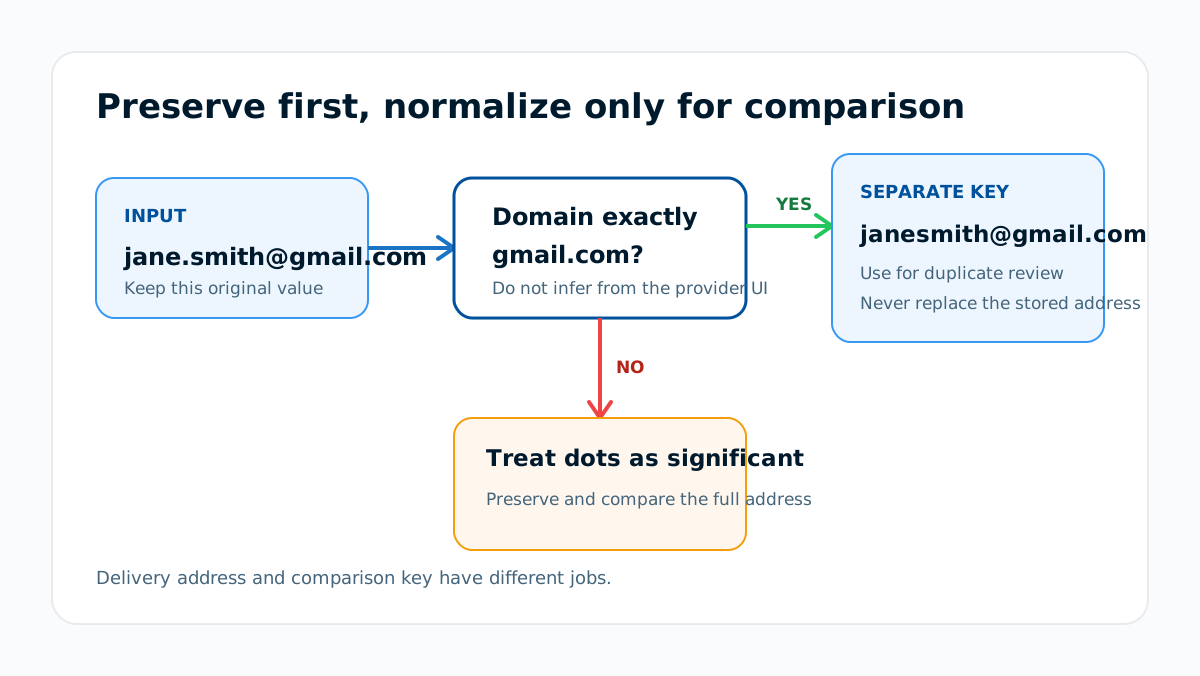
A safe comparison model for signup systems
The risk appears when an application treats raw strings as separate users while Gmail delivers both strings to one inbox. That can let one person create multiple records in a system that intends to allow one account per email address. Gmail's delivery behavior is not an identity check, so it cannot be used as one.
Keep two values when the business rule requires duplicate detection:
Original delivery address: jane.smith@gmail.com
Comparison domain: gmail.com
Comparison local part: janesmith
Comparison key: janesmith@gmail.com
The original address remains the contact and consent record. The comparison key is only for an explicit uniqueness, abuse, or deduplication rule. Document that rule because changing it later can merge records that were previously separate.
Do not silently rewrite historical addresses, merge user accounts, or transfer consent based on normalization alone. Confirm ownership through the application's normal verification process, then resolve conflicting records under an approved account-recovery policy.
What to check before treating two addresses as one
1. Confirm the complete domain
Normalize only addresses ending exactly in @gmail.com. Do not extend the rule to a lookalike domain, a subdomain, or a Google-hosted organization domain.
2. Preserve the submitted value
Store the original address with its verification, consent, and account history. Use a separate comparison field so support staff can see what the person entered.
3. Compare existing records without merging them automatically
Flag a collision for review. A matching comparison key does not tell you which account record, profile, entitlement, or consent state should win.
4. Test the policy with known variants
Use a controlled personal Gmail account and confirm that your signup, password-reset, unsubscribe, and account-recovery paths behave consistently. This tests your application logic. It does not establish how another email provider treats dots.
Address syntax and mailbox delivery are separate questions. If the input may be malformed or the domain may not accept mail, use the evidence order in checking email address deliverability. A syntax or MX check cannot decide who owns two application accounts.
Evidence
Sources and further reading
Questions readers ask
Frequently asked questions
Do dotted Gmail addresses go to different inboxes?
No. For a personal address ending in @gmail.com, Google says dotted variants of the same local part reach the same inbox.
Can someone register the dotted version of my Gmail address?
No. Google says another person cannot register a dotted variant of an existing personal Gmail address.
Should a signup form remove dots from every email address?
No. Apply dot-insensitive comparison only to personal @gmail.com addresses. Preserve dots for managed Google domains and every other provider unless that provider documents the same behavior.
Can dot normalization replace email verification?
No. Normalization compares strings under a provider-specific rule. Verification confirms control of the address used for the account, and those are different checks.
Why am I getting mail addressed to a dotted version of my address?
Because you own every dotted variant of your personal Gmail address, so all of them land in your inbox. The usual cause is a sender mistyping someone else's address into a form. Google's guidance is to contact the sender and tell them the address was mistyped.
Can someone sign up for services using a dotted version of my address?
Yes. Google states plainly that it "can't prevent people from accidentally or maliciously using a dotted version of your address to sign up for subscription emails". The mail reaches you because the address is yours; unsubscribing or contacting the site is the remedy.
Can Gmail dots create duplicate application accounts?
Yes. An application that compares only raw address strings can treat dotted variants as separate records even though Gmail sends their mail to one inbox. That result depends on the application's own comparison logic.

Written by
Dominic LandryDeliverability & DNS
Dominic Landry works on email deliverability and DNS configuration at Palisade, from SPF and DKIM records through to DMARC enforcement.
More from Dominic →