Can email addresses be spoofed?
 ChatGPT
 Claude
 Gemini
 Perplexity
 Grok
GrokIn brief
Can email addresses be spoofed? Yes. Learn how displayed From addresses can be forged, how DMARC helps, and how to check a suspicious email.
Yes. An attacker can put an email address they do not control in the visible From field, so a message can appear to come from a colleague, bank, or service. SMTP was designed to permit flexible sender fields, not to prove the displayed author. SPF, DKIM, and DMARC help receivers test whether the visible domain is authorized, but authentication alone does not prove that a message is safe.
At a glance
Quick takeaways
- A visible
Fromaddress is a claim made in the message, not proof of who sent it. - SPF checks the SMTP envelope sender or HELO identity, not necessarily the address a reader sees.
- DKIM can authenticate a signing domain without proving that domain is the visible author.
- DMARC requires an aligned SPF or DKIM pass for the visible
Fromdomain. - A DMARC pass validates authorized use of a domain for that message. It is not a safety or inbox-placement guarantee.
- Lookalike domains and deceptive display names can still mislead readers even when DMARC protects an exact domain.
How email address spoofing works
SMTP's security section states that mail can be created to trick a naive recipient into believing it came from somewhere else. The sending side chooses both the SMTP envelope return path and the message header From field. That flexibility supports legitimate cases such as a system sending mail on behalf of a person, but it also permits impersonation.
The visible From field identifies the author of the message under RFC 5322. It is different from the Sender field, which identifies the mailbox responsible for transmission. A mail app commonly shows the From field first, which makes it a useful target for fraud.
A simplified spoofed message can look like this:
From: Finance team <finance@yourdomain.com>
Sender: mailer@unrelated-example.com
To: employee@recipient.example
Subject: Urgent payment approval
This illustration does not establish whether the message authenticated. It shows why reading the display name or visible address by itself is insufficient.
DMARC's current specification describes the RFC 5322 From address as a field that has been trivially forged throughout email's history. DMARC addresses that problem by checking whether an SPF or DKIM result passes and aligns with the domain in the visible From address.
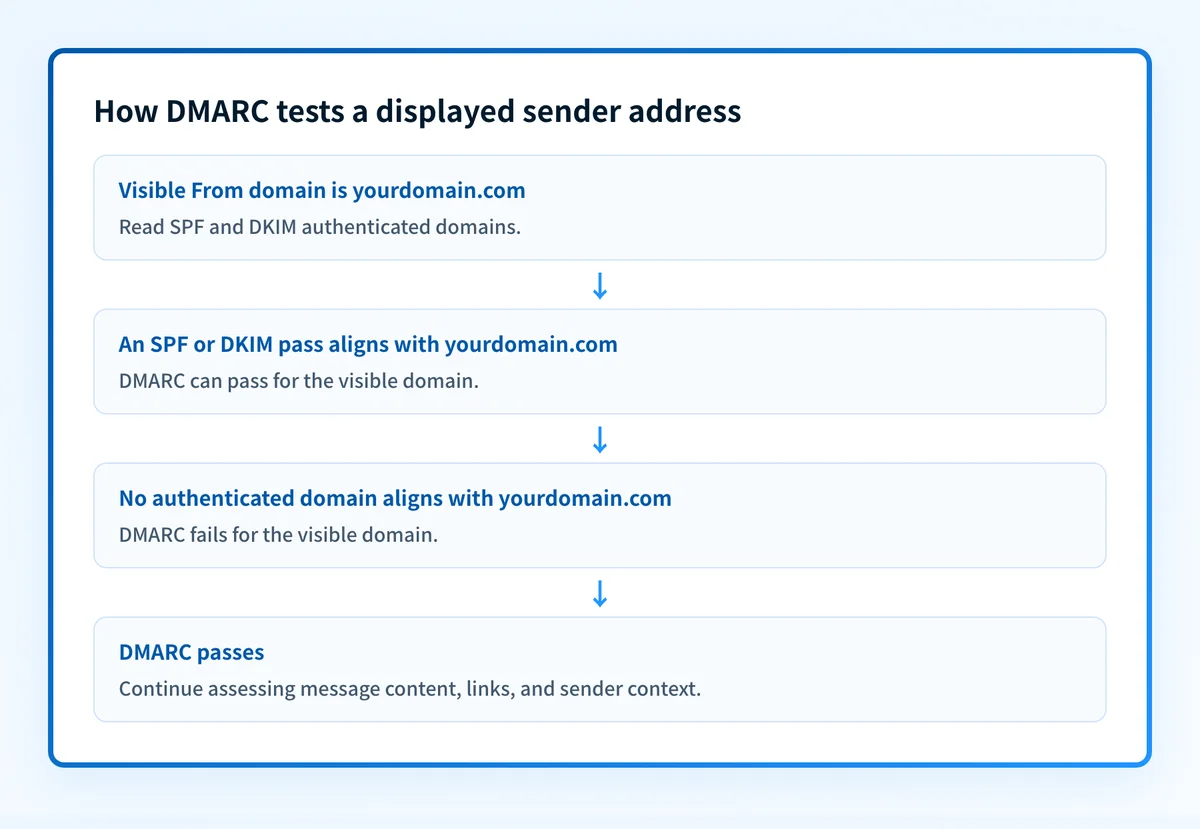
SPF and DKIM each answer a narrower question. RFC 7208 explains that SPF evaluates the SMTP MAIL FROM identity and, where needed, the HELO or EHLO identity. An SPF pass can therefore be valid for an envelope domain that differs from the visible From domain.
DKIM lets a signing domain claim responsibility for a message, while separating the signer's identity from the purported author. DMARC adds the connection that matters to the recipient: at least one passing SPF or DKIM domain must align with the visible author domain. Under RFC 9989's alignment rules, relaxed alignment means the domains share an organizational domain, while strict alignment requires identical domains.
When a spoofed address is more or less likely
Use this decision rule: treat the visible sender as unverified until the receiving service shows authentication details that support the sender's domain, and still assess the message's request, links, and context.
A suspicious message can use several different forms of deception:
- An exact-domain spoof uses your real address, such as
ceo@yourdomain.com, without authorization. DMARC is designed to help with this case. - A display-name spoof uses a familiar name while the underlying address belongs to another domain.
- A lookalike-domain message uses a domain that resembles the real one, such as a spelling variation or a visually similar character.
For Gmail users, Google's authentication guidance says a question mark beside the sender's name means the message is not authenticated. Gmail also exposes "Mailed by" and "Signed by" information in message details. This is a Gmail-specific indicator, not a rule for Outlook or Apple Mail.
If you inspect raw headers, look for an Authentication-Results field added by your own receiving system. RFC 8601 defines that field for recording authentication results. Do not trust an arbitrary copy found in a forwarded message or supplied by an attacker. The same RFC warns that malicious senders can forge a convincing-looking authentication-results field if a receiving system fails to remove it.
For the header-by-header walkthrough and the visible signals that give a forgery away first, see how to spot an email sender spoof.
A worked authentication example
Consider a message that displays billing@yourdomain.com:
From: Billing <billing@yourdomain.com>
Authentication-Results: mx.recipient.example;
  spf=pass smtp.mailfrom=mailer.unrelated-example.com;
  dkim=pass header.d=unrelated-example.com;
  dmarc=fail header.from=yourdomain.com
This is an illustrative evidence object, not a copied production header.
The SPF and DKIM checks passed for unrelated-example.com, but neither authenticated identity aligns with yourdomain.com, the domain shown in From. The result is a DMARC failure for the visible domain.
The reverse result also needs care. A DMARC pass means the domain owner authorized use of that visible domain for the message. RFC 9989 states that this does not make a message safe or desirable, and it does not guarantee inbox placement. A compromised legitimate account can send an authenticated phishing message.
What to check next
If you received a suspicious email, preserve it and use your mail provider's phishing-reporting control. Do not reply, open unexpected attachments, or use links in a message that asks for credentials, payment, or urgent action. Compare the visible address with the full address and inspect provider-authentication details where your mail app offers them.
If you own the impersonated domain, start with Palisade's email security guidance and review the wider email threats hub. Check whether SPF, DKIM, and DMARC are published, then confirm that legitimate production messages pass with alignment. A public email security score check can inspect published domain controls, while guidance for blocked email covers delivery failures that occur after a receiver evaluates a message.
For stronger protection against exact-domain spoofing, publish DMARC only after legitimate senders are understood and tested. CISA's phishing guidance recommends p=reject for sent email and explains that DMARC reports can identify apparent forgery sources. A reject policy can disrupt legitimate mail that still fails DMARC, so validate each real sending path before moving policy.
Review your domain's email-security controls
A spoofed visible address is only one signal. Use the email security guide to understand the controls your domain needs, then inspect its public DNS posture with the security-score tool.
Review email-security controls
A public check cannot prove why one received message was delivered, whether a header was forged before delivery, or whether every production sender is authenticated and aligned.
Evidence
Sources and further reading
- RFC 5321: Simple Mail Transfer Protocol
- RFC 5322: Internet Message Format
- RFC 9989: Domain-Based Message Authentication, Reporting, and Conformance
- RFC 8601: Message Header Field for Indicating Message Authentication Status
- Google Gmail: Check if your Gmail message is authenticated
- CISA phishing guidance
Questions readers ask
Frequently asked questions
What does a spoofed email address look like?
A spoofed email can show the exact address of a real person or organization in the visible From field. It can also use a familiar display name with an unrelated address, or a lookalike domain that differs slightly from the real domain. Check the full address and authentication details rather than relying on the displayed name.
How do you know if an email is spoofed?
You cannot determine that from the visible sender alone. Check your mail provider's authentication details, inspect a trusted Authentication-Results header when available, and compare the full address, request, links, and expected context. In Gmail, a question mark next to the sender indicates that the message is not authenticated.
Can someone spoof my own email address?
Yes. Someone can place your address in a message's visible From field without controlling your mailbox. SPF, DKIM, and an aligned DMARC policy reduce exact-domain spoofing. A p=reject DMARC policy asks receivers to reject messages that fail DMARC, but it does not stop display-name impersonation or lookalike domains.
What happens if I open a spoofed email?
Opening an email does not by itself prove that your account or device is compromised. Risk increases if you open an attachment, enter credentials on a linked site, approve a payment request, or follow instructions from the sender. Report the message through your mail provider and use known contact details to verify any urgent request.
Does a DMARC pass mean an email is legitimate?
No. A DMARC pass means the visible domain was authorized for that message through aligned SPF or DKIM. It does not assess whether the content is truthful, whether an account was compromised, or whether the message is safe to act on.

Written by
Ian BussieresCTO & Co-Founder, Palisade
Ian Bussieres is the CTO and co-founder of Palisade, agentic DMARC software for IT teams and MSPs.
More from Ian →