How to block spoofed emails
 ChatGPT
 Claude
 Gemini
 Perplexity
 Grok
GrokIn brief
How to block spoofed emails: use separate inbound email-security controls and domain-authorization controls instead of relying on one blocked message.
Blocking a single suspicious email can help with that message, but it is not a durable way to block spoofed emails across an organization. Treat the problem as two separate jobs: protect recipients from impersonation attempts with inbound email-security controls, and control who is authorized to use your organization's domain. These controls address related risks, but neither is evidence that every future impersonation attempt will be stopped.
At a glance
Quick takeaways
- Blocking one sender or message is different from protecting an organization's domain from unauthorized use.
- Inbound email security and domain authorization address different parts of an impersonation problem.
- Lookalike sender domains are an impersonation signal, even when the visible sender is not your exact domain.
- Business email compromise and VIP impersonation are examples of email-security use cases.
- A security assessment can identify questions to investigate, but it cannot prove a receiver's future filtering decision.
- Do not treat a single security product claim as proof that all spoofed email will be blocked.
How blocking spoofed emails works
The phrase "block spoofed emails" covers more than one problem. A recipient may be receiving suspicious messages, while an organization may also be concerned about unauthorized messages that appear connected to its brand or people.
Inbound email-security controls focus on messages arriving at a mailbox. For example, Abnormal describes its offering as helping stop "BEC, phishing, and account takeover attacks." Its example threat display includes the labels "LOOKALIKE SENDER DOMAIN" and "PAYMENT REDIRECT ATTEMPT," which show the kinds of signals an inbound security product may surface. Those labels are examples of threat context. They do not establish how every email is authenticated or how every mailbox provider will handle a message. Abnormal's email-security product page describes those categories.
A separate domain-protection objective is to ensure that trusted senders are the ones using an organization's domain. IRONSCALES describes DMARC Management with the outcome, "Ensure only trusted senders can use your domain." That is a useful control objective, but it does not by itself document the record configuration, rollout steps, or handling outcome at a recipient.
For the wider set of impersonation and phishing risks, see Palisade's email threats learning hub. The important distinction is practical: an inbound control evaluates incoming risk, while a domain-authorization program addresses the organization's own sending identity.
When the answer changes
Choose the next action based on the evidence you have.
- If an employee received a suspicious message, preserve the message and use the reporting, investigation, and response process approved for that mailbox environment. The available evidence does not establish a universal rule for blocking, reporting, deleting, or marking that message as spam.
- If the concern is a lookalike domain, treat it as an impersonation signal. It is not, by itself, proof of the message's authentication state or the sender's intent.
- If the concern is that messages appear to come from your organization's domain, focus on domain authorization and the sending systems your organization approves. The available evidence supports that goal, but not a particular configuration procedure or enforcement result.
- If the concern is broad inbox protection, assess inbound email-security controls as part of a wider email security program.
Do not make a DNS or authentication-policy change based only on one suspicious message. First establish which domain, mailbox environment, and approved sending path are actually involved.
A worked decision rule
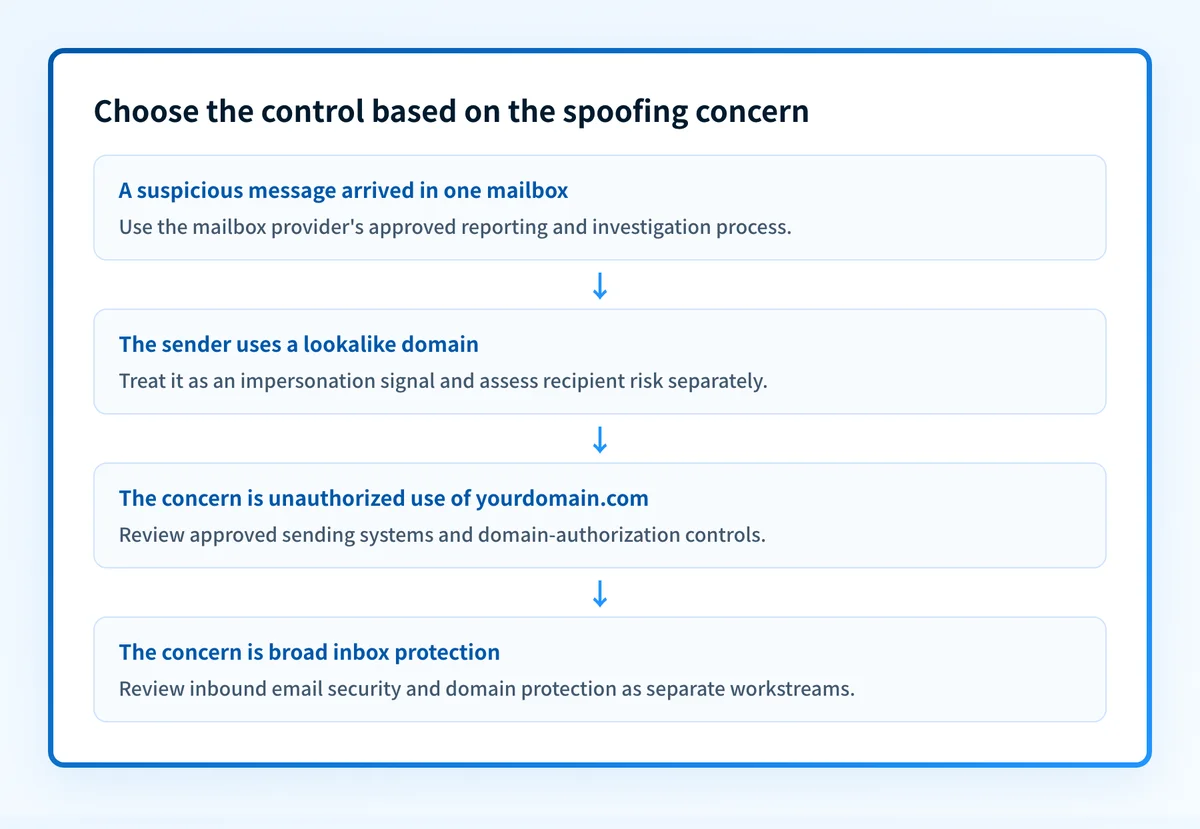
Use this decision rule to keep an investigation within the evidence available. It is a triage aid, not a guarantee that a message will be blocked or that a sender is legitimate.
Illustrative decision rule
If the evidence is a suspicious message in one mailbox:
  Use the mailbox provider's approved reporting and investigation process.
If the evidence is a lookalike sender domain:
  Treat it as an impersonation signal.
  Assess the message and the recipient risk separately.
If the evidence is concern about use of your organization's domain:
  Identify the approved sending systems.
  Review domain-authorization controls with the responsible email team.
If the evidence is a broad security concern:
  Review inbound email-security controls and domain protection as separate workstreams.
The rule avoids an unsupported shortcut: a suspicious message does not prove that a domain-wide authorization control failed, and a vendor's security alert does not prove a specific authentication result.
The same separation applies to business email compromise and VIP impersonation. IRONSCALES lists Business Email Compromise and VIP impersonation among its email-security use cases. Those categories help describe the risk under review. They do not reveal why a particular message arrived, whether a recipient will receive another message, or which control will resolve the case.
What to check next
Start with the evidence closest to the problem.
For a suspicious message, use the recipient's approved security process and collect only the information that process permits. The available material does not verify a universal mailbox-provider workflow, so follow the documentation and escalation path for the service your organization uses.
To decide whether a single message is forged before escalating it, see how to spot an email sender spoof, which covers the visible signals and the header lines that settle it.
For an organization-wide concern, write down the exact question before selecting a control:
- Is the concern inbound phishing or impersonation attempts against employees?
- Is the concern a lookalike sender domain?
- Is the concern unauthorized use of the organization's own domain?
- Is the concern an approved sender that needs review by the email team?
A public check or score cannot prove the production sending path, a mailbox provider's private filtering decision, continuous security state, or future inbox placement. It also cannot repair a suspicious message or establish that every sender using a domain is approved.
Review the email-security controls around the incident
When the concern extends beyond one message, review the organization-wide controls that cover inbound impersonation risk and domain authorization.
This guidance cannot determine why a particular mailbox received a message, block a future message, or confirm that all approved senders use the organization's domain correctly.
Evidence
Sources and further reading
Questions readers ask
Frequently asked questions
Why do I keep getting spam emails even after blocking them?
Blocking stops one sender address, and whoever sent it simply uses a new one. Most spam arrives from a churn of throwaway addresses and lookalike domains, so a personal block list can never keep pace on its own. Use your mailbox provider's report-as-spam control instead of only blocking, because that feeds its filtering rather than just your own mailbox.
Why am I getting 20 spam emails a day?
Volume like that usually means your address sits on lists that get resold and reused, often after it appeared in a breach or on a public page. The count itself does not point to any single cause, and it does not mean your domain has been compromised. Keep this separate from the different question of whether someone is sending mail that looks like it came from your domain.
Why should you never delete spam emails?
You usually can delete them, and that advice is really about preserving evidence rather than about spam in general. Keep a message when your security team needs it for an investigation, or when your mailbox provider asks you to report it first. Otherwise report it, delete it, and do not click anything inside it.
Can someone spoof my email address?
Yes, because nothing in plain email stops someone writing your address into the From line. That is what SPF, DKIM, and DMARC exist to counter, since together they let a receiver check whether a message really came from a sender authorized for your domain. Publishing a DMARC record and working it toward enforcement is how you make spoofing your domain harder.

Written by
Ian BussieresCTO & Co-Founder, Palisade
Ian Bussieres is the CTO and co-founder of Palisade, agentic DMARC software for IT teams and MSPs.
More from Ian →