Advanced Email Security from GoDaddy
 ChatGPT
 Claude
 Gemini
 Perplexity
 Grok
GrokIn brief
Advanced Email Security from GoDaddy is a Microsoft 365 email protection service with spam, phishing, quarantine, and encryption controls for tenants.

GoDaddy Advanced Email Security is an add-on security service for eligible GoDaddy Microsoft 365 email accounts. GoDaddy documents protections for spam, phishing, malware, spoofing, and sensitive-message encryption, plus administrator controls for filtering and quarantine. It is an inbound email-security product, not proof that a tenant is configured correctly, that a specific message is safe, or that the sending domain's DMARC policy is valid.
At a glance
Quick takeaways
- GoDaddy Advanced Email Security is designed for GoDaddy Microsoft 365 email customers.
- GoDaddy documents anti-spam, anti-phishing, malware, spoofing, quarantine, and encryption capabilities for the service.
- Administrators access the product through GoDaddy's Email & Office Dashboard, then select the Advanced Email Security sign-in action.
- Spam settings include controls such as Spam Sensitivity and Inbound domain spoofing protection.
- A public DMARC record is separate evidence from an inbound filtering product's settings or a mailbox's message outcome.
- A quarantine or filtering decision needs portal and message evidence, not a public DNS lookup alone.
How GoDaddy Advanced Email Security works
GoDaddy's Advanced Email Security product description presents the service as email protection for phishing, spam, malware, and other unwanted mail. Its product help article describes the service for Microsoft 365 email and lists functions that include inbound filtering, quarantine, anti-spoofing protection, and email encryption.
The practical model is an email-security gateway and policy layer. It evaluates inbound mail according to the protections and settings available in the GoDaddy service. That makes it part of a broader set of email security controls, alongside mailbox configuration, user reporting, endpoint protection, and sender-domain authentication.
GoDaddy's documentation also distinguishes administrator activity from ordinary mailbox use. An administrator can access Advanced Email Security through the Email & Office Dashboard and use the documented portal controls. Users may interact with mail that reaches their mailbox, while the tenant's filtering settings and policy choices require the appropriate GoDaddy account access.
This product category answers an inbound question: how a service evaluates messages delivered toward a mailbox. It does not replace the sender's responsibility to publish and maintain SPF, DKIM, and DMARC. Those controls allow receivers to evaluate whether a visible From domain aligns with authenticated mail. For that separate protocol question, see are DMARC failure reports worth the trouble for email security.
When the answer changes
The right evidence depends on the question being asked.
- If the question is "What capabilities does GoDaddy Advanced Email Security offer?", GoDaddy's current product and help documentation is the relevant evidence.
- If the question is "Is this tenant configured to use those capabilities?", use the authenticated GoDaddy portal and the account's assigned service details.
- If the question is "Why was this message filtered, quarantined, or delivered?", inspect the relevant message evidence and the tenant's portal evidence. A public DNS record cannot answer that question.
- If the question is "Does this sending domain publish DMARC?", query the public DMARC TXT record. That reveals sender-domain policy, not GoDaddy's inbound filtering outcome.
Security Settings > Email > Spam Settings. The documented settings include Spam Sensitivity, Quarantine release policy, and Inbound domain spoofing protection. The names establish what GoDaddy documents for the service. They do not show which options a particular tenant has selected or whether a given message matched a policy.
Do not release or alter a quarantine policy solely because a sender claims a message is legitimate. Confirm the message, sender, recipient, and applicable tenant policy before changing a control that can affect future mail flow.
The same boundary applies when comparing vendor categories. Abnormal Email Security describes another named email-security product. A product name alone does not establish that two services expose the same controls, licensing, or tenant evidence.
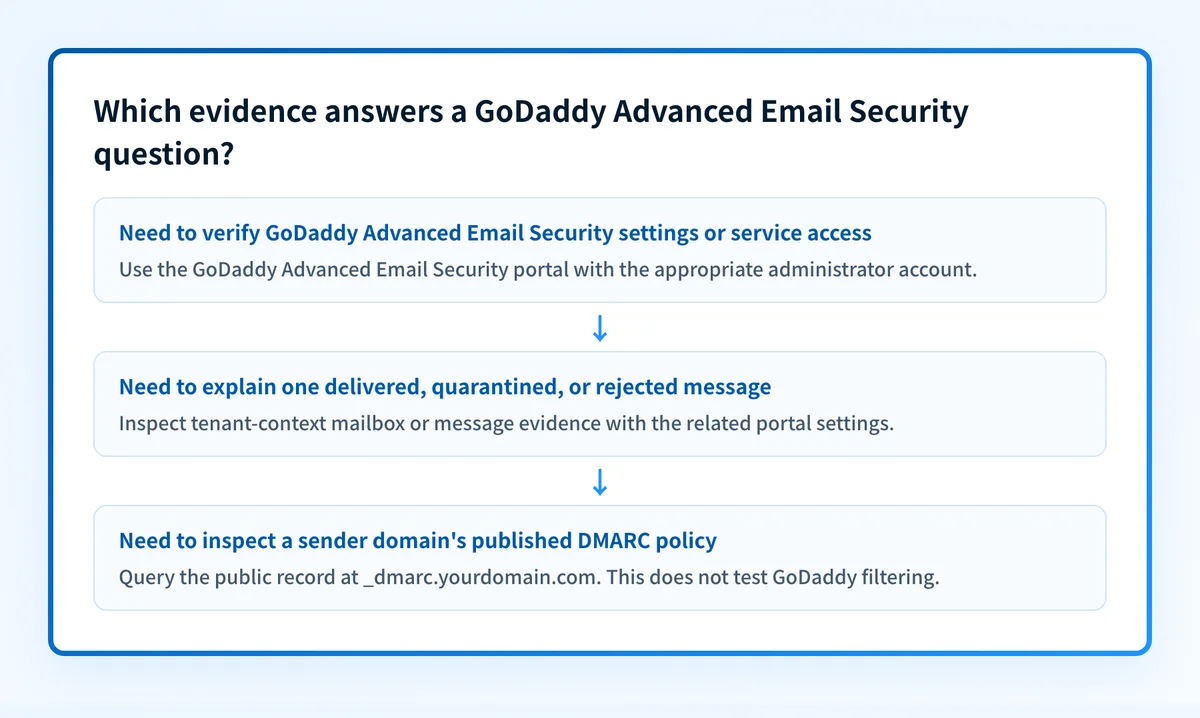
A decision rule for checking the right evidence
Use this decision rule before treating an email-security result as proof.
Question: "Is GoDaddy Advanced Email Security operating as intended?"
Need to verify a documented feature?
  Use GoDaddy's current product and help documentation.
Need to verify this tenant's settings or entitlement?
  Sign in through the GoDaddy Email & Office Dashboard.
Need to verify why one message was handled a certain way?
  Inspect the delivered message or quarantine evidence in the tenant context.
Need to verify a sending domain's published DMARC policy?
  Query _dmarc.yourdomain.com through a public DNS check.
A DMARC record has a specific DNS location and format. This is an illustrative structure only. Do not publish copied values, reporting addresses, or records from another organization.
_dmarc.yourdomain.com TXT "v=DMARC1; p=none; rua=mailto:dmarc-reports@yourdomain.com"The DMARC record above can express a domain owner's requested handling for mail that fails DMARC. RFC 9989 defines DMARC and the relationship between DMARC evaluation, alignment, policy discovery, and reporting. It does not define GoDaddy Advanced Email Security settings, a tenant's quarantine state, or an individual inbound message verdict.
What to do next
Start with the evidence closest to your question.
For access, GoDaddy's Advanced Email Security sign-in instructions direct administrators to sign in to the GoDaddy Email & Office Dashboard, open the Advanced Email Security page, and choose the sign-in action. Use that route to confirm the service is available to the account and to reach its administrative portal.
For a suspected unwanted or missing message, preserve the message context before changing settings. Record the sender address, recipient address, delivery time, subject, and whether the message was delivered, quarantined, or rejected. Then compare that evidence with the applicable portal settings. A green status indicator or a published DNS record does not prove why that individual message was handled as it was.
For broader security planning, use the email threats hub to separate phishing, spoofing, malware, and sender impersonation questions. Each requires evidence from the appropriate system.
Check the sending domain's public DMARC policy
If the remaining question is whether the sender's domain publishes a DMARC policy, inspect that public DNS record before drawing conclusions about sender-domain authentication.
A public DMARC check cannot inspect GoDaddy Advanced Email Security settings, scan a mailbox, review a quarantine decision, or prove that an inbound message was safe.
Evidence
Sources and further reading
Questions readers ask
Frequently asked questions
Should I activate GoDaddy Advanced Email Security?
Only if your GoDaddy Microsoft 365 account is eligible for the service and its documented inbound protections fit your email-security requirements. Confirm the service assignment and available controls in the GoDaddy Email & Office Dashboard before treating it as active for a tenant.
Is GoDaddy Advanced Email Security free?
No. GoDaddy presents Advanced Email Security as an email-security product or add-on, rather than a universal free feature of every Microsoft 365 mailbox. Check GoDaddy's current account and product information for the plan and price that apply to your tenant.
How do I log into GoDaddy Advanced Email Security?
Sign in to the GoDaddy Email & Office Dashboard with an administrator account, open the Advanced Email Security page, and select the documented sign-in action. The portal path and available actions can depend on the account's assigned service and permissions.
What is AES GoDaddy?
AES is a common shorthand for GoDaddy Advanced Email Security. It is GoDaddy's documented email-security service for eligible Microsoft 365 email accounts, with protections and controls for inbound threats such as spam, phishing, malware, and spoofing.
Does GoDaddy Advanced Email Security configure DMARC for my domain?
No. GoDaddy Advanced Email Security and a domain's DMARC record answer different questions. The product handles documented inbound email-security functions, while DMARC is a sender-domain authentication policy published in DNS. Verify the DMARC record separately.
Does a DMARC record prove GoDaddy blocked a phishing email?
No. A DMARC lookup shows the sending domain's public policy record. It cannot show a GoDaddy tenant's filtering settings, explain a quarantine decision, or prove that a specific message was phishing.

Written by
Samuel ChenardCEO & Co-Founder, Palisade
Samuel Chenard is the CEO and co-founder of Palisade, agentic DMARC software for IT teams and MSPs, from one domain to thousands.
More from Samuel →