Email security testing tools: run, interpret, repair, retest
 ChatGPT
 Claude
 Gemini
 Perplexity
 Grok
GrokIn brief
Email security testing tools help safely test gateway handling of safe threats, interpret blocking or disarming results, repair gaps, and retest.
Email security testing tools help you check how an inbound security product handles safe simulations of threats such as spoofed senders, malicious links, attachments, QR-code phishing, and business-email-compromise attempts. Run a test against the recipient path you need to assess, inspect whether each sample was blocked, disarmed, or disinfected, repair the control gap, then repeat the same test. A received message alone does not prove the gateway failed.
At a glance
Quick takeaways
- Gateway testing and staging-email testing answer different questions.
- A safe threat test can assess whether an email-security product blocks, disarms, or disinfects a sample.
- A test message that reaches an inbox may still have been disarmed.
- Test the same recipient route again after changing a gateway policy or control.
- A public domain check cannot prove how one inbound gateway handled a particular message.
- Use the wider email-threat learning hub to investigate the threat type behind a failed test.
What this tool checks
Email security testing starts by matching the tool to the evidence you have.
A gateway threat tester sends safe, disarmed messages that behave like common threat scenarios. The Email Security Tester describes examples including spoofed envelope senders, EICAR virus attachments, malware URI links, QR-code phishing, business-email-compromise spoofing, and macro-formula Excel content. Its stated expectation is that the recipient security product blocks, disarms, or disinfects the samples.
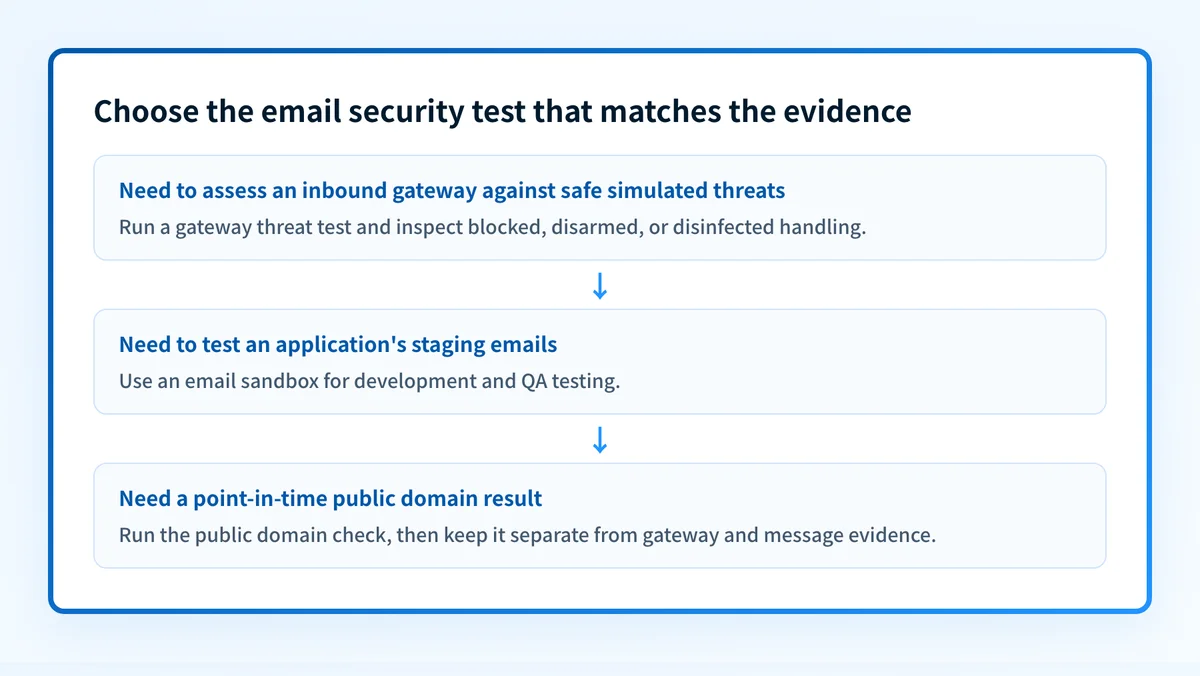
That is different from a development email sandbox. Mailtrap Email Sandbox describes its service as a place for developers and QA teams to safely test staging emails. A sandbox can help test an application's outgoing messages without delivering them to real recipients. It does not, by itself, test whether a production inbound gateway stopped a simulated phishing message.
Use Palisade's Email Security Score as a separate public-domain check when you want to inspect the result it currently returns for a domain. It is not evidence of the exact inbound message route, the actions an email-security gateway took on a sample, continuous security state, or a receiver's private decision about one message.
How to run the check
1. Define the recipient route to test
Choose the exact mailbox and inbound route that matter. Record the recipient address, gateway or security product in front of it, and any routing rules that can affect delivery. A test sent to a different mailbox, tenant, or policy group does not establish how the target route behaves.
Do not use a live malicious attachment or phishing URL. Use a service that states its samples are safe test messages. If you already have a real suspicious URL to assess, check it against threat blocklists rather than sending it through the gateway.
2. Choose the test type that matches the question
Use a gateway threat tester when the question is whether inbound protections handle simulated threats. Use a staging-email sandbox when the question is whether an application builds and sends test emails correctly before production delivery.
If you need a domain-level public check in addition to gateway testing, open Palisade's Email Security Score. Treat its displayed result as a point-in-time public check. Keep it separate from the test messages and gateway evidence.
You can confirm that the public tool page is reachable before starting a domain check:
curl -I https://www.palisade.email/tools/email-security-scoreThis command confirms only that the public page responds. It does not test a domain, inspect a mailbox, or establish the effectiveness of an inbound security gateway.
3. Send the safe test to the target mailbox
Follow the tester's current instructions and use the target recipient. Keep a record of the date, recipient route, test category, and result for each sample. The Email Security Tester page warns that a message received in the inbox may have been disarmed, so open the message description before classifying it as a failure.
The result categories below are an interpretation aid for safe gateway tests. They are not result labels from Palisade's public domain tool.
How to interpret the results
The sample was blocked
A blocked sample indicates that the tested recipient route prevented that test message from reaching the mailbox. Record which sample was blocked and the policy or product status available to the administrator.
This is evidence for that route and test at that time. It does not prove that every threat variation will be blocked, that every mailbox uses the same policy, or that future messages will receive the same treatment.
The sample reached the mailbox but was disarmed
A received sample can still be handled safely. The Email Security Tester specifically instructs readers to check whether a delivered sample was disarmed. For example, a gateway may alter an attachment or link before delivery.
Classify the outcome from the message description and the gateway's own event evidence, not from inbox delivery alone. If the message was disarmed, determine whether the changed content matches the intended policy for that test category.
The sample was disinfected
The tester identifies disinfection as another expected handling outcome. Record what the recipient received and confirm the gateway's event or administrative evidence if available.
Do not assume that disinfection has the same operational consequence as blocking. The distinction matters when setting policy expectations, incident procedures, and user guidance.
The sample reached the mailbox without documented safe handling
Treat this as a finding that needs investigation, not immediate proof that every protective control is absent. First confirm the recipient route and test category. Then inspect the gateway's logs, quarantine, policy assignment, and any product-specific event details.
The test can show an outcome. The gateway's own administration interface is the place to determine why it reached the mailbox and which policy applied.
How to act on the result
Work from the most specific evidence first.
- Confirm that the tested mailbox used the intended inbound route. Shared mailboxes, alternate MX routing, forwarding, and different policy groups can change the result.
- For a sample that was not blocked, disarmed, or disinfected as expected, inspect the gateway's event record and the policy assigned to that recipient. Do not change unrelated mail-flow rules based on a single result.
- Repair the narrow control implicated by the test. A link-handling gap calls for gateway policy investigation. An attachment-handling gap calls for the relevant attachment or malware policy investigation. A spoofing scenario calls for review of the security product's sender and impersonation controls.
- Repeat the same safe test after the change. Compare the new result with the original outcome for the same recipient route.
- Review broader operating controls through email security practices for businesses. A passing simulation is useful evidence, but it is one part of an email-security program.
Warning: Do not weaken inbound filtering or bypass a production gateway to make a test produce a cleaner result. Test the policy that protects the mailbox in normal operation.
If the issue involves a public domain signal rather than the gateway's handling of a received test message, keep that investigation separate. Email security covers the broader set of controls and operational questions around protecting business email.
Investigate this with your coding agent
Use this when you have a non-sensitive public domain and want a read-only record of the visible public checker result alongside the gateway-test outcome. Prepare only redacted result text and public domain information.
Agent handoff
Copy the prepared prompt
Give this to a coding agent that can inspect the relevant repository or configuration source of truth.
Problem: A safe email-security gateway test reached the target mailbox without a documented block, disarm, or disinfection outcome.
Evidence: Public domain name, redacted Palisade Email Security Score result text, test date, redacted recipient route description, and the safe test category.
Repository scope: Public DNS and the public Palisade Email Security Score page only.
Constraints: Inspect before editing. Do not apply changes until I approve the proposed diff. Do not change DNS, mail flow, gateway policy, or tool configuration. Exclude credentials, private keys, tokens, unredacted headers, and customer data.
Requested output: Diagnosis, minimal proposed change, rollback, and unknowns.
Verification: Re-run the same public tool path and repeat the same safe gateway test through the same recipient route.
Stop if: Credentials, private data, production mutation, or missing evidence is required.
Human approval required: Review the proposed diff and verification plan before allowing changes. Do not paste secrets, private keys, API tokens, unredacted headers, or customer data.
How to retest
Repeat the same safe test category through the same mailbox and gateway route after the relevant policy change. Check the message description and the gateway's own event evidence again. Record whether the new outcome is blocked, disarmed, disinfected, or still unresolved.
For a public-domain follow-up, run the same Email Security Score check again and retain the displayed result with its date. A public check does not prove that the production inbound gateway enforced a policy, repaired the original finding, or will handle all future messages the same way.
Check the public domain result alongside the gateway test
After you have documented the gateway outcome, run the domain through Palisade's Email Security Score to inspect the public result currently displayed for that domain.
Check the email security score
The check does not inspect a specific delivered test message, repair an inbound gateway policy, monitor the recipient route continuously, or guarantee that future messages will be blocked or delivered.
Evidence
Sources and further reading
Questions readers ask
Frequently asked questions
What is the best email security tool?
The best email security tool is the one that matches what you are testing. Use a gateway threat tester when you need to see how inbound protection handles safe simulations of spoofed senders, malicious links, attachments, and QR-code phishing. Use a staging-email sandbox when you need to check the messages your own application sends before they reach real recipients.
Which tool is best for security testing?
Pick the tool by the question you are asking, because these two categories do not overlap. A gateway threat tester answers whether inbound protection blocks, disarms, or disinfects a safe threat sample sent to a real mailbox. A staging-email sandbox answers whether an application builds and sends the right messages during development and QA.
What are email security tools?
Email security tools are products that test or operate the controls protecting a mailbox from email threats. A gateway test sends safe simulations of spoofing, malicious links, attachments, QR-code phishing, and business-email-compromise scenarios to a chosen recipient route. The expected handling is that the security product blocks, disarms, or disinfects each sample.
Does a test message in my inbox mean my gateway failed?
No, delivery alone does not mean the gateway failed, because a gateway can pass a sample through after disarming or disinfecting it. Read the tester's description of that specific message and the gateway's own event log before you record a miss. A genuine failure shows an untouched sample and no protective action in the logs.
What are SAST and DAST tools?
SAST and DAST are application-security tests, not email tests. Static Application Security Testing inspects an application's source code without running it, while Dynamic Application Security Testing probes the running application from the outside. ImmuniWeb lists the two as separate products. Neither one tells you how an email gateway handled a message, so keep them apart from the gateway tests on this page.

Written by
Samuel ChenardCEO & Co-Founder, Palisade
Samuel Chenard is the CEO and co-founder of Palisade, agentic DMARC software for IT teams and MSPs, from one domain to thousands.
More from Samuel →