What are the top email security tips for small businesses?
 ChatGPT
 Claude
 Gemini
 Perplexity
 Grok
GrokIn brief
Email security tips for small businesses: use MFA, verify sensitive requests, authenticate sending domains, and test recovery paths safely today.

The top email security tips for small businesses are to require multi-factor authentication, verify sensitive requests outside the email thread, restrict mailbox and DNS access, authenticate every sending domain, and maintain a recovery process. These controls address different risks. A protected mailbox does not prove that an invoice request is genuine, and a published DMARC record does not prove that every application sending mail for the business is authenticated.
At a glance
Quick takeaways
- Require multi-factor authentication for mailboxes, administrator accounts, and recovery accounts.
- Verify payment, payroll, bank-detail, and credential requests through a trusted channel outside the suspicious email.
- Limit access to mailboxes, forwarding rules, DNS, domain registration, and billing settings.
- Publish SPF, DKIM, and DMARC for every domain that sends business email.
- Test a real message from each important production sender after changing authentication settings.
- Keep recovery contacts and DNS rollback details available outside the normal email system.
How small-business email security works
Small-business email security has four connected layers: account access, message handling, sending-domain authentication, and recovery.
Account protection reduces the chance that a stolen password becomes mailbox access. The Cybersecurity and Infrastructure Security Agency's guidance on phishing-resistant MFA recommends MFA because an additional authentication factor makes a password alone less useful to an attacker. Apply it to regular mailboxes, shared-mailbox administrators, domain registrar accounts, and DNS-provider accounts.
Message handling protects high-consequence actions. A display name, reply-to address, or familiar signature is not enough evidence to approve a payment or change bank details. CISA's business email compromise guidance advises organizations to verify payment requests through a separate, trusted communication channel. Use a phone number from an approved directory, an existing vendor portal, or an established contact record. Do not use a phone number or reply address supplied in the suspicious message.
Sending-domain authentication helps receiving systems evaluate mail that uses the business's visible From domain. RFC 9989 defines DMARC as a mechanism built on SPF and DKIM authentication with identifier alignment. SPF, DKIM, and DMARC are related but distinct controls:
- SPF authorizes sending infrastructure through DNS, but its authenticated domain must align with the visible From domain for SPF to support DMARC.
- DKIM adds a cryptographic signature that a receiver can validate. Its signing domain must align with the visible From domain for DKIM to support DMARC.
- DMARC tells receivers how to handle mail that fails DMARC validation and can request aggregate reports.
When the priority changes
The first action should follow the evidence in front of you.
If a person receives a suspicious request to send money, disclose credentials, alter payroll, or update bank information, pause the action and verify it outside email. Preserve the message for review. Do not begin with a DNS change or assume a familiar display name proves identity.
If a mailbox may be compromised, review more than its password. Check mailbox forwarding rules, delegated access, recovery methods, active sessions, administrator roles, and recent configuration changes. An attacker who created a forwarding rule or added a recovery method may retain access after a password reset.
If the business adds a marketing platform, invoicing system, support desk, or transactional application, treat it as a sending-domain change. Record the service owner, the visible From domain, the authentication records it requires, and the test message that will confirm the live path.
If a domain has no DMARC record, first inventory its legitimate senders. A stronger DMARC policy before that inventory is complete can disrupt valid mail that has not yet achieved SPF or DKIM alignment. RFC 9989 gives receivers the final decision on local handling, so a published policy is not proof of one receiver's final delivery decision.
Use this decision rule: protect the action with the greatest immediate consequence, then gather evidence before changing the control that governs it.
A worked small-business security review
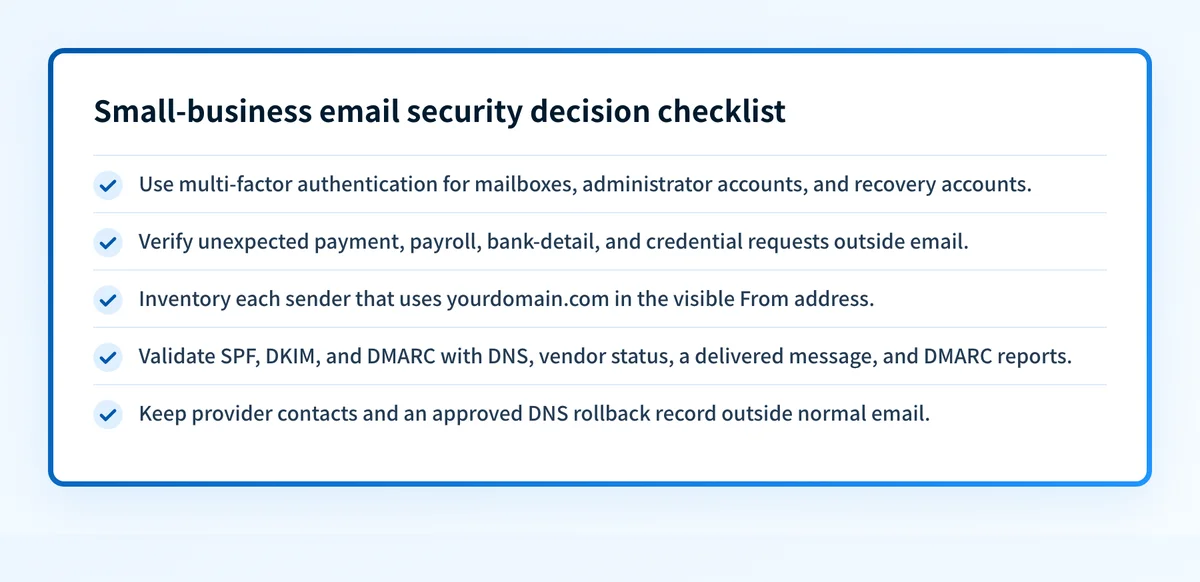
Use this checklist for one sending domain and the mailboxes associated with it. It is a starting point for a review, not proof that a message is safe or that every sender is configured correctly.
Small-business email security review
Account access
- List mailbox administrators, delegates, and recovery contacts.
- Require multi-factor authentication for each account.
- Remove unused users, recovery methods, and delegated access.
Sensitive requests
- Verify payment, payroll, bank-detail, and credential requests outside email.
- Use a known phone number, contact directory, or vendor portal.
- Review unexpected mailbox forwarding or recipient changes.
Sending domain
- List each application that sends with your domain in the visible From address.
- Record the SPF, DKIM, and DMARC records each application requires.
- Send a real message through each production path and inspect its headers.
Recovery
- Document contacts for the email provider, DNS provider, and registrar.
- Retain the approved previous DNS record for rollback.
- Review administrator access and forwarding rules after an incident.
Validate email authentication at four separate layers:
- DNS: Confirm the intended records through the authoritative DNS provider and at least one public resolver.
- Vendor: Confirm that the sending service reports the domain or sender configuration as verified.
- Message: Send a real message from the exact production path and inspect its
Authentication-Resultsheader. RFC 8601 defines this header field. - DMARC: Review aggregate-report data after reports have accumulated.
Take the next action based on the evidence you have
For a suspicious request, use the known contact method before approving the action. For a possible mailbox compromise, review access, forwarding, recovery, and administrator settings before closing the incident.
For a domain that sends business email, build the sender inventory first. Then run the domain through the Palisade Email Security Score tool to inspect its publicly visible email-security records. Compare the result with the DNS records your sending services require and with headers from real production messages.
Check the public controls behind your sending domain
Use the Email Security Score tool to inspect the public DNS controls associated with the business domain. This follows naturally after the sender inventory because it can reveal records that need closer review before you test each sending path.
Check your domain's email security score
A public check cannot prove that every application uses the domain correctly, repair a compromised mailbox, monitor later changes, or explain a receiver's private placement decision.
If DMARC aggregate reports show recurring sending sources or alignment failures, Palisade is DMARC software that analyzes aggregate-report data, identifies sources and authentication or alignment issues, and creates prioritized remediation tickets. A human reviews the evidence and applies any DNS or DMARC policy change.
Palisade does not autonomously change the DMARC policy, repair every sender, or guarantee that future messages will authenticate.
Evidence
Sources and further reading
Questions readers ask
Frequently asked questions
Is multi-factor authentication enough to secure a business mailbox?
No. Multi-factor authentication reduces the risk from a stolen password, but it does not stop an authorized user from approving a fraudulent request or prevent a compromised administrator account from changing mailbox settings.
Should a small business verify every invoice by phone?
No. Apply an out-of-band verification process to unexpected, changed, or high-consequence requests, especially those involving payment instructions, payroll, credentials, or bank details. Use a known contact method rather than contact details supplied in the message.
Does SPF alone protect a domain from impersonation?
No. SPF can authenticate a sending path, but SPF alone does not provide DMARC protection for visible From-domain impersonation. DMARC requires an aligned SPF or DKIM pass and a published DMARC policy.
Can a public email-security check prove that business email is safe?
No. A public check can inspect published DNS records. It cannot prove that each application sends with the expected authentication, that a specific message passed DMARC, or that a receiver will place future mail in the inbox.
When should a small business move to a stronger DMARC policy?
Only after it has inventoried legitimate sending sources, validated aligned authentication on real production messages, and reviewed aggregate-report evidence for remaining failures. Keep an approved rollback record before changing DNS.

Written by
Samuel ChenardCEO & Co-Founder, Palisade
Samuel Chenard is the CEO and co-founder of Palisade, agentic DMARC software for IT teams and MSPs, from one domain to thousands.
More from Samuel →