Email security for small business: what actually matters first
 ChatGPT
 Claude
 Gemini
 Perplexity
 Grok
GrokIn brief
The working order for small business email security: MFA first, then the controls Microsoft 365 and Google Workspace already include, then DMARC.
Turn on multi-factor authentication first. CISA, NSA, FBI, and MS-ISAC name strong MFA as the best step a small business can take to protect its internet-facing accounts against phishing. Next, switch on the anti-phishing settings your Microsoft 365 or Google Workspace subscription already includes, keep software updating itself, and then authenticate your own domain with SPF, DKIM, and DMARC. A paid email security product is a later decision, not a first one.
At a glance
Quick takeaways
- MFA on every account, administrators first, is the highest-value hour a small team spends on email.
- Microsoft 365 and Google Workspace already run spoof detection, attachment scanning, and link warnings on every mailbox.
- SPF, DKIM, and DMARC protect whoever receives mail claiming to be from you, and Google requires them from bulk senders.
- DMARC stops exact-domain spoofing only, so lookalike domains and forged display names stay a people problem.
- Buy an add-on when you can name the message your current settings let through, not before.
What your mail platform already includes
Before pricing anything, find out what you own. Microsoft's anti-phishing protection documentation says every cloud mailbox gets spoof intelligence, tunable anti-phishing policies, an option to honor the sending domain's DMARC policy when a message is detected as spoof, and implicit email authentication that adds sender reputation and behavioral analysis to the SPF, DKIM, and DMARC results. Impersonation protection, mailbox intelligence, and Campaign Views sit in Defender for Office 365, the paid tier above that baseline.
Google Workspace ships the same job as admin settings rather than a separate product. Google's advanced phishing and malware protection covers attachments (encrypted files, malicious scripts, unusual types), links and external images (shortened URLs, linked images, clicks through to untrusted domains), and spoofing and authentication (visually similar domains, employee name impersonation, unauthenticated mail). Most default to keeping the message in the inbox with a warning, so the protection is on but quiet, and the stricter actions are still an unmade decision.
That is why the honest first answer to "which email security product should we buy" is usually "none, for now". Work this order instead.
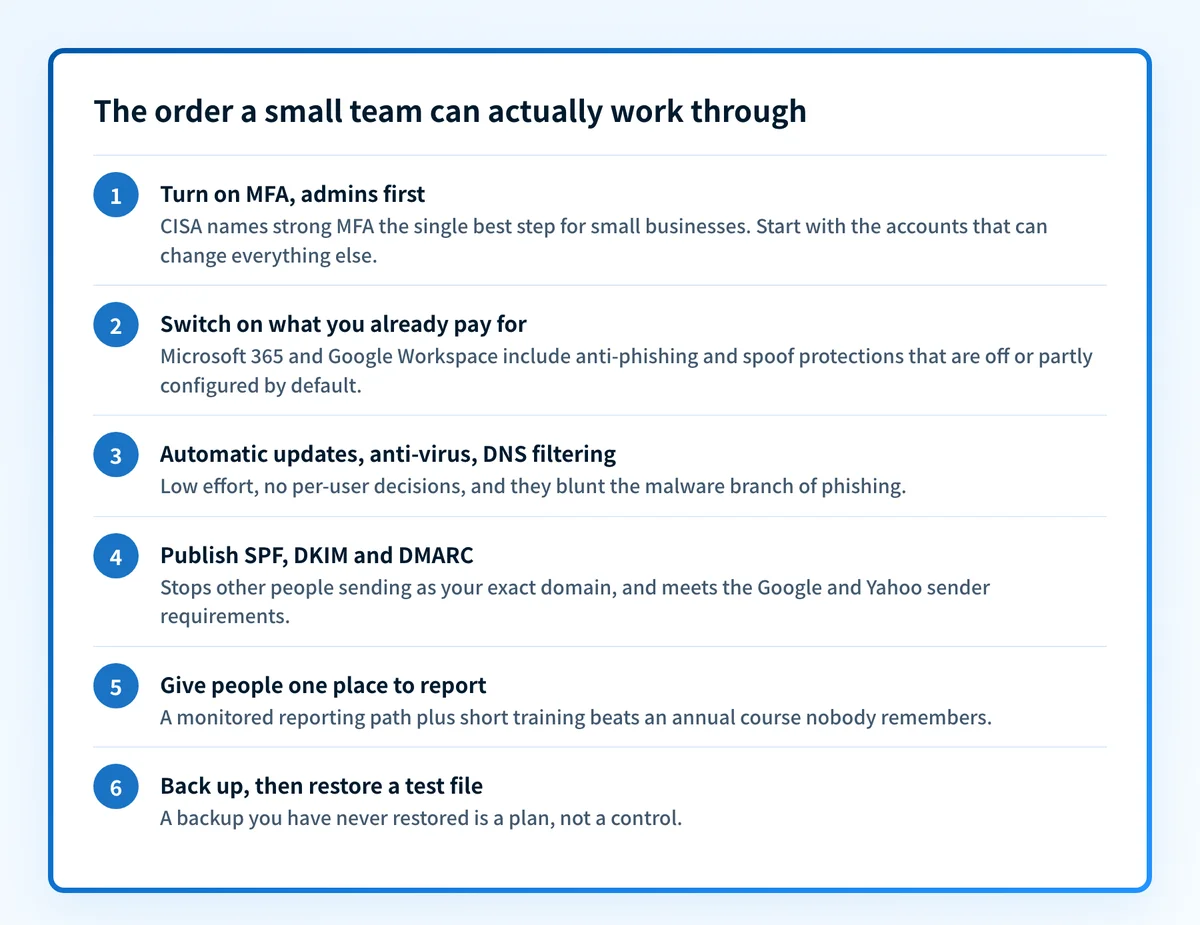
The order to work in when nobody owns IT full time
1. Turn on multi-factor authentication, administrators first
CISA, NSA, FBI, and MS-ISAC's phishing guidance puts activating strong MFA at the top of what small businesses should do, because a stolen password stops being enough on its own. Start with the accounts that can change everything else: the Microsoft 365 or Google Workspace admin, the DNS registrar, and the finance and payroll logins.
The same guidance is specific about weak MFA: push approval without number matching can be worn down by repeated prompts until someone taps approve, and SMS or voice codes fall to a carrier being talked into moving the number. The UK National Cyber Security Centre's small business guide now leads with passkeys where a service offers them, and two-step verification elsewhere.
Effort: an afternoon for a team of twenty, most of it walking people through enrollment. Cost: included in every Microsoft 365 and Google Workspace plan.
2. Switch on the protection you are already paying for
Open both consoles and read the current settings against the lists above. In Microsoft 365 that means the anti-phishing policy, the spoof intelligence insight, unauthenticated sender indicators in Outlook, and the setting that honors a sender's p=quarantine or p=reject policy. In Google Workspace it means deciding, per protection group, where a warning banner is enough and where the message should be quarantined.
Change one group at a time and watch it for a week. Quarantining a category that carries a real supplier's invoices is what makes a team switch everything back off.
Effort: about an hour per console, plus a week of watching. Cost: included.
3. Let software update itself, and block the known-bad destinations
Phishing works when the click lands somewhere. The federal guidance asks small businesses to set applications to update automatically, run anti-virus so an opened attachment cannot execute, restrict high-risk file types such as .exe and .scr on standard accounts, and put DNS filtering or firewall denylists in front of known malicious sites. It names free tools for the DNS layer when there is no budget.
None of it is email-specific, which is the point: it catches the click your filter missed.
Effort: a morning to configure, then close to zero. Cost: update policies and anti-virus are included; DNS filtering has free tiers.
4. Authenticate your own domain with SPF, DKIM, and DMARC
The first three steps protect your people from inbound mail. This one protects everyone who receives mail claiming to come from you, and it is now a delivery requirement. Google's email sender guidelines require SPF or DKIM from every sender, valid forward and reverse DNS, a TLS connection, and spam complaints below 0.3%. Senders of 5,000 or more messages a day to Gmail accounts also need a DMARC record (a policy of none meets the minimum), a From domain aligned with the SPF or DKIM domain, and one-click unsubscribe on marketing mail. Unauthenticated mail can be rejected with a 5.7.26 error.
Publish a monitoring record first, so you see who sends as you before anything is blocked:
_dmarc.yourdomain.com. IN TXT "v=DMARC1; p=none; rua=mailto:dmarc-reports@yourdomain.com"Read the reports until every legitimate sender passes and aligns, then move to quarantine and finally reject, which is where the federal guidance says outbound DMARC should end up. How DMARC works covers the alignment mechanism doing the actual work.
Report reading is what stalls small teams, because aggregate reports arrive as compressed XML from dozens of receivers. Run the free email security score check to see which records your domain publishes today. Palisade is DMARC automation for the step after that: the agent reads the reports, identifies each sender, drafts the SPF and DKIM fixes, and proposes each policy move for you to approve. The Palisade documentation scopes the product to authentication and DMARC compliance, so it sits beside your platform's inbound filtering rather than replacing it.
Effort: under an hour to publish the records, then a few weeks of report reading before enforcement. Cost: DNS changes are free.
5. Give people somewhere to report, then keep the training short
The federal guidance asks for an anti-phishing training program reviewed annually, with a check that people retained it, and points small businesses at free NIST and FTC material. Pair that with a report button that lands in a mailbox somebody reads. A report route nobody monitors is not a control.
Teach the two patterns that survive good filtering: a payment or bank detail change requested by email, and an urgent request from a name people recognize. Both are covered in what phishing is and how it works.
Effort: recurring, roughly 20 minutes per person per year, plus an owner for the queue. Cost: free material exists.
6. Back up what your mail holds, and test one restore
The NCSC small business guide leads with backups and asks you to prove the data can be restored, not just that a backup ran. Mailboxes hold contracts, invoices, and the only copy of plenty of decisions, and ransomware arrives through that same inbox.
Effort: half a day to set up, an hour a quarter to test a restore. Cost: low, and lower than the first incident.
What email authentication does not cover
DMARC is narrower than it is usually sold as. RFC 9989 states that DMARC does not attempt to solve all fraudulent email, and specifically that it does not address visually similar domain names, known as cousin domains, or abuse of the display name in the From header.
So acme-billing.com sending mail about your invoices passes its own authentication checks and arrives, as does a message carrying your CEO's name with a free webmail address behind it. Those are caught by the impersonation settings in step 2, the reporting path in step 5, and a rule that no bank details change on the strength of an email.
What to skip while you are still small
- A separate secure email gateway, until you have used the settings you already own. How email security gateways work explains what the extra hop buys and what it costs in mail flow complexity.
- Phishing simulation platforms, until there is a monitored queue to report into. A click rate with no response path measures nothing you can act on.
- Data loss prevention and log management projects, which need an owner with weekly time or they become shelfware with a subscription attached.
- Lookalike domain monitoring, until your own domain is at
p=reject. Stop the spoofing you can stop for free first.
When a paid add-on earns its place
Buy when you can point at what your setup missed: a phishing message that reached an inbox with no policy covering it, an archiving obligation the platform does not meet, or mailboxes split across platforms with no single console. Growth alone is not a signal, and neither is a renewal quote.
Evidence
Sources and further reading
- Phishing Guidance: Stopping the Attack Cycle at Phase One, CISA, NSA, FBI, and MS-ISAC.
- Anti-phishing protection in Microsoft 365, Microsoft.
- Advanced phishing and malware protection, Google Workspace.
- Email sender guidelines, Google.
- RFC 9989, the DMARC specification.
Questions readers ask
Frequently asked questions
What is the first email security control a small business should turn on?
Multi-factor authentication, starting with administrator accounts. The federal phishing guidance names activating strong MFA as the best step a small business can take for its internet-facing accounts, and it costs nothing beyond the plan you already pay for. Prefer passkeys or an authenticator app over SMS codes.
Does Microsoft 365 include phishing protection without buying Defender?
Yes. Microsoft documents spoof intelligence, anti-phishing policies, unauthenticated sender indicators, and implicit email authentication as present for all cloud mailboxes. Defender for Office 365 adds impersonation protection, mailbox intelligence, Campaign Views, and attack simulation training. Configure the included layer and see what still gets through before paying for the upper tier.
Do small businesses need an email security gateway?
Not usually, and not first. A gateway adds a hop in front of Microsoft 365 or Google Workspace, and both already filter, scan attachments, and warn on links. The case strengthens when a message the built-in settings had no policy for reaches an inbox, or when mailboxes live on two platforms.
Does DMARC stop someone spoofing a lookalike domain?
No. RFC 9989 says DMARC does not address visually similar cousin domains or abuse of the From header display name. It stops mail that forges your exact domain in the From address. Lookalike domains and display name tricks are handled by impersonation settings, a reporting path people use, and an out-of-band check before any payment detail changes.

Written by
Samuel ChenardCEO & Co-Founder, Palisade
Samuel Chenard is the CEO and co-founder of Palisade, agentic DMARC software for IT teams and MSPs, from one domain to thousands.
More from Samuel →