Email security protocols
 ChatGPT
 Claude
 Gemini
 Perplexity
 Grok
GrokIn brief
Email security protocols protect different parts of email: transport, mailbox access, and domain authentication. See how TLS, SMTP, SPF, DKIM, and DMARC.
Email security protocols are standards and controls that protect different parts of email rather than one single security feature. SMTP transports mail, TLS protects eligible connections, and SPF, DKIM, and DMARC help receivers assess whether a message is authorized to use a domain. Their protections overlap, but none proves that every message is safe or will reach the inbox.
At a glance
Quick takeaways
- SMTP is the Internet standard protocol for transporting email between mail systems.
- TLS protects an email connection in transit when both endpoints negotiate and use it.
- SPF, DKIM, and DMARC address domain authorization and authentication, not message confidentiality.
- POP3 and IMAP are mailbox-access protocols, while SMTP handles submission and transport.
- There is no universally "most secure" email protocol because transport, mailbox access, and sender authentication protect different functions.
- A public domain check shows published controls, not the behavior of every production message path.
How email security protocols work together
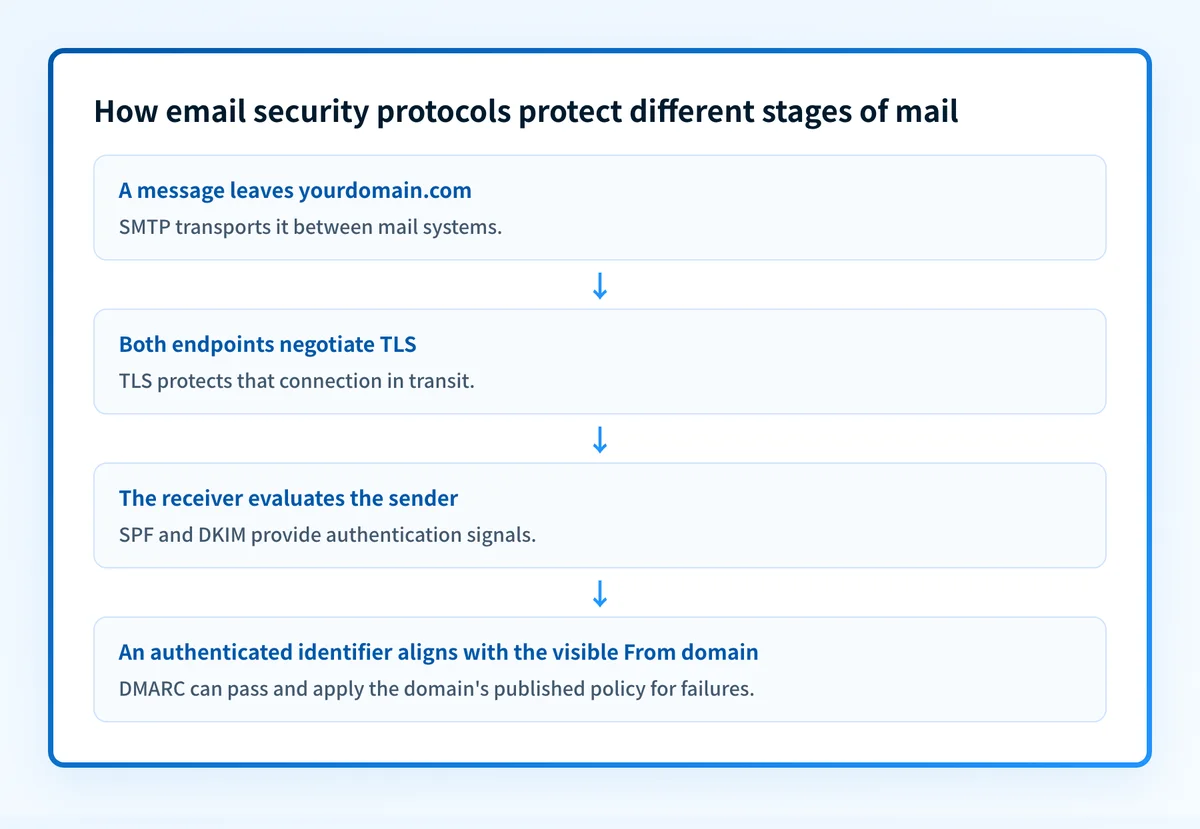
The term "email security protocols" covers controls at different points in the message lifecycle. RFC 5321 defines SMTP as the basic protocol for Internet electronic-mail transport. SMTP moves a message between sending, relay, and receiving systems. It is still used because mail systems need a transport protocol, but SMTP alone does not establish that the visible From domain authorized the message.
TLS addresses a different risk. RFC 8314 specifies the use of TLS for email submission and access and treats cleartext access as obsolete. TLS protects the connection between two participating endpoints. It does not establish that a sender is entitled to use a particular From domain, and it does not control what happens after a recipient system receives the message.
Domain-authentication controls add that authorization layer:
- SPF lets a domain publish which hosts are authorized to use the domain in an SMTP envelope identity.
- DKIM attaches a cryptographic signature that a receiver can verify against a public key published in DNS.
- DMARC builds on SPF and DKIM results and checks whether an authenticated identifier aligns with the visible From domain. It also lets a domain publish requested handling for DMARC failures and request aggregate feedback.
For a wider look at the threats these controls help reduce, see email security threats. Authentication is useful against unauthorized use of a domain, but it does not make malicious content harmless or replace recipient-side filtering.
When the answer changes
The right protocol depends on the question you need to answer.
Use this decision rule:
If the question is "How does mail move between systems?"
Use SMTP.
If the question is "Is the submission or mailbox-access connection protected?"
Use TLS with the applicable email submission, POP3, or IMAP service.
If the question is "Was this domain authorized to send this message?"
Inspect SPF, DKIM, and DMARC results.
If the question is "Did a user receive a malicious message?"
Inspect the message, recipient-side controls, and the relevant security investigation evidence.
"TLS and SSL in email" often refers to encrypted connections for email submission or mailbox access. Current standards language uses TLS. SSL is an older name and protocol family, so a configuration that says "SSL/TLS" needs a closer look at the actual protocol and service configuration. RFC 8314 recommends TLS 1.2 or later for email submission and access.
"The three email protocols" is also context-dependent. In a mail-client context, it commonly means SMTP, POP3, and IMAP: SMTP submits or transports mail, while POP3 and IMAP access mailboxes. That grouping does not mean SPF, DKIM, and DMARC are less important. They solve a separate sender-authentication problem.
There is no single most secure email protocol. A TLS-protected connection does not prove domain authorization. A valid DKIM signature does not encrypt the transport connection. A DMARC pass does not guarantee inbox placement, recipient trust, or protection from a compromised legitimate sender. Choose controls by the part of the email system that needs protection.
A worked email security example
Consider a message sent as billing@yourdomain.com through a legitimate service.
Illustrative message path and checks
Visible From: billing@yourdomain.com
SMTP: carries the message to the receiving system
TLS: protects the connection when the sending and receiving systems use TLS
SPF: checks whether the service is authorized for the relevant envelope domain
DKIM: checks a signature against the sending domain's DNS public key
DMARC: checks whether an SPF or DKIM pass aligns with yourdomain.com
This example is structural only. It does not show an actual record, signing selector, provider hostname, or message result.
A useful interpretation is:
- A successful TLS connection can protect the hop without proving the visible From domain is authorized.
- An SPF or DKIM pass can authenticate an identifier that is different from the visible From domain.
- DMARC adds the alignment test that connects an eligible authentication result to the visible From domain.
- A DMARC pass still says nothing by itself about content safety or a receiver's final placement decision.
For an operational discussion of those authentication signals, see whether DMARC failure reports are worth the trouble for email security.
Choose the next check from the evidence you have
Start with the evidence closest to the problem.
If you only have a domain name, assess its public posture with the Email Security Score tool. Treat the result as a point-in-time public check. It cannot prove which application sent a particular message, whether every production sender is aligned, or how a recipient privately evaluated a message.
If you have a message that was delivered, inspect its raw headers and Authentication-Results fields. That evidence can show the receiver's recorded SPF, DKIM, and DMARC outcomes for that message. Compare those results with the visible From domain and the known sending service.
If you are changing a production configuration, validate at separate layers:
- Query authoritative DNS and at least one public resolver for the published record.
- Confirm the sending provider's current authentication or verification status.
- Send a real message through the exact production path and inspect its delivered headers.
- Review DMARC aggregate reports after enough data has accumulated.
Read the email security guide
Use the email security guide to place protocol controls alongside filtering, access controls, and operational response practices.
That guide can help route the next investigation, but it cannot prove an individual message's production path, repair a sender configuration, or guarantee delivery.
Evidence
Sources and further reading
Questions readers ask
Frequently asked questions
What is TLS and SSL in email?
TLS is the current protocol name for protecting email submission and mailbox-access connections. SSL is an older name and protocol family that still appears in product labels such as "SSL/TLS." For current email submission and access, RFC 8314 recommends TLS 1.2 or later.
What are the three email protocols?
There is no single official set called "the three email protocols." In a mail-client context, the phrase commonly refers to SMTP, POP3, and IMAP. SMTP handles submission and transport, while POP3 and IMAP provide mailbox access. SPF, DKIM, and DMARC are a separate set of domain-authentication controls.
What is the most secure email protocol?
No single email protocol is the most secure across every function. TLS protects eligible connections, SMTP transports mail, and SPF, DKIM, and DMARC provide different authentication and authorization signals. A secure email design uses the controls that match the risk under review.
Is SMTP used anymore?
Yes. SMTP remains the Internet standard protocol for electronic-mail transport. Modern email systems commonly pair SMTP with TLS and domain-authentication controls because SMTP transport alone does not establish visible From-domain authorization.
Does DMARC encrypt email?
No. DMARC evaluates domain-aligned SPF or DKIM authentication and lets a domain publish requested handling for failures. It does not encrypt message content or replace TLS for connection protection.

Written by
Samuel ChenardCEO & Co-Founder, Palisade
Samuel Chenard is the CEO and co-founder of Palisade, agentic DMARC software for IT teams and MSPs, from one domain to thousands.
More from Samuel →