Check email address deliverability
 ChatGPT
 Claude
 Gemini
 Perplexity
 Grok
GrokIn brief
Check email address deliverability by verifying address, MX, and mailbox signals, then separate valid results from actual inbox placement today.
To check email address deliverability, run the address through an email-verification service before sending. These services can test syntax, the recipient domain's MX records, and mailbox-related signals without delivering a message. A positive result can reduce the chance of sending to an invalid address, but it does not prove that a future campaign will reach the inbox. Email deliverability also depends on the sending domain, message, recipient policy, and receiver decisions.
At a glance
Quick takeaways
- Email verification checks address-related signals before you send a message.
- A valid MX record shows that a domain publishes mail-routing records, not that a specific mailbox will accept mail.
- Vendor result labels are not universal, so act on the detailed reason code where one is available.
- An inconclusive result needs a separate handling rule, not an assumption that the address is invalid.
- Recheck lists because an address that was usable can later become dormant or unavailable.
- Inbox placement requires a delivered-message test and broader sender-domain evidence.
What this tool checks
An email-verification service assesses whether an address appears usable without sending an email. Email Hippo's verifier documentation describes a sequence that checks formatting, the domain's MX records, a connection to the receiving mailbox without delivery, disposable-provider signals, and bounce history.
That makes verification useful for list hygiene. It can help separate obvious bad addresses from addresses that need review before a campaign sends. It cannot see your production sending path, prove that your application will sign mail correctly, continuously observe address status, or explain why a particular mailbox provider placed a message in spam.
For the broader distinction between address validity and inbox arrival, use the email deliverability learning hub. Address verification is one pre-send check within that larger operating problem.
How to run the check
1. Start with the exact address you plan to contact
Copy the address from the source system that will supply your send list. Keep the original value available for comparison, especially if the address was entered manually or imported from a form.
Do not replace a failing address with a guessed variant. A changed local part, domain, or plus-address suffix can point to a different mailbox or have provider-specific handling.
2. Submit the address to an email-verification service
Use an email verifier that documents what its result means. Email Hippo states that its free verifier can check whether an email address exists and identify fake emails and possible bounces without sending an email. Its free verifier documents a maximum of 100 daily checks.
Treat the returned classification as a vendor-specific assessment. Email Hippo documents the labels "OK, Bad, or Unverifiable." Verifalia documents a different set of categories: "Deliverable, Undeliverable, Risky, or Unknown." The labels overlap in intent but do not carry identical rules across providers.
You can independently inspect the recipient domain's public MX records with a repeatable lookup:
dig +short MX yourdomain.comA returned MX answer confirms public DNS routing information for yourdomain.com. It does not confirm that person@yourdomain.com exists or that the mailbox will accept your message.
3. Keep the address result with its timestamp
Record the address, result label, any detailed status, provider, and date of the check in your list-management process. Email Hippo notes that email-data validity can change over time and recommends checking lists regularly.
Do not delete an address solely because an MX lookup fails once. Confirm the exact domain spelling and inspect the authoritative DNS answer before treating the address as permanently unusable.
How to interpret the results
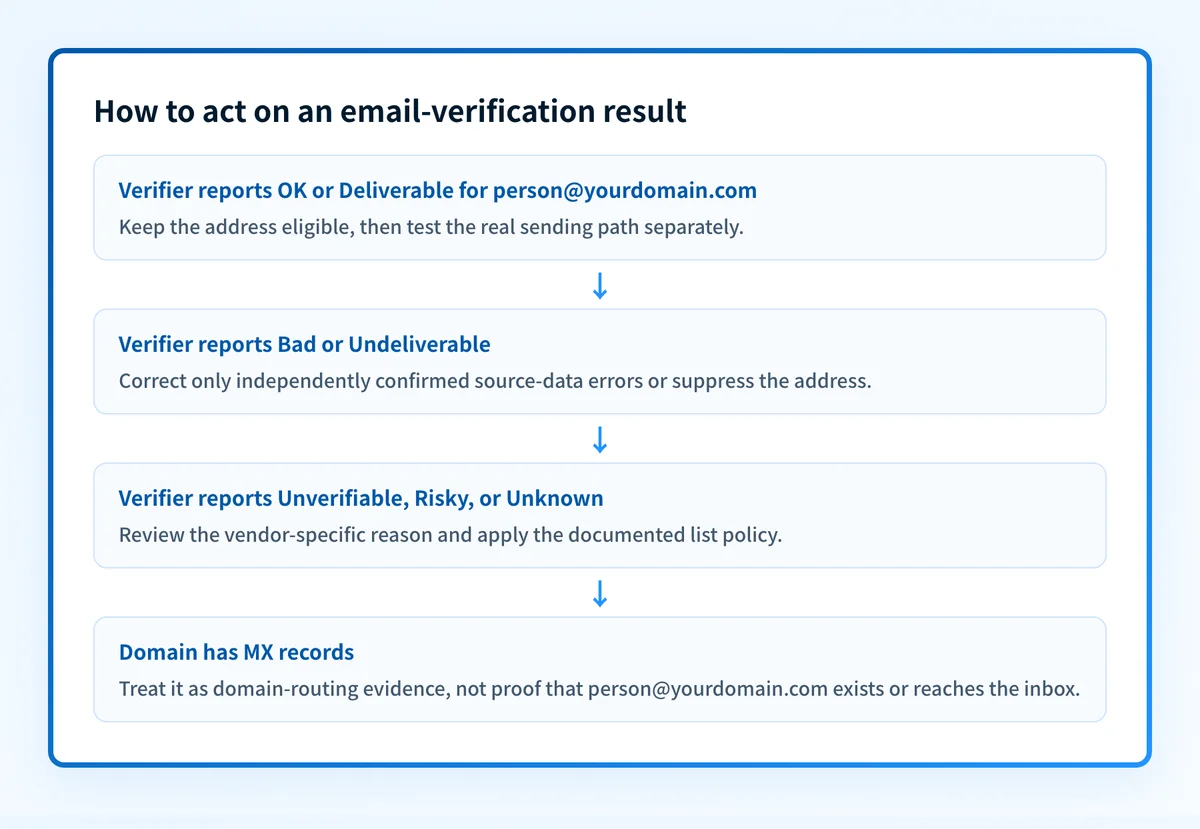
An address is reported as OK or Deliverable
Email Hippo uses "OK" and Verifalia uses "Deliverable" for positive outcomes in their respective systems. Treat either result as evidence that the provider found no disqualifying issue under its documented checks.
Do not treat it as proof of inbox placement. This is an inference from the distinction between address verification and deliverability: a verifier can assess address and mailbox-related signals, while inbox arrival also depends on the sending domain, authentication, content, traffic pattern, and the recipient provider's private filtering decision.
An address is reported as Bad or Undeliverable
Email Hippo's "Bad" and Verifalia's "Undeliverable" categories indicate that the service found a reason the address should not be treated as a normal send target. Check the detailed reason in the provider's result before taking action because the evidence supporting that category can differ.
Correct a clear transcription error at the source if you have independent confirmation of the intended address. Otherwise, suppress the address from the next send and retain the result record so the decision can be reviewed later.
An address is reported as Unverifiable, Risky, or Unknown
These labels are not interchangeable across providers. Email Hippo documents "Unverifiable," while Verifalia documents "Risky" and "Unknown" among its categories. Do not convert them into a universal pass or fail rule.
Put these addresses into a review segment with a defined sending policy. The right action depends on the provider's detailed status, your consent record, and the cost of a possible bounce. If the address belongs to an existing customer or user, use an approved confirmation path rather than guessing from a verification result.
The recipient domain has MX records
MX records direct mail for a domain. MXToolbox describes an MX lookup as listing MX records in priority order from the domain's authoritative name server. This evidence is useful when a verifier reports a domain-level issue or when you need to check whether a domain is configured to receive email.
It is not mailbox evidence. A domain can have valid MX records while a particular recipient address is unavailable, restricted, dormant, or filtered.
How to act on the result
Use a repair threshold based on the observed category and your own documented list policy, rather than an invented universal bounce-rate target.
Before using a verifier, separate basic address syntax from mailbox evidence with valid characters for an email address.
- For an invalid syntax or obvious domain typo, correct the source data only when an independent record confirms the intended address. Otherwise remove it from the immediate send audience.
- For a bad or undeliverable result, suppress the address from the campaign and investigate the source of the data. Repeatedly importing the same invalid values will recreate the problem.
- For an unverifiable, risky, or unknown result, keep the provider's detailed explanation and apply your review policy. Do not label the mailbox nonexistent without more evidence.
- For a positive result, continue to test the actual sending program. A verified recipient list does not validate sender authentication, message construction, or inbox placement.
How to retest
Run the same address through the same verifier after correcting source data or after the provider's documented retry interval. Compare the new result with the earlier timestamp and detailed status.
Then test a real message through the same production application, authenticated sending domain, and recipient-provider path that matter for the campaign. Inspect the delivered message and its receiver-added authentication results. Address verification and message delivery are separate evidence layers.
For recurring programs, recheck older lists before reuse because address validity can change. A previous positive verification result should not be treated as permanent evidence.
Check the sending domain behind a list-quality issue
After you have separated invalid and inconclusive addresses, inspect the sending domain's email-authentication posture with the Palisade Email Security Score. This is useful when list hygiene is not the whole explanation for delivery problems and you need a domain-level security check alongside real-message evidence.
Check the sending domain's email security score
A domain-level security check does not verify an individual mailbox, repair a recipient list, continuously monitor every sending path, or guarantee inbox placement. For ongoing DMARC work, Palisade is agentic DMARC software that analyzes aggregate-report data, identifies sending sources and alignment issues, and proposes the next policy step for human review.
Evidence
Sources and further reading
Questions readers ask
Frequently asked questions
How to check deliverability of email?
Use an email-verification service to check formatting, domain and MX availability, and mailbox-related signals before sending. Then send a real message through the production path to assess delivery evidence. A successful verification result is useful for list hygiene, but it does not prove inbox placement.
What is the 60 40 rule in email?
No verified email standard or provider rule in the available documentation defines a universal "60 40 rule in email." Do not use the phrase as a delivery threshold or list-cleaning policy without identifying the source, product, or program that defines it.
What is the +1 Gmail trick?
No verified provider documentation establishes a deliverability rule called the "+1 Gmail trick." Do not alter recipient addresses or assume that address variants have the same mailbox behavior without current provider documentation and a test of the intended sending path.
Is there an application that checks email addresses for deliverability?
Yes. Email Hippo's verifier says it can identify fake emails and possible bounces without sending an email. Verifalia also documents real-time and bulk email verification categories. These applications assess address-related signals, not guaranteed inbox placement.
Do MX records prove an email address is deliverable?
No. MX records show that a domain publishes mail-routing information. They do not prove that a specific mailbox exists, will accept a message, or will place it in the inbox.
Should I check an email list only once?
No. Email Hippo states that email-data validity can change at any time and recommends checking lists regularly. Recheck before important sends and keep the result date with each verification record.

Written by
Dominic LandryDeliverability & DNS
Dominic Landry works on email deliverability and DNS configuration at Palisade, from SPF and DKIM records through to DMARC enforcement.
More from Dominic →